AI agents can do more than chat. With the right protocol, an agent can render an interactive chart inline in your conversation, update a shared canvas in real time, or pause mid-execution to ask for your approval before proceeding. These interactions (generative UI, shared state, and human-in-the-loop) need a standard way for agent backends to communicate dynamic events to frontends.
AG-UI (Agent-User Interaction Protocol) is an open protocol that defines this standard. It works with multiple agent frameworks (Strands Agents, LangGraph, CrewAI) and frontend libraries (React, Angular, Vue). With AG-UI, your agent code and your frontend code stay decoupled. You pick the best framework for your backend and the best library for your frontend, and AG-UI connects them.
Amazon Bedrock AgentCore is part of the Amazon Bedrock family of services for generative AI. AgentCore is an agentic platform for building, deploying, and operating AI agents securely at scale, using any framework and any model.
This post walks through how AG-UI integrates into the Fullstack AgentCore Solution Template (FAST) to build interactive agent frontends on Amazon Bedrock AgentCore. We then show how CopilotKit extends this with generative UI, shared state, and human-in-the-loop interactions, all deployed on Amazon Bedrock AgentCore.
Overview of solution
Amazon Bedrock AgentCore Runtime provides a secure, serverless, and purpose-built hosting environment for deploying and running AI agents or tools. AgentCore Runtime supports several agent protocols. Model Context Protocol (MCP) connects agents to tools, Agent2Agent (A2A) connects agents to other agents, and AG-UI connects agents to users. When you deploy an agent container with the AG-UI protocol flag, AgentCore acts as a transparent proxy. It handles authentication (Signature Version 4 [SigV4] or OAuth 2.0 through Amazon Cognito), session isolation, scaling, and observability. Your container exposes POST /invocations for AG-UI requests and GET /ping for health checks on port 8080. AgentCore passes requests through unchanged. For more details, see Deploy AGUI servers in AgentCore Runtime.
FAST is a ready-to-deploy starter project. It connects AgentCore Runtime, Gateway, Identity, Memory, and Code Interpreter with a React frontend and Amazon Cognito authentication, all defined with AWS Cloud Development Kit (AWS CDK). It ships with agent patterns for Strands Agents, LangGraph, and the Claude Agent SDK. FAST v0.4.1 added two AG-UI patterns (agui-strands-agent and agui-langgraph-agent) that share a single frontend parser. For a full walkthrough of FAST’s architecture and deployment, see Accelerate agentic application development with a full-stack starter template for Amazon Bedrock AgentCore.
The solution has two layers. AG-UI in FAST provides two new agent patterns and a single frontend parser that handles both, so the frontend doesn’t need to know which agent framework is running. CopilotKit + FAST is a standalone sample that replaces FAST’s built-in chat UI with CopilotKit. It adds generative UI (inline charts and components), bidirectional shared state (a todo canvas), and human-in-the-loop interactions (a meeting scheduler that pauses the agent and waits for your input). Both layers deploy on AgentCore Runtime with Cognito authentication, AgentCore Gateway for MCP tool connectivity, and AgentCore Memory for persistent conversations.
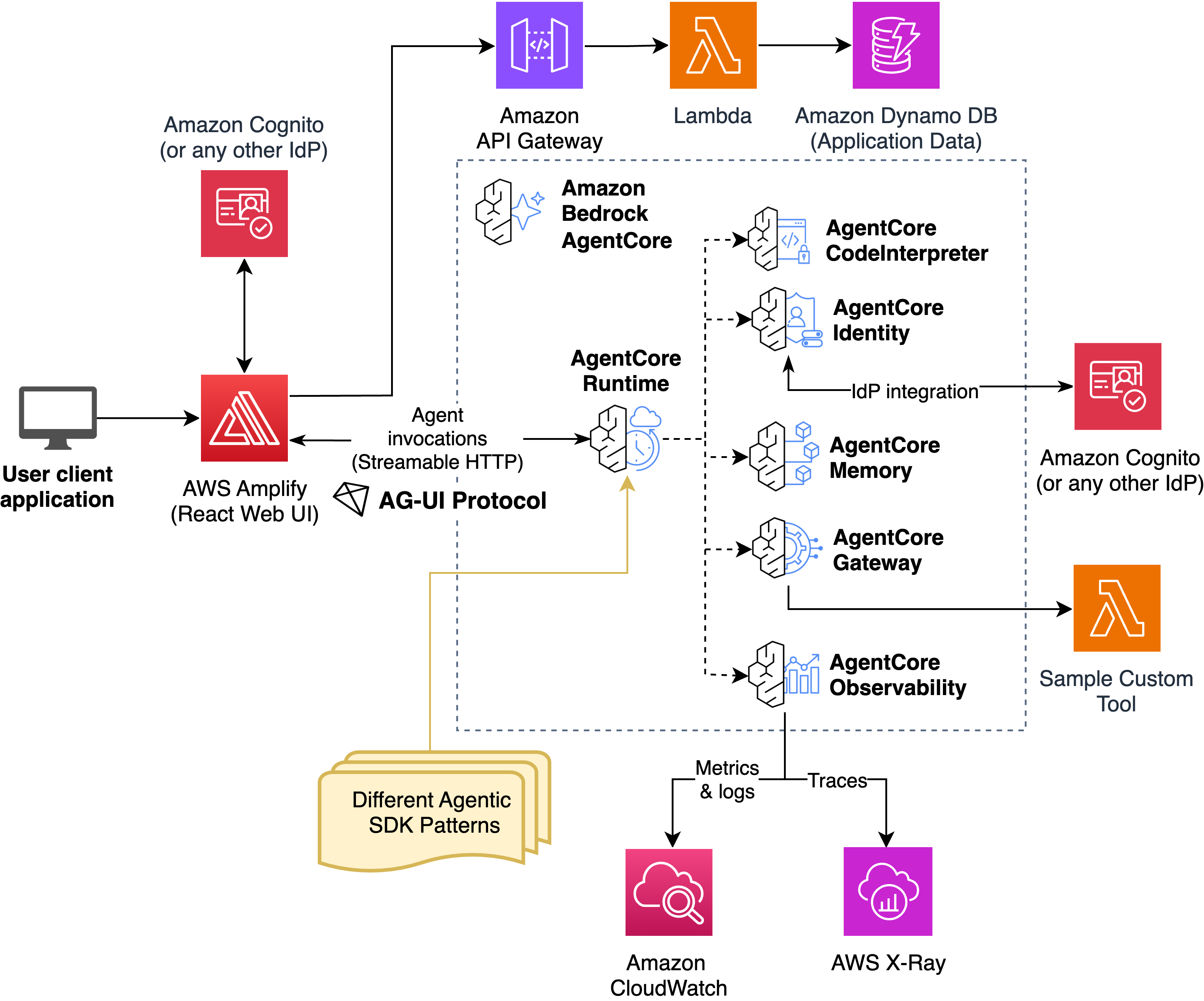
Architecture overview. The frontend communicates with AgentCore Runtime through AG-UI events. AgentCore handles auth, scaling, and session isolation. The agent runtime translates framework-specific events into the AG-UI protocol.
Walkthrough
This walkthrough has two parts. First, we show how the AG-UI patterns work in FAST and how a single frontend parser handles both Strands and LangGraph backends. Second, we deploy the CopilotKit sample to demonstrate generative UI, shared state, and human-in-the-loop on AgentCore.
Source code:
Prerequisites
For this walkthrough, you should have the following prerequisites:
- An AWS account with permissions for AWS CloudFormation, Amazon Elastic Container Registry (Amazon ECR), Amazon Bedrock AgentCore, Amazon Cognito, and AWS Amplify.
- AWS Command Line Interface (AWS CLI) v2 installed and configured.
- AWS CDK installed.
- Node.js 18 or later and Python 3.11 or later.
- Docker running, for container builds.
- Model access enabled in the Amazon Bedrock console for the model the agent uses.
AG-UI in FAST: One parser, two frameworks
The agui-strands-agent pattern wraps a Strands Agent in StrandsAgent from the ag-ui-strands library. The wrapper translates Strands streaming events into AG-UI Server-Sent Events automatically.
Each request creates a fresh agent with Gateway MCP tools. AgentCore Memory is attached per thread through a session-manager provider, so conversation history persists across AgentCore Runtime scaling. Memory is opt-in: the provider returns None when MEMORY_ID is unset:
# patterns/agui-strands-agent/agent.py
from ag_ui_strands import StrandsAgent, StrandsAgentConfig
from bedrock_agentcore.runtime import BedrockAgentCoreApp, RequestContext
from strands import Agent

app = BedrockAgentCoreApp()

# Build the model and Code Interpreter once at module load
MODEL = BedrockModel(model_id="us.anthropic.claude-sonnet-4-5-20250929-v1:0")
CODE_INTERPRETER = StrandsCodeInterpreterTools(REGION).execute_python_securely


@app.entrypoint
async def invocations(payload: dict, context: RequestContext):
    input_data = RunAgentInput.model_validate(payload)
    actor_id = extract_user_id_from_context(context)
    # Fresh agent per request --- picks up the caller's identity and tools
    agent = Agent(
        model=MODEL,
        system_prompt=SYSTEM_PROMPT,
        tools=[create_gateway_mcp_client(actor_id), CODE_INTERPRETER],
        session_manager=get_memory_session_manager(actor_id, session_id),
    )
    agui_agent = StrandsAgent(
        agent=agent,
        name="agui_strands_agent",
        config=StrandsAgentConfig(
            session_manager_provider=make_memory_provider(actor_id),
            replay_history_into_strands=False,
        ),
    )
    async for event in agui_agent.run(input_data):
        yield event.model_dump(mode="json", by_alias=True, exclude_none=True)
BedrockAgentCoreApp reads the AgentCore Runtime headers (WorkloadAccessToken, Authorization, Session-Id) and populates context variables, so Gateway authentication and Memory work the same way as the HTTP patterns.
The agui-langgraph-agent pattern uses LangGraphAGUIAgent from the copilotkit library. It builds the compiled graph fresh on every request, so each invocation gets MCP tools scoped to the caller. AgentCore Memory is opt-in here too: the helper returns None when MEMORY_ID is unset, so you can run the pattern without provisioning Memory:
# patterns/agui-langgraph-agent/agent.py
from copilotkit import CopilotKitMiddleware, LangGraphAGUIAgent


async def build_graph(actor_id: str):
    """Build a fresh LangGraph compiled graph with Gateway tools."""
    mcp_client = await create_gateway_mcp_client(actor_id)
    tools = await mcp_client.get_tools()
    tools.append(CODE_INTERPRETER)
    return create_agent(
        model=MODEL,
        tools=tools,
        checkpointer=get_memory_saver(),  # None when MEMORY_ID is unset
        middleware=[CopilotKitMiddleware()],
        system_prompt=SYSTEM_PROMPT,
    )


@app.entrypoint
async def invocations(payload: dict, context: RequestContext):
    input_data = RunAgentInput.model_validate(payload)
    actor_id = extract_user_id_from_context(context)
    graph = await build_graph(actor_id)
    agui_agent = LangGraphAGUIAgent(
        name="agui_langgraph_agent",
        graph=graph,
        config={"configurable": {"actor_id": actor_id}},
    )
    async for event in agui_agent.run(input_data):
        yield event.model_dump(mode="json", by_alias=True, exclude_none=True)
Both patterns produce the same AG-UI events. The protocol defines a typed event stream over Server-Sent Events. For example, a single tool call produces this sequence:
data: {"type": "RUN_STARTED", "threadId": "t1", "runId": "r1"}
data: {"type": "TEXT_MESSAGE_START", "messageId": "m1", "role": "assistant"}
data: {"type": "TEXT_MESSAGE_CONTENT", "messageId": "m1", "delta": "Let me check "}
data: {"type": "TEXT_MESSAGE_CONTENT", "messageId": "m1", "delta": "that for you."}
data: {"type": "TEXT_MESSAGE_END", "messageId": "m1"}
data: {"type": "TOOL_CALL_START", "toolCallId": "tc1", "toolCallName": "get_weather"}
data: {"type": "TOOL_CALL_ARGS", "toolCallId": "tc1", "delta": "{"location": "Seattle"}"}
data: {"type": "TOOL_CALL_END", "toolCallId": "tc1"}
data: {"type": "TOOL_CALL_RESULT", "toolCallId": "tc1", "content": "{"temp": 55}"}
data: {"type": "RUN_FINISHED", "threadId": "t1", "runId": "r1"}
The frontend parser maps each event to a frontend action:
// frontend/src/lib/agentcore-client/parsers/agui.ts
export const parseAguiChunk: ChunkParser = (line, callback) => {
  if (!line.startsWith("data: ")) return;
  const json = JSON.parse(line.substring(6).trim());
  switch (json.type) {
    case "TEXT_MESSAGE_CONTENT":
      callback({ type: "text", content: json.delta ?? "" });
      break;
    case "TOOL_CALL_START":
      callback({ type: "tool_use_start", toolUseId: json.toolCallId, name: json.toolCallName });
      break;
    case "TOOL_CALL_RESULT":
      callback({ type: "tool_result", toolUseId: json.toolCallId, result: json.content ?? "" });
      break;
    case "RUN_FINISHED":
      callback({ type: "result", stopReason: "end_turn" });
  }
};
Compare this to the HTTP patterns, where Strands, LangGraph, and Claude-agent-sdk each need a separate parser to handle their different streaming formats. With AG-UI, the backend framework is abstracted away. You can swap agui-strands-agent for agui-langgraph-agent in your configuration and the frontend doesn’t change.
To deploy, set the pattern in infra-cdk/config.yaml and run CDK:
backend:
  pattern: agui-strands-agent  # or agui-langgraph-agent
  deployment_type: docker
cd infra-cdk
cdk deploy --require-approval never
python3 ../scripts/deploy-frontend.pyCopilotKit + FAST: Generative UI, shared state, and human-in-the-loop
The base FAST frontend provides a functional chat interface, but AG-UI supports much richer interactions: agents rendering custom UI components, syncing state with the frontend, and pausing for user input mid-execution. CopilotKit is a React library built specifically for these patterns. The CopilotKit team built a sample application on top of FAST that demonstrates these capabilities on AgentCore. It includes both LangGraph and Strands agent patterns, and you pick one at deploy time.
Generative UI spans a spectrum from high frontend control to high agent freedom. This sample sits at the controlled end: the frontend owns prebuilt React components, and the agent chooses which to render and supplies the data over AG-UI events. Further along the spectrum, agents return declarative UI descriptions that the frontend renders, or full UI surfaces that the frontend embeds. AG-UI carries all three, because it standardizes the event and state stream rather than the UI itself. The more freedom you hand the agent, the more you take on: open-ended surfaces need sandboxing and input validation.
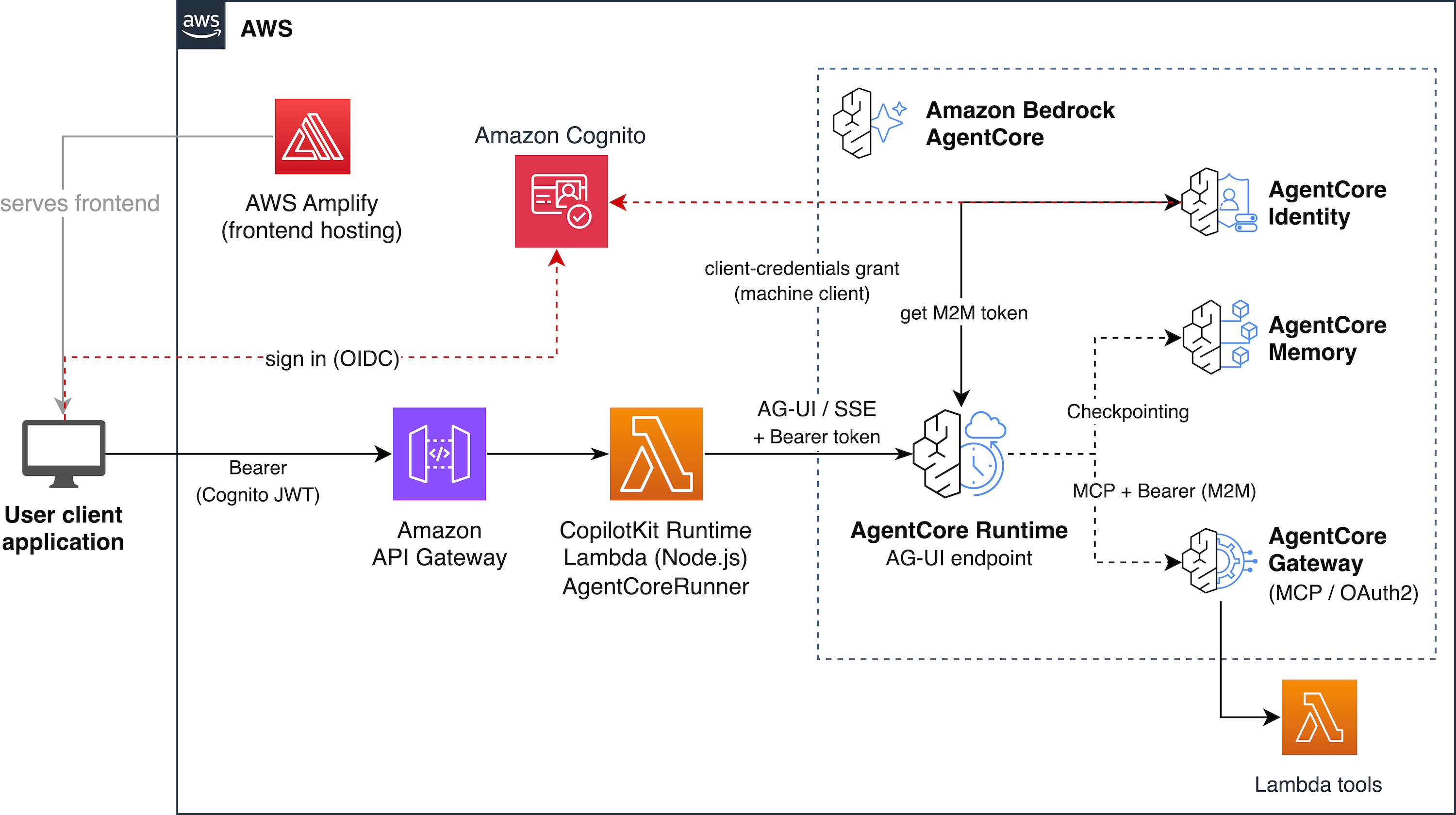
The CopilotKit sample architecture. The CopilotKit Runtime Lambda acts as a server-side bridge between the browser and AgentCore Runtime, handling AG-UI event parsing, generative UI routing, and authentication forwarding.
Generative UI: Agents render React components
With CopilotKit, the agent renders custom React components inline in the chat, not only text. The frontend registers components that the agent can invoke through AG-UI tool call events:
// Register a pie chart the agent can render
useComponent({
  name: "pieChart",
  description: "Displays data as a pie chart.",
  parameters: PieChartPropsSchema,
  render: PieChart,
});
When the agent calls the pieChart tool, CopilotKit intercepts the TOOL_CALL_START and TOOL_CALL_ARGS events and renders the PieChart component directly in the conversation. The agent first calls a query_data tool to fetch data from a sample comma-separated values (CSV) file, then passes the results to the chart component.
Shared state: A todo canvas synced with the agent
The sample includes a todo canvas that stays in sync between the agent and the UI bidirectionally. When you tell the agent “Add three tasks: design the API, write tests, and deploy to staging,” the agent calls manage_todos and the canvas updates in real time through AG-UI STATE_SNAPSHOT events. You can also edit todos directly in the UI. The agent sees the updated state on its next turn because the Strands pattern injects the current todos into the system prompt:
def state_context_builder(state: dict) -> str:
    todos = state.get("todos", [])
    if todos:
        return f"nCurrent todos:n{json.dumps(todos, indent=2)}"
    return ""
Human-in-the-loop: The agent pauses and waits
The sample demonstrates a meeting scheduler where the agent pauses mid-execution and renders a time picker. The user selects a time, and the agent continues with that selection:
useHumanInTheLoop({
  name: "scheduleTime",
  description: "Schedule a meeting with the user.",
  parameters: z.object({
    reasonForScheduling: z.string(),
    meetingDuration: z.number(),
  }),
  render: ({ respond, status, args }) => (
    <MeetingTimePicker status={status} respond={respond} {...args} />
  ),
});
This works through AG-UI’s tool call flow: the agent emits TOOL_CALL_START for scheduleTime, CopilotKit renders the picker instead of executing a backend tool, and the user’s response flows back as a TOOL_CALL_RESULT.
Deploying the CopilotKit sample
Clone the FAST Samples repository and deploy:
git clone https://github.com/aws-samples/sample-FAST-applications.git
cd sample-FAST-applications/samples/copilotkit-generative-ui
cp config.yaml.example config.yaml
# Edit config.yaml --- set stack_name_base and admin_user_email
./deploy-langgraph.sh  # or ./deploy-strands.sh
The deploy script provisions the full stack: Amazon Cognito user pool, Amazon ECR repository, AgentCore Runtime, AgentCore Gateway, AgentCore Memory, the CopilotKit Runtime Lambda with Amazon API Gateway, and AWS Amplify hosting. When it finishes, open the Amplify URL printed at the end and log in. You’ll land on the CopilotKit chat interface, where a few quick checks confirm the deployment works:
- Ask the agent for a pie chart from the sample data. It renders inline in the conversation.
- Ask to add three tasks to the todo canvas. The canvas updates in real time.
- Ask to schedule a meeting. The agent pauses and shows a time picker.
Cleaning up
The walkthrough deploys two separate stacks. Tear down whichever you deployed so they stop incurring charges.
To remove the FAST deployment:
cd infra-cdk
npx cdk destroy --all
To remove the CopilotKit sample:
cd sample-FAST-applications/samples/copilotkit-generative-ui
npx cdk destroy --all
If an Amazon ECR repository still holds container images, delete it by hand, since some CDK configurations keep repositories in place.
Conclusion
This post showed how to build interactive agent frontends on Amazon Bedrock AgentCore using the AG-UI protocol. The AG-UI integration in FAST lets you swap between Strands and LangGraph agent backends without changing your frontend code. The CopilotKit sample extends this with generative UI, shared state, and human-in-the-loop interactions, all running on AgentCore with managed auth, scaling, and memory.
To learn more, explore the following resources:
- FAST repository: clone and deploy an AG-UI pattern with
pattern: agui-strands-agentorpattern: agui-langgraph-agent. - CopilotKit Generative UI sample: try generative UI, shared state, and human-in-the-loop on AgentCore.
- AgentCore AG-UI documentation: full protocol contract and deployment details.
- AG-UI protocol specification: core event types and protocol design.
- CopilotKit documentation: frontend integration guide for generative UI.
If you have questions or feedback, open an issue in the FAST repository or the FAST Samples repository.
About the authors