Part 1 introduced granular cost attribution for Amazon Bedrock. This feature automatically traces every inference request back to the IAM principal that made the call. It showed how the new line_item_iam_principal column can give you per-user and per-application visibility. With optional cost allocation tags, you can also aggregate spend by team, project, or tenant using AWS Cost Explorer. With this approach, you can typically track usage at the granularity you want for any Bedrock-powered service or application, whether third-party tools like Claude Code or Codex or your own custom builds. This post shows how to visualize and analyze cost attribution for Amazon Bedrock through Amazon Athena queries and CUDOS dashboards.
First, this post shows you how to set up Cost and Usage Report (CUR) 2.0 through Data Exports instrumented with IAM principal data. Next, this post shows you how to query CUR data with Amazon Athena for analysis. It then introduces the new capabilities of CUDOS dashboards, including granular Bedrock cost and usage data. While Athena provides flexibility for aggregations, integration with different business intelligence (BI) tools, and chargeback processes, CUDOS offers pre-built visuals tailored to your organization’s specific structure.
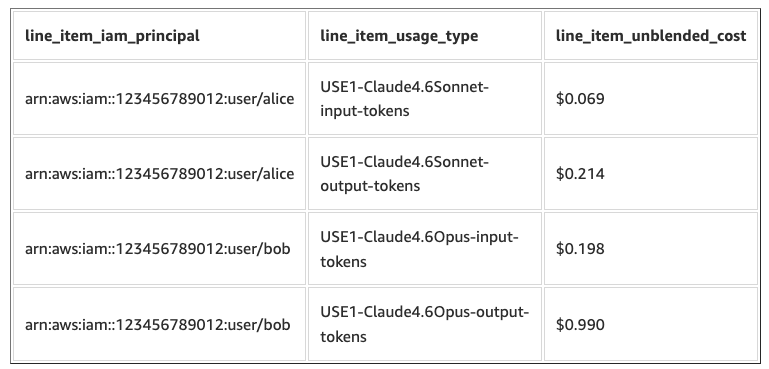
Example query output showing Amazon Bedrock costs by IAM principal and usage type
Setting up Cost and Usage Reports (CUR 2.0)
Before you can analyze Amazon Bedrock costs, set up a CUR 2.0 data export and connect it to Amazon Athena.
Prerequisites
You need the following:
- An AWS account with billing console access.
- IAM permissions for Cost and Usage Reports, S3, and Athena.
- An S3 bucket for CUR data storage.
- Basic familiarity with SQL and the AWS Management Console.
- (Optional) Claude Code or Kiro-CLI for automated setup.
Make sure you have the required IAM permissions.
For Amazon Bedrock cost attribution, you need to enable IAM principal data in your CUR 2.0 export so that the line_item_iam_principal column and associated IAM principal tags are populated.
Creating a CUR 2.0 data export with IAM principal data
Follow the instructions in Creating a standard data export to set up your CUR 2.0 export. When configuring the export, make sure the following options are part of your final configuration:
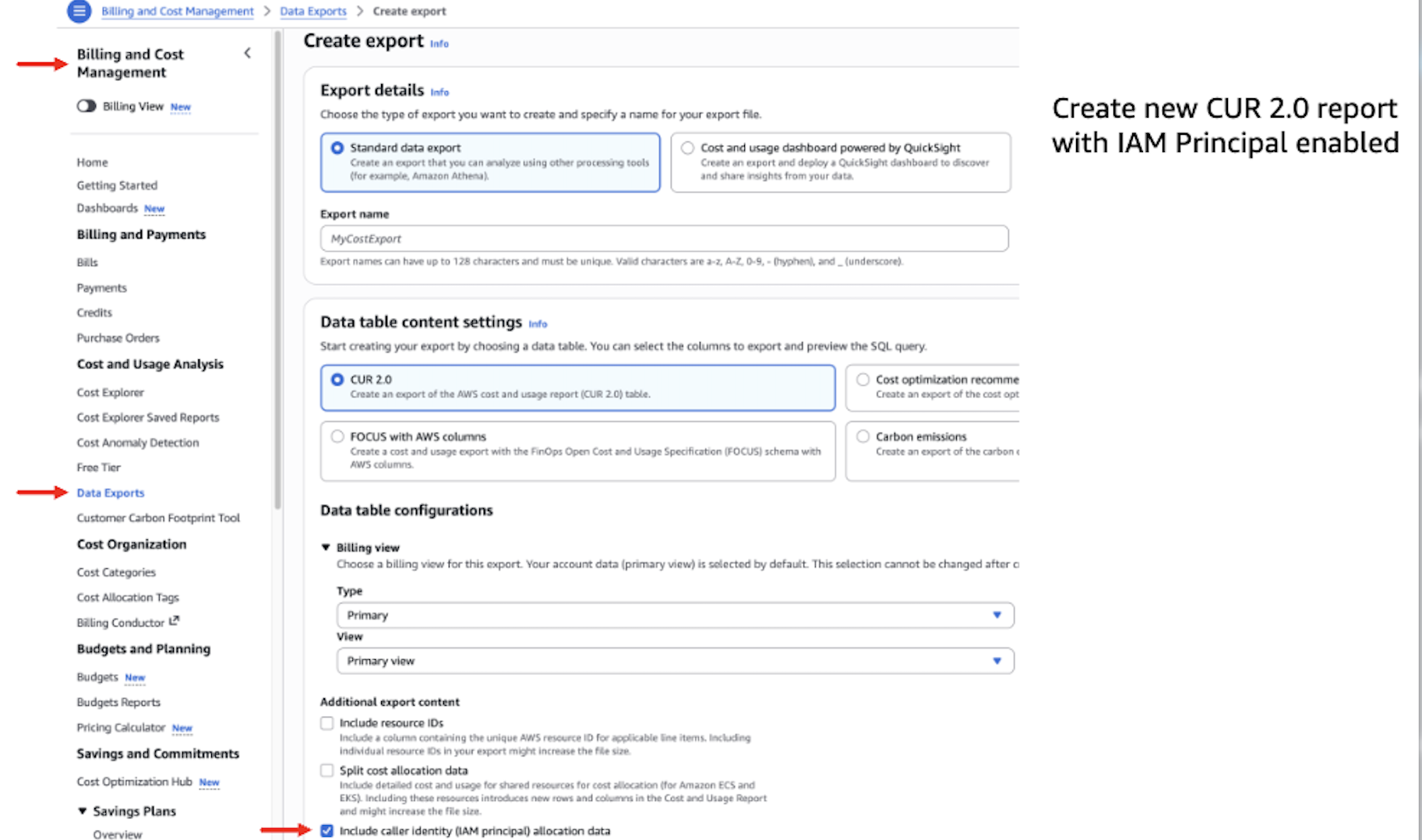
Creating a CUR 2.0 standard data export with caller identity (IAM principal) allocation data enabled
- In Additional export content, select the following checkboxes:
- Include caller identity (IAM principal) allocation data — This is the critical setting that populates the
line_item_iam_principalcolumn and surfaces IAM principal tags (prefixed withiamPrincipal/) in your cost data.
- Include caller identity (IAM principal) allocation data — This is the critical setting that populates the
- In Data table configurations:
- Time granularity: Select Hourly for maximum detail.
- In Data export delivery options:
- File versioning: Select Overwrite existing report to avoid storing duplicate data.
Important: Enabling IAM principal data increases CUR file sizes because usage that was previously a single row is now expanded into multiple rows, one for each IAM principal that contributed to the usage. For high-volume workloads with many distinct principals, plan your Amazon S3 storage accordingly and consider Amazon S3 Lifecycle policies for older CUR files.
It may take up to 24 hours for AWS to deliver your first CUR 2.0 report to the S3 bucket.
Connecting CUR 2.0 to Amazon Athena
With Amazon Athena, you can query your CUR data using standard SQL with no infrastructure to manage. To streamline this setup, an optional agent.md skill repo is available that you can use with AI assistants like Claude Code, Kiro-CLI, or Codex. It automates the end-to-end process of connecting your Athena environment to your CUR data.
- Clone the repo (
git clone https://github.com/aws-samples/sample-cur-iam-principal-bedrock-tracking). - Launch Claude Code (
claude) or Kiro CLI (kiro) in this directory. - Prompt: “Read agent.md and follow its workflow to set up Cost and Usage Report tracking and run the Amazon Bedrock-by-principal query for the current month.”
You may also follow the manual setup steps.
If you plan to deploy the CUDOS dashboard as well, you can deploy it from AWS CloudFormation. This also deploys the Athena query database as part of the process.
Once deployed, here is a sample test query in the Athena Query Editor that you can use:
If this returns rows with IAM principal ARNs and Bedrock usage types, your setup is complete and ready for deeper analysis.
Athena query patterns for Bedrock cost tracking
With your CUR 2.0 data available in Athena, you can now answer granular cost attribution questions using SQL. This section provides three progressively sophisticated query patterns that cover the most common analysis scenarios.
Note: In the following queries, replace your_cur_table_name with the actual name of your CUR Athena table (for example, cid_data_export.cur2).
Query 1: Bedrock costs by IAM principal and usage type
This query provides a complete breakdown of Amazon Bedrock spending by caller identity and model usage. It answers the question: “Who is calling which models, and how much are they spending?”
Example output:
| line_item_iam_principal | line_item_usage_type | total_tokens | total_cost |
| arn:aws:sts::123456789012:assumed-role/ChatApp/session-1 | USW2-anthropic.claude-opus-4-8-mantle-cache-write-tokens-standard | 1629.5 | $11.2029 |
| arn:aws:sts::123456789012:assumed-role/DocProcessor/batch-7 | USW2-Claude4.6Sonnet-output-tokens | 68.579 | $1.131 |
| arn:aws:sts::123456789012:assumed-role/ClaudeCode/chat | USW2-Claude4.6Sonnet-cache-write-input-token-count | 831.74 | $3.4309 |
| arn:aws:iam::123456789012:user/alice | USW2-Claude4.6Sonnet-input-tokens | 17.33 | $0.0572 |
Analysis tips:
- Use LIKE patterns such as
line_item_usage_type LIKE '%Sonnet%output%'or%nova%to filter for specific models. - The
line_item_iam_principalcolumn contains the full ARN. For assumed roles, the session name after the last/identifies the specific user or session.
Query 2: Costs broken down by known IAM principal tags
When you’ve tagged your IAM principals with dimensions like team, project, or costcenter (and activated those tags as cost allocation tags), they appear in your CUR 2.0 data as part of the tags columns, with the iamPrincipal/ prefix followed by your tag key. This query groups costs by those tags to answer questions like: “How much did the engineering team spend on Bedrock this month?” or “What’s the total Bedrock cost for the chatbot project?”
By project:
Example output:
| project | line_item_usage_type | total_tokens | total_cost |
| data-science | USW2-Claude4.5Sonnet-cache-write-input-token-count | 433.893 | 1.789808625 |
| data-science | USW2-Claude4.6Sonnet-cache-read-input-token-count | 5372.659 | 1.77297747 |
| engineering | USW2-Claude4.5Sonnet-input-tokens | 29.481 | 0.0972873 |
| engineering | USW2-Claude4.5Sonnet-output-tokens | 31.102 | 0.513183 |
Note: This query returns results only if your IAM principals have been tagged with the relevant keys and those tags have been activated as cost allocation tags.
Query 3: Dynamic tag discovery using UNNEST for unknown tag schemas
In large organizations, you may not know in advance which tags have been applied across all IAM principals. Different teams might use different tag keys, or new tags might be introduced over time. The following example shows how to dynamically explore using Athena’s UNNEST function.
This query discovers all IAM principal tags being used across your Bedrock workloads and shows cost allocation for each tag key-value pair:
Real-world use case: Multi-service cost comparison
Consider a platform team running multiple AI-powered services. For example, the team might run a document summarization pipeline (DocProcessor) and a customer-facing chatbot (ChatApp). The team can assign each service to its own IAM role. With the query patterns from the preceding section, you can isolate how the spend for each service trends with the following query:
Example output:
| line_item_iam_principal | line_item_usage_type | total_usage | total_cost |
| arn:aws:sts::123456789012:assumed-role/ChatApp/session-1 | USE1-Claude4.6Sonnet-output-tokens | 4,800,000 | $72.00 |
| arn:aws:sts::123456789012:assumed-role/ChatApp/session-1 | USE1-Claude4.6Sonnet-input-tokens | 2,900,000 | $8.70 |
| arn:aws:sts::123456789012:assumed-role/DocProcessor/batch-7 | USE1-NovaLite-output-tokens | 6,100,000 | $1.46 |
| arn:aws:sts::123456789012:assumed-role/DocProcessor/batch-7 | USE1-NovaLite-input-tokens | 3,200,000 | $0.19 |
From this output, the platform team can answer questions like:
Which application is the top contributor to this month’s Bedrock spend? In this example, ChatApp accounts for over $80 using Claude 4.6 Sonnet, while DocProcessor costs under $5 using Nova Lite.
Could we reduce costs by using a different model for each workload? DocProcessor is already on Nova Lite (appropriate for straightforward summarization tasks), but the team might evaluate whether ChatApp could handle some interactions with a lighter model to reduce the $72 output-token cost.
Cost of Athena queries
You pay only for the queries that you run. You are charged based on the amount of data scanned by each query. The console displays this information after each query, and this information is also available in the Recent Queries tab in the Athena console.
Athena queries are billed at $5 per TB scanned (with a 10 MB minimum per query). Because our table automatically uses hive partition projection on billing_period, queries scoped to a single month only scan the parquet files in that month’s folder. Scans are typically well under 10 MB, which costs about $0.00005 per query (the 10 MB minimum).
To keep costs low, always include a WHERE billing_period = ... filter and select only the columns you need rather than SELECT *.
The Cloud Intelligence Dashboards framework
CUDOS dashboard is part of the open source Cloud Intelligence Dashboards (CID) framework, which you can deploy in your AWS account using the provided infrastructure as code (IaC) templates. The framework helps you drive financial accountability and increase operational efficiency across your AWS organizations. The CUDOS dashboard provides detailed and actionable insights, supporting data-driven decisions for cost efficiency across your AWS infrastructure.
Amazon Bedrock cost and usage insights in CUDOS
CUDOS version 5.8 introduces a comprehensive Amazon Bedrock section in the AI/ML tab, with full IAM principal cost attribution support. The dashboard provides:
- Flexible grouping dimensions: Group your Amazon Bedrock spend by IAM Principal, IAM Principal Tags (such as Project or Team), Model/Resource Group, Region, or any other cost taxonomy fields configured during dashboard deployment.
- Cost-per-million-tokens tracking: A trend line overlaid on your spend chart showing how cost per million tokens evolves over time, helping you measure the impact of model selection changes or prompt optimization efforts, like caching for example.
The following figure shows the Amazon Bedrock Summary section in the AI/ML tab of the CUDOS dashboard, grouped by IAM principal, with per-principal cost breakdown and cost-per-million-tokens trend.
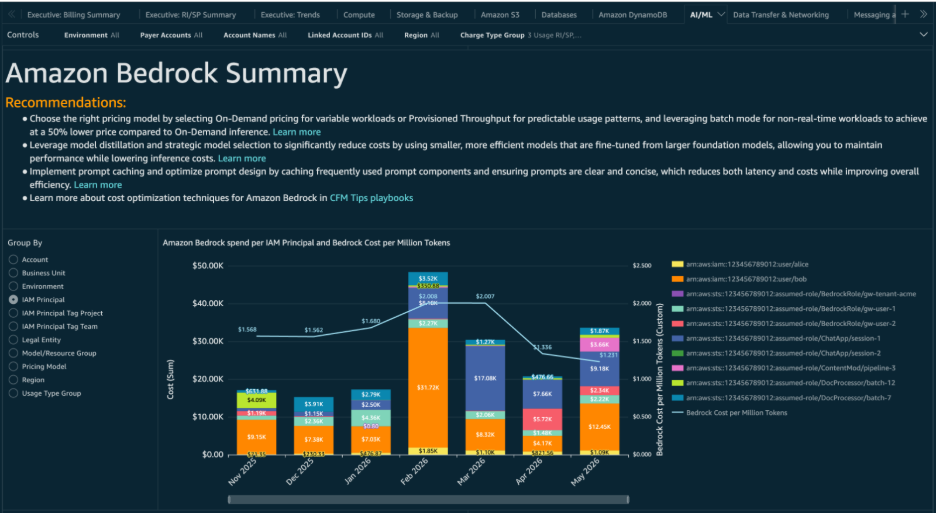
CUDOS dashboard showing Amazon Bedrock spend grouped by IAM principal
- Interactive drill-down filtering: Choose any value in the top-level spend chart (such as a specific project, principal, or account) and every other visual automatically filters to that selection, letting you drill from a high-level overview into per-model and per-usage-type detail without navigating away from the dashboard.
- Granular model and usage breakdown: Additional visuals, filtered by the top-level chart, show spend per model, per usage type, and cost-per-million-tokens by model, so you can identify which models and token types are driving costs for a given team or project.
When you switch the grouping to IAM Principal Tag Project and choose a specific project (in this example, “chatbot-v2”), all other visuals filter to show only that project’s spend. The visuals break down that spend by model, usage type, and unit cost trends.
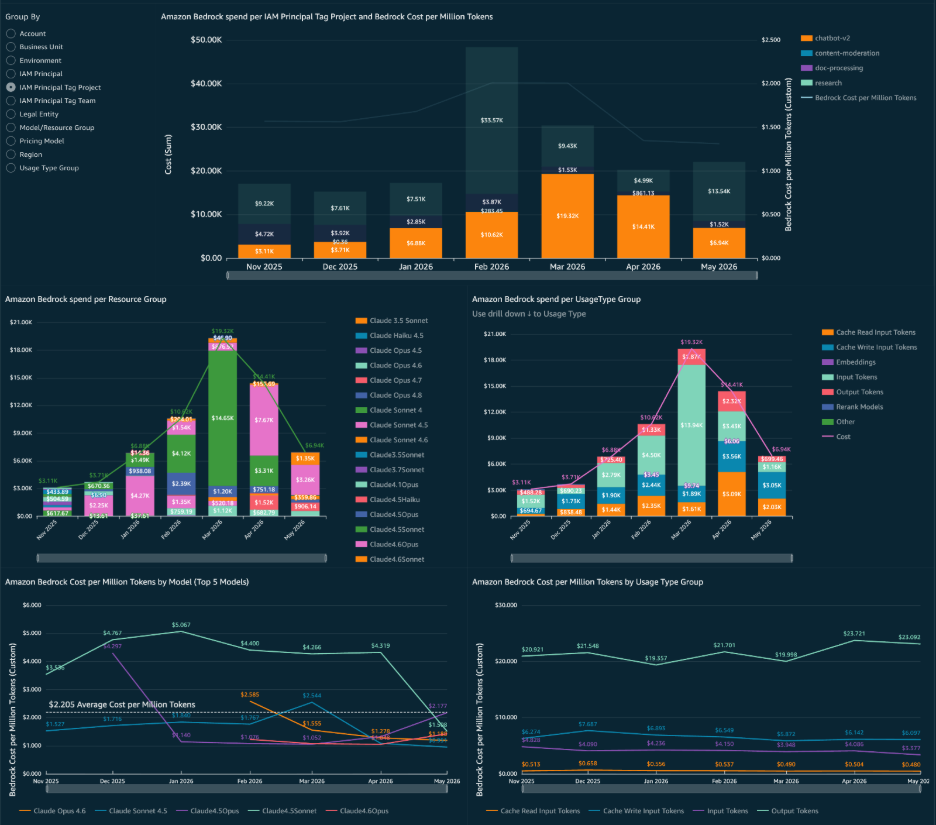
CUDOS dashboard showing Amazon Bedrock spend grouped by IAM principal tag Project, filtered to the chatbot-v2 project
With these visuals, you can quickly answer questions like “Which project is driving the most output token costs?”, “Is our chatbot team using cost-efficient models?”, or “How has our cost per million tokens changed since we switched from Opus to Sonnet?”, without writing any SQL.
Getting started with CUDOS
To get started with CUDOS, you can explore the Bedrock section in an interactive demo dashboard. Follow the deployment guide to set up CUDOS in your organization.
If you’re already using CUDOS, follow the update guidance to upgrade to version 5.8. You can also use the add organizational taxonomy to add IAM Principal data to your existing CUDOS dashboard.
Clean up
First, drop the Athena table and AWS Glue database (these are metadata, so no compute is running):
Warning: Dropping the Athena table and Glue database will remove your ability to query CUR data. You will need to recreate these resources following the preceding section if you want to analyze billing data in the future.
Second, if you no longer need the cost data itself, disable the export in the AWS Billing and Cost Management console under Data Exports and empty the S3 prefix it writes to. Note this is your raw billing history, so only delete it if you’re sure.
Finally, clear out any Athena query results that have accumulated:
There are no crawlers, AWS Lambda functions, or schedules to delete. Partition projection means the only ongoing cost is S3 storage for the CUR files themselves, which is typically pennies per month.
For cleaning up CUDOS, refer to the CUDOS dashboard teardown instructions.
Conclusion and next steps
This two-part series walked through a complete toolkit for understanding and managing Amazon Bedrock inference costs:
- Part 1 introduced granular cost attribution: how Amazon Bedrock automatically captures the IAM principal behind every inference call, and how you can use cost allocation tags to aggregate spend by team, project, or tenant.
- Part 2 (this post) showed you how to put that data to work: setting up CUR 2.0 with IAM principal data, querying cost patterns in Amazon Athena, and comparing spend across projects and principals to inform cost allocation decisions. It also introduces the CUDOS dashboard, which provides a comprehensive AI/ML sheet with similar insights for Bedrock.
Turn on CUR 2.0 with caller identity data in the AWS Billing console, connect it to Athena using the provided agent.md file, and run your first cost-by-principal query. Track Bedrock adoption across your organization with the CUDOS dashboard.
About the authors