Design patterns for scalable voice agents matter for organizations that need to deliver fast, natural, and reliable voice experiences. Many teams face challenges like high latency, managing real-time audio, and coordinating multiple agents in complex workflows.
In this post, you’ll learn how to use Amazon Nova Sonic, Amazon Bedrock AgentCore, and Strands BidiAgent to build scalable, maintainable voice agents that handle these challenges efficiently, resulting in more responsive and intelligent customer interactions.
We’ll explore three popular architectural patterns for voice agents, highlighting their trade-offs and best practices for minimizing latency.
The building blocks
Before diving deeper into the architecture patterns, here’s a quick overview of the three key components used as the sample solution in this post.
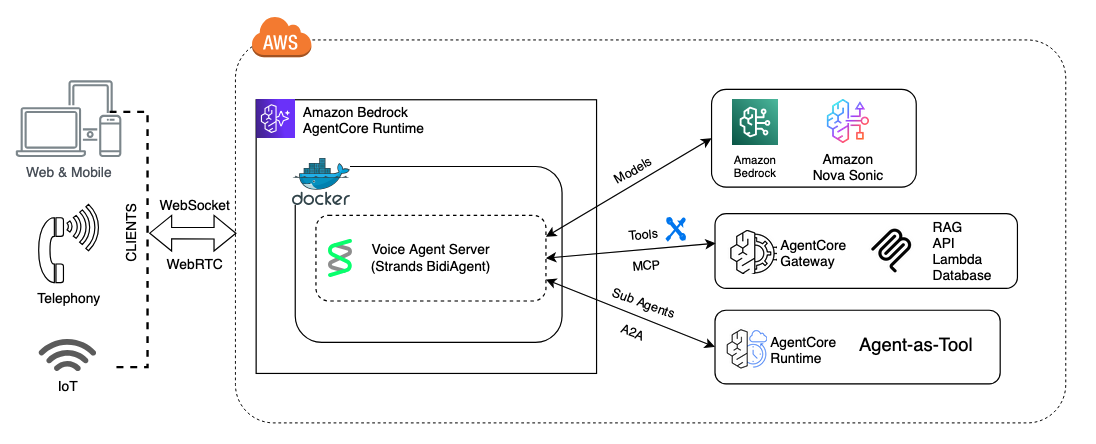
Amazon Nova Sonic is a foundation model that creates natural, human-like speech-to-speech conversations for generative AI applications. Users can interact with AI through voice in real time, with capabilities for understanding tone, natural conversational flow, and performing actions.
Amazon Bedrock AgentCore Runtime is a serverless hosting environment for AI agents. You package your agent as a container, deploy to AgentCore Runtime, and it handles scaling, session isolation, and billing. For voice agents, it provides bidirectional WebSocket streaming with SigV4 auth, microVM-level session isolation to avoid noisy-neighbor latency spikes, AgentCore Gateway for shared tool hosting using the Model Context Protocol (MCP) open source protocol, persistent memory across sessions, and telemetry for voice-specific metrics like time-to-first-audio.
Strands Agents is an open source framework for building AI agents. Its BidiAgent class is one integration option between Nova Sonic and your application. It manages the bidirectional stream lifecycle, routes tool calls, and handles session management, simplifying the voice agent application through the model SDK interface.
Three integration patterns: tool, agent-as-tool (sub-agent), and session segmentation
Instead of building one all-powerful agent, modern voice systems are increasingly composed of tool-driven agents, sub-agents acting as tools and session segmentation strategies that isolate prompts, memory, and permissions. These patterns allow teams to decompose large assistants into smaller, specialized, and reusable components while maintaining clear security boundaries.
Before running the samples in the following sections, install Python and the required dependencies, including strands-agents and boto3, and make sure your IAM setup has the necessary permissions for the required services. For the full example, refer to the GitHub repository.
Pattern 1: AgentCore Gateway – tool selection for low latency
A tool call is when a voice agent sends input to an external function or service, which processes it and returns output. It lets the agent perform tasks like querying a database or triggering a service quickly and securely, without extra reasoning steps.
With AgentCore Gateway, you expose your existing business logic as tools, discrete functions that Nova Sonic can call directly during a conversation. The voice model selects which tool to invoke, passes parameters, gets a result, and speaks it back. There’s no intermediate reasoning layer between the model and the tool.
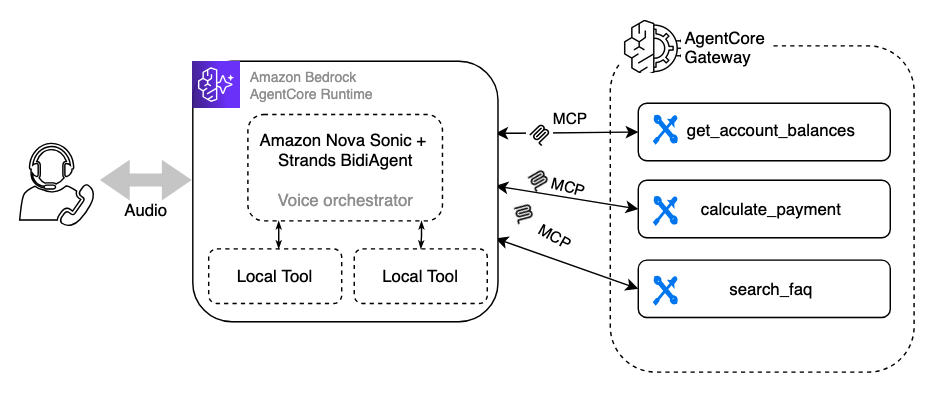
AgentCore Gateway hosts MCP servers as managed endpoints. MCP is the protocol, AgentCore Gateway is the AWS feature that runs them. The voice agent connects via Gateway ARNs.
When a user says “What’s my account balance?”, Nova Sonic:
- Understands the intent from speech.
- Selects
get_account_balancefrom the available MCP tools. - Calls the tool with the right parameters.
- Speaks the result back.
Trade-off: Nova Sonic makes all the decisions. If a tool call requires multi-step validation, conditional logic, or chaining multiple operations together, that reasoning burden falls entirely on the voice model’s system prompt. For simple tools this is fine. For complex workflows, it gets brittle.
Pattern 2: Sub-agent – additional reasoning with decoupled agents
With the sub-agent or agent-as-tool pattern, your existing business logic runs in autonomous agents, each with its own model, system prompt, tools, and reasoning capabilities. The voice orchestrator delegates whole tasks to these sub-agents instead of calling individual tools.
There are many ways to connect to a sub-agent from your voice agent. Agent-to-Agent (A2A) and Strands Agent-as-Tool are two common approaches:
- Local agent-as-tool: The sub-agent runs in-process, wrapped as a
@toolfunction using the Agents as Tools pattern in Strands. This is the most straightforward approach with no network hop and no separate deployment. The trade-off is that the sub-agent shares the same process and scales with the orchestrator. - Remote agent via A2A protocol: The sub-agent is deployed as an independent A2A server on AgentCore Runtime (or a remote server) and invoked over the network. A2A is an open protocol for agent-to-agent communication. As MCP connects agents to tools, A2A connects agents to other agents. As the AWS blog on A2A protocol support in AgentCore Runtime explains, agents built with different frameworks (Strands, OpenAI, LangGraph, Google ADK) can share context and reasoning in a common format. This provides full deployment independence and cross-framework interoperability.
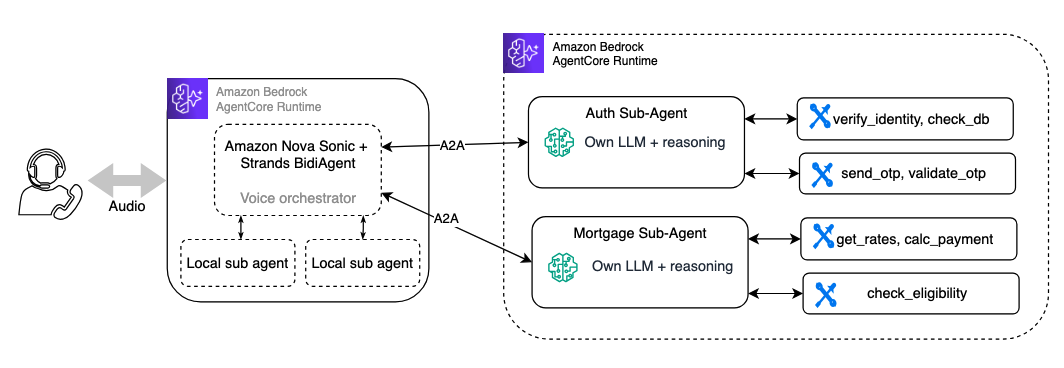
Strands Agents has built-in support for both protocols, MCP for tool access and A2A for agent-to-agent communication. For a hands-on walkthrough, see the community guide on Agent Collaboration: Strands Agents, MCP, and the Agent2Agent Protocol.
Here’s the local agent-as-tool approach, each sub-agent is a @tool wrapping a full Strands Agent:
The voice orchestrator then uses BidiAgent with these sub-agent tools:
The sub-agent does its own thinking. Nova Sonic doesn’t need to orchestrate the individual steps. It delegates and speaks the result.
Trade-off: Each sub-agent call adds latency: the sub-agent’s own model inference plus its tool calls. In a voice conversation, this means longer silence while the sub-agent reasons. The AWS blog on multi-agent voice assistants recommends starting with smaller, efficient models like Amazon Nova 2 Lite for sub-agents to reduce latency while still handling specialized tasks effectively.
Amazon Nova 2 Sonic supports asynchronous tool calling, so the conversation continues naturally while tools run in the background. It keeps accepting input, can run multiple tools in parallel, and gracefully adapts if the user changes their request mid-process, delivering all results while focusing on what’s still relevant.
Pattern 3: Session segmentation for ultra-low latency
There’s a third approach worth considering. It doesn’t map neatly to the MCP or sub-agent patterns, but is purpose-built for voice scenarios where latency is the overriding concern.
Instead of delegating external tools or sub-agents, you segment the conversation into logical phases, each with its own Nova Sonic session, system prompt, and tool set. When the conversation transitions from one phase to the next (for example, from authentication to account inquiry), you close the current session and open a new one with a different prompt and tools, within the same WebSocket connection. Each sub-voice-agent can use its own MCP gateways, tools, or even sub-agents — the differences that it operates with a focused prompt and minimal tool surface, reducing reasoning overhead and latency.
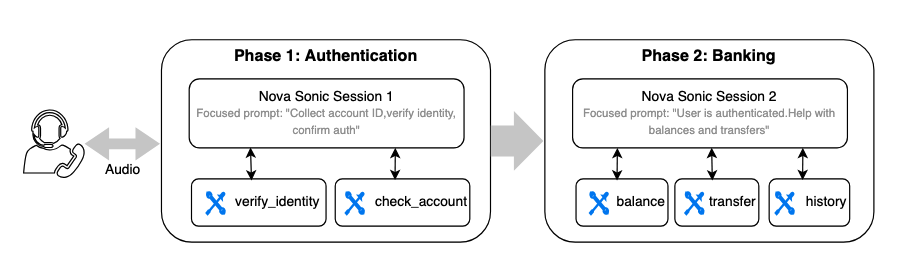
Think of a banking voice assistant with three conversation phases: authentication, account management, and mortgage inquiry. Rather than loading one massive system prompt with every tool, you run each phase as a focused Nova Sonic session:
Each phase gets a clean Nova Sonic session with:
- A focused system prompt: Shorter, more specific, less room for the model to get confused.
- Only the relevant tools: via MCP gateways, local tools, or both. The model doesn’t waste reasoning cycles choosing between 15 tools when it only needs 3.
- Optionally its own sub-agents: a phase that requires deeper reasoning can use Pattern 2 internally, while simpler phases stay tool-only.
- The previous session context can be passed into the new session as chat history, so the overall conversation retains continuity.
Compared to tool, sub-agent, and session segmentation patterns
| Factor | Tool | Sub-Agent (Agent-as-Tool) | Session Segmentation |
| Latency | Low | Higher (sub-agent reasoning) | Lowest (with latency during session transitions) |
| Tool set per turn | Tools loaded | Sub-agent’s tools | Only phase-relevant tools |
| System prompt | One large prompt | Orchestrator + sub-agent prompts | Small, phase-specific prompts |
| Reasoning depth | Voice model only | Voice model + sub-agent | Voice model only (per phase) |
| Reuse of existing agents | High (same MCP tools) | Highest (same sub-agents) | Medium (composes tools/sub-agents per phase) |
| Conversation continuity | Seamless | Seamless | Requires handoff logic between phases |
Latency best practices for voice agents
Latency is a key consideration when building voice versus text agents. Here are practical techniques to keep response times fast and responsive:
Start with small models for sub-agents. Your voice orchestrator uses Nova Sonic for the conversation, but sub-agents don’t need a large model. Start with Amazon Nova 2 Lite or Nova 2 Micro. They’re fast, cost optimized, and handle most specialized tasks well. You can always upgrade a specific sub-agent to a larger model if quality requires it, but default to small.
Design stateful sub-agents with caching. A stateless sub-agent that hits a database or API on every call adds latency every time. Instead, design sub-agents to cache results from data sources (APIs, AWS Lambda functions, databases) within a session. If the banking sub-agent fetches account details once, it should hold that data in memory and serve subsequent questions (balance, transactions, summary) from cache rather than making repeated backend calls.
Prefetch data after authentication. This is especially valuable for contact center scenarios. After a customer authenticates, you already know who they are. Don’t wait for them to ask before pulling their data. Immediately fetch account balances, recent transactions, pending alerts, and mortgage status in the background. When the customer asks “What’s my balance?”, the answer is already in memory.
Parallelize independent tool calls. If the user asks “Give me an overview of my accounts”, don’t call get_checking_balance, then get_savings_balance, then get_credit_card_balance sequentially. Use concurrent execution so three calls happen at once. Strands supports this natively. The agent’s tool executor runs independent calls in parallel by default.
Use filler phrases to mask tool latency. When a tool call or sub-agent delegation is unavoidable, instruct the voice model to speak a brief filler while waiting: “Let me check that for you…” or “One moment while I look that up…” This keeps the conversation feeling alive instead of dropping into silence.
Minimize tool count per session. Tool selection gets slower as the number of available tools grows. If your agent has 15 tools but a typical conversation only uses 3 to 4, consider the session segmentation pattern to load only the relevant tools per phase.
Clean up
After you finish testing the sample, remember to clean up the resources you created to avoid unnecessary costs. Follow the repository instructions to stop services and delete any deployed infrastructure.
Conclusion
Migrating a text chatbot to a voice assistant isn’t a straightforward wrapper job. The interaction model is fundamentally different, from response design to latency budgets to turn-taking behavior. But with a well-structured multi-agent architecture and Amazon Bedrock AgentCore, the business logic layer stays intact.
The sub-agents you’ve already built are your biggest asset. Reuse them.
For a working example of a Strands BidiAgent voice assistant deployed on AgentCore Runtime with WebSocket streaming, see the AgentCore bidirectional streaming sample.
Next steps
Next, you can extend the sample to fit your own use case, integrate your business tools, refine prompts for voice interactions, and test the agent in real-world scenarios to prepare for production deployment. To learn more about voice agents on AWS, visit:
- Amazon Nova 2 Sonic Service Card
- Amazon Bedrock AgentCore Runtime Bidirectional Streaming
- Strands BidiAgent
- Amazon Bedrock AgentCore Bidirectional Streaming Sample Code
About the authors