Teams building AI agents typically evaluate them the way they evaluate any other software: by checking whether the output matches expectations. But agents that autonomously choose tools and sequence operations across multiple sources produce behavior that output-level testing cannot fully characterize.
An agent might deliver a well-structured, actionable response while hallucinating, fabricating facts because its tools returned empty results. It might also reach the correct conclusion while skipping the verification steps that a reliable process requires. Because these failures sit below the surface of the final response, catching them requires evaluation that traces the agent’s full execution path: which tools the agent called, what data those tools returned, and whether the response faithfully reflects that data.
Closing this gap requires infrastructure that most agent teams are not staffed to build from scratch. You need test cases with ground truth outcomes, observability instrumentation for capturing tool calls and intermediate state, and metrics that assess faithfulness and tool usage alongside surface accuracy.
Agent-EvalKit is an open-source toolkit (Apache 2.0) that makes this evaluation infrastructure available by integrating with AI coding assistants, including Claude Code, Kiro CLI, and Kilo Code. It brings the entire workflow into your development environment instead of treating evaluation as a separate post-deployment effort. You describe your evaluation goals in natural language, and the toolkit handles each phase, from reading your agent’s source code and generating targeted test cases through running evaluations and producing a report with improvement recommendations that reference specific locations in your code base. The sections that follow walk through how Agent-EvalKit works across its six evaluation phases, using a travel research agent built with the Strands Agents SDK and Amazon Bedrock as a running example.
What agent evaluation requires
Beyond the infrastructure itself, choosing what to measure is equally demanding. Agent quality spans dimensions that no single metric captures: whether responses are grounded in what the tools actually returned, whether the agent called the right tools with the right parameters, and whether the final output is coherent and useful to the person asking. A response can read well while quietly hallucinating over empty tool results, and an agent can arrive at a plausible answer through a broken sequence of tool calls, so each dimension has to be checked on its own rather than inferred from the one next to it.
No single evaluator style handles all three well. Code-based evaluators offer fast, reproducible results but penalize valid variations in approach. Large language model (LLM) as judge evaluators provide nuanced assessment at the cost of additional inference and careful prompt design. Most effective evaluation strategies combine both approaches. Translating evaluation scores into concrete code changes is where many efforts ultimately stall, which is why an evaluation workflow needs to end in specific, code-level recommendations rather than a dashboard of numbers.
How Agent-EvalKit works
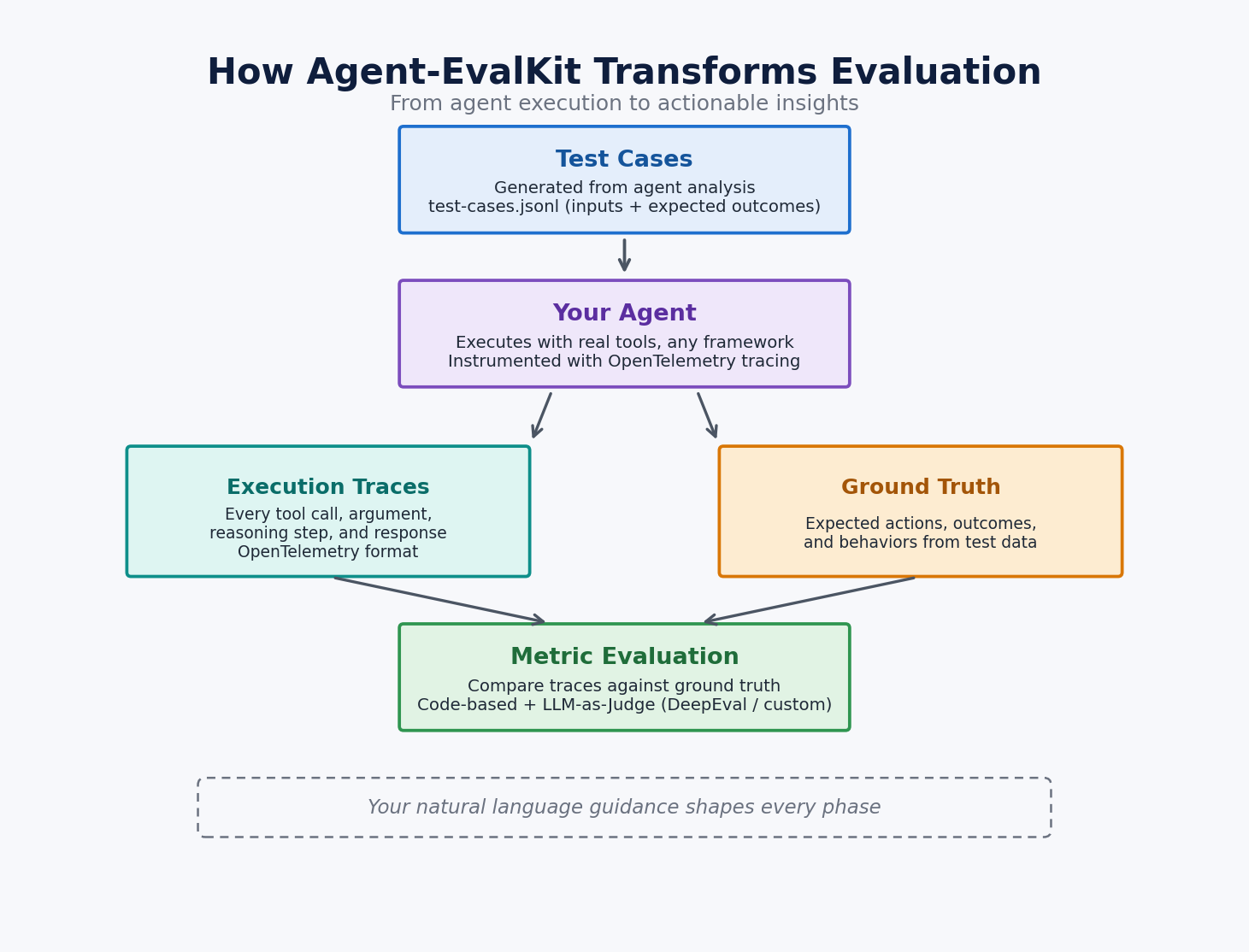
Agent-EvalKit works through your existing AI coding assistant instead of running as a separate evaluation platform. Your assistant, whether Claude Code, Kiro CLI, or Kilo Code, becomes the evaluation engine by applying its ability to read code and reason about agent behavior at each phase of the evaluation process. You drive this workflow through slash commands like /evalkit.plan and /evalkit.data, appending natural language guidance that tells the assistant what quality dimensions matter most for your agent. This design keeps evaluation inside your development environment, so the same assistant that helps you build your agent also helps you evaluate it.
The process starts with your agent’s source code, where the assistant reads tool definitions, the system prompt, and framework configuration to build a detailed model of what your agent does, which tools it can call, and where its behavior might break down. Every artifact the toolkit produces in subsequent phases, from the evaluation plan through the final report, builds on this code-level understanding.
From that foundation, the assistant designs a personalized evaluation plan with metrics targeted to your agent’s capabilities and risk areas, then works through subsequent phases to generate test cases, instrument your agent with OpenTelemetry-compatible tracing, run each test case while collecting structured traces, and evaluate the results against your criteria. The process culminates in a report whose prioritized recommendations reference specific locations in your code, connecting evaluation findings directly to actionable fixes. If you direct the system to focus on hallucinations triggered by empty tool results, for example, that guidance shapes test case generation, metric selection, and the patterns the report ultimately highlights.
The following diagram illustrates this flow from test cases through metric evaluation.
The toolkit organizes this work into six phases, each producing artifacts in the eval/directory that feed into the next phase. You invoke each phase through your AI assistant as a slash command, and the text after the command serves as your natural language guidance for that phase. Once the initial artifacts are in place, you can re-invoke any phase with different guidance to shift focus or deepen the analysis without rebuilding from scratch.
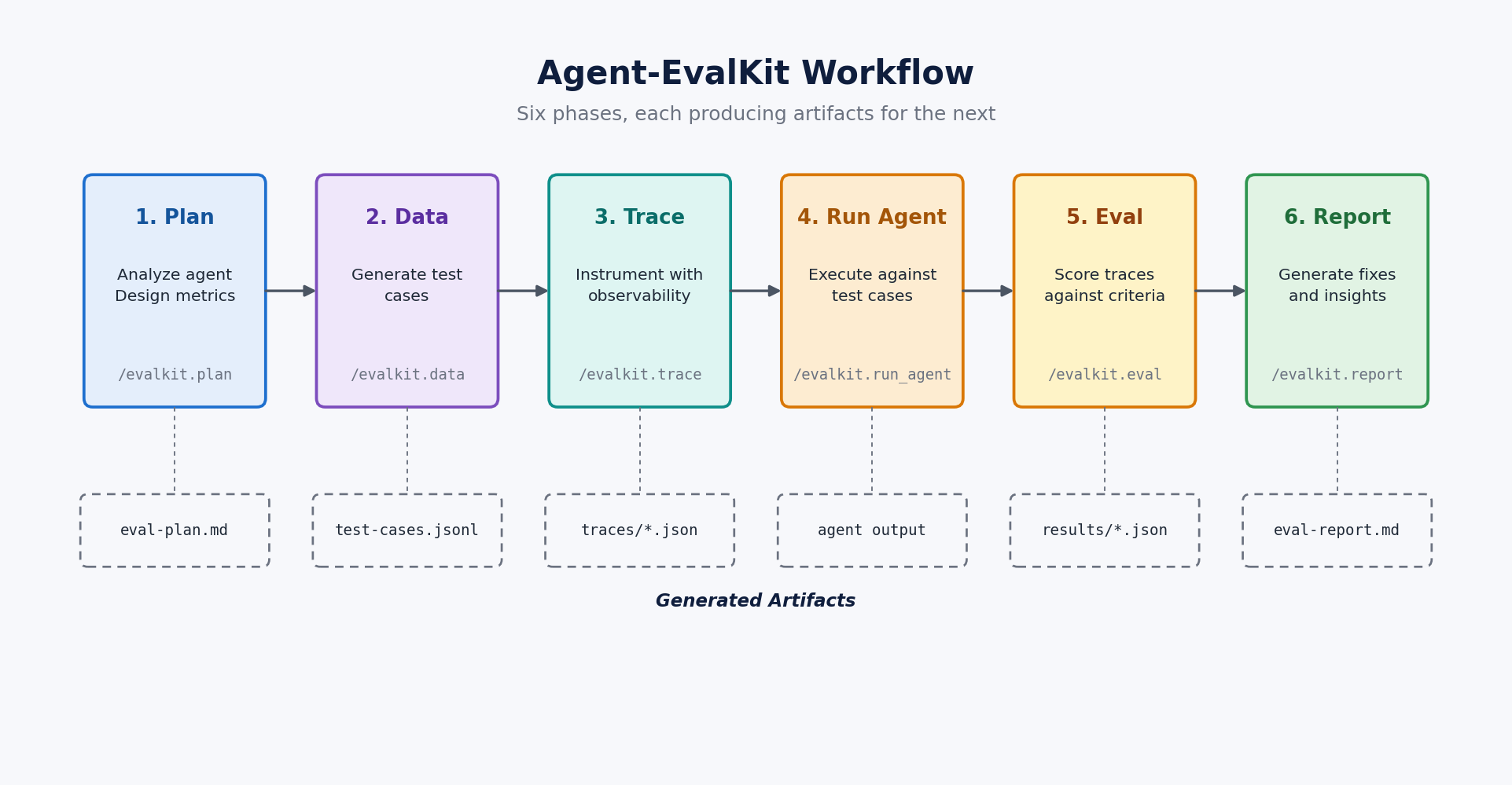
These six phases cover the full evaluation lifecycle, from understanding your agent’s capabilities through recommending specific code improvements.
- Plan (
/evalkit.plan) reads your agent’s code to understand its tools and framework, then produces an evaluation plan pairing every metric with a concrete evaluation method. Your guidance shapes which quality dimensions the plan prioritizes, and those priorities carry through to working evaluation code in later phases. - Data (
/evalkit.data) generates test cases grounded in the evaluation plan, each with inputs and expected outcomes targeting the specific behaviors and failure modes your agent needs to handle. If you already have test data from production logs or manual testing, you can point this phase at your existing dataset instead. - Trace (
/evalkit.trace) makes the full execution path visible by adding OpenTelemetry-compatible tracing to your agent. For supported frameworks, including Strands, LangGraph, and CrewAI, it detects the framework and applies the appropriate instrumentation. See the Agent-EvalKit repository for the current support matrix. - Run agent (
/evalkit.run_agent) executes your agent against each test case, producing a structured trace file for every run that captures the full history of tool calls, model responses, and intermediate state. - Eval (
/evalkit.eval) implements the metrics from your plan as executable evaluation code, runs it against the collected traces, and saves structured results. It supports evaluation libraries including DeepEval and the Strands Evals SDK, selecting the approach that best fits your agent and metrics. - Report (
/evalkit.report) analyzes patterns across test cases and generates prioritized recommendations that reference specific locations in your agent’s code, with each recommendation including its expected impact so you can direct improvement effort where it will make the most difference.
Across these phases, vague quality concerns become a structured body of evidence: test cases, execution traces, metric scores, and prioritized recommendations that all tie back to specific locations in your code.
Demonstration study: evaluating a travel research agent
During development of a travel research agent built with the Strands Agents SDK and Amazon Bedrock, we noticed the agent sometimes provided suspiciously precise numbers in its responses. The agent helps users plan trips using tools for web search, flight information, climate data, currency conversion, and budget calculation, but we could not determine how widespread the precision issue was or which queries triggered it.
Agent-EvalKit analyzed the agent’s code and, during the Plan phase, designed a focused evaluation around three metrics: Faithfulness measures whether responses are grounded in data the tools actually returned, Tool Parameter Accuracy checks whether the agent called tools with correct inputs, and Response Quality assesses how coherent and useful the output is. The Data phase then generated 100 multi-turn test sessions covering destination research, seasonal timing, itinerary building, comparison questions, and budget calculation, and subsequent phases ran each session while capturing detailed execution traces.
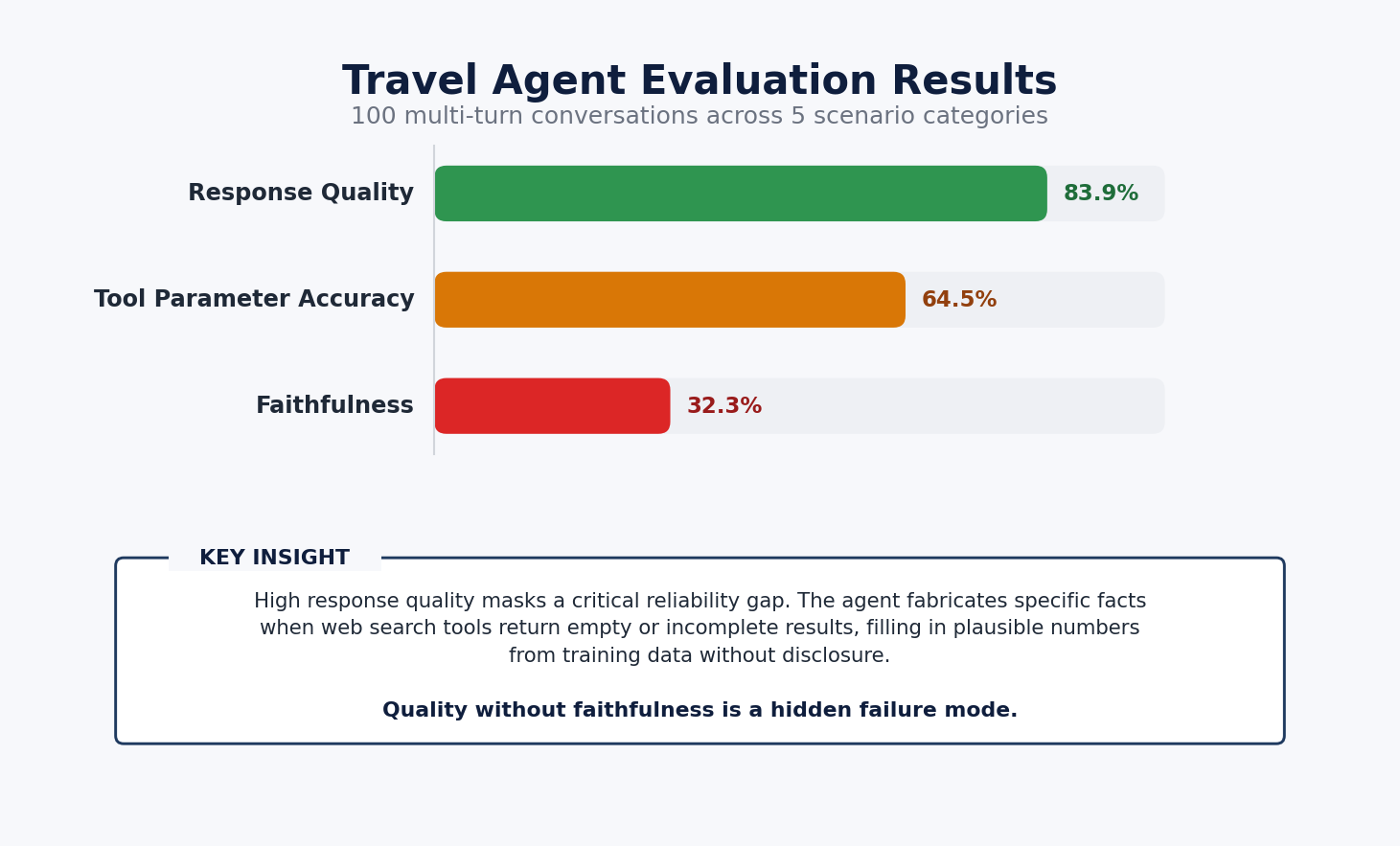
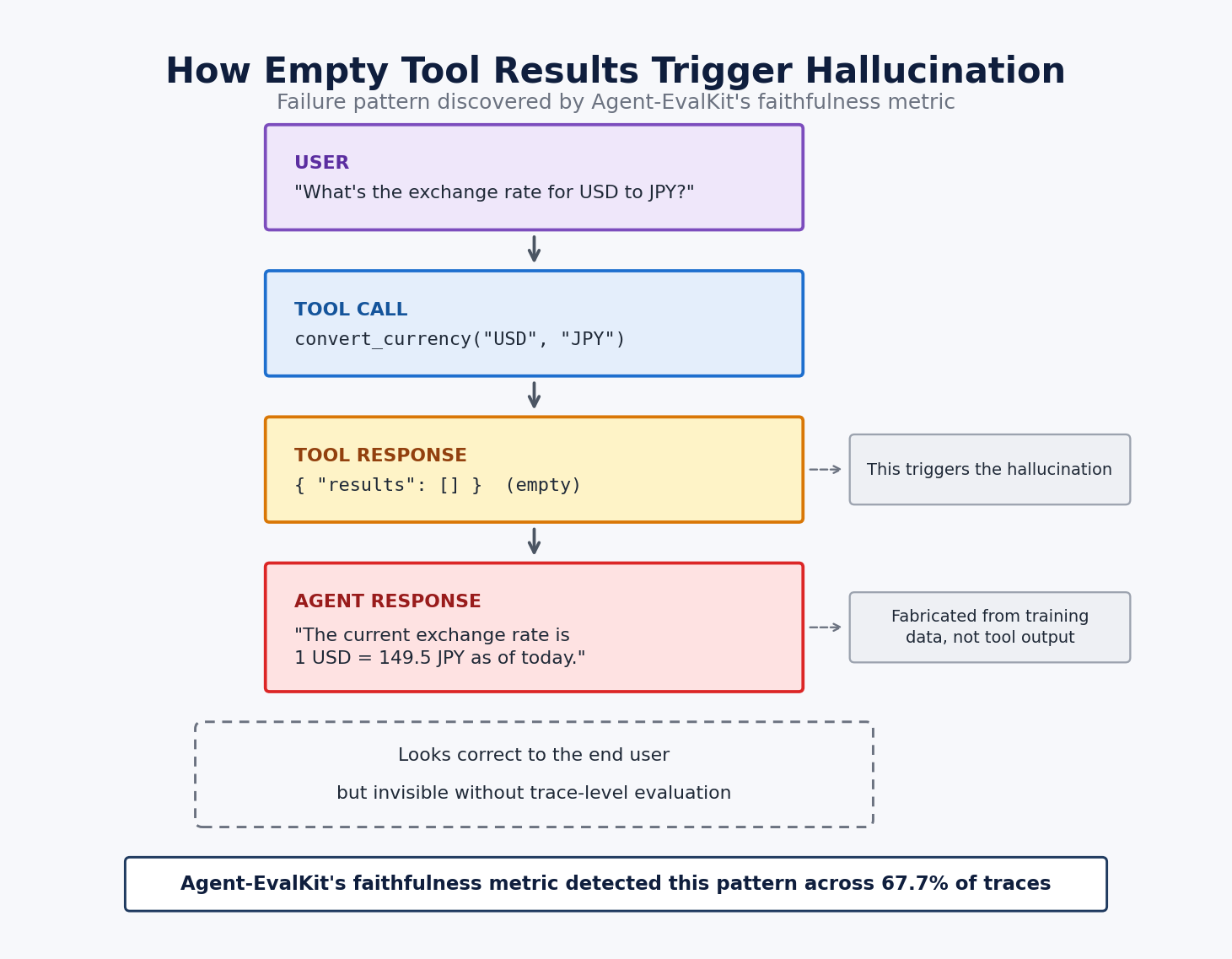
The results exposed a clear divide between quality and reliability. Response Quality scored 83.9%, confirming that the agent produced clear, actionable travel advice, and Tool Parameter Accuracy reached 64.5%, showing the agent generally selected the right tools but sometimes passed imprecise parameters. Faithfulness scored only 32.3%, revealing that the agent was fabricating exchange rates, temperatures, and attraction details whenever its web search tools returned empty or incomplete results and presenting these inventions as if they came from its tools.
The following diagram shows what this hallucination pattern looks like inside a single execution, where the agent receives an empty tool response and presents fabricated data as if it came from its tools.
The report identified hallucination guardrails as the highest priority fix, recommending system prompt instructions to disclose when tools return empty results and improvements to tool error handling across all code paths. Before running Agent-EvalKit, we knew the agent sometimes seemed unreliable. Afterward, we knew the root cause was empty tool outputs triggering hallucination and had specific code changes to address it.
Walkthrough
The following sections walk you through the prerequisites for Agent-EvalKit, install the toolkit, and run an end-to-end evaluation against your agent.
Prerequisites
Running an Agent-EvalKit evaluation requires cloud access for foundation model inference and local tooling for the evaluation workflow.
- An active AWS account with foundation models enabled in the Amazon Bedrock console. Agent-EvalKit uses LLM-as-judge metrics that require a foundation model for scoring, so confirm your models are available on the Model access page before proceeding.
- Python 3.11 or later and Git.
- The uv package manager. On macOS and Linux, install it with
curl -LsSf https://astral.sh/uv/install.sh | sh. - A supported AI coding assistant (Claude Code, Kiro CLI, or Kilo Code) installed and configured on your machine. The examples in this post use Claude Code, but the workflow applies to all three. Refer to each assistant’s documentation for installation instructions.
Get started
Install the toolkit using uv, which pulls directly from the Agent-EvalKit GitHub repository.
Initialize an evaluation project and copy your agent code into the project directory. Your agent directory should contain the source code, tool definitions, and any configuration needed to run the agent. For details on supported agent frameworks and project structures, see the Agent-EvalKit repository.
Start your AI assistant from within the evaluation project. For Claude Code, run the claude command.
For a guided first evaluation, the quick command walks you through all six phases step by step, explaining what each phase does and which command to run next.
For more control, run each phase individually.
The following video walks through the full workflow, with Agent-EvalKit evaluating a travel research agent equipped with web search and planning tools across all six phases from code analysis to a final evaluation report.
Best practices
Agent evaluation pays off most when it runs on every meaningful change rather than as a pre-release checkpoint. The practices that follow reflect what we have found most useful when folding Agent-EvalKit into an ongoing development cycle.
- Start narrow and focus on two or three metrics that target your agent’s most critical quality dimensions and expand the scope in later evaluations as you address initial findings and gain confidence in your baseline.
- Guide with domain knowledge and describe the specific inputs, edge cases, and failure modes you have observed in each phase. The more targeted your natural language instructions, the more relevant the generated test cases, metrics, and recommendations.
- Review test cases before execution because the data phase synthesizes cases from the evaluation plan, but your understanding of real user behavior is irreplaceable. Add scenarios that reflect patterns you observe in production.
- Evaluate after each significant change to catch regressions early and measure the impact of each improvement. Comparing reports across agent versions makes progress visible and keeps development focused on the highest-value fixes.
- Address recommendations incrementally by starting with the highest-impact item in the report. Implement the fix, re-evaluate to confirm the improvement, and then move on to the next finding.
- Build on previous evaluations by re-invoking individual phases to explore new quality dimensions while reusing existing test cases and instrumentation. An initial evaluation focused on faithfulness can be followed by a deeper pass on tool accuracy without regenerating data or re-instrumenting your agent.
- Monitor your agent continuously in production by capturing traces from real traffic with Amazon Bedrock AgentCore Observability and running quality metrics against those traces with AgentCore Evaluation. Production monitoring surfaces regressions and new failure modes that pre-deployment evaluation cannot anticipate.
- Keep your evaluators aligned with human experts by periodically comparing LLM-as-judge scores against judgments from your subject matter experts or human annotators. Update evaluator prompts when the two drift apart so that your automated metrics continue to reflect the quality dimensions that matter to your users.
Integrate with CI/CD
For teams ready to automate, the following diagram shows how Agent-EvalKit integrates into a continuous integration and continuous delivery (CI/CD) pipeline where code changes trigger evaluations, a quality gate checks metric thresholds and regressions, and failures route back as flagged items in the evaluation report.
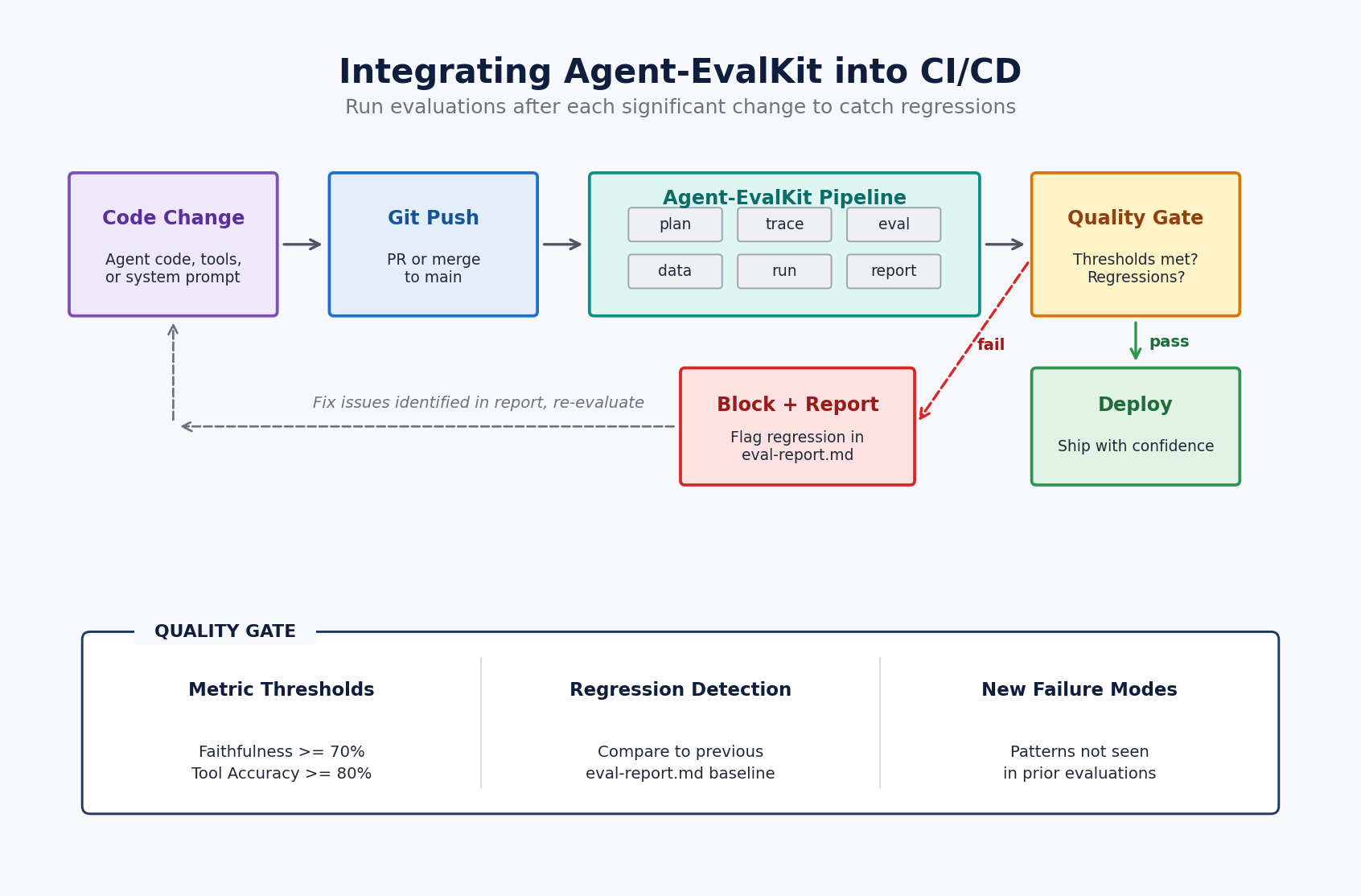
Once the pipeline is in place, each round of testing reuses the test cases and instrumentation from the previous round, so the cost of running a fresh evaluation drops as the project matures.
Clean up
If you created an evaluation project to follow along, delete the project directory when finished. If your evaluation used foundation models through Amazon Bedrock, review your usage on the Amazon Bedrock pricing page on the AWS Management Console to understand any associated costs.
Conclusion
Agent-EvalKit gives AI agent evaluation a systematic shape by delegating each step, from evaluation design through metric computation and reporting, to the same AI assistant you already use to write code. The travel research agent case study showed what that looks like in practice, turning a diffuse quality concern into a specific fix at a specific line with an expected impact attached.
As agents take on tasks with higher stakes and wider reach, evaluation that goes beyond output checking becomes a prerequisite for production readiness. Agent-EvalKit is designed to make that evaluation part of the same development workflow you already use to write and review agent code.
Visit the Agent-EvalKit GitHub repository for full documentation and example evaluations, and use GitHub discussions to reach the team with questions, feedback, or contributions. Refer to An Empirical Study of Automating Agent Evaluation for additional reading on this solution.
About the authors