Refining an Automated Reasoning policy in Amazon Bedrock has been a manual cycle of diagnose, hand-edit, retest, and repeat. Today, we are announcing automatic policy refinement, which automates the diagnose-and-fix work in that cycle. The refinement engine diagnoses failing tests and proposes formal-logic fixes. You approve every change before it takes effect.
Automated Reasoning checks in Amazon Bedrock Guardrails use formal verification to prove answer correctness. On unambiguous translations from natural language to formal logic, they deliver up to 99% verification accuracy, as reported in the GA announcement. To get started, you build an Automated Reasoning policy from a source document and validate it with test cases. Customers told us that this iterative tuning creates the biggest friction point in policy development.
In this post, we walk through two new refinement modes: Iterative Refinement for rule issues, and Ambiguous Variable Refinement for language issues. For each mode, we show a complete API workflow (start, poll, retrieve) and a repeatable console workflow for turning failing policies into passing ones.
What Automated Reasoning checks actually are
Automated Reasoning checks translate natural language into formal logic, then apply automated reasoning techniques to produce a finding: VALID, INVALID, SATISFIABLE, IMPOSSIBLE, or TRANSLATION_AMBIGUOUS. For a full introduction to how policies work, refer to our GA announcement post.
For this post, the key concept is the two-step validation pipeline. First, the translate step maps natural-language input/output to variable assignments using the variable descriptions in your policy. Second, the validate step applies your formal rules to those assignments. When a test fails, the root cause lives in one of those two steps, and each refinement mode targets a different one. Figure 1 traces that pipeline end to end.
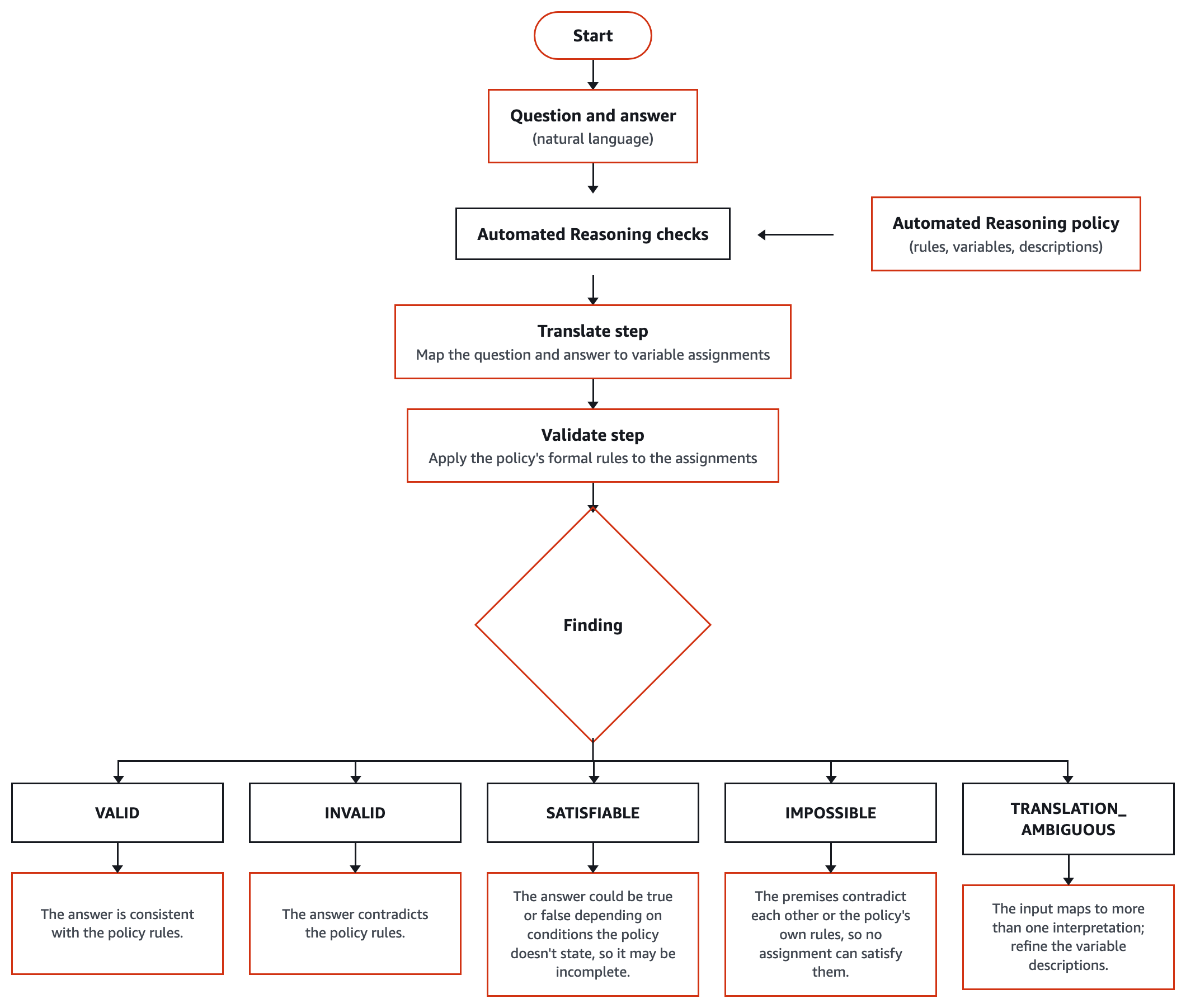
Figure 1: How Automated Reasoning checks validate a response at runtime. Automated Reasoning checks translate natural language into variables using the policy’s variable descriptions, then validate those variables against the policy’s formal rules to return a finding. This two-step pipeline is why refinement has two modes.
Testing your policy. You validate a policy by attaching tests: each test is input/output text plus the result you expect. Run tests individually or as a batch. Failures tell you exactly where the policy diverges from your intent.
Why policies need refinement: Two failure modes
Recall the two-step pipeline: translate (natural language to variable assignments) and then validate (formal logic to finding). A failed test means one of these steps produced something you didn’t expect. Automated Reasoning checks surface two distinct failure signals that map cleanly to each step.
Failure mode 1: Rule issues (the logic is wrong)
In a rule-issue failure, the translation works correctly: the right variables have the right values, but the validation result doesn’t match your expectation. The problem lives in your rules: a rule is too permissive, too restrictive, or missing entirely. Concretely, you expected INVALID but got SATISFIABLE because a missing or too-permissive rule lets a bad answer through. Or you expected SATISFIABLE but got INVALID because an overly strict rule blocks a correct answer.
Mental model: The system understood the question perfectly but applied the wrong logic. You need to fix the rules.
Failure mode 2: Translation ambiguous (the language is wrong)
When a test returns TRANSLATION_AMBIGUOUS, the validation engine runs and produces different outcomes depending on which interpretation it follows. In some cases, the translation models disagreed on how to map the natural-language input to your policy’s variables, and each competing interpretation led to a different validation result. The finding surfaces two or more options, each with its own translation and conclusion, plus differenceScenarios showing where the interpretations diverge in practice. Common root causes include overlapping variable definitions (“tenure” compared to “years of service”), vague descriptions, and inconsistent value formats (5 compared to 0.05 for “5%”).
Matching mode to failure
This table summarizes which refinement mode addresses which failure type:
| Failure mode | Root cause | Refinement mode | What it does |
| Rule issues | Logic is wrong | Iterative Refinement | Proposes rule or variable additions, edits, or deletions |
| Translation ambiguous | Language is ambiguous | Ambiguous Variable Refinement | Proposes clearer variable descriptions that collapse multiple interpretations into one |
Use Ambiguous Variable Refinement when the system cannot determine a single translation. The next two sections walk through each mode in turn: what it does, when to use it, how the review gate works, and how to launch it programmatically. We start with Iterative Refinement because rule-issue failures are the more common case.
Iterative Refinement: Fixing the rules
When tests fail because the logic is wrong (the translation is clean but the validation result doesn’t match your expectation), the problem lives in your rules. Iterative Refinement (ITERATIVELY_REFINE_POLICY) automates the diagnose-and-fix cycle so you don’t need to manually trace each rule, hypothesize a correction, and hand-edit formal logic.
Consider a policy with 10–30 rules. Previously, a fix would take a subject matter expert multiple rounds of manual diagnosis and hand-editing of SMT-LIB formal logic. That work now compresses to a single review-and-approve step, with no formal logic written by hand.
How it works
Iterative Refinement takes three inputs. The first is your existing policy definition (the current rules, variables, and types). The second is a source document containing the authoritative natural-language text that describes how things should work. The third input is optional: natural language feedback with explicit instructions describing the change you want.
For example, the feedback field might contain: “Update the tenure requirement for parental leave from 12 months to 6 months, as specified in section 3 of the revised document.”
Given these inputs, the refinement engine analyzes how the current rules diverge from the source document and your feedback. It proposes a set of candidate changes (new rules, edited rules, added variables) that bring the policy in line.
The convergence loop
Iterative Refinement, as the name suggests, iterates. Behind the scenes, the engine generates a candidate change, simulates its effect on your saved tests, checks whether the previously failing tests now pass, and adjusts if they don’t. This can involve several internal cycles for a single request, especially when a fix in one rule ripples into others. The iteration happens internally, though: you don’t observe each intermediate attempt, and you don’t need to shepherd it. What you receive is the converged result: a proposed diff that shows exactly which rules changed, which variables changed, and how the change affects every test in your suite.
The review gate
After convergence, the Review policy changes screen appears.
You then select Accept changes or Discard changes. Accepting writes the changes to your DRAFT policy. Discarding leaves everything exactly as it was.
Prerequisites and when to use
Iterative Refinement requires at least one test attached to your policy. Without a failing test signal, there’s nothing to drive the refinement. Use this mode when the translation is correct (right variables, right values) but the validation result is unexpected. Do not use it when the finding is TRANSLATION_AMBIGUOUS. That’s a language problem better addressed by Ambiguous Variable Refinement.
Through the API
Refinement runs as an asynchronous build workflow. Using the AWS SDK for Python (Boto3), the flow has four steps: export the current policy definition, start the workflow, poll for completion, and retrieve the proposed changes. Set buildWorkflowType to ITERATIVELY_REFINE_POLICY.
The iterativeRefinementContent block accepts one to five source documents (required) and up to 4,000 characters of optional feedback:
The call returns immediately with a buildWorkflowId, not the proposed changes. The workflow moves from SCHEDULED to BUILDING until it reaches COMPLETED, FAILED, or CANCELLED. Convergence typically takes one to a few minutes, depending on policy size. Poll get_automated_reasoning_policy_build_workflow until the status reaches a terminal state. Then retrieve the converged proposal with get_automated_reasoning_policy_build_workflow_result_assets, requesting the POLICY_DEFINITION asset to see the updated rules (and BUILD_LOG for the action log):
The returned policy definition is the proposed DRAFT, the full new definition. To commit it, call update_automated_reasoning_policy with this definition. To see what changed, diff it against the policy definition you exported before starting the workflow. The console Review policy changes screen wraps this same start-poll-retrieve sequence, rendering the diff behind the Accept changes and Discard changes buttons.
Ambiguous Variable Refinement: Fixing the language
Iterative Refinement handles rule issues, but not every failing test is a rule issue. When the translation itself is unstable, no amount of rule-editing will help. You need to fix the language the policy uses to describe its variables. That is what Ambiguous Variable Refinement does. It follows the same asynchronous start-poll-retrieve pattern and lands on the same review-and-accept screen. The difference is in the proposals. They center on variable descriptions and merges, with rule and type updates applied as needed to keep the policy consistent.
When tests produce TRANSLATION_AMBIGUOUS results (refer to failure mode 2 earlier in this post), competing translations lead to different validation outcomes. Ambiguity can also come from how the validated content itself is phrased. This section focuses on ambiguity in the policy variables.
How it works
Translation ambiguity, because of policy variable issues, typically stems from a handful of root causes. Overlapping variables occur when two variables describe the same concept. For example, tenureMonths (“How long the employee has worked in months”) and monthsOfService (“The employee’s months of service”) both capture employment duration. As a result, translation models disagree on which one to use. Incomplete descriptions arise when a variable’s description is too vague to guide translation. Inconsistent value formatting creates ambiguity when the system can’t determine if “5%” should become interestRate = 5 or interestRate = 0.05. Logic baked into variable names creates confusion. A name like timelyReportingNotFeasible already contains a negation, so expressing the positive case requires negating a negative. Translation models often drop one of the two.
These are only the most common patterns. Because detection works by exercising the policy’s variables in translation rather than checking against a fixed list of known problems, variable-level issues that causes translations to disagree can surface.
When you run Ambiguous Variable Refinement, it pinpoints which variable descriptions or overlapping definitions cause the disagreement, then proposes refined descriptions that collapse multiple interpretations into one precise definition.
These refined descriptions incorporate unit conversion rules, synonyms, alternative phrasings, and explicit format guidance. This before/after example illustrates a typical proposal:
| Before | After (proposed) |
| tenureMonths : “How long the employee has worked in months.” | tenureMonths : “The number of complete months the employee has been continuously employed. When users mention years of service, convert to months (for example, 2 years = 24 months). This variable captures references to employment duration, length of service, time at the company, or seniority.” |
If overlapping variables are detected, a merge may also be proposed: one variable is deleted and rules that reference it are updated to use the surviving variable.
The review gate
Just like Iterative Refinement, you review the proposed changes before anything is applied.
It also displays Test results, where tests that previously returned TRANSLATION_AMBIGUOUS now produce a definitive VALID, INVALID, or SATISFIABLE result. You select Accept changes or Discard changes. No change touches your DRAFT policy until you approve.
When to use it
Use Ambiguous Variable Refinement when tests produce TRANSLATION_AMBIGUOUS results, or when you inspect a VALID/INVALID finding and discover that the translation assigned values to the wrong variables. Do not use it when the translation is correct but the validation result is unexpected. That’s a rule problem for Iterative Refinement.
Through the API
Ambiguous Variable Refinement uses the same asynchronous start-poll-retrieve pattern. Set buildWorkflowType to RESOLVE_POLICY_AMBIGUITIES. This mode analyzes your policy’s variables directly and needs neither a source document nor attached tests, so workflowContent can be omitted. The current policy definition is still required in sourceContent. Export it first with export_automated_reasoning_policy_version as shown for Iterative Refinement earlier:
As with Iterative Refinement, the response is a buildWorkflowId. Poll get_automated_reasoning_policy_build_workflow until the status reaches a terminal state. Then call get_automated_reasoning_policy_build_workflow_result_assets with assetType="POLICY_DEFINITION" to retrieve the proposed variable descriptions and merges:
The changes remain a proposal until you accept them.
You approve every change: The human-in-the-loop gate
Both refinement modes share one non-negotiable property: no change takes effect until you say so. The refinement engine has suggestion authority. It can analyze, diagnose, and propose. You have commit authority. You decide what reaches your DRAFT policy and, ultimately, production.
The five-step loop
Regardless of which refinement mode you use, the workflow follows the same five-step pattern. First, test: run your saved tests against the current policy. Second, check: identify which tests don’t match their expected result. Third, propose: the system generates candidate fixes for rules or variable descriptions. Fourth, review: you inspect the proposed diff and its impact on the tests. Fifth, apply: you accept the changes into DRAFT, or reject and nothing changes.
After you accept, re-test to confirm the fix resolved the issue without breaking other tests. This creates a ratchet: each cycle either moves you closer to a passing policy or gives you new diagnostic information.
What the review screen shows you
The review screen lets you understand the ramifications of a change, not just the change itself. It answers two questions at once: what did the engine propose, and how does that proposal affect every test you care about?
The proposal comes in three sections. Changes to rules lists the rules added, edited, or deleted, with the formal-logic expression for each. Changes to variables shows updated variable descriptions and added or deleted variables, with the previous wording alongside the proposed wording so you can compare the two directly. Changes to custom variable types covers changes to the policy’s enumerated types.
Alongside those changes, the screen shows a Test results section that lists the saved test with its previous and new outcome. Each row gives the expected finding and whether the test passed before and after. Choose View findings on a row to see the finding itself. This view is the single most important indicator on the screen. If your failing tests now pass and your passing tests still pass, you can accept with confidence.
Validate with the Fidelity Report
After applying changes, generate a Fidelity Report (GENERATE_FIDELITY_REPORT) to validate that your updated policy still faithfully represents your source document. The report provides three measurements. The coverage score (0.0–1.0) indicates how much of your source document is represented in the policy. The accuracy score (0.0–1.0) indicates how faithfully the rules match the intent of the original document. Per-rule grounding links each rule to the specific source-document statements that support it, with justifications.
Compare Fidelity Reports before and after refinement. If your accuracy score drops, the proposed fix may have drifted from your source material, which is a signal to reject or iterate further.
The principle
Automatic refinement accelerates the labor of diagnosing failures and generating candidate fixes. It does not accelerate the authority to change what your guardrail enforces. Every fix remains a suggestion until you decide to accept it.
Steering the engine: Source documents and custom feedback
You can steer both modes by providing context that guides the system toward the right fix faster.
Source documents
When you launch Iterative Refinement, you supply a source document representing the ground truth your policy should encode. The console offers three modes for supplying it: Recently used re-selects a previously uploaded doc, Upload takes a new PDF or text file, and Enter text accepts pasted content directly. The clearer and more focused the document, the more precise the proposals.
Custom feedback: Explicit if-then guidance
You can also provide natural language feedback that tells the system exactly what to fix. Effective feedback is specific and testable. Vague feedback like “Fix the tenure rule” gives the engine too much latitude. Compare it with a specific, testable alternative: “If an employee is full-time and has worked for more than 6 months (not 12), they should be eligible for parental leave.”
Your feedback acts as a constraint: the system generates changes that satisfy both the source document and your guidance. If the two conflict, the conflict is flagged for your review.
You can provide both a source document and feedback together. When your document is dense, feedback focuses the system on the specific section that matters.
End-to-end walkthroughs
This section provides two walkthroughs, one for each refinement mode. Together they give you a repeatable workflow for both failure types.
Prerequisites
To use automatic policy refinement with Automated Reasoning checks in Amazon Bedrock, make sure you have met the following prerequisites:
- An active AWS account.
- Confirmation of AWS Regions where Automated Reasoning checks is available, and access to Amazon Bedrock in one of them.
- IAM permissions to create, view, and refine Automated Reasoning policies and to work with Amazon Bedrock Guardrails.
- An Automated Reasoning policy in your account, created from a source document that captures the rules you want to enforce. For step-by-step instructions, refer to Create your Automated Reasoning policy. You need this policy to have at least one attached test — Iterative Refinement requires a failing test signal to drive its diagnosis. To add tests, refer to Test an Automated Reasoning policy.
Walkthrough A: Fixing a rule issue with Iterative Refinement
Your HR leave-eligibility policy has a failing test. The assistant reports that a part-time employee with 8 months of tenure qualifies for parental leave. The test expects INVALID, but the policy returns VALID.
Step 1: Validate the tests
- In the Amazon Bedrock console, navigate to Automated Reasoning and open your policy.
- Choose the Tests tab, and then choose Validate all tests. Figure 2 shows the results. Three of the four tests pass, and the parental-leave test fails with an unexpected
VALIDfinding.
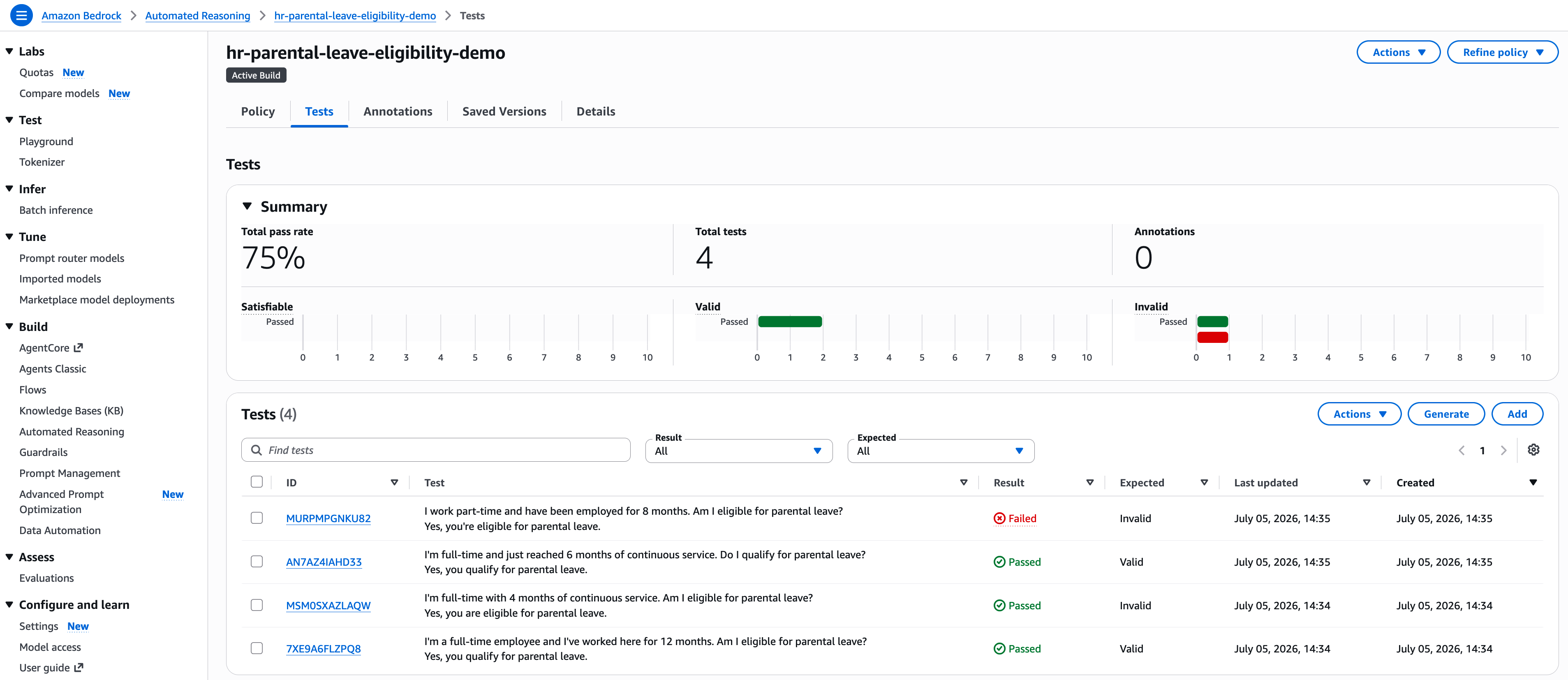
Figure 2: The Tests tab after validation, with three of four tests passing (75%)
Step 2: Inspect the failing finding
- Open the failing test’s finding and inspect the translation, shown in Figure 3. The variables are correctly captured:
- monthsOfContinuousService = 8.
- employmentStatus =
PART_TIME.
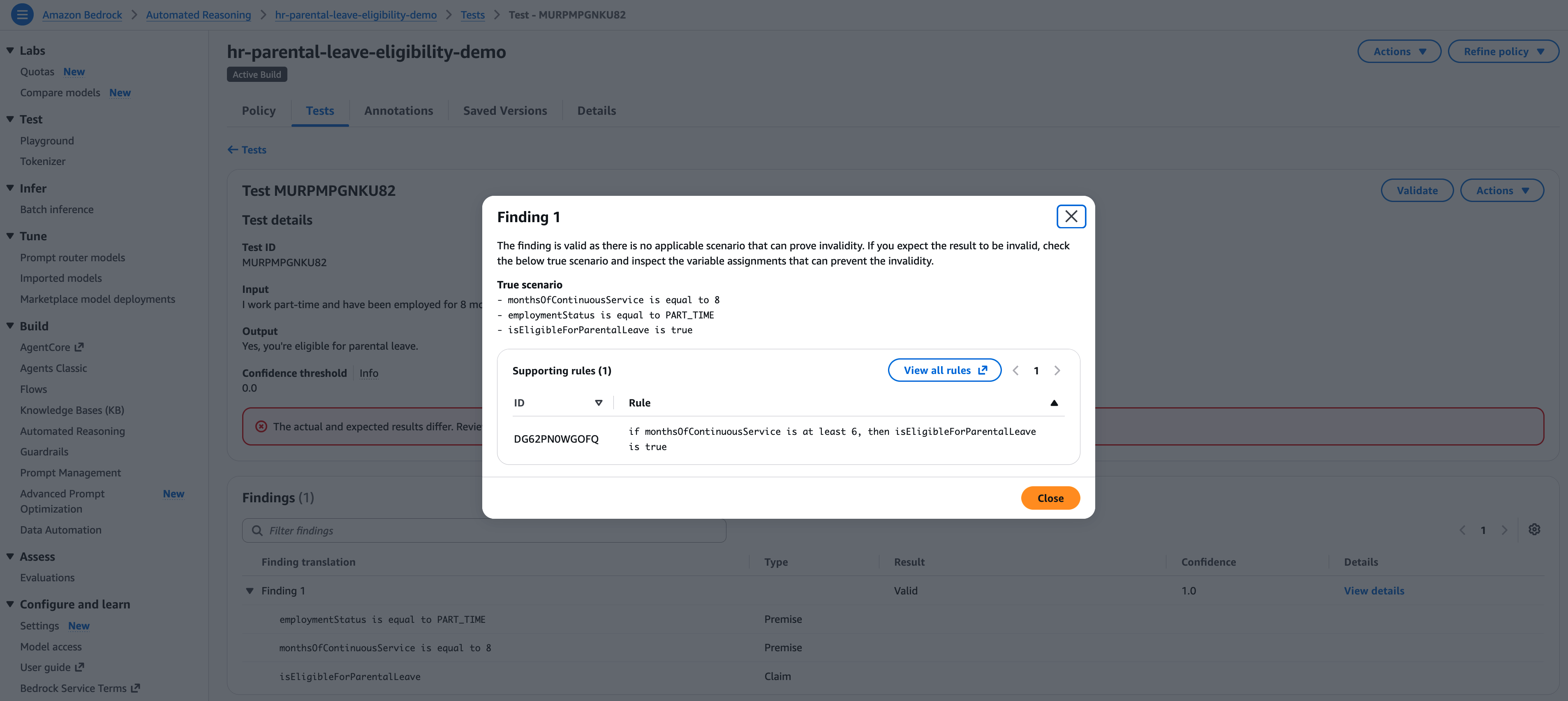
Figure 3: The failing test’s finding, with the translation showing correctly captured variables
The finding is VALID because the only supporting rule grants eligibility after 6 months of continuous service, and no rule excludes part-time employees. The translation is clean and the logic is wrong, so this is a rule issue.
Step 3: Refine the policy
- Choose Refine policy, then choose Automatically refine policy.
- Set the refinement type to Iterative Refinement.
- Provide a source document using any of the three modes:
- Recently used.
- Upload (a new version).
- Enter text (paste the relevant paragraph).
- Optionally, add custom feedback to focus the fix, for example: “Add a rule that explicitly makes part-time employees ineligible for parental leave.”
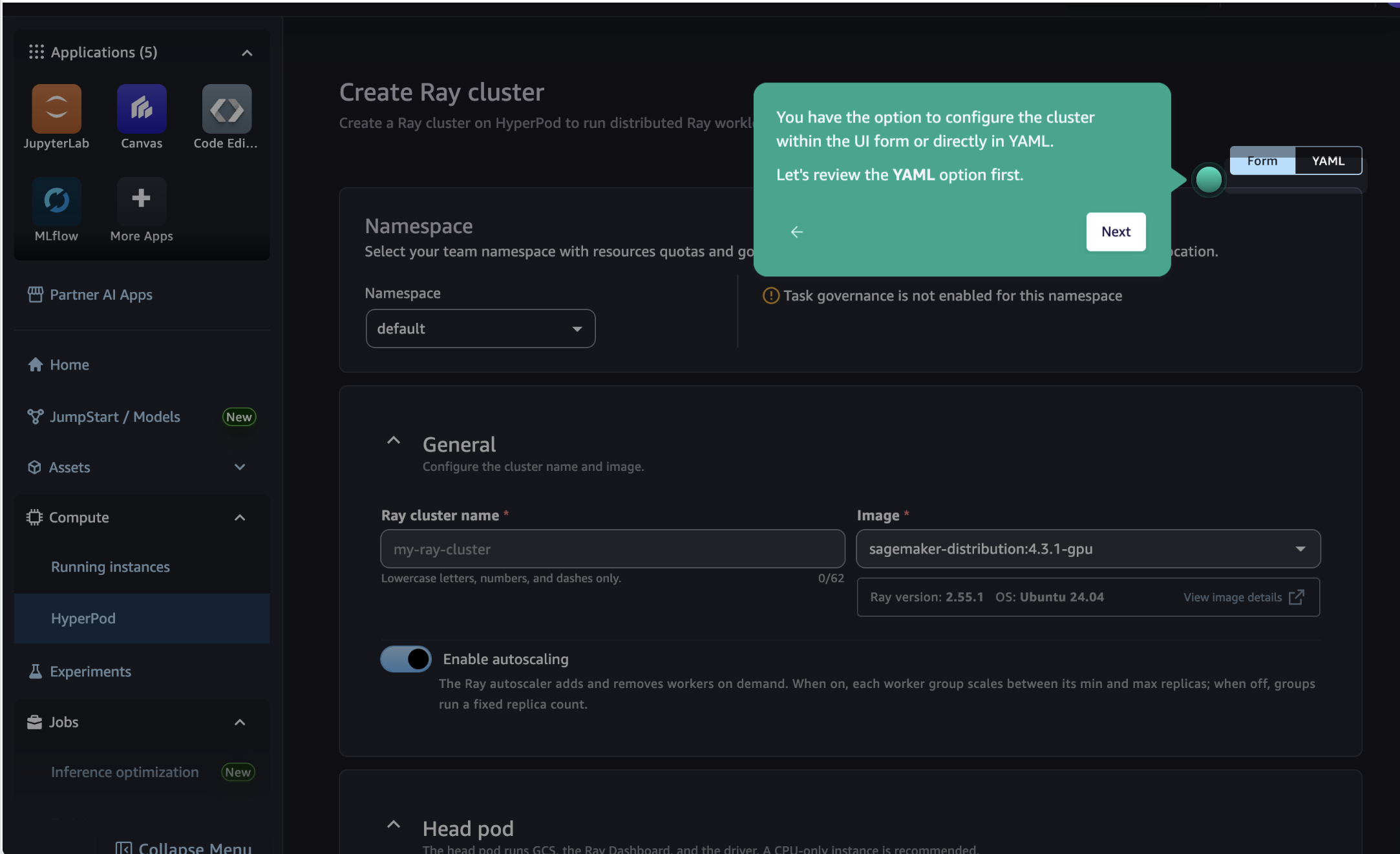
- When your inputs are ready, choose Start.
Figure 4 shows the completed setup, with the refinement type selected, the source document attached, and the custom feedback entered.
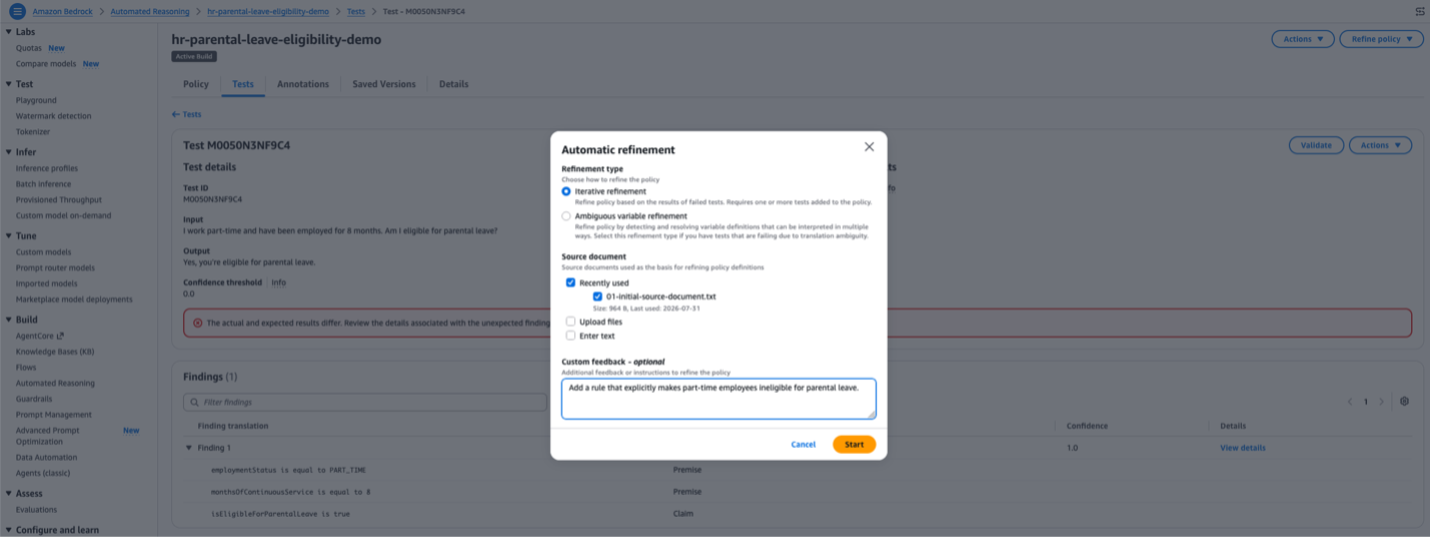
Figure 4: Iterative Refinement setup with a source document and custom feedback
Step 4: Review and accept the changes
- When convergence completes, the Review policy changes screen appears. Under Changes to rules, it lists two changes: one deleted rule and one added rule. The engine removed the rule that granted eligibility on continuous service alone:
-
- if
monthsOfContinuousServiceis at least 6, thenisEligibleForParentalLeaveistrue
- if
And added a rule that excludes part-time employees:
-
- if
employmentStatusis equal toPART_TIME, thenisEligibleForParentalLeaveis false
- if
-
Under Test results, the part-time test moves from Failed to Passed, and the other three tests remain Passed. Figure 5 shows the screen before you accept.
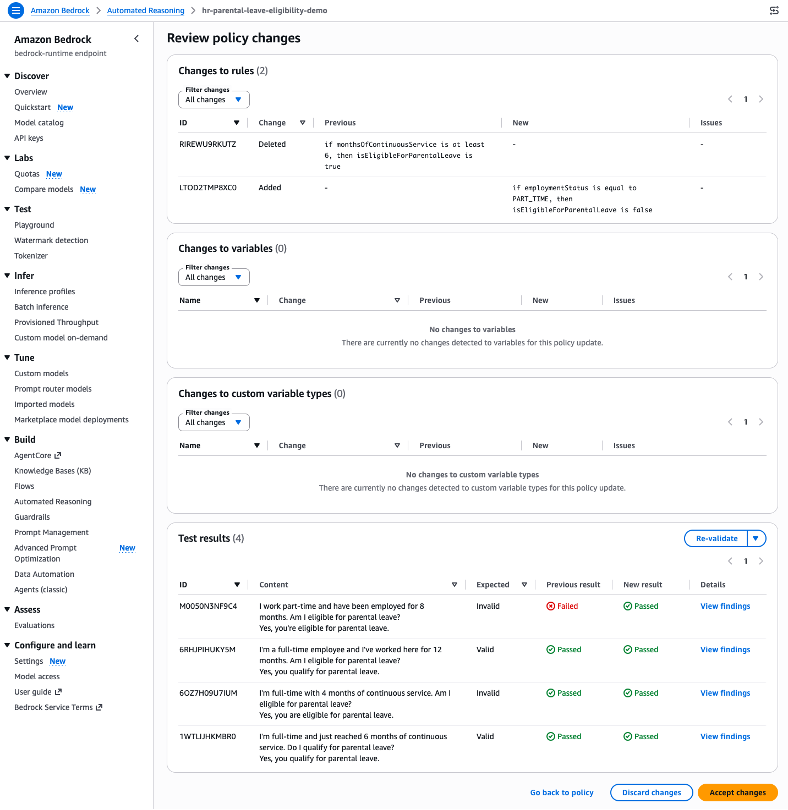
Figure 5: The Review policy changes screen. Changes to rules lists the deleted tenure-only eligibility rule and the added part-time exclusion, and Test results shows the part-time test moving from Failed to Passed with no regressions.
- Choose Accept changes.
Step 5: Confirm the fix
- Return to the Tests tab and choose Validate all tests again.
- Figure 6 shows the expected result. The previously failing test now passes, and the pass rate reaches 100%.
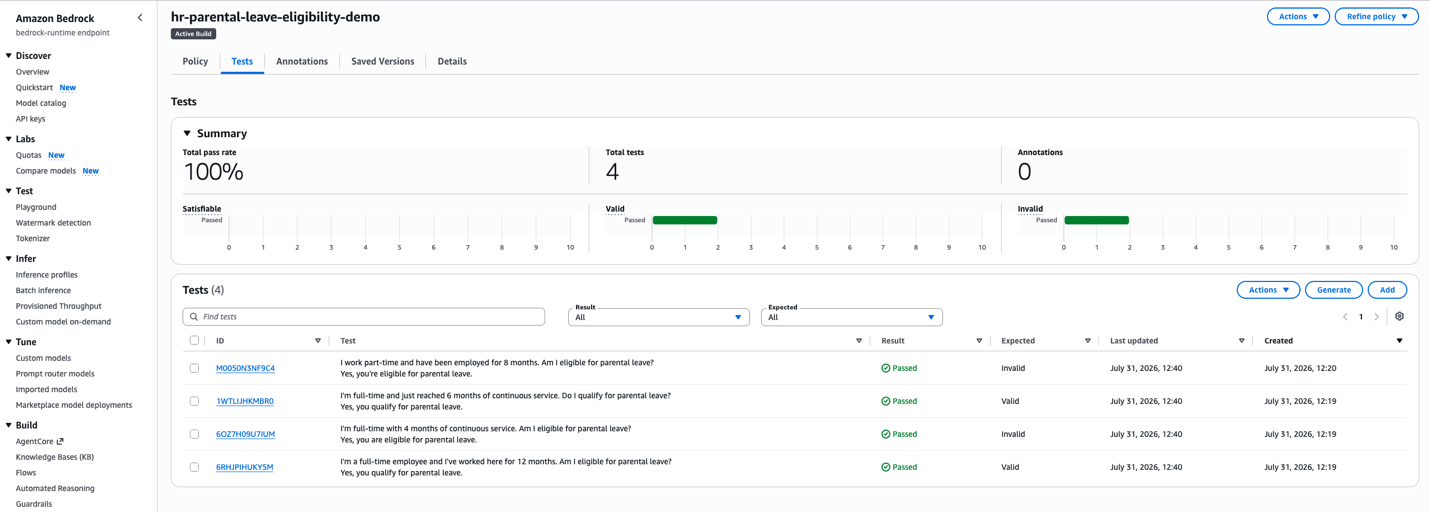
Figure 6: The Tests tab after refinement, with all four tests passing (100%)
If tests still fail or regressions appear
There is no guarantee that a single refinement cycle resolves all failures or avoids regressions. If the previously failing test still fails, or if other tests that previously passed are now failing:
- Choose Discard changes on the review screen.
- Add more specific custom feedback describing what the engine should fix differently. For example, “The rule should exclude part-time employees entirely, not only reduce their eligibility window.”
- Narrow the source document to the exact section covering the failing rule.
- Run Iterative Refinement again with these tighter inputs.
If the test still won’t pass after two or three rounds, fall back to manual editing. Use the failing finding’s translation and rule trace as a guide to hand-edit the specific rule in the policy editor.
Step 6: Report and deploy
- Select Generate Fidelity Report and compare scores with the previous report.
- When satisfied, create a numbered version to deploy.
Walkthrough B: Fixing a language issue with Ambiguous Variable Refinement
You have the same HR policy, but this time a test returns TRANSLATION_AMBIGUOUS. The finding shows two options:
- One interpreted “2 years of service” as tenureMonths = 24.
- The other as monthsOfService = 24.
The two options reveal overlapping variables. Both tenureMonths and monthsOfService describe employment duration, and the translation models can’t agree on which to use. This overlap is the root cause of the ambiguity.
Step 1: Refine the policy
- Choose Refine policy, then Ambiguous Variable Refinement.
- As Figure 7 shows, no source document is required for this mode, so the setup is a single selection.
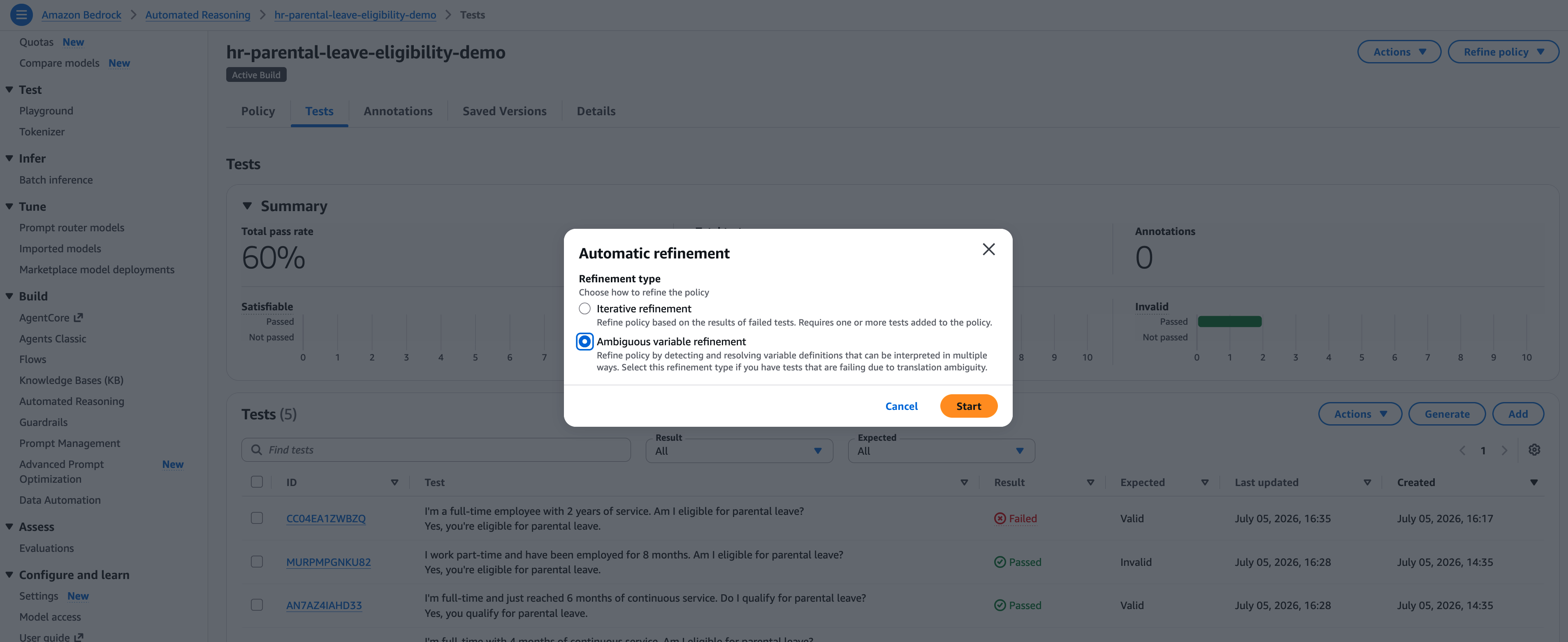
Figure 7: Ambiguous Variable Refinement setup, with no source document required
- Choose Start.
Step 2: Review and accept the changes
- On the Review policy changes screen, review the proposed variable merge:
- monthsOfService is deleted.
- Rules are updated to reference tenureMonths.
- The description of tenureMonths expanded to:
- “The number of complete months the employee has been continuously employed. When users mention years of service, convert to months (for example, 2 years = 24 months). This variable captures all references to employment duration, length of service, time at the company, or seniority.”
- Under Test results, the previously ambiguous test now produces a definitive
VALIDresult.
- Select Accept changes.
Step 3: Confirm the fix
- Return to the Tests tab and choose Validate all tests again.
- Figure 8 shows the confirmation. The test that previously returned
TRANSLATION_AMBIGUOUSnow produces a definitiveVALIDfinding and passes.
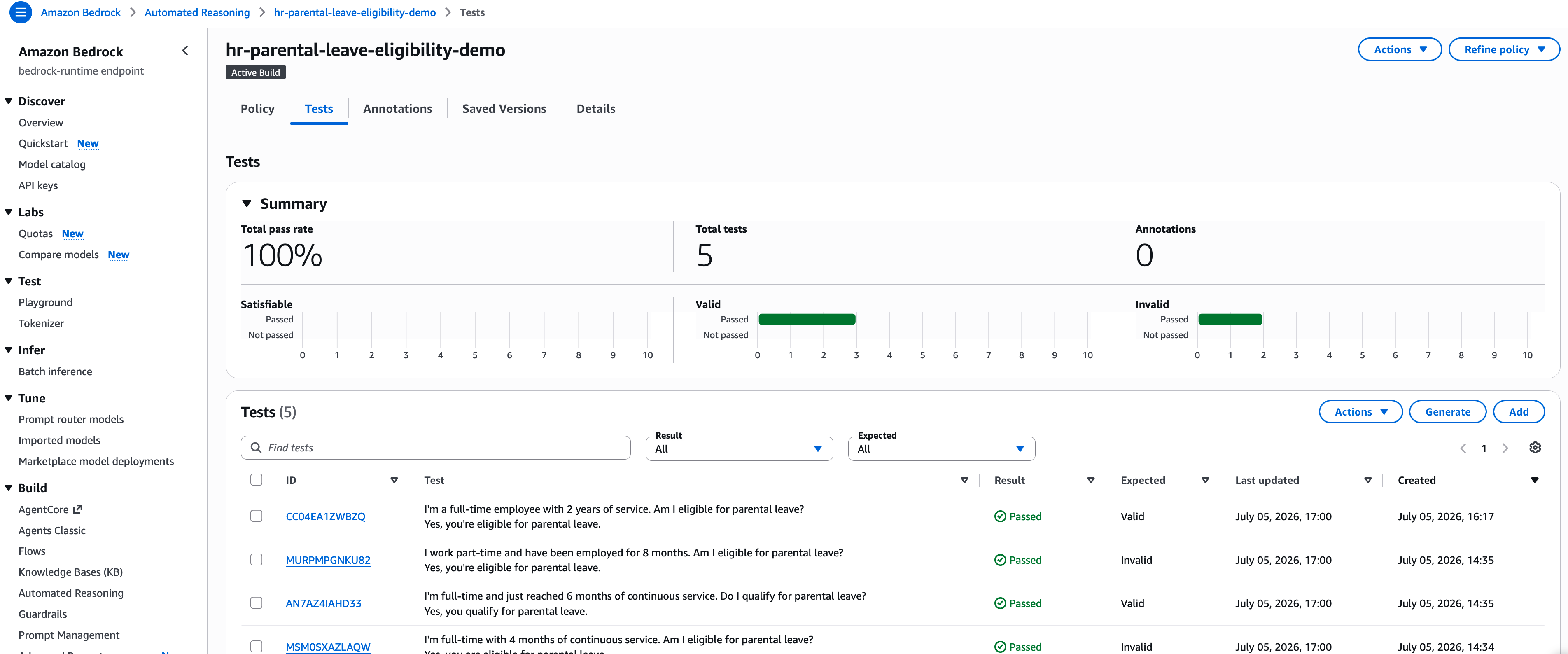
Figure 8: Tests tab after the ambiguity refinement is applied
Step 4: Report and deploy
- Choose Generate Fidelity Report and compare the scores with the previous report.
- When you are satisfied with the results, create a numbered version to deploy.
Note
In both refinement modes, there is no guarantee that the test will pass or the proposed changes don’t introduce regressions. If the test is not passing or other passing tests are now failing, you can discard changes and try again.
Best practices and real-world use cases
The refinement engine works best when you give it a clear signal and a bounded change. The following practices show how, and the use cases show where they pay off.
Best practices
The following practices come from the two most common ways refinement goes sideways. Either you drive it with an ambiguous failure signal, or you let it change more of the policy than you intended.
- Read the translation before you pick a mode. Open the failing finding and look at the variable assignments first. If the right variables have the right values but the result is wrong, that’s a rule issue for Iterative Refinement. If the assignments are wrong, or the finding is
TRANSLATION_AMBIGUOUS, that’s a language issue for Ambiguous Variable Refinement. Choosing the mode by symptom rather than by inspecting the translation is the most frequent cause of a refinement that “fixes” the wrong thing. - Scope the inputs to bound the change. Refine against a source document scoped to a single part of your policy (for example, parental-leave eligibility). Pair it with specific if-then feedback when you need only one rule fixed. Focused inputs produce tighter, more reviewable proposals than pointing the engine at a 40-page handbook with vague guidance like “fix the tenure rule.”
- Trust Test results over the diff. The review screen shows both the changed rules and their effect on every saved test. The Test results panel is the decision-maker: accept when your failing tests flip to passing and your passing tests stay green. A clean-looking diff that regresses a previously passing test is not a fix.
- Compare Fidelity Reports before you version. Refinement optimizes to make tests pass. That optimization can pull a rule away from what your source document actually says. After accepting, compare the accuracy score to the pre-refinement run. A drop signals drift, and is a reason to reject and iterate rather than re-run blindly. Once tests pass and the report holds, create a numbered version to promote the change to production.
Real-world use cases
These patterns apply across regulated industries. In HR eligibility scenarios, the employee handbook updates annually, and Iterative Refinement ingests the new document and proposes rule changes so the HR team can review without touching formal logic. In financial services, overlapping variables such as debtToIncomeRatio and DTI cause translation ambiguity across customer phrasings, and Ambiguous Variable Refinement consolidates them to support deterministic validation. When clinical protocols are revised, healthcare compliance teams upload the new guideline. Iterative Refinement proposes rule updates, and the team validates the proposal before pushing to production. In manufacturing QA, tolerances tighten over time, and the team refines policies iteratively while maintaining an audit trail through versioned snapshots and Fidelity Reports.
Conclusion
Teams shipping generative AI into regulated domains have paid a hidden tax: policy maintenance.
Automatic policy refinement changes the labor equation without changing the authority equation.
The rules-vs-language dichotomy. When the logic is wrong (rules that are too permissive, too strict, or missing), Iterative Refinement proposes formal-logic fixes grounded in your source document and feedback. When the language is wrong (overlapping variables, vague descriptions, inconsistent formats), Ambiguous Variable Refinement proposes precise variable definitions that collapse competing interpretations into one.
The approval gate. In both cases, the system suggests and you decide. Every proposed change surfaces on a review screen that shows the diff and its impact on your saved tests. No change reaches your DRAFT policy, let alone production, without your explicit approval. Automatic in labor. Guided in authority.
Your next step
If you don’t yet have an Automated Reasoning policy with attached tests, start by creating a policy from a source document and adding tests that cover your key scenarios. Refer to the Prerequisites section for links. With a policy and at least one failing test in hand, pick one failing test today and inspect the finding. If the translation is correct but the result is wrong, run Iterative Refinement with a focused source document. If the result is TRANSLATION_AMBIGUOUS, run Ambiguous Variable Refinement.
Accept the proposal, re-test, and compare Fidelity Reports before and after. You will have a tighter policy, verified to up to 99% accuracy on unambiguous translations (see the GA announcement), without writing a single line of formal logic by hand.
Resources
- Get started: Explore the Automated Reasoning checks documentation for setup guidance, or open your existing policy in the Amazon Bedrock console and select Refine policy. To learn more about the service, visit Amazon Bedrock.
- Hands-on walkthrough: For a step-by-step guide, refer to How to minimize generative AI hallucinations with Automated Reasoning checks.
- Rewriting chatbot: Your chatbot can iteratively rewrite its answers using Automated Reasoning checks feedback, asking the user clarifying questions until it reaches a provably correct answer. Refer to the Automated Reasoning checks rewriting chatbot reference implementation and the sample code on GitHub.
- Policy formalization agent: An agent can walk a subject matter expert through the entire process of improving the Automated Reasoning policy in natural language. Refer to our open-source sample of such an agent.
- Code samples: Explore the Automated Reasoning checks samples on GitHub.
- Customer results: Amazon Logistics case study | PitCrew case study | PwC Responsible AI in Education case study | AWS Responsible AI resources
- More about Amazon Bedrock features: Amazon Bedrock Guardrails | Amazon Bedrock AgentCore
- Responsible AI guidance: AWS Well-Architected Responsible AI Lens
About the 99% accuracy figure
The 99% figure cited in the introduction and conclusion refers to verification accuracy that measures the rate of correct findings (VALID, INVALID, or SATISFIABLE) given an unambiguous translation from natural language to formal logic. It was first published in the GA announcement, Minimize AI hallucinations and deliver up to 99% verification accuracy with Automated Reasoning checks: Now available (AWS News Blog, August 6, 2025).
About the authors