When building a Retrieval Augmented Generation (RAG) solution with Amazon Bedrock Knowledge Bases, selecting the right vector store impacts performance and cost. Amazon Bedrock Knowledge Bases offers a fully managed option and a customer-managed option where you choose your own vector store. This post focuses on the customer-managed path, comparing the three supported backends: Amazon OpenSearch Service, Amazon Aurora PostgreSQL with pgvector, and Amazon S3 Vectors, a capability of Amazon Simple Storage Service (Amazon S3), across distinct RAG use cases.
For broader guidance across all AWS vector solutions, see AWS vector solutions: Build agentic AI where your data lives. For the role of vector datastores in generative AI applications, see The role of vector datastores in generative AI applications. For prescriptive guidance on vector databases for RAG, see Choosing an AWS vector database for RAG use cases.
How vector databases fit into RAG solutions
A RAG architecture combines the capabilities of large language models (LLMs) with information retrieval systems to generate more accurate, up-to-date, and contextually relevant responses. It is based on the mathematical concept of a vector, where the text is translated into vectors that align to the meaning of the text. A search performed on vectors will find results that have similar meaning to the question, which is more effective at capturing semantic similarity than keyword matching.
When a user submits a query, it is converted into a vector embedding using an embedding model. The vector database, where document content has been pre-processed, chunked, and stored as vector embeddings, performs a similarity search to find the chunks whose embeddings are most similar to the query. Typically, the system retrieves the top n chunks (for example, the top five most similar) to enrich the original query. These retrieved chunks are provided to the LLM as additional context so it can generate a more informed, accurate response.
The vector database serves as the key bridge between raw information and contextual understanding. It transforms unstructured data into a searchable, semantically meaningful knowledge space that helps large language models deliver more precise and relevant responses. Vector databases achieve this by storing embedding vectors in an efficient data structure called a vector index, which supports rapid, high-dimensional semantic searches and near-instantaneous retrieval of semantically similar information.
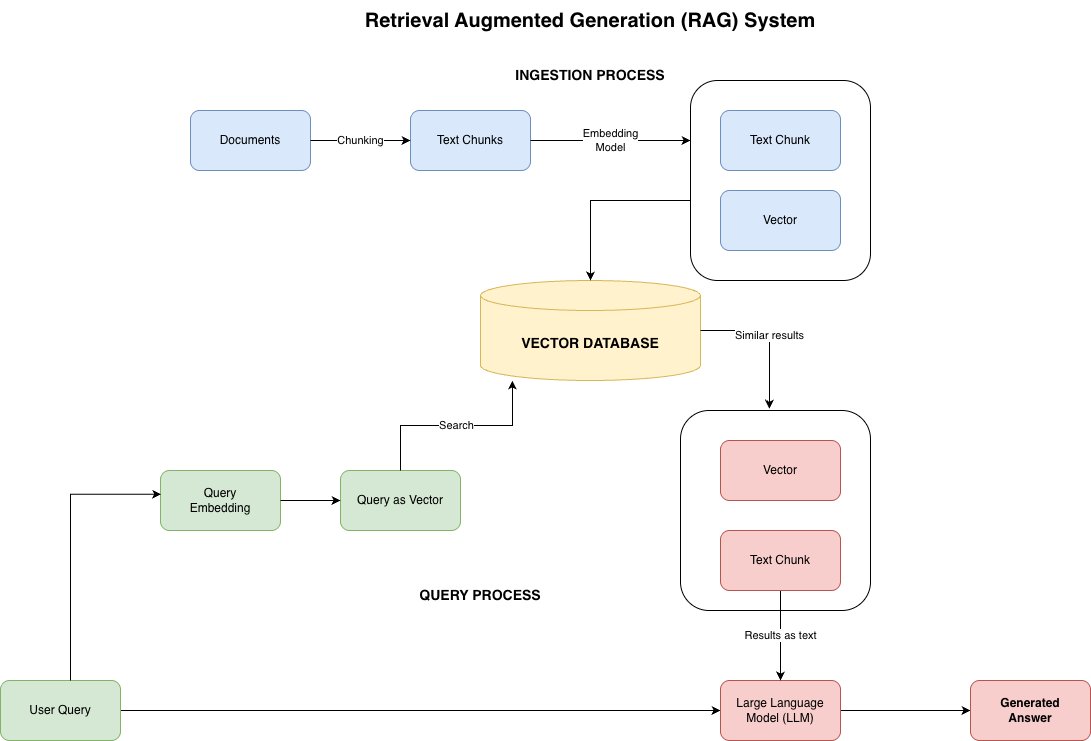
Figure 1: Retrieval Augmented Generation (RAG) architecture, where documents are chunked, embedded, and stored in a vector database during ingestion, and at query time the query is embedded, similar chunks are retrieved, and passed to the LLM as context for response generation
Vector store backends for Amazon Bedrock Knowledge Bases
Amazon Bedrock Knowledge Bases with a customer-managed (unmanaged) configuration supports three vector store backends. For the full AWS vector portfolio covering six services, see AWS vector solutions: Build agentic AI where your data lives.
Amazon OpenSearch Service provides high-speed results from data held in memory. It supports high-dimensional vector embeddings with both managed cluster and serverless deployment options, and features including k-NN search and hybrid search combining lexical and vector approaches. Amazon Bedrock Knowledge Bases supports both Amazon OpenSearch Managed Clusters and Amazon OpenSearch Serverless as vector store backends.
Amazon Aurora PostgreSQL with pgvector combines the high-performance relational database capabilities of Amazon Aurora with pgvector’s vector similarity search functionality. It supports multiple indexing methods (IVFFlat and HNSW), various distance metrics (L2, cosine, inner product), and can handle vectors up to 2,000 dimensions in single precision.
Amazon S3 Vectors is the AWS cloud object storage service with native vector support, designed for cost-effective storage and querying of vector embeddings at scale. It provides sub-second query performance for similarity searches while reducing vector storage costs by up to 90 percent compared to traditional vector databases.
To understand how these options perform in practice, let’s examine three distinct RAG use cases, each with different latency, cost, and search requirements, and see which vector database is the best fit for each.
Use case 1: Product catalog search
Ecommerce platforms face the challenge of helping customers find exactly what they’re looking for among thousands of products. An effective product search tool must understand natural language queries and scale to handle thousands of concurrent queries during peak shopping periods while maintaining low latency.
Why Amazon OpenSearch is the best fit for this use case
Amazon OpenSearch Serverless is well suited for product catalog search because it supports combining semantic understanding with traditional keyword matching through hybrid search capabilities. When dealing with large product catalogs, performance matters. Amazon OpenSearch Serverless handles vector search with query latency in the low milliseconds range.
What makes it particularly valuable for ecommerce is the built-in support for complex filtering and aggregations that power faceted navigation (think filtering by price, brand, or color). You can also choose from multiple distance metrics like cosine similarity or Euclidean distance to fine-tune how product similarity is calculated based on your specific needs.
Amazon OpenSearch Serverless Classic collections offer several optimization options to balance cost and search quality, as detailed in the following section.
Note: Amazon Bedrock Knowledge Bases supports both Amazon OpenSearch Serverless and Managed Clusters. The following benchmarks were run on Serverless Classic collections. Amazon OpenSearch Serverless NextGen collections (generally available May 2026) aren’t yet compatible with the Amazon Bedrock Knowledge Bases Retrieve API. NextGen simplifies index creation by removing the engine and mode parameters from index mappings, defaults to 32× compression with GPU-accelerated index builds, and supports scale-to-zero. The benchmarks in this post use Classic collections, where engine, mode, and HNSW parameters are configured explicitly. Managed Clusters offer additional tuning options (auto-optimize, GPU-accelerated indexing, configurable instance sizing) that may yield different results.
Performance analysis and optimizations for Amazon OpenSearch serverless vector search
Amazon OpenSearch is highly configurable and provides several configuration options. Be careful when selecting these options because they can significantly affect the performance of the vector index. We consider some of these options targeted at optimizing cost and database size and quantitatively demonstrate their impact on vector index performance.
Some of the common optimization options are:
- Size of vector embeddings: A larger vector can generally contain more semantic information about the embedded text. However, it also leads to higher memory consumption, which increases vector index size and cost. Modern embedding models like Amazon Titan Text Embedding v2 offer the ability to embed text in vectors of different sizes (1024, 512, or 256 for Amazon Titan). It is useful to benchmark performance of embeddings of different size to quantitatively measure impact of performance and cost on a particular use case. For model availability by AWS Region, refer to Supported models by AWS Region in Amazon Bedrock.
- Data type of embeddings: We can also reduce vector index size (and thus cost) by storing embeddings in lower precision data types, such as binary embeddings. This can significantly reduce the size of the vector index.
- Disk optimized storage: Amazon OpenSearch Serverless Classic collections offer disk-based vector search (on_disk mode) that applies 32× binary quantization internally while rescoring against full-precision vectors from disk. This preserves quality while reducing in-memory footprint, at the cost of higher latency. Note that on_disk requires float data type and can’t be combined with binary embeddings.
Depending on the indexing algorithm used, users may also configure HNSW parameters (ef_construction, m) to tune the trade-off between index build time, memory usage, and search accuracy (for practical guidance, see A practical guide to selecting HNSW hyperparameters). Additionally, Faiss 16-bit scalar quantization is available on Classic collections to reduce memory usage. Choosing embedding dimension and data type requires evaluating against your own relevance data, as these change the embedding space itself. After selected, the auto-optimize feature can remove the remaining HNSW and quantization tuning in under an hour, by evaluating index configurations against recall and latency thresholds (available for both Amazon OpenSearch Serverless and Managed Clusters with Faiss engine).
Dataset
We use the “Shopping Queries Data Set” (ESCI), a large dataset of difficult search queries provided by Amazon. The dataset contains 1,215,851 unique US products (title, description, bullets, and brand; approximately 1,140 characters median) and 97,345 judged queries. For each query, the dataset provides graded relevance labels: Exact (3), Substitute (2), Complement (1), and Irrelevant (0). An example query and a relevant and irrelevant product are shown in the following examples.
Query:
self-seal envelopes without window
Relevant product title:
BAZIC Security Self Seal Envelope 4 1/8" x 9 1/2" #10, No Window Tint Pattern Mailing Envelopes, Peel & Seal, Office Checks Invoices (30/Pack), 1-Pack
Irrelevant product title:
ValBox 200 Count #8 Double Window Envelopes 3 5/8" x 8 11/16" Flip and Seal Double Window Security Check Envelopes- Security Tint Pattern Designed for Home Office Secure Mailing
We sample 5,000 queries (approximately 19 judged products per query, approximately 17 relevant) and index all 1,215,851 product descriptions for benchmarking. We measure retrieval quality (NDCG@10), latency (p50/p95/p99 at concurrency 1 and 10), and index size (ANN in-memory footprint).
Vector index construction
We test all combinations of embedding dimension (1024, 512, 256) and data type (float, binary), totaling six configurations, plus 1024-float in on_disk mode at the default compression_level: 32x, compared against the 1024-float in-memory baseline (seven configurations total). All indexes use FAISS with HNSW (ef_construction=128, m=24), l2 distance for float embeddings and hamming for binary. Note that on_disk mode requires data_type: float and applies its own binary quantization internally at 32×, rescoring against full-precision vectors read from disk. So “1024-dim binary on_disk” is not a valid index configuration. Each index is created alone in the collection, ingested with all 1.22M documents, warmed until latency stabilizes, measured, then deleted with a 15-minute cool down before the next configuration.
| Configuration | Embedding size | Embedding type |
| In memory | 1024 | float (baseline) |
| In memory | 512 | float |
| In memory | 256 | float |
| In memory | 1024 | binary |
| In memory | 512 | binary |
| In memory | 256 | binary |
| On disk (32×) | 1024 | float |
Evaluation methodology
For each configuration, we create a vector index in Amazon OpenSearch Serverless (Classic collection), ingest all 1,215,851 products, wait for merges to settle, then run an adaptive warm-up until latency stabilizes before measuring. We measure 1,000 queries × 3 repetitions at concurrency 1 and concurrency 10. Configuration order was interleaved so data type and dimension are decorrelated from time. The main benchmark (Table 1) uses semantic search (k-NN only). We separately evaluate hybrid search (semantic + keyword with BM25) in Table 2. We evaluate:
- Retrieval latency: Latency is measured as the time taken to retrieve relevant matches from the vector index as reported by the Amazon OpenSearch results. This doesn’t include the time to convert text to embeddings.
- Retrieval performance: We use the Normalized Discounted Cumulative Gain (NDCG) metric to score the retrievals for each query. This metric measures the quality of ranked retrieval results by considering both the relevance of retrieved documents and their position in the ranking. Higher-ranked relevant documents contribute more to the overall score than those ranked lower. The score is normalized against the ideal possible ranking to fall between 0–1, which is especially important in product search, where users are more likely to look at top results.
- Index size: We report the ANN (Approximate Nearest Neighbor) index size, which is the in-memory structure that drives search compute cost and determines capacity requirements. This differs from total store size, which includes the _source JSON copy of each document and varies with document text volume.
Results
Table 1: Semantic search (k-NN only) performance across seven Amazon OpenSearch Serverless configurations (1,215,851 indexed vectors, 5,000 queries, k=10). Latency is server-side at concurrency 1 unless noted. Deltas are paired bootstrap against the 1024-float in-memory baseline. See Table 2 for hybrid search results.
- Reducing dimensions doesn’t always reduce quality. On this dataset, 512-float was statistically indistinguishable from the 1024-float baseline (NDCG 0.3628 vs 0.3627, p = 0.87) at half the index size (2.79 vs 5.34 GiB) and lower latency (25 vs 31 ms p50). Dropping to 256 dimensions showed a measurable 4.4 percent quality loss. The gap between “lossless” and “lossy” dimension reduction will depend on the embedding model and dataset.
- Binarization offers large index size reductions, but the quality cost depends on the number of dimensions. At 1024 dimensions, binary embeddings reduced index size by 13.4× (0.40 vs 5.34 GiB) with a 5.2 percent NDCG loss and comparable latency (22 vs 31 ms p50). At 256 dimensions the quality cost rose to 28.3 percent while the incremental size saving was much smaller (5.0×). On this dataset, the trend was clear: the binary penalty grows as dimensions shrink, suggesting that reducing precision at higher dimensions is more efficient than reducing both precision and dimensions.
- Disk mode (on_disk 32×) preserves quality at the cost of latency. At 1024 dimensions, disk mode achieved NDCG 0.3610 (−0.5 percent vs baseline) with the same 0.40 GiB index size as 1024-binary, but at approximately 3× higher latency (99 ms p50 vs 31 ms in-memory). Both 1024-binary and on_disk reduce the index by 13.4×, but disk mode retained significantly more quality (−0.5 percent vs −5.2 percent). The approximately 3× latency ratio was consistent across p50, p95, and p99. At small corpus sizes this penalty may not appear because the index fits in page cache. It emerges at production scale.
| Configuration | NDCG@10 | Δ vs baseline | p50 (ms) | p95 (ms) | p99 (ms) | Index size (ANN) | p50 @ conc 10 |
| 1024 float | 0.3627 | baseline | 31 | 44 | 52 | 5.34 GiB | 161 ms |
| 512 float | 0.3628 | +0.0002 | 25 | 37 | 62 | 2.79 GiB | 149 ms |
| 256 float | 0.3468 | −4.4% | 22 | 35 | 47 | 1.51 GiB | 85 ms |
| 1024 binary | 0.3438 | −5.2% | 22 | 37 | 55 | 0.40 GiB | 70 ms |
| 512 binary | 0.3200 | −11.8% | 19 | 30 | 47 | 0.32 GiB | 57 ms |
| 256 binary | 0.2600 | −28.3% | 17 | 24 | 32 | 0.28 GiB | 52 ms |
| 1024 float, on_disk 32× | 0.3610 | −0.5% | 99 | 139 | 176 | 0.40 GiB | 255 ms |
Hybrid search results
Table 2: Hybrid search comparison at 1024 dimensions (1,215,851 vectors, 5,000 queries, k=10). Hybrid uses normalization-processor with 0.7 semantic / 0.3 lexical weighting.
| Method | 1024-float NDCG | float p50 | 1024-binary NDCG | binary p50 |
| Keyword (BM25) | 0.3141 | 11 ms | 0.3177 | 17 ms |
| Semantic (k-NN) | 0.3633 | 30 ms | 0.3451 | 17 ms |
| Hybrid | 0.3850 | 38 ms | 0.3658 | 35 ms |
Hybrid search provides a consistent quality lift over semantic-only search. On this dataset, hybrid improved NDCG by +6.0 percent over semantic-only for both float (0.3633 → 0.3850) and binary (0.3451 → 0.3658). In particular, 1024-binary with hybrid (0.3658) exceeded 1024-float with semantic-only (0.3633), at 13× less memory (0.40 vs 5.34 GiB). This suggests that turning on hybrid search can offset the quality cost of binarization.
Hybrid search adds latency. The fusion step roughly doubles sequential latency (30 → 38 ms for float, 17 → 35 ms for binary) and the gap widens under concurrency.
Note: This dataset (product search) favors keyword matching: BM25 alone reached NDCG 0.314, only 13 percent behind semantic. On natural-language RAG queries the absolute hybrid lift may differ. The fusion weight (0.7/0.3) was set for demonstration, not tuned.
Use case 2: Deep research agent
Deep research agents represent a significant evolution beyond traditional RAG systems. While standard RAG performs a single retrieval-generation cycle, deep research agents tackle complex, multi-turn research tasks through dynamic reasoning, adaptive planning, and iterative information retrieval. These agents can search for information, analyze findings, adapt their approach based on intermediate results, and synthesize comprehensive reports over extended periods.
A key characteristic of deep research agents is their tolerance for higher latency in exchange for thoroughness. Unlike real-time search applications where users expect sub-second responses, deep research workflows may run for minutes or hours, making cost-efficiency and scalability far more important than raw query speed.
The vector storage layer for this use case must efficiently handle tens of millions of embeddings at minimal cost while supporting batch operations for periodic re-indexing, flexible metadata filtering, and elastic scaling to millions of vectors.
Why S3 Vectors is the best fit for this use case
For deep research agents that operate over very large embedding collections, Amazon S3 Vectors is a practical and efficient vector storage option. It significantly lowers the cost of storing and querying vectors compared to traditional vector databases, which makes it feasible to work with billions of embeddings derived from large document collections. Amazon S3 Vectors scales elastically without infrastructure provisioning, supporting tens of millions of vectors per index and thousands of indexes per bucket, which suits long-running research systems with growing datasets. It supports a wide range of embedding dimensions and is optimized for batch ingestion and retrieval, enabling efficient background processing of large collections. It integrates with other AWS services, such as Amazon Bedrock Knowledge Bases (the fully managed RAG capability) and Amazon OpenSearch, so teams can combine low-cost storage with more specialized retrieval or RAG workflows when required. Its pay-as-you-go pricing model further supports research workloads with variable or unpredictable usage patterns.
Dataset
We use a subset of English Wikipedia, comprising over 6 million articles. For our benchmarking, we created vector indexes at multiple scales to evaluate how Amazon S3 Vectors performs as the dataset grows:
| Configuration | Target Vectors |
| XSmall | 5,000 |
| Small | 250,000 |
| Medium | 500,000 |
| Large | 1,000,000 |
Each Wikipedia article is chunked into 300-token segments using a token-based splitter.
Vector index construction
We construct vector indexes using Amazon Titan Text Embedding v2, which produces 1024-dimensional float32 embeddings. Our ingestion pipeline uses the following configuration:
| Parameter | Value |
| Embedding Model | Amazon Titan Text Embedding v2 |
| Embedding Dimensions | 1024 |
| Distance Metric | Cosine Similarity |
| Chunk Size | ~300 Tokens |
Results
We measured query latency across four index sizes using 100 research-style questions generated from Wikipedia content. Each query retrieves the top 50 most similar vectors. Latency measurements exclude embedding generation time to isolate Amazon S3 Vectors performance.
Query example:
What factors influence the career trajectories of government officials and policymakers?
| Index Size | Vector Count | p50 (ms) | p95 (ms) | p99 (ms) |
| XSmall | 5,314 | 82 | 180 | 220 |
| Small | 250,514 | 205 | 416 | 527 |
| Medium | 500,401 | 266 | 386 | 479 |
| Large | 1,000,413 | 294 | 395 | 506 |
The key findings are as follows:
- Sub-linear scaling: Query latency grows much slower than index size. Going from 5K to 1M vectors (200x increase) only increases p50 latency by approximately 3.5x (82ms → 294ms). This demonstrates the efficient indexing structure of Amazon S3 Vectors.
- Stabilizing tail latency at scale: The p50 → p95 gap widens from approximately 100ms at 5K vectors to approximately 210ms at 250K but then narrows and holds steady at approximately 100-120ms from 500K to 1M vectors. This suggests that once the index reaches moderate scale, worst-case performance becomes predictable and adding more vectors doesn’t increase tail latency proportionally.
- Sub-second queries at scale: Even at 1 million vectors, p99 latency stays under 510ms. For a deep research agent that spends seconds reasoning over retrieved context, this retrieval overhead is acceptable.
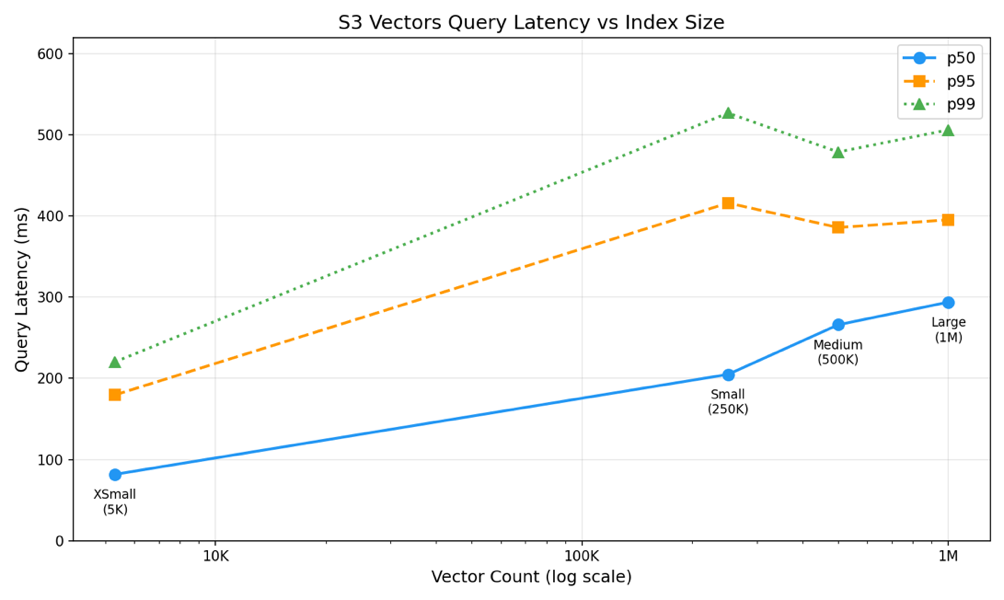
Figure 2: Amazon S3 Vectors query latency (p50, p95, p99) as a function of index size, from 5K to 1M vectors, showing sub-linear scaling with median queries under 300 ms even at 1M vectors
Integration with Amazon OpenSearch for hybrid search workflows
For research workloads that require advanced search capabilities beyond pure vector similarity, Amazon S3 Vectors integrates with Amazon OpenSearch Service through two complementary patterns.
The first uses Amazon S3 Vectors as a cost-effective storage engine directly within Amazon OpenSearch managed clusters, allowing teams to use the hybrid search, aggregations, and complex filtering of Amazon OpenSearch while maintaining the low storage costs of Amazon S3 Vectors.
The second pattern supports one-time exports from S3 vector indexes to Amazon OpenSearch Serverless collections when specific subsets of data require high query throughput or sub-100ms latency for real-time applications. With this tiered approach, research teams can store their full corpus cost-effectively in Amazon S3 Vectors while selectively promoting high-priority vectors to Amazon OpenSearch for performance-critical queries. Both integrations preserve vector dimensions and metadata, supporting smooth transitions between storage tiers as research requirements evolve.
Use case 3: Customer-facing RAG chatbot
Customer-facing chatbots have become essential tools for businesses to provide immediate, personalized support to users. When powered by RAG, these chatbots can deliver accurate, contextual responses by grounding their answers in trusted knowledge sources. However, the diverse types of source data and ways that users formulate their questions mean that it is important to be able to tune the RAG querying to find results that match customer expectations.
A typical use case for a customer-facing chatbot is to provide answers to customer questions based on the content of an internal knowledge base. The knowledge base will have been built up over time in response to customer queries and projects that have built or changed internal systems. They’re likely to contain answers to customer questions, but won’t always include matching keywords or direct references to terms in the question. The requirements for a knowledge base retrieval system are:
- Able to find source material from indirect questions.
- Provide answers quickly.
- Scale to include large knowledge bases.
Why Aurora is the best fit for this use case for large knowledge bases
For customer-facing RAG chatbots with large knowledge bases, Amazon Aurora PostgreSQL with pgvector balances the capacity and performance of S3 and Amazon OpenSearch, and provides the ability to change indexing methods to optimize retrieval for any given dataset.
Amazon Aurora Serverless may also be used for use cases such as development environments where automatic database scaling has cost or performance benefits.
Performance analysis and optimizations for Aurora PostgreSQL
PostgreSQL offers multiple indexing algorithms for vector search, including HNSW and IVFFlat. HNSW (Hierarchical Navigable Small World) builds a multi-layer graph for fast approximate nearest neighbor search, offering faster query times at the cost of higher memory usage and slower index builds. IVFFlat (Inverted File with Flat compression) partitions vectors into clusters for efficient search, using less memory but requiring periodic reindexing as data changes. For a detailed comparison of these algorithms, see Optimize generative AI applications with pgvector indexing: A deep dive into IVFFlat and HNSW techniques. The ability to A/B test different indexes on the same dataset helps teams optimize retrieval performance for their specific use case. Key optimization factors include:
- Database provisioning: Instance sizing and warm-up considerations.
- Index selection: HNSW vs IVFFlat trade-offs for different query patterns.
- Index parameters: Configuration options for each algorithm type.
Amazon Relational Database Service (RDS) provides a wide variety of instance sizes and deployment options such as multiple availability zones and serverless operation. This helps you tune the cost and performance of the database using skills familiar to cloud development and operations teams. The ability to rapidly switch between index types supports testing against real-world customer queries to determine which approach delivers better results.
Dataset
The test environment used a knowledge base of book summaries with the following characteristics:
- 500,000 chunks in the vector database.
- 5,000 randomized queries with 1024-dimensional embeddings.
- Amazon Aurora v15.15.
- Queries executed against the RDS API interface for standardized performance measurement.
- Provisioned database instances that had been running for at least 15 minutes to eliminate startup latency.
Vector index construction
Two vector index types were constructed for comparison: HNSW and IVFFlat. Both indexes used 1024-dimensional embeddings and were configured with the pgvector extension. All other parameters were kept consistent across both index types to make the comparison fair.
Results
The following table presents query latency measurements for both index types across 5,000 queries:
| Index Type | p50 (ms) | p95 (ms) | p99 (ms) |
| HNSW | 31.91 | 38.20 | 89.00 |
| IVFFLAT | 35.94 | 42.38 | 94.08 |
The key findings are:
- Comparable performance: There was a consistent difference in median performance between HNSW and IVFFlat for this dataset, with both achieving sub-50ms median query times but HNSW was 4ms faster.
- Low latency: Both index types deliver latencies suitable for real-time chatbot responses, with median times under 50ms.
- Consistent tail latency: The p95 latency remains under 60ms for both index types, indicating predictable performance for most queries.
These results demonstrate that Amazon Aurora PostgreSQL provides a balanced approach for customer-facing RAG chatbots, offering latency between the high-performance Amazon OpenSearch and cost-optimized Amazon S3 Vectors, while maintaining the flexibility to optimize indexing strategies based on actual usage patterns.
Selection guidance for Amazon Bedrock Knowledge Bases
The following guidance applies specifically to selecting among the three vector store backends available in Amazon Bedrock Knowledge Bases. For the full AWS vector solution selection framework covering all six services, see the decision model in AWS vector solutions: Build agentic AI where your data lives. If your data already lives in an AWS data store that supports vectors, the recommended approach is to add vector search to that existing service rather than introducing a new one.
Step 1: Profile your application
Start by identifying which pattern your application most closely resembles:
| . | Real-time Search | Conversational AI | Background Processing |
| Example | Product catalog, autocomplete, faceted search | Customer support chatbot, internal knowledge assistant | Research agents, batch analysis, document processing |
| Latency tolerance | <50ms | <100ms | <1 second |
| Query pattern | High volume, concurrent | Moderate, session-based | Low frequency, complex |
| Hybrid search needed? | Often critical | Sometimes useful | Rarely needed |
| Cost sensitivity | Lower (performance is the priority) | Moderate | Higher (cost-efficiency is the priority) |
Most applications fall clearly into one of these categories. If yours spans multiple (for example, a research agent that also powers a user-facing summary view), consider a tiered architecture where different vector stores serve different parts of the workflow.
Step 2: Match your profile to a vector database
After you know your application profile, you can map it to a vector database:
| If your primary requirement is… | Then start with… | Because… |
| Low latency (<50ms) with hybrid search | Amazon OpenSearch Service | Provides single-digit millisecond latency with in-memory HNSW indexing and native support for combining lexical and vector search |
| Balanced latency (~100ms) with relational data needs | Aurora PostgreSQL with pgvector | Delivers sub-50ms query times, supports A/B testing of index types (HNSW vs IVFFlat), and integrates naturally with existing PostgreSQL workflows |
| Cost-efficient storage at massive scale | Amazon S3 Vectors | Reduces vector storage costs by up to 90% compared to traditional vector databases, scales elastically to millions of vectors with no infrastructure to manage |
| Minimal operational overhead | Amazon S3 Vectors | Fully managed with pay-as-you-go pricing—no provisioning, patching, or capacity planning |
Step 3: Consider your growth path
Your choice today doesn’t need to be permanent. These services can complement each other as your needs evolve:
- Start with Amazon S3 Vectors if you’re building a prototype or cost-sensitive research workload. If you later need faster queries for a subset of your data, you can export vectors to Amazon OpenSearch or Amazon Aurora without re-embedding.
- Start with Amazon Aurora PostgreSQL if you need to join vector results with relational data in a single query. It is the only option here that can do this. It’s also a natural fit if your team already runs PostgreSQL, since the familiar operational model reduces the learning curve.
- Start with Amazon OpenSearch if sub-20ms latency or hybrid search is a day-one requirement. You can use Amazon S3 Vectors as a cost-effective backing store for your full corpus while Amazon OpenSearch serves real-time queries.
The tiered storage pattern is particularly powerful for applications that grow beyond a single use case. Use Amazon S3 Vectors for the full corpus and Amazon OpenSearch Service or Amazon Aurora for performance-critical subsets.
Conclusion
Building an effective RAG solution with Amazon Bedrock Knowledge Bases requires selecting a vector store that balances your application’s performance requirements with operational and cost constraints.
Through our analysis of three distinct use cases, a clear picture emerges of how each Amazon Bedrock Knowledge Bases vector store backend fits different needs. Amazon OpenSearch Serverless is well suited where real-time performance and hybrid search are required, delivering low-latency results with the flexibility to combine semantic and keyword search. Amazon Aurora PostgreSQL with pgvector provides a balanced middle ground for conversational applications, delivering sub-100ms latency with the operational familiarity of PostgreSQL and the ability to iterate on indexing strategies. Amazon S3 Vectors addresses cost-sensitive, large-scale workloads, so teams can store and query millions of embeddings without dedicated infrastructure overhead.
The examples and figures in this post come from separate workloads tailored to each database rather than a head-to-head benchmark on a shared dataset, so the numbers illustrate the shape of each option’s tradeoffs rather than a direct apples-to-apples comparison. Understanding these tradeoffs and measuring them against your specific workload is the key to making the right fit.
As your RAG application matures, you may find that a tiered architecture gives you the best of all worlds: scale, performance, and cost-efficiency working together. This approach uses Amazon S3 Vectors for cost-effective storage of your full embedding corpus while selectively promoting high-traffic vectors to Amazon OpenSearch Service or Amazon Aurora.
We encourage you to use the benchmarking methodologies outlined in this post to evaluate these options against your own data and query patterns. The right vector store is ultimately the one that best fits your workload’s latency, cost, and retrieval quality requirements.
About the authors