Running large language model (LLM) inference at scale typically forces a KV cache trade-off: you either pay for oversized GPU instances to accommodate a growing KV cache, or you accept slow time-to-first-token (TTFT) as identical prompts get recomputed on every request. For teams deploying a broad catalog of publicly available foundation models (FMs), such as Qwen, Llama, DeepSeek, and others, across per-business-line endpoints, Retrieval Augmented Generation (RAG) pipelines, or multi-turn dialogue applications, this trade-off translates directly into higher infrastructure cost and degraded user experience.
The root cause is straightforward. During generation, vLLM stores the attention keys and values for every token it has already processed in a KV cache, so it doesn’t recompute them on each step. Prefix caching extends this by reusing that cache across requests that share the same leading tokens (like a common system prompt). On cost-efficient instances like ml.g6e.4xlarge (48 GB per GPU), once model weights and runtime allocations are accounted for, the memory left for prefix caching is limited, and it tightens further with larger models or higher concurrency. Cache hit rates drop on long prompts, identical system prompts get re-prefilled on every request, and horizontally scaled vLLM replicas each maintain isolated caches. Routing to a different replica is functionally a cold start.
In this post, we build a tiered KV cache architecture on Amazon SageMaker HyperPod that extends the cache hierarchy beyond GPU and CPU memory into a shared, distributed NVMe pool. It builds on two HyperPod capabilities, Managed Tiered KV Cache and Intelligent Routing, and adds Curvine, a lightweight distributed cache filesystem, as the shared L2 tier (GPU to CPU to shared NVMe). With this setup, you can reuse KV cache across replicas at near-local-disk speeds.
We walk through the end-to-end implementation, from enabling HyperPod Tiered Storage to deploying Curvine workers on node-local NVMe to patching the Inference Operator for filesystem-backed L2. On a test deployment, this achieved up to a 100 percent cross-Pod cache hit rate, up to a 2.7x TTFT improvement, and cross-node L2 read latency of about 56 ms for a approximately 1,900-token prompt. See the Benchmarking section for the full methodology and results. With this architecture, workloads that previously required P5 instances can run on lower-cost G6e instances, reducing per-endpoint cost. Actual savings depend on model size and traffic profile.
Solution design
The central idea is to extend the KV cache beyond what fits on a single Pod. Rather than accepting that each vLLM replica lives in isolation, which is its own GPU blocks, its own CPU spill area, no sharing, we build a three-tier hierarchy: L0 (GPU HBM), L1 (local CPU/host memory), and L2 (Curvine, a shared cross-node cache), and overlay it with cache-aware request routing.
L0 – GPU prefix cache. This is vLLM’s native paged-attention layer, holding the hottest KV blocks at the lowest access latency, but its capacity is only whatever GPU memory is left after the model weights. On a 48 GB GPU, a 7B model in bf16 uses around 14 GB for weights, leaving over 30 GB for KV blocks, which is plenty of headroom, so L0 pressure is minimal. A 32B model uses around 64 GB of weights and doesn’t even fit on one 48 GB GPU. Even after sharding, far less memory remains for KV, so the cache fills quickly and evicts under concurrency. That shrinking headroom is exactly why extending the cache off-GPU matters as you scale up model size and traffic.
L1 – CPU memory offload. When GPU blocks are evicted, LMCache catches them in host DRAM before they’re lost. This runs inside each inference Pod and is managed automatically by the SageMaker HyperPod Inference Operator when you set enableL1Cache: true in the InferenceEndpointConfig CRD. Think of it as a safety net. It’s fast, Pod-local, and sized by InstanceMemoryAllocationPercentage (we recommend starting at 20 percent).
L2 – Shared distributed NVMe pool. This is where cross-replica reuse happens. Curvine, a lightweight distributed cache filesystem, pools the local NVMe drives that ship with G6e/P5 instances into a single namespace, which a FUSE client (a user-space driver that presents the pool as an ordinary mounted directory) mounts as a ReadWriteMany PVC (PersistentVolumeClaim) into every inference Pod. LMCache reads and writes through its fs:// connector, so the distributed pool looks like a local directory. Because every Pod mounts the same namespace, a KV block written by one replica is immediately readable by others.
Curvine itself is straightforward to operate: a Primary Node (called the “Master” in Curvine’s documentation) handles metadata and journaling, persisted on Amazon Elastic Block Store (Amazon EBS) for durability, while Worker components run on each GPU node and store data on the node’s NVMe (typically mounted at /opt/dlami/nvme/curvine-data). If a Worker dies, the cache it held is recomputed, no data-loss concern, since these are reproducible KV blocks.
Intelligent routing – getting requests to the right replica. A three-tier cache only delivers its full benefit if requests land on replicas that already hold relevant KV blocks. The HyperPod Inference Operator includes a built-in router that supports three strategies:
| Strategy | Best for |
| prefix-aware (default) | Multi-turn dialogue, shared system prompts |
| kv-aware | Long document processing, extended sessions |
| round-robin | Stateless batch inference, load testing |
The router maintains a prefix tree (prefix-aware) or queries each worker’s cache state (kv-aware) to select the replica most likely to produce a cache hit. This happens transparently, no client-side changes are needed.
How these pieces fit together. The Inference Operator is installed as an Amazon Elastic Kubernetes Service (Amazon EKS) add-on and manages the full lifecycle. It spins up vLLM Pods with LMCache sidecars, configures L1 and L2 backends, deploys the router, and exposes a single load-balanced endpoint. You declare the cache topology you want in the InferenceEndpointConfig CRD (enableL1Cache, enableL2Cache, l2CacheBackend, routingStrategy), and the Operator renders the correct environment variables, volume mounts, and routing rules. The one caveat today: the CRD’s l2CacheBackend field only accepts redis or tieredstorage natively. To point L2 at a Curvine FUSE mount, we patch the LMCACHE_REMOTE_URL environment variable in the vLLM container spec to fs://localhost:0/mnt/curvine/l2cache/. We walk through this patch in Stage 4 of the implementation.
The net effect is a request arrives at the router, gets dispatched to the replica with the best prefix match, that replica checks GPU blocks (L0), then CPU (L1), then the shared NVMe pool (L2). Only on a complete miss does it re-prefill from scratch. For workloads with moderate-to-high prompt overlap (roughly over 40 percent shared leading tokens, for example a common system prompt or shared RAG context), skipping that re-prefill substantially reduces TTFT.
Figure 1 shows the full data path. Each vLLM Pod stacks an L0 GPU prefix cache and an L1 CPU offload. Below them, all Pods share the L2 tier on a Curvine distributed filesystem pooled from node-local NVMe and mounted ReadWriteMany over FUSE, while the Curvine metadata node persists to Amazon EBS. The HyperPod Intelligent Router sits in front, directing each request to the replica most likely to already hold the relevant cache.
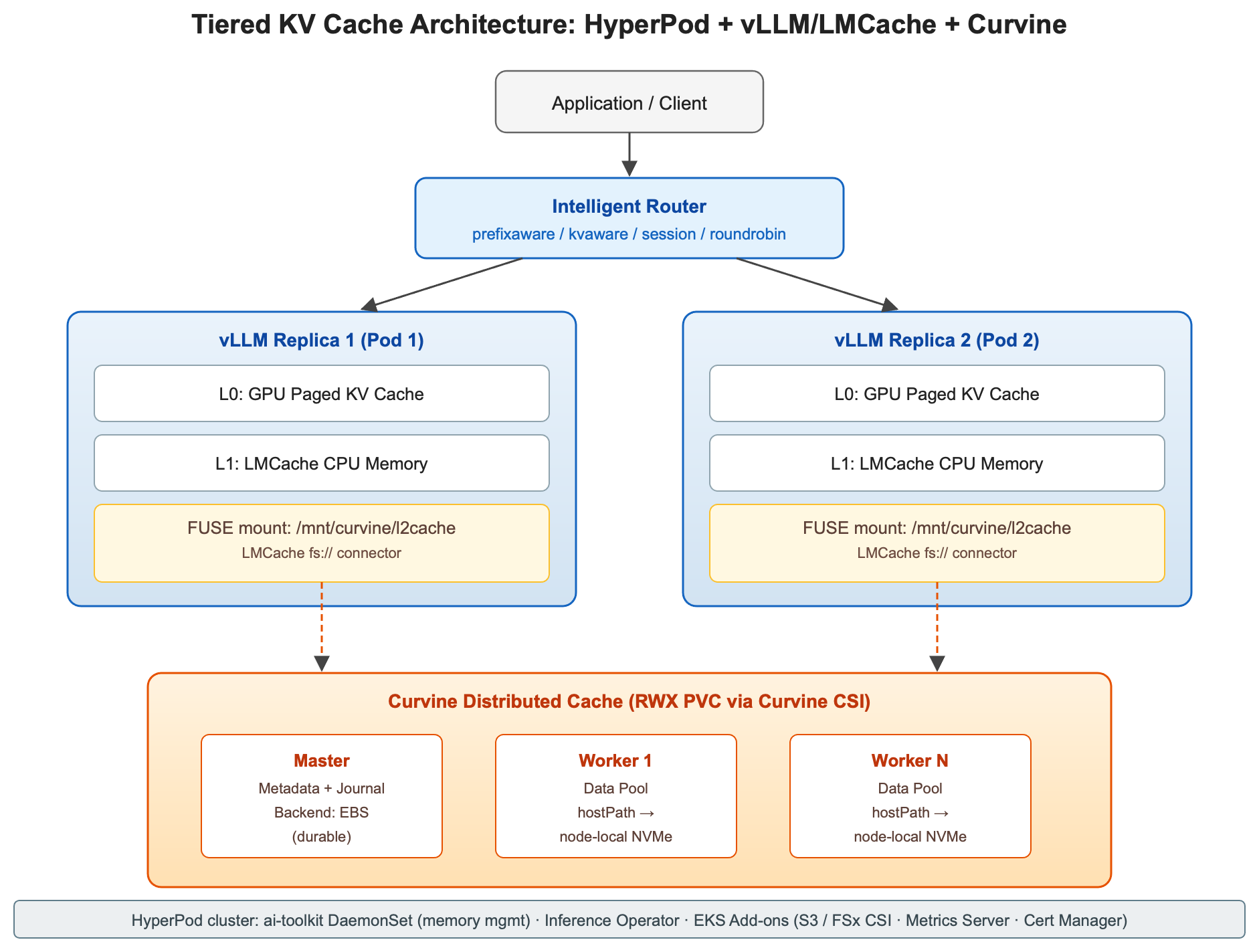
Figure 1: Tiered KV cache architecture
Curvine is a high-performance distributed cache file system that sits between applications and underlying storage such as Amazon Simple Storage Service (Amazon S3), HDFS, or NAS. Clients reach it through the CLI, SDK, FUSE, or CSI. Primary Nodes handle metadata, and Workers serve data with local disk cache for low-latency I/O. Figure 2 shows the Curvine architecture and its key components.
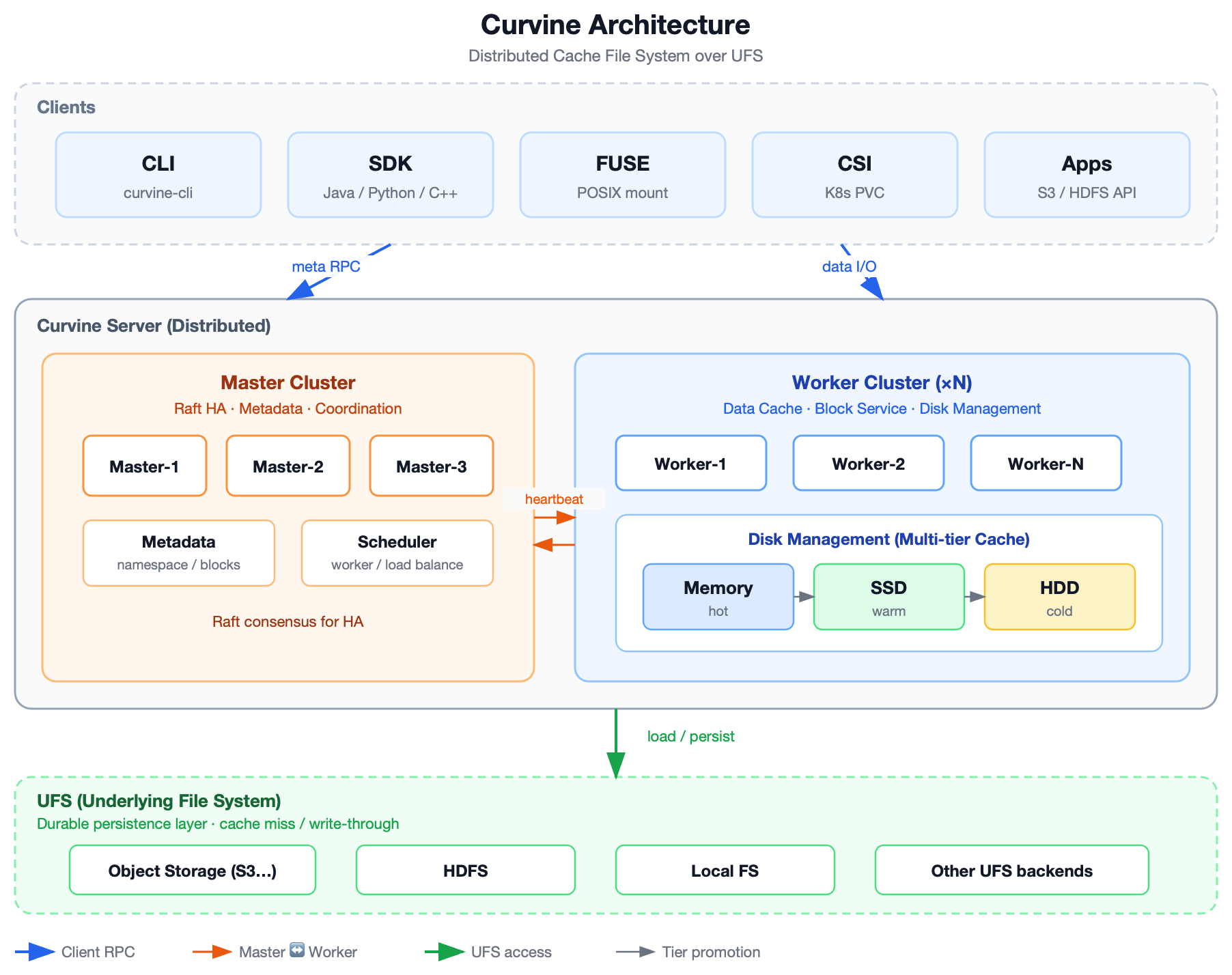
Figure 2: Curvine architecture
How Curvine works (cluster view):
- Clients send metadata RPC to Masters and data I/O to Workers.
- Masters coordinate Workers using heartbeats and place blocks for load balance and HA.
- Workers read/write local tiers and promote/demote data by heat.
- On miss or policy-driven persistence, Curvine loads from / dumps to UFS, so durability stays on the underlying store while Curvine accelerates access.
Prerequisites
Amazon SageMaker HyperPod Tiered Storage is a cluster-level capability that provisions a node-local cache tier for inference workloads. After Tiered Storage is active, SageMaker HyperPod deploys the ai-toolkit DaemonSet on every GPU node, reserves a configurable share of host memory (InstanceMemoryAllocationPercentage) for the L1 CPU offload, and exposes the local NVMe instance store under /opt/dlami/nvme so that Curvine Workers can pool it into a shared L2 namespace. The Inference Operator consumes these tiers automatically when enableL1Cache and enableL2Cache are set on the InferenceEndpointConfig CRD.
This walkthrough assumes a SageMaker HyperPod cluster orchestrated by Amazon EKS. To create one, follow Orchestrating SageMaker HyperPod clusters with Amazon EKS in the SageMaker documentation, or with AWS CloudFormation, using the reference templates on the AWSome Distributed AI repository. Provision at least two GPU nodes. A single node can’t demonstrate cross-node reuse. Throughout this post we use the cluster name hyperpod-cluster-eks and the US West (Oregon) AWS Region (us-west-2) as examples, replace them with your own cluster name and Region to reproduce this solution in your account.
Verify the following are in place:
- GPU capacity with local NVMe: A SageMaker HyperPod EKS cluster with at least one GPU instance group. G6e or P5 is recommended for their local NVMe, which Curvine pools into L2.
- CLI tooling: On your workstation: AWS Command Line Interface (AWS CLI) v2 (with permissions for
sagemaker:UpdateClusterandeks:CreateAddon), kubectl configured against the cluster withaws eks update-kubeconfig, and Helm v3. - AWS Identity and Access Management (IAM) for EBS attach: Grant the EBS CSI driver role
sagemaker:AttachClusterNodeVolume,sagemaker:DetachClusterNodeVolume, andeks:Describe*so the Curvine metadata node can attach its EBS volume. Keep the Amazon Virtual Private Cloud (Amazon VPC) CNI and EBS CSI add-ons current. - Model weights: this post pulls Qwen2-7B from HuggingFace, so no bucket is required. To stage weights yourself, use an Amazon S3 bucket with the SageMaker HyperPod execution role granted read access. TLS certificates are generated automatically.
Tiered Storage is enabled in Stage 1. The Inference Operator, Amazon S3 and Amazon FSx CSI drivers, Metrics Server, and Cert Manager are installed in Stage 2 (or through console Quick Install), the EBS CSI driver and Curvine in Stage 3.
Step-by-step implementation
The following procedure uses this implementation as a worked example, organized into five stages. Cluster names and Regions shown are placeholders, substitute your own.
Stage 1: Enable HyperPod Tiered Storage
Tiered Storage is a cluster-level toggle. Once Tiered Storage is active, HyperPod automatically deploys the ai-toolkit DaemonSet to every node.
API note. Calling
update-clusterwith--tiered-storage-configalone returnsValidationException. At least one of--node-recoveryor--instance-groupsmust also be supplied. The approach is to read the currentNodeRecoveryvalue by runningdescribe-clusterand pass it back unchanged. This has no side effect on the cluster configuration.
InstanceMemoryAllocationPercentage accepts 20–100. Begin at 20 and increase as needed based on observed throughput and hit rate. Verify with the following commands:
Stage 2: Install the Inference Operator and dependencies
The most convenient approach is Quick Install in the SageMaker console, which provisions the IAM role and installs S3 CSI, FSx CSI, Metrics Server, Cert Manager, and the Inference Operator in one action. The CLI alternative:
Stage 3: Deploy the Curvine distributed cache
Several prerequisites must be in place before deploying Curvine. Upgrade the VPC CNI plugin and the EBS CSI driver to a current version, with IRSA preferred over Pod Identity to avoid additional IP consumption on nodes. Grant the aws-ebs-csi-dri-role the EBS-attach permissions listed in Prerequisites (without them, EBS attach on SageMaker HyperPod nodes returns ValidationException). Finally, verify an EBS StorageClass (for example ebs-sc) is available in the cluster. Check the actual name with kubectl get sc. On SageMaker HyperPod EKS clusters the default EBS StorageClass is often gp3. Use that name for master.storage.meta.storageClass and master.storage.journal.storageClass in the Helm install that follows, or create an ebs-sc StorageClass first:
Install the Curvine CSI
The CSI install doesn’t create a StorageClass automatically. One must be created manually:
Curvine CSI 0.3.x and later requires three StorageClass parameters: master-addrs (the Curvine master RPC endpoint, which must match the service DNS created by the Helm install, and comma-separate multiple addresses if the master component has replicas), fs-path (the mount-path prefix inside the Curvine filesystem), and path-type (DirectoryOrCreate lets the CSI create the directory automatically). Without them, PVC provisioning fails with Parameter 'master-addrs' is required.
Install the Curvine server (Primary + Worker components)
For KV cache workloads, node-local NVMe with hostPath is the recommended Worker data backend: G6e/P5 instances ship with NVMe (approximately 3 GB/s), which delivers far higher performance than EBS gp3, incurs no additional cost, and is acceptable for caches where loss is recoverable.
Constraints. Master meta and journal must use durable EBS storage. Loss of metadata or WAL upon node rebuild isn’t acceptable. When the Worker
dataDirs[0].storageClassis empty andhostPathis set, the Helm chart enables hostPath mode. The two are mutually exclusive and exactly one must be chosen.
Create a ReadWriteMany (RWX) PVC for inference Pods
Stage 4: Deploy a vLLM endpoint with tiered KV cache
With Tiered Storage enabled, the operator installed, and Curvine running, the final stage deploys the inference endpoint and points its L2 cache at Curvine. This involves three steps: declaring the endpoint with an InferenceEndpointConfig CRD, patching the rendered Deployment to mount the Curvine PVC, and overriding the operator-injected cache URL so L2 reads and writes go to Curvine.
Deploy using the Inference Operator
Apply the InferenceEndpointConfig CRD below (deploy-qwen-kvcache.yaml). The SageMaker HyperPod Inference Operator reconciles it into a Deployment, vLLM Pods (each with an LMCache sidecar), the intelligent router, and a single load-balanced endpoint. Three points differ from a stock deployment:
- Model source is huggingface: the Operator’s built-in init container downloads the weights to
/opt/ml/modelat Pod startup, so no S3 staging is needed. (SetmodelSourceType: s3with an s3Storage block if you prefer to stage weights yourself.) - LMCACHE_REMOTE_URL is intentionally NOT listed in the CRD. When enableL2Cache: true, the Operator injects its own value. Declaring it here as well produces a duplicate env entry that you would then need to find and remove by index. Leave it out and override the injected value with the patch in the next section.
- tlsConfig is omitted: it’s not a required field, and the Operator auto-generates the endpoint certificate into its default output bucket.
Two of those environment variables deserve explanation, because both look arbitrary and neither is:
- LMCACHE_REMOTE_SERDE=naive – the
cachegenserializer has a zip-serialization bug under LMCache’s filesystem connector. Thenaiveserializer is the stable choice. - PYTHONHASHSEED=0 – LMCache derives cache keys from Python hashes. Without a pinned seed, each Pod computes different keys for the same prompt and cross-Pod sharing silently doesn’t hit.
Apply it and wait for both Pods to become Ready (each Pod runs three containers: vLLM, reverse-proxy, otel-collector):
Patch the Deployment to mount the Curvine PVC
The Operator-rendered Deployment needs two adjustments that the CRD cannot express: mounting the Curvine PVC into the vLLM container, and repointing L2 at the FUSE mount. When enableL2Cache: true, the Operator injects LMCACHE_REMOTE_URL=sagemaker-hyperpod://$(NODE_IP):9200 (its node-local backend), and because l2CacheBackend accepts only redis or tieredstorage, there’s no CRD field to point L2 at a Curvine path. So we patch the rendered Deployment directly.
There is a complication: the Operator runs a reconcile loop, and patches applied to a live Deployment are overwritten the next time it re-renders. The reliable sequence is therefore: pause the Operator, scale the Deployment to zero, apply every patch in a single command, scale back up, and restore the Operator only after the Pods are Ready. Scaling to zero also sidesteps a rolling-update deadlock: with replicas equal to available GPUs (two replicas, two single-GPU nodes), the default maxSurge tries to start a new Pod before freeing an old one, and the new Pod sticks in Pending forever waiting for a GPU that never frees.
Start by pausing the Operator and draining the Deployment:
Next, find where the Operator placed LMCACHE_REMOTE_URL in the container’s env array. Don’t hardcode the index, it varies between Operator versions:
Now, apply all three patches in one command, the URL replacement, the Curvine volume, and its mount. Replace N with the index you found in the previous step:
A note on the URL format: localhost:0 is a placeholder. LMCache’s parse_remote_url requires a non-empty host and port even for the filesystem connector. The fs:// connector ignores them and uses only the path portion (/mnt/curvine/l2cache/), which is where the Curvine PVC is mounted.
Verify the patch landed before scaling anything back up. You want exactly one LMCACHE_REMOTE_URL, set to the fs:// value, plus the volume and mount:
Finally, bring the Pods back and, only after they’re ready, restore the Operator. Restoring it earlier triggers an immediate reconcile that re-renders the Deployment and discards the patch:
The patch persists as long as the Operator has no reason to re-render the Deployment. Editing the CRD, upgrading the Operator, or deleting the Deployment all trigger a re-render that drops the patch, re-run this section afterwards. For long-running production use, replace the manual patch with a MutatingWebhook or a Kyverno ClusterPolicy that injects the Curvine volume, mount, and URL automatically on every render, so the Operator can reconcile freely.
Stage 5: Verify L2 write, hit, and cross-Pod sharing
A short prompt won’t trigger an L2 write: LMCache stores a block only once a prompt crosses the 256-token chunk size. The following test uses a real long document (Alice’s Adventures in Wonderland from Project Gutenberg) and sends the byte-identical request to two different Pods on two different nodes: the first Pod computes the prefill and writes to Curvine, the second reads that same entry back over the shared FUSE mount. We call each Pod’s own localhost:8000 to bypass the router, so we control which replica writes and which reads.
Identify the two Pods and confirm the shared FUSE mount:
Build one deterministic payload (approximately 1,900 tokens) from the first 8 KB of the book, and reuse the SAME file for both requests so the cache keys match:
Send it to POD1 first, which is cold and writes to L2, then to POD2, which reads the same entry across nodes, and inspect the LMCache logs on each:
Observed results (two replicas on two separate G6e nodes):
# POD1 (node A) -- cold: 0 hits, computes prefill, writes all 1,925 tokens to Curvine
LMCache INFO: Reqid: ..., Total tokens 1925, LMCache hit tokens: 0, need to load: 0
LMCache INFO: Stored 1925 out of total 1925 tokens. size: 0.1028 GB, cost 10.71 ms, throughput: 9.60 GB/s

# POD2 (node B) -- reads the SAME entry over Curvine: 100% cross-Pod hit, no prefill
LMCache INFO: Reqid: ..., Total tokens 1925, LMCache hit tokens: 1925, need to load: 1924
LMCache INFO: Retrieved 1925 out of 1925 required tokens. cost 55.75 ms, throughput: 1.84 GB/s
The 1,925/1,925 hit on POD2 is a 100 percent cross-Pod cache hit for a request POD2 never prefilled. This is the proof that the shared L2 works. Confirm the same cache files are visible from both Pods (the shared ReadWriteMany mount):
Measured on this deployment: cross-Pod hit rate 100 percent (1,925 / 1,925 tokens), same-node L2 write approximately 9.6 GB/s, cross-node L2 read approximately 1.8 GB/s, cross-node load latency approxmiately 56 ms for 1,925 tokens. Without shared L2, the POD2 request would have been a full cold prefill.
Benchmarking
To quantify the benefit of the shared L2 tier, we ran two complementary benchmarks against the architecture described above. Both use Qwen2-7B-Instruct (fp16, tensor parallelism 1), served by two vLLM replicas on two separate GPU nodes, with Curvine workers co-located on those nodes (required anti-affinity) and LMCache’s default 256-token chunk size. In both tests we bypass the router and address each Pod directly, so we control which replica writes the cache and which reads it. Request one goes to Pod A: a cold start that does a full prefill, then writes asynchronously to Curvine. The byte-identical request then goes to Pod B on the other node, which has no local cache and must load everything over the shared L2 mount. Generation is capped at five tokens with temperature=0, so measured latency is dominated by prefill, the component L2 caching accelerates. The first benchmark sweeps single-shot prompts from 500–3,000 tokens to find where L2 reuse pays off (two ml.g5.4xlarge nodes, A10G 24 GB). The second replays a four-turn conversation with accumulating history, 530–2,114 prompt tokens, to model multi-turn dialogue (one ml.g6e.4xlarge and one ml.g6.16xlarge node).
Cross-Pod L2 reuse delivered up to a 2.7× TTFT improvement, with an optimal range. For prompts of 1,000 tokens and above, Pod B hit 100 percent of tokens written by Pod A and skipped prefill entirely: speedup grew from 1.7× at 1,000 tokens to 2.7× at 2,500 tokens, where a cold 774 ms request completed in 287 ms. Below roughly 1,000 tokens the L2 round-trip costs about as much as simply recomputing the prefill (0.99× at 500 tokens), for short prompts, the GPU and CPU tiers (L0/L1) are the right place to hit, which is exactly what prefix-aware routing encourages. Beyond 3,000 tokens the relative speedup eases back (2.2×) as cross-node read time grows, but the absolute saving keeps rising, 490 ms saved per request at 3,000 tokens, the largest in the sweep. Figure 3 plots cold-prefill TTFT against cross-Pod L2-hit TTFT for each prompt length. The cold bars grow with prompt size while the L2-hit bars stay nearly flat, and the widening gap between them is the time cross-Pod reuse saves.
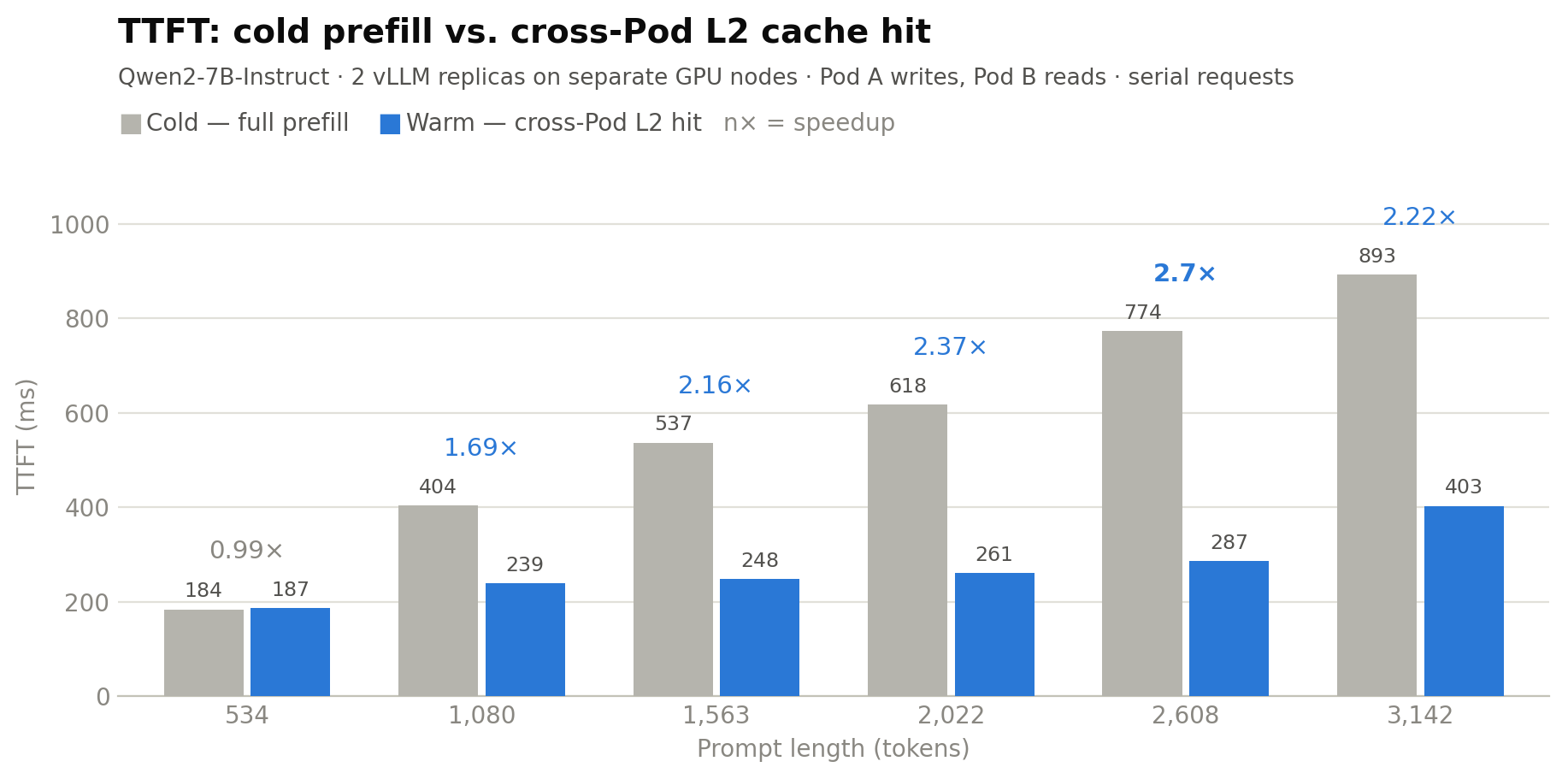
Figure 3: TTFT speedup from cross-Pod L2 reuse compared to prompt length (single-shot, Pod A writes / Pod B reads, ml.g5.4xlarge)
The multi-turn benchmark shows the same effect in a dialogue shape. Four turns of accumulating conversation history were sent to Pod A (writing 2,048 tokens of KV cache, 109 MB to Curvine at 7.8 GB/s aggregate, a 3–4 ms detour per turn on the local NVMe path), then replayed against Pod B. Every turn hit 100 percent in L2, cutting total conversation latency from 4.21 s to 3.25 s (1.30×), with per-turn speedup growing as history accumulated, from 1.22× at 530 tokens to 1.34× at 2,114 tokens. Speedup is smaller here because these GPUs (L40S/L4) prefill faster, a cache hit saves less when prefill was cheap to begin with. On smaller accelerators, expect the higher end of the range. Figure 4 shows the same comparison across the four dialogue turns, first pass versus replay on the second node, with per-turn speedup labeled above each pair.
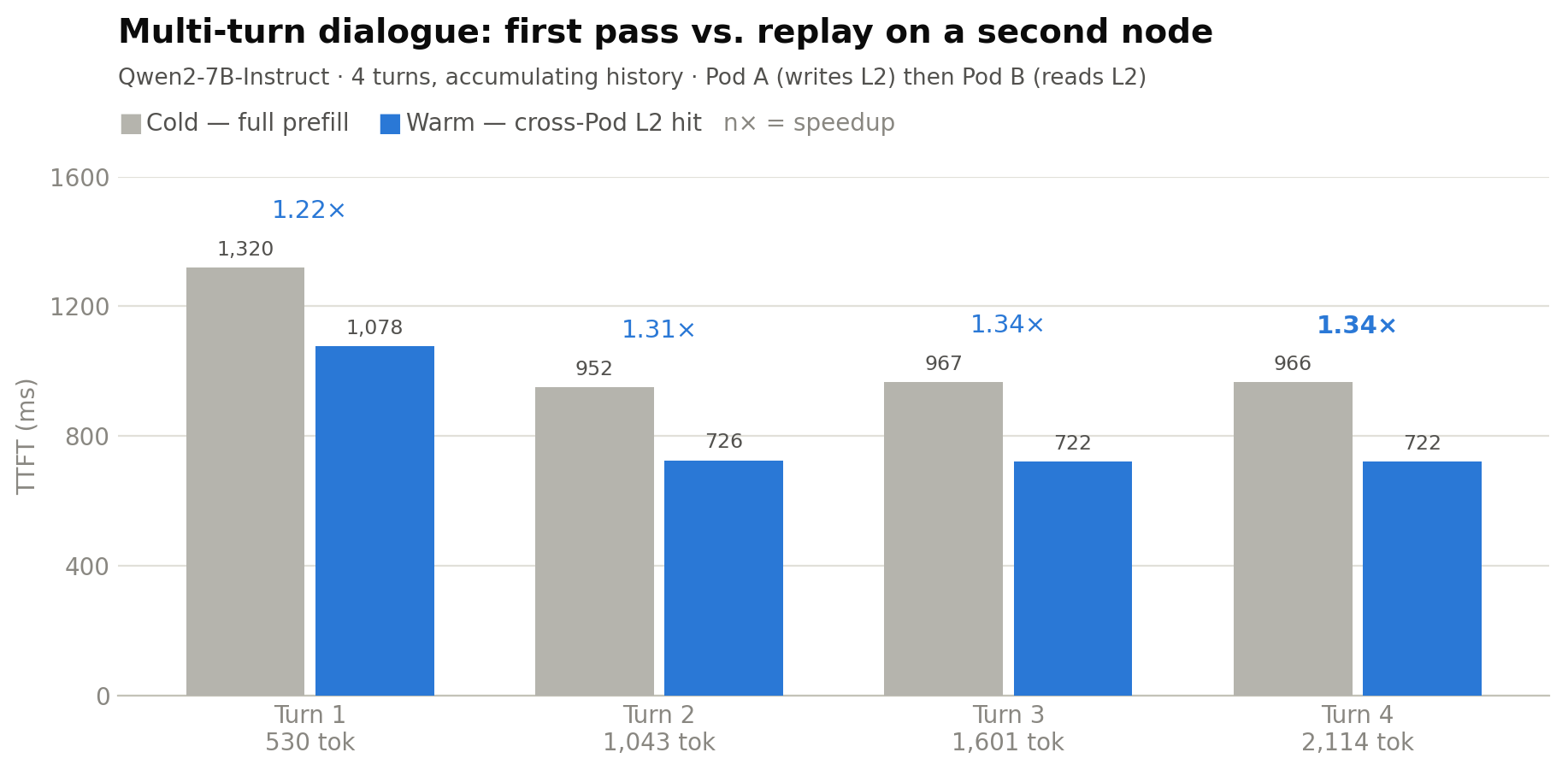
Figure 4: Multi-turn dialogue, first pass compared to replay on a second node (Pod A writes / Pod B reads, ml.g6e.4xlarge / ml.g6.16xlarge)
Two practical takeaways from the numbers. First, writes incur little cost: they land on the node-local NVMe worker at near-disk speed. Reads are the cost to manage, they cross the Pod network, which is why prefix-aware routing matters: every request the router lands on the replica that already holds the cache turns a approximately 60–200 ms L2 read into a sub-millisecond L0 hit. Second, the economics improve with context length up to the network’s comfort zone (approximately 2,500 tokens here), and workloads dominated by prompts under approximately 1,000 tokens should rely on L0/L1 rather than L2.
As with any benchmark, these figures are environment-specific: speedup depends on the GPU generation (faster prefill narrows the gap), inter-node network bandwidth, and prompt-overlap ratio of the workload. Both tests measure serial single requests to isolate the caching path. Concurrent-load behavior additionally benefits from the router’s hit-rate optimization and is workload-dependent.
Solution benefits
After rollout, measurable benefits are observed across multiple dimensions.
Enabling KV cache for large models on small instances: NVMe as a safety net
Cost-efficient instances such as ml.g6e.4xlarge (48 GB per GPU) suffice to host long-tail models like Qwen2-7B and Llama-3-8B while preserving high KV cache hit rates on long prompts (thousands of tokens). The KV cache is no longer bounded by GPU memory: hottest data resides on the GPU, warm data on host CPU memory, and cold data is offloaded to the pooled node-local NVMe, with L2 capacity scaling linearly to the hundreds of GBs (100 Gi NVMe per Worker × N nodes). Consequently, multi-tenant long-prompt workloads previously requiring ml.g6e.12xlarge or ml.p5.24xlarge can be downsized onto smaller instances, reducing per-endpoint cost. The actual savings depend on the model and traffic profile.
Unified FUSE mount for cross-Pod L2 cache sharing
This is the principal differentiator of this solution relative to a plain LMCache + node-local disk setup. When a request routes to a Pod that didn’t compute the prefill, both L0 and L1 miss, but the Pod reads the KV cache another replica wrote to the shared L2 mount and skips prefill entirely, so TTFT drops sharply.
Figure 5 traces this path: Pod 1 computes a prefill and writes the KV cache to the shared Curvine mount. A later request with the same prefix routes to Pod 2, which misses L0 and L1, reads the cache from Curvine over FUSE, and skips prefill.
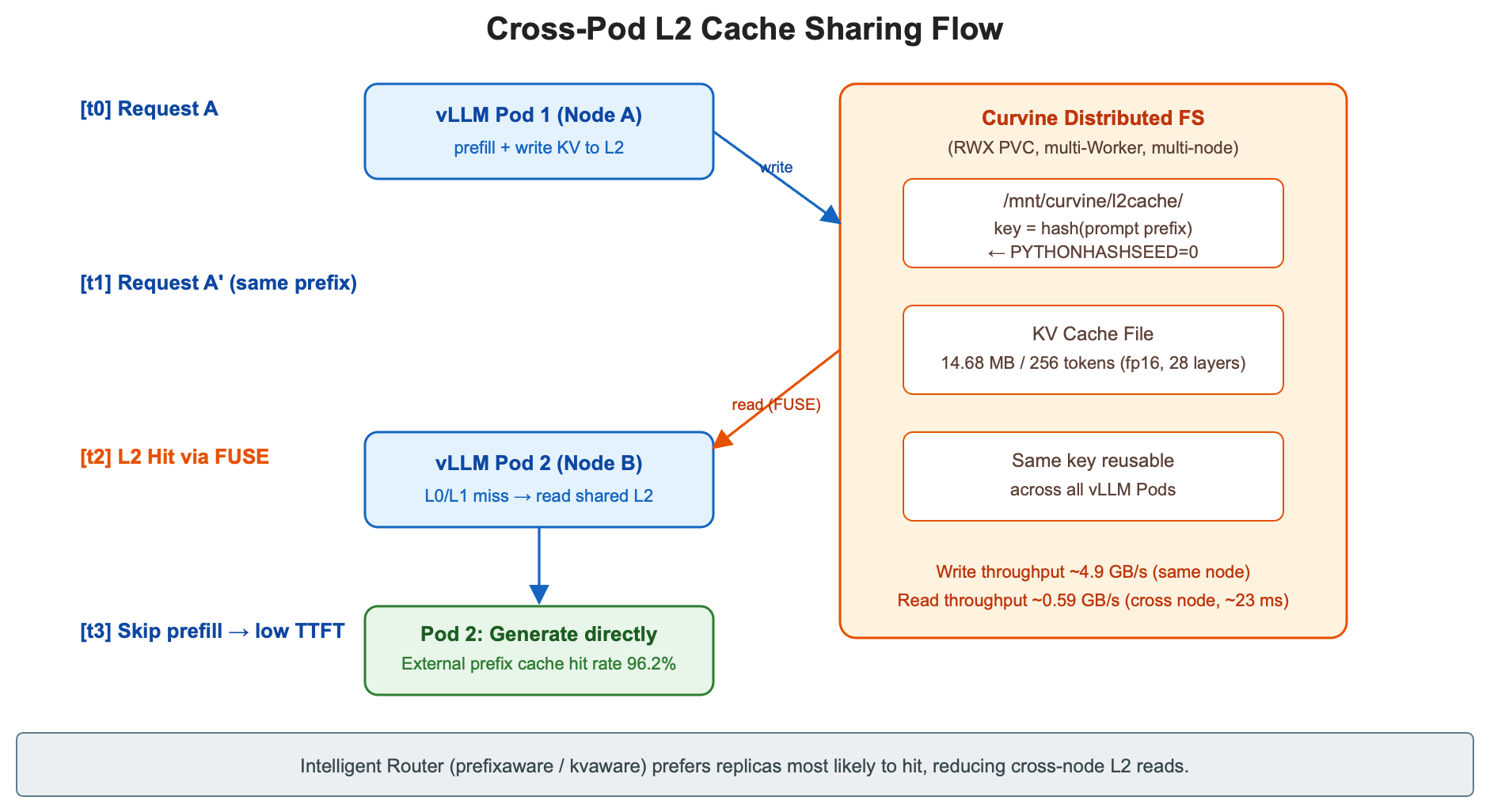
Figure 5: Cross-Pod L2 cache sharing flow
The comparative significance is direct: without shared L2, caches in Pod1 and Pod2 are mutually invisible, so routing to Pod2 amounts to a miss and triggers a full prefill. With shared L2, caches written by Pod1 are directly reusable by Pod2, and aggregate hit rate increases as the number of replicas grows. Combined with the Inference Operator’s built-in prefixaware / kvaware routing, same-prefix requests are preferentially dispatched to the replica with the highest hit probability, further reducing the frequency of cross-node L2 reads.
Latency grows with tier depth: sub-millisecond for GPU (L0) hits, low milliseconds for CPU (L1), and tens of milliseconds for cross-Pod L2, but every tier is far cheaper than re-running the full prefill. See the Benchmarking section for measured figures.
Operations and cost
The fully managed nature of SageMaker HyperPod deploys the ai-toolkit DaemonSet automatically to every node, with new nodes self-onboarding and memory-management details requiring no operator attention. With Curvine, you get elastic scaling from Workers that use hostPath + NVMe instance store at zero additional storage cost (NVMe is included with the instance), while Master component uses only a small EBS volume (10–50 Gi) for metadata. The Inference Operator owns vLLM Pod lifecycle, intelligent routing, Cert Manager, and metrics, so workload teams maintain only a single CRD.
Clean up
To avoid ongoing charges, tear down the test environment in the reverse order of the implementation:
- Delete the inference endpoint to stop GPU consumption:
kubectl delete inferenceendpointconfig ${ENDPOINT_NAME} -n ${NAMESPACE}. The Inference Operator removes the rendered Deployment, Service, router config, and ALB target group automatically. - Uninstall Curvine and its CSI:
helm uninstall curvine -n curvine && helm uninstall curvine-csi -n curvine, thenkubectl delete pvc -n curvine --allandkubectl delete ns curvine. Confirm the underlying EBS volumes for Curvine Master component are released (the reclaim policy onebs-scdetermines whether the volume is deleted or retained). The node-local NVMe used as L2 storage is ephemeral and freed automatically. - If the cluster won’t be reused for tiered KV cache testing, remove the Inference Operator add-on (
aws eks delete-addon --addon-name amazon-sagemaker-hyperpod-inference) and disable Tiered Storage on the HyperPod cluster:aws sagemaker update-cluster --cluster-name hyperpod-cluster-eks --tiered-storage-config Mode=Disable --node-recovery Automatic. The same--node-recoveryflag is required here, as in Stage 1. - Finally, delete any S3 objects (model weights, exported TLS certificates) and Amazon CloudWatch log groups created during testing if they aren’t needed for future runs. Scaling the GPU instance group to zero, or deleting the HyperPod cluster entirely if it was created solely for this evaluation, stops the largest cost driver.
Conclusion
Deploying large language models on cost-efficient instances doesn’t require sacrificing latency. The tiered KV cache architecture described in this post, which combines vLLM’s GPU prefix cache, LMCache’s CPU offload layer, and Curvine’s distributed NVMe pool, all orchestrated by the HyperPod Inference Operator, demonstrates that you can run a fleet of model replicas on ml.g6e.4xlarge instances while maintaining a 100 percent cross-Pod cache hit rate and cross-node retrieval latency in the tens of milliseconds.
This architecture suits workloads with high prompt overlap: RAG pipelines that reuse retrieved context, multi-turn dialogue where session history accumulates, and multi-tenant deployments sharing a system prompt template. If your traffic looks like this and you want lower TTFT on smaller instances, it’s worth evaluating. The same L2 tier also underpins prefill/decode-disaggregated (PD) serving in the HyperPod Inference Operator, which routes KV exchange between prefill and decode pools through the same LMCache stack, so Curvine can extend to large multi-node models through the standard LMCACHE_REMOTE_URL override, subject to the cross-node latencies shown in Benchmarking.
Get started:
- Learn more about Amazon SageMaker HyperPod on the service detail page.
- Activate Managed Tiered KV Cache on your HyperPod cluster using the HyperPod model deployment documentation.
- Review the Managed Tiered KV Cache and Intelligent Routing blog post for detailed benchmarking results and routing strategy guidance.
- Deploy the Curvine distributed filesystem using the Curvine Helm charts.
- Explore vLLM and LMCache for details on cache connector configuration and eviction policies.
- For cluster setup and Inference Operator installation, see the HyperPod setup guide.
About the authors