This post was co-written with Motorway and the AWS Prototyping and AI Customer Engineering (PACE) team.
Motorway, a UK-based online car marketplace, runs a daily auction where up to 8,000 dealers bid on up to 2,500 vehicles. Motorway worked with AWS Prototyping and AI Customer Engineering (PACE) to build an AI-powered dealer stock search agent that transforms how dealers find vehicles, replacing hours of manual filtering with natural language queries.
The challenge
The agent gives a confident-sounding response, but how do you prove it works reliably with real money on the line?
- Tool selection errors cause wrong search results, eroding dealer trust.
- Semantic search misinterpretations return irrelevant results. A query like “Petrol, Hybrid and electric cars up to 5 years old” requires the agent to correctly parse multiple constraints.
- Context drift in multi-turn conversations loses dealer refinements.
- Non-deterministic outputs make single-trial testing unreliable.
The solution
Together, Motorway and AWS built an end-to-end evaluation pipeline that reduced incorrect results from 1 in 8 queries to 1 in 50 and cut issue detection time from few hours to few minutes.
The pipeline combines the Strands Agents SDK with Amazon Bedrock AgentCore, a fully managed service for deploying and operating AI agents at scale. In this post, you will learn how to build this pipeline for your own agents:
- A two-phase evaluation strategy spanning build-time testing with strands-agents-evals (the open source evaluation library for Strands Agents) and production monitoring with Amazon Bedrock AgentCore Evaluations.
- A three-layer framework for assessing tool usage, reasoning, and output quality.
- A five-stage deployment pipeline with quality gates that block releases when metrics fall below thresholds.
A companion repository provides a deployable blueprint that you can adapt for your own agents. Although the blueprint uses AWS services, the core principles are essential and system-agnostic requirements for any production-ready AI agent. These principles include the three-layer evaluation framework and the use of the pass^k metric for consistency.
Prerequisites
You must have the following prerequisites to follow along with this post.
- An AWS account with permissions for Amazon Bedrock, AWS Lambda, Amazon Simple Storage Service (Amazon S3), Amazon DynamoDB, Amazon EventBridge, Amazon CloudWatch, and Amazon Simple Notification Service (Amazon SNS).
- AWS Cloud Development Kit (AWS CDK) v2 installed and bootstrapped.
- Python 3.14+.
- Access to Anthropic Claude models and Amazon Titan models through Amazon Bedrock model access.
- Familiarity with Python, AWS CDK, and agent concepts (tool calling, multi-turn conversations).
Time to complete: 30–45 minutes for initial deployment and 2–3 hours to customize for your domain.
Estimated costs: Running the sample evaluation suite costs approximately $5–10 in Amazon Bedrock inference charges. Production monitoring costs vary based on sampling rate.
Security note: The companion repository implements least-privilege AWS Identity and Access Management (IAM) roles, stores API keys in AWS Systems Manager Parameter Store (not environment variables), and uses typed parameters to help prevent injection attacks. See the repository README for details.
The worked example: A dealer stock search agent
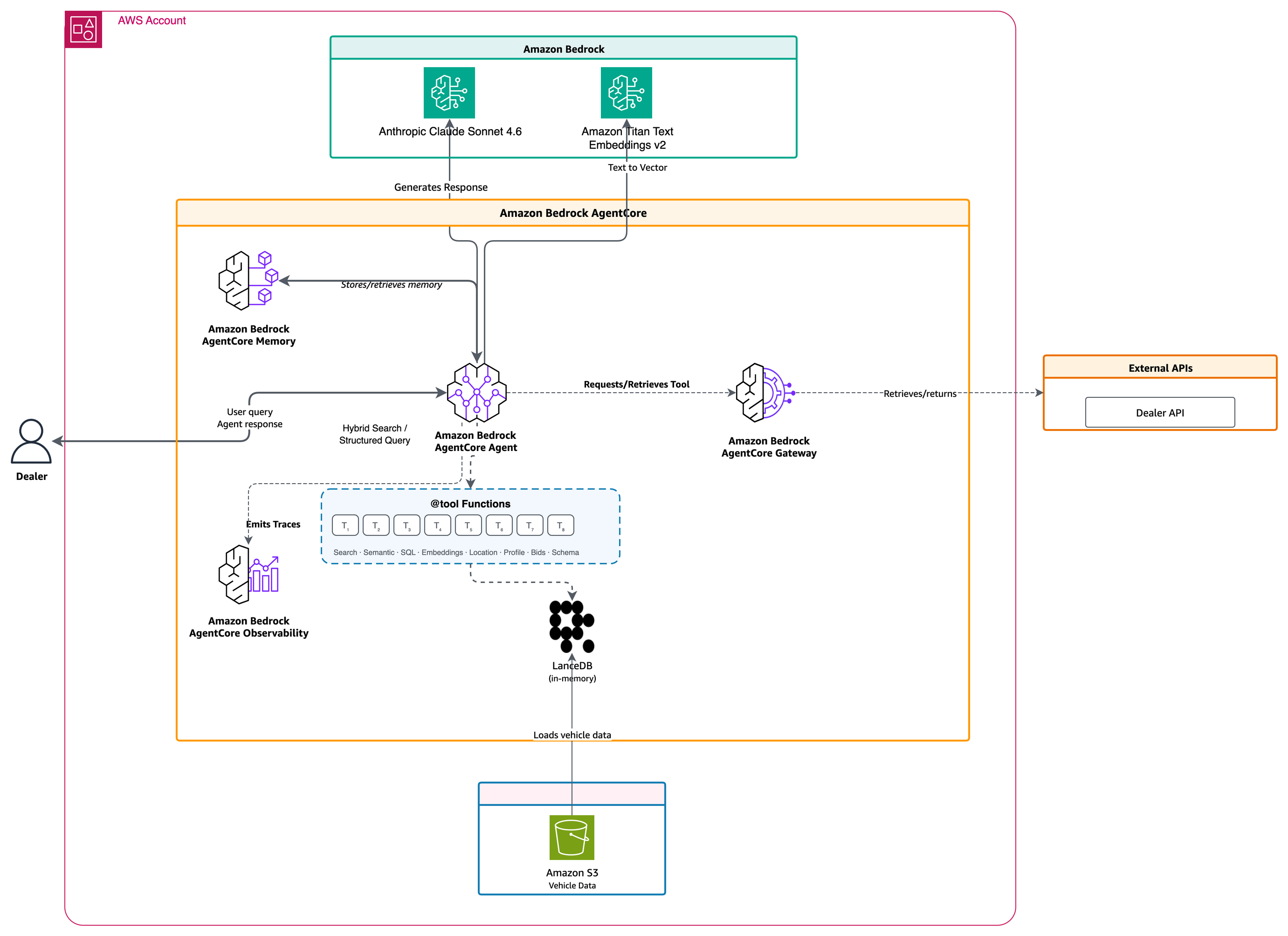
Motorway built the dealer stock search agent on the Strands Agents SDK and Amazon Bedrock AgentCore. The agent exposes eight tools that combine structured filtering across over 89 vehicle attributes with vector similarity search powered by LanceDB and Amazon Titan Text Embeddings V2.
Dealers typically spent hours browsing through listings using CSVs and rigid filters. By introducing a conversational AI agent, dealers can now talk to the agent: “Find me diesel SUVs under 25k near my dealership” or “something sporty and automatic for a family.”
With around 1,500 concurrent users during peak hours, getting agent behavior right isn’t optional. A tool selection error or semantic search misinterpretation directly impacts user trust. Figure 1 shows the end-to-end request flow: dealers submit natural language queries through a web interface, which routes to Amazon Bedrock AgentCore Runtime. The runtime orchestrates calls to eight different tools while using Amazon Bedrock models (Claude for reasoning, Amazon Titan for embeddings). Tool responses flow back through the runtime to generate the final dealer-facing results.
Why agent evaluation is different
Large language model (LLM) evaluation focuses on text generation quality: coherence, factual accuracy, response relevance. Agent evaluation assesses something fundamentally different. Think of it this way: LLM evaluation examines engine performance. Agent evaluation assesses how the whole car drives in traffic, in rain, or with a backseat full of passengers.
Traditional LLM metrics don’t tell you whether the Motorway agent called the right search tool for “Grade 1 Suzuki models.” They don’t reveal if the agent passed correct filter parameters to LanceDB. And they miss whether a dealer refining results from a previous turn gets the right response.
| Evaluation dimension | Why it matters for agents |
| Task completion | Agents run multi-step workflows where partial completion is common |
| Tool use correctness | Wrong tools or bad parameters can derail entire workflows |
| Reasoning coherence | Flawed reasoning leads to unpredictable failures as conditions change |
| Reliability and consistency | Non-determinism means the same input can produce different outcomes |
| Safety and compliance | Autonomous agents can take actions with real-world consequences |
| Cost and efficiency | An agent requiring 50 API calls per task may not be economically viable |
A precise query like “Volkswagen Golf 7-12 years old” might work perfectly, but a colloquial variant like “I’m looking for an older VW” could fail if the semantic search layer isn’t properly evaluated.
Catch issues before deployment with strands-agents-evals
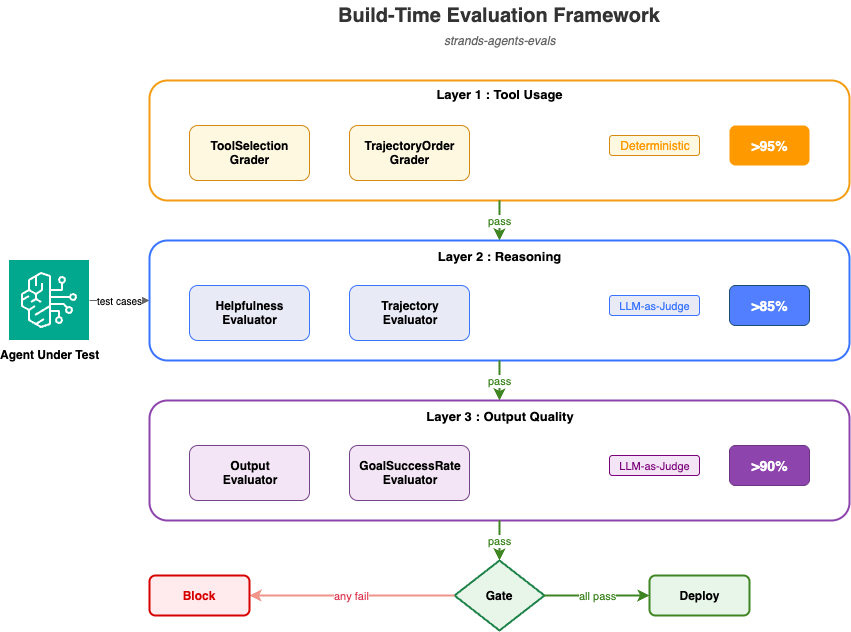
The blueprint implements evaluation across two phases that map to the GenAIOps lifecycle. Build-time evaluation catches issues before deployment, and production evaluation catches what synthetic tests miss. The following diagram (Figure 2) shows how the tool usage, reasoning, and output quality layers must pass before deployment. The framework evaluates agents across three layers:
- Layer 1 (Tool Usage) validates correct tool selection and parameter passing with a greater than 95 percent threshold.
- Layer 2 (Reasoning) assesses logical decision-making with a greater than 85 percent threshold.
- Layer 3 (Output Quality) measures response helpfulness and accuracy with a greater than 90 percent threshold. All three layers must pass before deployment proceeds.
During development and continuous integration and continuous deployment (CI/CD), the pipeline uses the strands-agents-evals framework to catch issues before deployment. It provides output validation, trajectory evaluation, multi-turn conversation simulation, and automated experiment generation. Each is designed to work natively with agents built on the Strands Agents SDK. The framework provides three primitives:
Experiment: A collection of test cases run against the agent.Case: Input query, expected output, and expected tool trajectory.Evaluator: Scoring logic (deterministic or LLM-based).
Structure your tests into layers. Layer 1 runs deterministic code-based graders for tool selection accuracy. Layers 2 and 3 use LLM-as-judge evaluators (using an LLM to score agent outputs) for reasoning and output quality.
Custom Evaluator subclasses handle domain-specific concerns. For the Motorway agent, these cover data freshness, dealer scoping, and safety guardrails. Your agent will have its own domain constraints.
Three types of graders
The evaluation framework uses three grader types, each suited to different evaluation needs.
| Grader type | Layer | What it measures | Trade-off |
| Code-based deterministic | Layer 1 | Tool selection, parameter passing, trajectory ordering | Fast, cheap, reproducible |
| LLM-as-judge (Claude Sonnet 4.6) | Layers 2–3 | Reasoning quality, output helpfulness, goal success | Flexible; non-deterministic (controlled via pass^k) |
| Human review | Calibration | Edge cases and safety | Expensive; used to calibrate LLM judge prompts |
In practice, grading what the agent produced catches more issues than grading the path it took. You care that the user got relevant results, not which tool the agent called first.
Three-layer assessment framework
Build-time evaluation operates across three distinct layers, each with specific pass/fail thresholds.
Layer 1: Tool Usage (> 95 percent threshold). Did the agent call the right tools with correct parameters?
- “Diesel vehicles from £7,000 to £20,000” should use search_vehicles with typed filters
(fuel_type=diesel,min_price=7000,max_price=20000). - “Modern hatchback with low mileage” should trigger hybrid_search, combining semantic embeddings with structured filters.
You measure this deterministically: ToolSelectionGrader checks which tools were called, TrajectoryOrderGrader verifies the call sequence.
Layer 2: Reasoning (> 85 percent threshold). Was the decision-making process logical? The HelpfulnessEvaluator and TrajectoryEvaluator from strands-agents-evals use LLM-as-judge scoring to assess whether the agent’s reasoning holds together. An agent that arrives at the right response through illogical reasoning will fail unpredictably as conditions change.
Layer 3: Output Quality (> 90 percent threshold). Was the response helpful, accurate, and actionable? The OutputEvaluator and GoalSuccessRateEvaluator from strands-agents-evals use LLM-as-judge evaluation to assess whether the user got a useful, well-formatted response.
The three layers must pass before deployment. A failure in a layer blocks the pipeline.
Handling non-determinism
Because LLM outputs vary between runs, single-trial results can be misleading. The run_all_layers() function in the companion repository accepts a num_trials parameter to address this. Two metrics from the code generation research community help measure reliability:
- pass@k measures the likelihood of succeeding at least once in k attempts. This metric is useful when finding one correct solution is sufficient.
- pass^k (pass to the power of k) measures the probability of succeeding in k consecutive trials. This metric is useful when users expect reliable behavior every time.
For customer-facing agents, pass^k matters most. An agent with a 75 percent per-trial success rate has only a 42 percent chance of passing three consecutive trials (0.75³). Users expect consistent quality on every interaction.
In the companion code, run_all_layers(task_fn, registry, num_trials=5) runs the evaluation layers with multi-trial support and gates deployment on pass^k. See the full implementation.
Test case management
Test cases are organized by category:
- Happy path: Common queries that should succeed.
- Edge cases: Ambiguous queries, slang, multi-turn refinements.
- Safety/Guardrails: Queries the agent should refuse or redirect.
When production monitoring detects an issue, that interaction becomes a new test case. Motorway’s suite grew from an initial 50 cases to 150 in three months, each grounded in real user behavior. Start with 20 to 50 cases and let production data grow the suite.
Include negative cases where the agent should not call certain tools. For example, a profile query should call the profile tool, not the search tool. A structured query should use structured search, not a raw SQL fallback. One-sided evals create one-sided optimization.
Multi-turn conversation testing
Single-turn evaluation misses a critical dimension: conversational coherence. Dealers naturally refine searches across multiple turns:
- Turn 1: “Find me diesel SUVs.”
- Turn 2: “Now show me only the automatics.”
- Turn 3: “What about estates instead?”
The strands-agents-evals framework provides ActorSimulator to generate realistic multi-turn interactions and InteractionsEvaluator to score context retention across turns. Multi-turn tests catch context drift, filter accumulation errors, and pronoun resolution failures that single-turn tests miss.
Monitor production behavior with AgentCore Evaluations
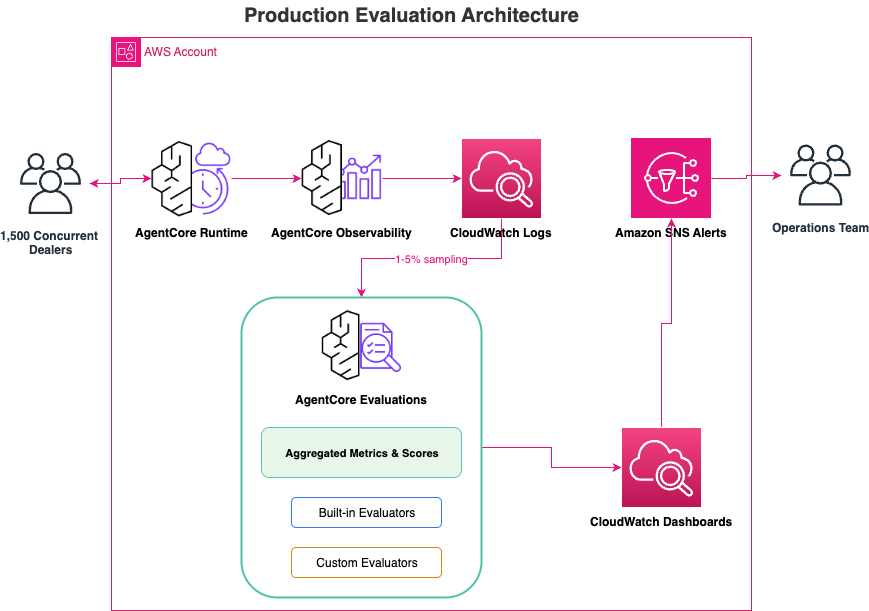
After you deploy your Strands Agent to Amazon Bedrock AgentCore Runtime, AgentCore Evaluations provides continuous monitoring. It integrates with Strands Agents through OpenTelemetry instrumentation (the industry-standard observability framework). Figure 3 illustrates the architecture in production, with observability traces sampled at 1–5 percent and with metrics aggregating to Amazon CloudWatch.
Two monitoring approaches
AgentCore Evaluations offers two complementary modes:
On-demand evaluation analyzes specific agent interactions by selecting spans from Amazon CloudWatch logs. This is useful for debugging issues or validating fixes.
Online evaluation automatically samples live traffic and applies evaluators in the background. Configure a sampling rate (1–5 percent is recommended), select up to 10 evaluators, and let it run.
Built-in and custom evaluators
AgentCore provides pre-configured evaluators for common scenarios. The following table shows the built-in evaluators and what they measure.
| Evaluator | Level | What it measures |
Builtin.Helpfulness |
TRACE | How helpful the agent’s response is (0–1 score across 7 levels) |
Builtin.GoalSuccessRate |
SESSION | Whether the user’s overall goal was achieved |
Builtin.ToolSelection |
TOOL_CALL | Whether the agent selected appropriate tools |
Builtin.Correctness |
TRACE | Factual accuracy of the response |
For domain-specific requirements, you can create custom evaluators using an LLM-as-a-judge configuration. Every agent has domain constraints that built-in evaluators don’t cover, including data freshness, access scoping, forbidden actions, latency budgets, and cost limits.
The companion repository includes five custom Evaluator subclasses you can adapt:
| Evaluator | What it validates |
DataFreshnessEvaluator |
Validates auction-cycle timestamps so the agent doesn’t surface stale inventory |
SafetyGuardrailEvaluator |
Blocks the agent from attempting automated bidding actions |
DealerDataScopingEvaluator |
Enforces dealer-scoped queries for data isolation |
See the companion repository for LatencyEvaluator and CostEvaluator examples.
Key metrics to track
The companion repository includes an AWS CDK stack that provisions CloudWatch dashboards and alarms. Track these metrics to monitor agent health.
| Metric | Target | Alert threshold |
| Task completion rate | >95% | <80% |
| Tool selection accuracy | >95% | <90% |
| Helpfulness score (0-1) | >0.83 | <0.58 |
| Response latency P50 / P99 | <2s / <10s | >5s / >15s |
| Hallucination rate | <2% | >5% |
| Cost per interaction | Monitor trend | >2x baseline |
Make quality checks a deployment gate
Evaluation should be a quality gate in your deployment pipeline, not an afterthought. Figure 4 shows the deployment pipeline with evaluation gates, spanning build-time evaluation, staging validation, shadow mode, A/B testing, and production rollout, with failures blocking deployment.
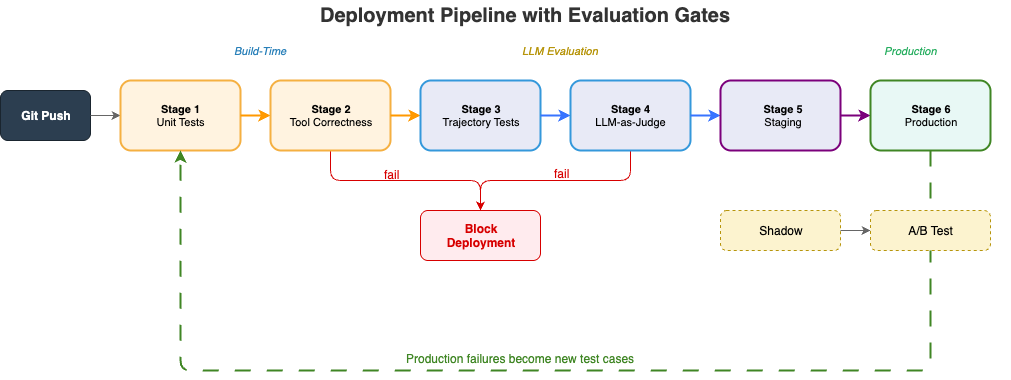
The deployment pipeline follows five phases:
- Build-time evaluation: Unit tests, tool correctness (
ToolSelectionGrader>95 percent), trajectory tests, and LLM-as-judge scoring (HelpfulnessEvaluator>85 percent). - Staging validation: On-demand AgentCore evaluation with synthetic traffic against staging data.
- Shadow mode: Real production traffic processed in parallel without user impact. Run this for at least 4 hours with a 2 percent deviation threshold.
- A/B testing: 5 percent of live traffic routes to the candidate agent for real outcome measurement.
- Production rollout: 100 percent traffic with continuous online evaluation and monitoring.
You define thresholds for each phase: tool selection accuracy below 95 percent or task completion below 80 percent blocks deployment. For major releases, multi-trial evaluation with num_trials=5 gates on pass^k to catch non-deterministic failures.
Shadow mode
Between staging and production, run the candidate agent against real queries without affecting users. Shadow mode receives a copy of production traffic, processes it through the candidate in parallel, and compares outcomes. Run shadow mode for at least 4 hours before proceeding to A/B testing. Define a deviation threshold (2 percent is a good starting point) that pauses deployment automatically.
Shadow mode catches issues that the other stages miss:
- Timeout handling under concurrent load.
- Domain terminology missing from synthetic tests.
- Tool call ordering that causes latency spikes under real traffic patterns.
Getting started: A phased approach
Phase 1: Build your test suite. Start with 20–50 test cases drawn from real user queries. Include positive and negative cases. Test what the agent should do and what it should refuse.
Phase 2: Configure build-time evaluation. Match grader types to what you’re measuring: deterministic for tool selection, LLM-as-judge for reasoning and output quality.
Phase 3: Enable production monitoring. Configure AgentCore Evaluations with a 1–5 percent sampling rate. Start low, then increase once you’ve confirmed evaluator costs are acceptable.
Phase 4: Close the feedback loop. Turn production failures into test cases. When failures become regression tests, this feedback loop has consistently improved evaluation quality across teams.
Results and impact
Before implementing this evaluation pipeline, the agent had an 87% tool selection accuracy- which meant 1 in 8 dealer queries returned wrong results. The team was seeing 12 production incidents per month, and it took an average of 4 hours to detect issues after they started affecting dealers.
After implementing the pipeline:
| Metric | Before | After |
| Tool selection accuracy | 87% | 98% |
| Task completion rate | 82% | 96% |
| Context retention (multi-turn) | 71% | 94% |
| Production incidents (monthly) | 12 | 2 |
| Mean time to detect issues | few hours | few minutes |
The business impact: dealers now complete vehicle searches in minutes instead of few hours, with confidence that results are accurate and current.
Troubleshooting
See the companion repository README for solutions to common issues including trajectory grader failures, LLM-as-judge variance, empty evaluation results, and cost threshold tuning.
Key takeaways
Keep these principles in mind when building your evaluation pipeline.
- Layer your evaluation: Tool usage (>95 percent), reasoning (>85 percent), and output quality (>90 percent) catch different failure modes.
- Gate on pass^k, not single trials: A 75 percent per-trial success rate means only 42 percent reliability across three consecutive runs.
- Turn production failures into test cases: Let real user behavior grow your evaluation suite.
- Shadow mode catches what synthetic tests miss: Real traffic reveals timeout handling, rare terminology, and latency patterns.
- Start monitoring at 1 percent sampling: Scale gradually to manage evaluator costs.
Conclusion
You’ve now seen how to build an evaluation pipeline for production AI agents on AWS, using Motorway’s dealer stock search agent as a worked example.
The core lesson: a fluent response doesn’t mean the agent did the right thing. You must verify tool selection, parameter correctness, reasoning coherence, and consistency across repeated runs. By combining build-time testing with strands-agents-evals and production monitoring with AgentCore Evaluations, you can deploy agents with evidence that they work as designed.
These patterns apply to most multi-tool, customer-facing agents: whether you’re building customer service agents that query knowledge bases and ticketing systems, financial advisory agents that pull portfolio data and market feeds, or healthcare triage agents that access patient records and scheduling tools.
To get started:
- Clone the companion repository:
- Navigate to the CDK project directory:
- Deploy the sample infrastructure:
Follow the repository README deployment steps to deploy the sample infrastructure. After deployment completes, verify the infrastructure by checking that all AWS CloudFormation stacks showCREATE_COMPLETEstatus in the AWS CloudFormation console. You should see the CloudWatch dashboard and Lambda functions listed in their respective consoles. - Run the sample evaluation suite against the included test cases to see the three-layer framework in action. Verify success by confirming: Layer 1 (Tool Usage) shows greater than 95% pass rate, Layer 2 (Reasoning) shows greater than 85% pass rate, and Layer 3 (Output Quality) shows greater than 90% pass rate. If a layer fails, check the CloudWatch logs for detailed error messages.
- Customize the evaluators for your domain. Start with the
DataFreshnessEvaluatorandSafetyGuardrailEvaluatoras templates.
To dive deeper, explore the Amazon Bedrock AgentCore documentation and the Strands Agents SDK on GitHub.
Clean up resources
To avoid incurring ongoing charges, delete the resources created in this walkthrough:
- Navigate to the CDK project directory:
- Destroy all deployed stacks:
- Confirm the deletion when prompted.
- Verify in the AWS Management Console that the cleanup process removed all resources, including Lambda functions, S3 buckets, DynamoDB tables, CloudWatch log groups and dashboards, EventBridge rules, and SNS topics.
Note: S3 buckets that contain objects may require manual deletion. Export any evaluation data or logs that you need to retain before running the cleanup.
Resources
- Evaluating AI agents for production: A practical guide to Strands Evals.
- Strands Agents SDK.
- strands-agents-evals.
- Amazon Bedrock AgentCore Evaluations.
- Evaluating AI agents: Real-world lessons from Amazon.
About the authors