Financial institutions process thousands of complex documents daily. Optical Character Recognition (OCR) errors in financial data can propagate through interconnected calculations, affecting analytical accuracy. While a single OCR error in a standard legal document might require only a quick manual correction, the same mistake in financial data can cascade through interconnected calculations, leading to systematic errors in analysis and potentially costly to organizations.
Traditional OCR tools fall critically short when processing the complex financial documents that institutions handle daily—balance sheets, income statements, SEC filings, research reports, and audit materials. These documents feature intricate table structures with merged cells and hierarchical data, multi-column layouts with interconnected references, and context-dependent information requiring semantic understanding. Traditional OCR approaches treat these documents as images, missing the structural relationships and contextual nuances that make financial documents meaningful. The result is a cascade of manual corrections, data entry delays, and systematic analytical errors.
This post demonstrates how to build a documentation extraction and model fine-tuning pipeline that addresses these critical challenges. By combining Pulse AI’s advanced document understanding capabilities with the powerful AI services of Amazon Bedrock, organizations can achieve enterprise-grade accuracy and extract contextually relevant financial insights at scale. Amazon Bedrock delivers fully managed model customization with zero machine learning (ML) ops overhead, on-demand deployment without capacity planning, and the Nova model family offers strong cost-to-performance characteristics, so teams can focus on innovation rather than infrastructure.
Unlike traditional monolithic OCR pipelines,Pulse integrates vision language models with classical ML components specifically engineered for document understanding, creating an intelligent solution that extracts structured data with semantic awareness, generates improved supervised fine-tuning datasets for financial domain models, and enables deployment of custom large language models (LLMs) trained on your specific financial data. Pulse is deployed across global enterprises including Samsung, Cloudera, Howard Hughes, and Fortune 500 financial institutions and leading private equity firms processing high volumes of financial and operational documents.
In one deployment, a batch of about 1,000 complex financial documents that previously required multi day turnaround was processed in under three hours, producing structured, auditable outputs ready for downstream analytics and AI applications.
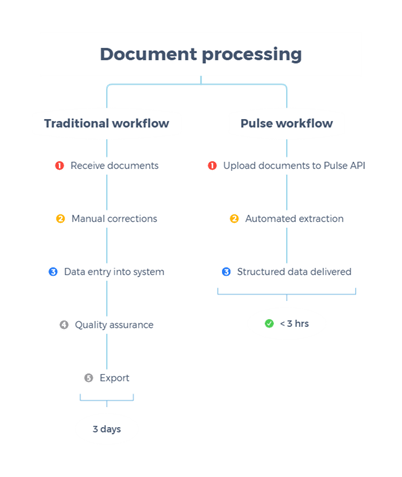
Fig 1 : Document processing workflows: Traditional vs. Pulse
In summary, Pulse AI and Amazon Bedrock together provides:
- Pulse AI extracts structured, semantically-aware data from complex financial documents handling intricate tables, multi-column layouts, and hierarchical data.
- Amazon Bedrock fine-tunes Amazon Nova models on that high-quality data to create domain-specific intelligence for your organization’s financial conventions.
- Custom models then process new documents with organization-specific understanding, reducing manual review from days to hours.
The following workflow demonstrates an approach to building intelligent financial applications powered. Starting with raw financial documents, the pipeline orchestrates a sophisticated series of steps—from document processing and fine-tuning, and deployment—to create a custom AI solution tailored to financial data analysis and insights.
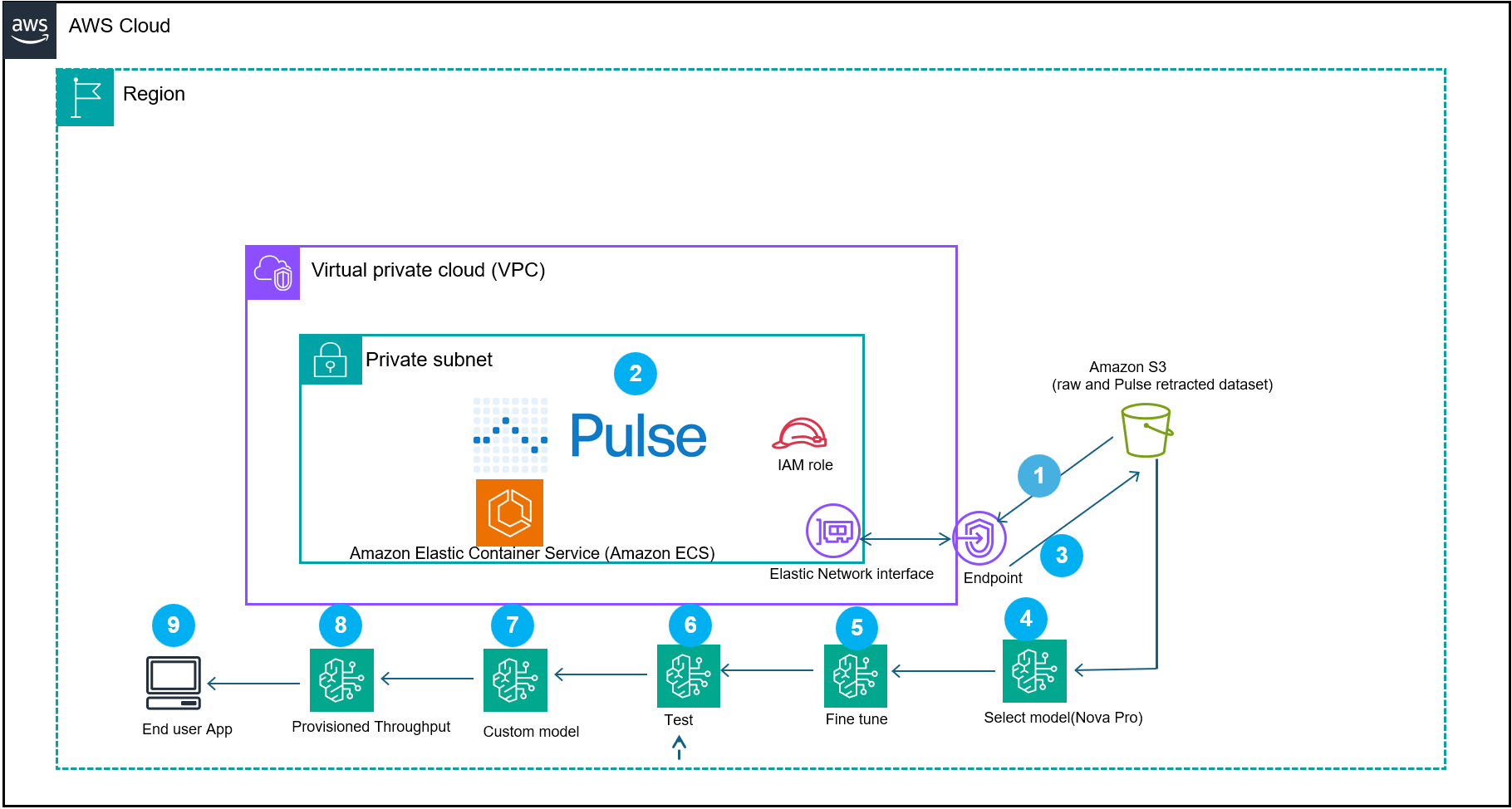
Fig 2: represents a document processing reference architecture workflow that demonstrates how Pulse AI, integrated with AWS services, creates domain-specific models for intelligent document processing (IDP)
The system begins by (step 1) ingesting the documents into the Pulse container in your VPC or Pulse software as a service (SAAS) offering. The Pulse model processes the financial documents (step 2). The output of the extracted data gets converted to Amazon Bedrock Nova Micro supervised fine-tuning format and then gets stored in an Amazon Simple Storage Service (Amazon S3) (step 3).
The workflow then uses other extended features of Amazon Bedrock:
A supervised fine-tuning job runs using Amazon Nova Micro (amazon.nova-micro-v1:0) and a cost-efficient model designed for text-based extraction tasks with a 128K context window (Step 5 and 6). Nova Micro offers competitive price performance. After job completion, deploy the resulting model for on-demand inference. You can also use Provisioned Throughput for mission-critical workloads that require consistent performance. Use Test in Playground to evaluate and compare responses. The resulting custom model is imported into Amazon Bedrock (step 8) and deployed with provisioned throughput (step 9) to power a scalable end-user application (step 10). This architecture combines the domain specific financial dataset with the custom supervised fine-tuned model, so organizations can build production-ready AI applications that understand financial context while maintaining performance and cost efficiency.
Prerequisites
You must have the following prerequisites to follow along with this post.
- AWS Account – Required to access AWS services, including Amazon Bedrock and S3 storage for your datasets.
- AWS Identity and Access Management (IAM) Policies allowing Amazon Bedrock access to S3 datasets – Grants the necessary permissions for Amazon Bedrock to read and process your data stored in S3 buckets securely.
- Pulse Standard Account (sign up at runpulse.com) – Required to integrate with the Pulse system and access its features for this workflow.
- AWS Region requirement:
us-east-1. - Python 3.12 or later.
- Instance type: t3.medium.
- Amazon Elastic Compute Cloud (Amazon EC2) instances incur hourly charges. Remember to terminate the instance after completing this tutorial to avoid ongoing costs.
- Amazon Linux 2023 (latest).
- Public financial statement: https://www.impact-bank.com/user/file/dummy_statement.pdf.
- S3 training data bucket:
s3://<your s3 bucket>/training-data/.
Note: This tutorial creates AWS resources that incur charges, including: EC2 instance (hourly), S3 storage (per GB-month), Amazon Bedrock fine-tuning (per training hour), provisioned throughput deployment (hourly), and AWS Secrets Manager (per secret per month).
Step-by-step implementation
Follow these steps to set up and configure your financial document processing pipeline using Pulse AI and Amazon Bedrock.
- Navigate to the Pulse console and create an account.
- Launch an EC2 instance using the AWS Console.
- Navigate to the EC2 console.
- Choose Launch Instance.
- In the AMI selection screen, search for Amazon Linux 2023 AMI.
- Select Amazon Linux 2023 AMI.
- In the instance type screen, select t3.medium.
- Create new key pair for SSH access to the Linux instance.
- In the security group configuration, add a rule to allow SSH (port 22) from your IP address.
- Choose Launch.
- Save the instance ID that appears in the success message.
- Create your API key from the RunPulse.
- To find your instance’s public DNS,
- Navigate to the EC2 console.
- Select your instance.
- Copy the Public IPv4 DNS value from the Details tab.
- To connect to your EC2 instance, run the following SSH command. Replace
YOUR_KEY_FILE.pemwith your actual key pair filename andYOUR_INSTANCE_DNSwith the Public IPv4 DNS value from step 4a:ssh -i YOUR_KEY_FILE.pem ec2-user@YOUR_INSTANCE_DNS Example: ssh -i my-keypair.pem ec2-user@ec2-54-123-45-67.compute-1.amazonaws.com - On your EC2 instance configure your AWS credentials by running aws configure. When prompted, enter your Access Key ID, secret access key, Region (
us-east-1), and output format (json). - Store your Pulse API key in AWS Secrets Manager using the command provided:
aws secretsmanager create-secret --name pulse-api-key --secret-string "your-api-key" - Note down the ARN, as it required for the permissions policy
Note: AWS Command Line Interface (AWS CLI) version 2 comes pre-installed on Amazon Linux 2023 AMIs by default.
- Under your EC2 instance, install the runpulse SDK.
- Install pip:
sudo yum install pip - Install the Pulse Python SDK:
pip install pulse-python-sdk
- Install pip:
- On your EC2 instance, create a file named bedrock-trust-policy.json in your current working directory with the configuration shown in the following section. You can use a text editor like nano or vi: nano
bedrock-trust-policy.json.- Create
bedrock-trust-policy.json{ "Version": "2012-10-17", "Statement": [ { "Effect": "Allow", "Principal": { "Service": "bedrock.amazonaws.com" }, "Action": "sts:AssumeRole", "Condition": { "StringEquals": { "aws:SourceAccount": "your-aws-account-ID" }, "ArnLike": { "aws:SourceArn": "arn:aws:bedrock:us-east-1:your-aws-account-ID:model-customization-job/*" } } } ] } - Create
bedrock-permissions.json{ "Version": "2012-10-17", "Statement": [ { "Sid": "S3AccessForFineTuning", "Effect": "Allow", "Action": [ "s3:GetObject", "s3:PutObject", "s3:ListBucket" ], "Resource": [ "arn:aws:s3:::your-bucket-name", "arn:aws:s3:::your-bucket-name/*" ] }, { "Sid": "SecretsManagerAccess", "Effect": "Allow", "Action": [ "secretsmanager:GetSecretValue", "secretsmanager:PutSecretValue", "secretsmanager:CreateSecret", "secretsmanager:UpdateSecret", "secretsmanager:DescribeSecret" ], "Resource": [ "arn:aws:secretsmanager:us-east-1:your-aws-account-ID:secret:your-secret-name-*" ] } ] } - Then create the role:
aws iam create-role --role-name AmazonBedrock-FineTuning-S3-Role --assume-role-policy-document file://bedrock-trust-policy.json --description "Role for Bedrock fine-tuning with S3 and Secrets Manager access"Expected output: JSON with role ARN, ID, and creation timestamp. Next,
- Create
- Create the permissions policy:
aws iam put-role-policy --role-name AmazonBedrock-FineTuning-S3-Role --policy-name Bedrock-S3-Access-Policy --policy-document file://bedrock-permissions.json
- View the role and trust policy:
aws iam get-role --role-name AmazonBedrock-FineTuning-S3-Role- To extract the dataset from the reference financial document, run the following command on the EC2 instance
# Retrieve API key from Secrets Manager. Security best practice: Don’t hardcode credentials. Retrieve from AWS Secrets Manager.
curl -X POST https://api.runpulse.com/extract -H "x-api-key: $(aws secretsmanager get-secret-value --secret-id pulse-api-key --query SecretString --output text)" -H "Content-Type: application/json" -d '{ "file_url": "https://www.impact-bank.com/user/file/dummy_statement.pdf", "figureProcessing": {"description": true}, "extensions": {"altOutputs": {"returnHtml": true}} }'> pulse_output.jsonPulse AI sample extracted json snippet:
{"bounding_boxes":{"Header":[{"average_word_confidence":0.9940000000000001,"bounding_box":[0.7418,0.04248181818181818,0.8901529411764706,0.042281818181818184,0.8901764705882352,0.05528181818181818,0.741835294117647,0.05548181818181818],"content":"0a-Account # 12345678","id":"txt-8","original_content":"Account # 12345678","page_number":2}],"Page Number":[{"average_word_confidence":0.99425,"bounding_box":[0.8071411764705881,0.24754545454545454,0.889635294117647,0.2474909090909091,0.8896588235294117,0.2616454545454545,0.8071529411764706,0.2617],"content":"0a-Page 1 of 2","id":"txt-3","original_content":"Page 1 of 2","page_number":1},{"average_word_confidence":0.9925,"bounding_box":[0.8076235294117646,0.057600000000000005,0.8898117647058823,0.05738181818181818,0.8898705882352942,0.0704,0.8076823529411765,0.07061818181818182],"content":"0a-Page 2 of 2","id":"txt-9","original_content":"Page 2 of 2","page_number":2}],"Tables":[{"cell_data":[{"confidence":0.9772562500000003,"location":{"coordinates":[0.0906,0.44435454545454545,0.8865647058823529,0.44499090909090905,0.8865647058823529,0.4685,0.0906,0.4678636363636363],"page":1},"position":{"column":0,"row":0},"properties":{"spans_columns":4,"type":"header"},"text":"0t-"},- Verify the extraction succeeded by checking the file exists and contains valid JSON
jq empty pulse_output.json &amp;&amp; echo "Valid JSON" || echo " Invalid JSON"- Next, convert the extracted data to a Nova training dataset.
- Create a new file named convert_to_nova.py and paste the following code.
import jsonINPUT_FILE = "pulse_output.json" OUTPUT_FILE = "nova_dataset.jsonl"MAX_TOKENS = 30000 # Buffer below 32,768 limitdef estimate_tokens(text): """Rough token estimation: ~4 characters per token""" return len(text) // 4def create_truncated_samples(data): """Creates smaller training samples within token limits""" samples = [] # Sample 1: Header and Page Number only if "bounding_boxes" in data: if "Header" in data["bounding_boxes"] and "Page Number" in data["bounding_boxes"]: header_sample = { "Header": data["bounding_boxes"]["Header"], "Page Number": data["bounding_boxes"]["Page Number"] } samples.append({ "document": header_sample, "extracted_data": header_sample }) # Samples 2-4: Individual tables (truncated to 20 cells) if "Tables" in data["bounding_boxes"]: for i, table in enumerate(data["bounding_boxes"]["Tables"][:3]): truncated_table = { "table_info": table.get("table_info", {}), "cell_data": table.get("cell_data", [])[:20] } samples.append({ "document": {"Tables": [truncated_table]}, "extracted_data": {"Tables": [truncated_table]} }) # Samples 5-7: Text chunks (3 items each) if "Text" in data["bounding_boxes"]: text_items = data["bounding_boxes"]["Text"] chunk_size = 3 for i in range(0, min(9, len(text_items)), chunk_size): text_chunk = {"Text": text_items[i:i+chunk_size]} samples.append({ "document": text_chunk, "extracted_data": text_chunk }) # Sample 8: Title only if "Title" in data["bounding_boxes"]: title_sample = {"Title": data["bounding_boxes"]["Title"]} samples.append({ "document": title_sample, "extracted_data": title_sample }) return samplesdef convert_to_nova_format(sample): """ Converts to Nova format with instructional prompts for domain-specific learning This function creates training samples that teach the model: 1. Financial document structure recognition (headers, tables, transactions) 2. Data type standardization (dates to ISO 8601, amounts to numbers) 3. Hierarchical relationship preservation (accounts → transactions → details) 4. Out-of-sequence detection (items marked with *) 5. Financial domain conventions (check numbers, terminal IDs, merchant data)""" doc_str = json.dumps(sample["document"]) extract_str = json.dumps(sample["extracted_data"]) total_tokens = estimate_tokens(doc_str) + estimate_tokens(extract_str) if total_tokens > MAX_TOKENS: print(f"Warning: Sample too large ({total_tokens} tokens), skipping...") return None return { "schemaVersion": "bedrock-conversation-2024", "messages": [ { "role": "user", "content": [{"text": doc_str}] }, { "role": "assistant", "content": [{"text": extract_str}] } ] }# Read inputwith open(INPUT_FILE, "r") as f: pulse_data = json.load(f)if isinstance(pulse_data, dict): pulse_data = [pulse_data]# Generate truncated samplesall_samples = []skipped = 0for record in pulse_data: truncated_samples = create_truncated_samples(record) for sample in truncated_samples: nova_record = convert_to_nova_format(sample) if nova_record: all_samples.append(nova_record) else: skipped += 1# Write to JSONLwith open(OUTPUT_FILE, "w") as f: for nova_record in all_samples: f.write(json.dumps(nova_record) + "n")print(f"✓ Created {len(all_samples)} training samples")print(f"✓ Skipped {skipped} samples that were too large")print(f"✓ Output saved to: {OUTPUT_FILE}")print(f"All samples are under {MAX_TOKENS} tokens (limit: 32,768)")print(f"Next steps:")print(f"1. Verify: wc -l {OUTPUT_FILE}")print(f"2. Upload: aws s3 cp {OUTPUT_FILE} s3://anypulse/training-data/nova_dataset.jsonl")print(f"3. Create new fine-tuning job")"""TRAINING FORMAT EXPLANATION:What this fine-tuning teaches Nova Micro:This conversion script creates training samples in a format that teaches Nova Micro domain-specific financial document understanding through pattern learning. While the training samples use a direct JSON-to-JSON mapping (user message contains Pulse extracted JSON, assistant message contains the same structured JSON), the model learns several key capabilities:1. DOCUMENT STRUCTURE RECOGNITION - Hierarchical relationships: Headers → Tables → Text → Page Numbers - Bounding box spatial understanding: Coordinate systems and element positioning - Multi-page document handling: Page number tracking and cross-page references 2. FINANCIAL DATA PATTERNS - Table structure preservation: Row/column semantics, cell-level extraction - Confidence score interpretation: High-confidence fields (0.99+) vs. lower confidence - Data type consistency: Account numbers, dates, monetary amounts, check numbers 3. STRUCTURAL CONSISTENCY - Field naming conventions: "content", "confidence", "page_number", "bounding_box" - Nested object relationships: Tables contain cell_data arrays with position metadata - Metadata preservation: Original_content alongside normalized values for audit trails4. DOMAIN-SPECIFIC CONVENTIONS - Financial document sections: Headers, footers, transaction tables, summary sections - Out-of-sequence detection: Items marked with asterisk (*) in check numbers - Merchant data extraction: Terminal IDs, location information, transaction referencesLEARNING MECHANISM:The model learns through exposure to Pulse AI's high-quality structured extraction patterns. By seeing hundreds of examples of how Pulse structures financial document data (with confidence scores, bounding boxes, hierarchical relationships), Nova Micro internalizes these patterns and can apply them to new financial documents.This approach is effective because:- Pulse AI provides consistently structured, high-quality training data- The JSON schema is self-documenting (field names indicate purpose)- Repetition across samples reinforces structural patterns- Confidence scores teach the model which extractions are reliableALTERNATIVE APPROACHES:For production deployments requiring more explicit task framing, consider adding instructional prompts to the training samples: instructional_prompt = f'''You are a financial document extraction specialist. Extract structured information from the following financial document and return it as valid JSON. Requirements: - Extract all key financial data (accounts, balances, transactions, dates) - Use consistent field naming (snake_case format) - Convert dates to ISO 8601 format (YYYY-MM-DD) - Represent monetary amounts as numbers with currency metadata - Preserve hierarchical relationships - Detect out-of-sequence items (marked with *) Financial Document: {doc_str} Return only the extracted JSON without explanations.'''This instructional approach provides explicit requirements and task context, which can improve generalization to document types not seen during training. However, for workflows where Pulse AI handles extraction and the model primarily learns to replicate Pulse's output structure, the current direct mapping approach is sufficient and avoids token overhead from lengthy instructions.PRODUCTION CONSIDERATIONS:- Training dataset size: 100–500 samples for pilot, 5,000–10,000 for production- Evaluation metrics: Compare fine-tuned model output against Pulse baseline- Iterative improvement: Retrain quarterly with new document types and edge cases- Quality monitoring: Track confidence scores and manual review rates post-deployment"""Run the conversion script: python3 convert_to_nova.py
This will generate a jsonl file: nova_dataset.jsonl
Nova Micro should learn to do the following differently after fine-tuning, Complete Document structure recognition, comprehensive table extraction, cross-document data integration and financial document conventions.
- Create the S3 bucket for training data (if not already created):
aws s3 mb s3://your-unique-bucket-name --region us-east-1Enable versioning for data protection:
aws s3api put-bucket-versioning --bucket your-unique-bucket-name --versioning-configuration Status=Enabled- Write the Nova training dataset to your S3 training bucket for the Amazon Bedrock Nova fine tuning
aws s3 cp nova_dataset.jsonl s3://<your s3 bucket>/training-data/Note: Amazon Bedrock fine-tuning jobs and custom model deployments incur charges. Review Amazon Bedrock pricing at https://aws.amazon.com/bedrock/pricing/ before proceeding.
- Next run the Amazon Bedrock training job
aws bedrock create-model-customization-job --job-name my-fine-tuning-job-nova-micro --custom-model-name my-custom-pulse-model-nova-micro --role-arn arn:aws:iam::<Your-AWS-Account>:role/AmazonBedrockNovaFineTuningRole --base-model-identifier amazon.nova-micro-v1:0:128k --training-data-config s3Uri=s3://<your-s3-bucket>/training-data/nova_dataset.jsonl --output-data-config s3Uri=s3://<your-s3-bucket>/output/ --hyper-parameters '{"epochCount":"2","learningRate":"0.00001","learningRateWarmupSteps":"10"}'- You can monitor the training progress using the console

Or by running the following command
export CUSTOM_MODEL_ARN=$(aws bedrock get-model-customization-job --job-identifier "<JobArn>" --region us-east-1 --query 'outputModelArn' --output text)echo "Your custom model ARN: $CUSTOM_MODEL_ARN"the jobArn can be retrieved from the console or from the output of the ran job.
Once complete, the console will reflect the status

- To deploy the new custom model, run:
aws bedrock create-custom-model-deployment --model-deployment-name "my-custom-pulse-model-deployment" --model-arn "$CUSTOM_MODEL_ARN" --region us-east-1- To check the status of the custom model deployment
aws bedrock get-custom-model-deployment --custom-model-deployment-identifier "your-deployment-name-or-arn" --region us-east-1Status “Active” confirms completed deployment
Verify that the model is ready:
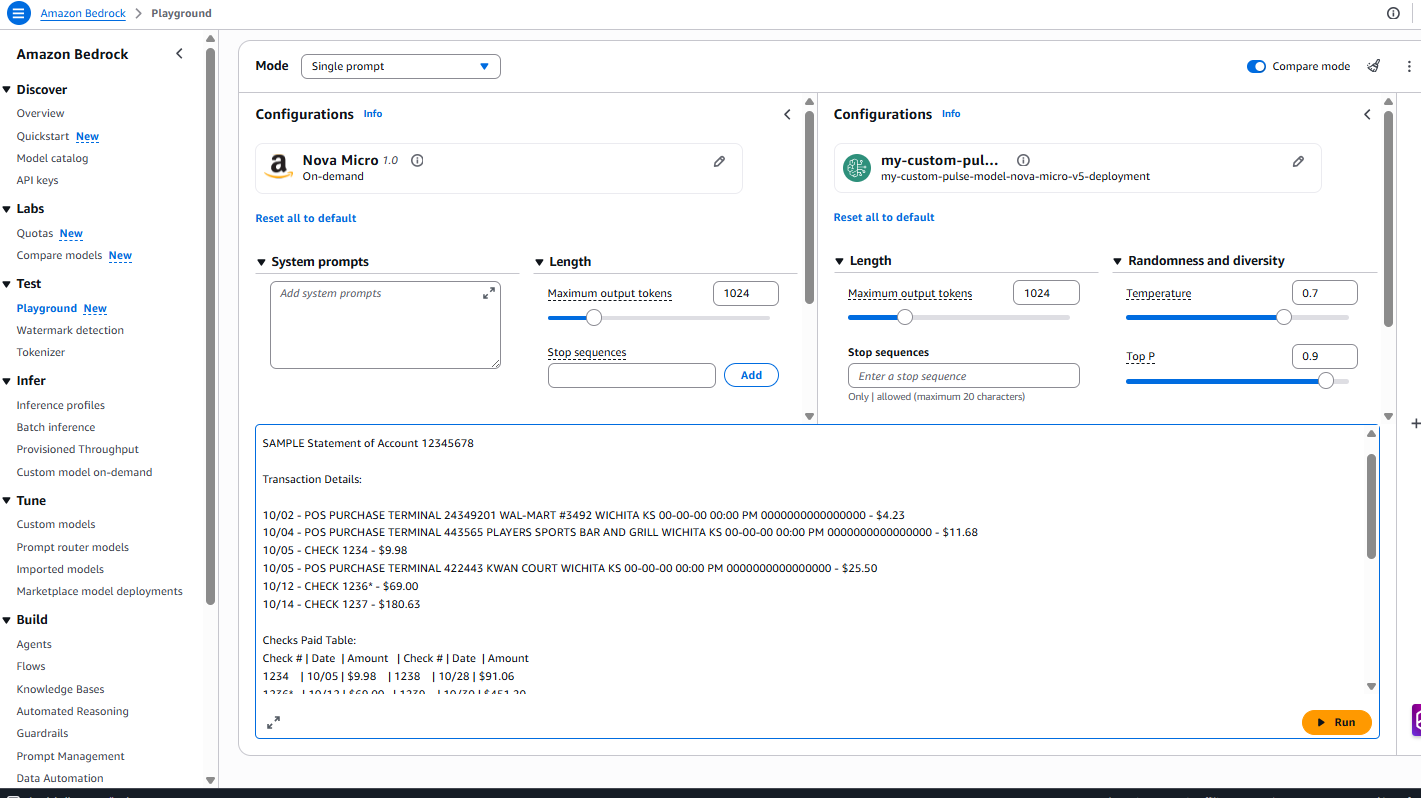
aws bedrock get-provisioned-model-throughput --provisioned-model-id <model-id> --region us-east-1Confirm the status shows “InService” before proceeding to testingTesting using the Amazon Bedrock playground.
Prompt used for testing :
Results:
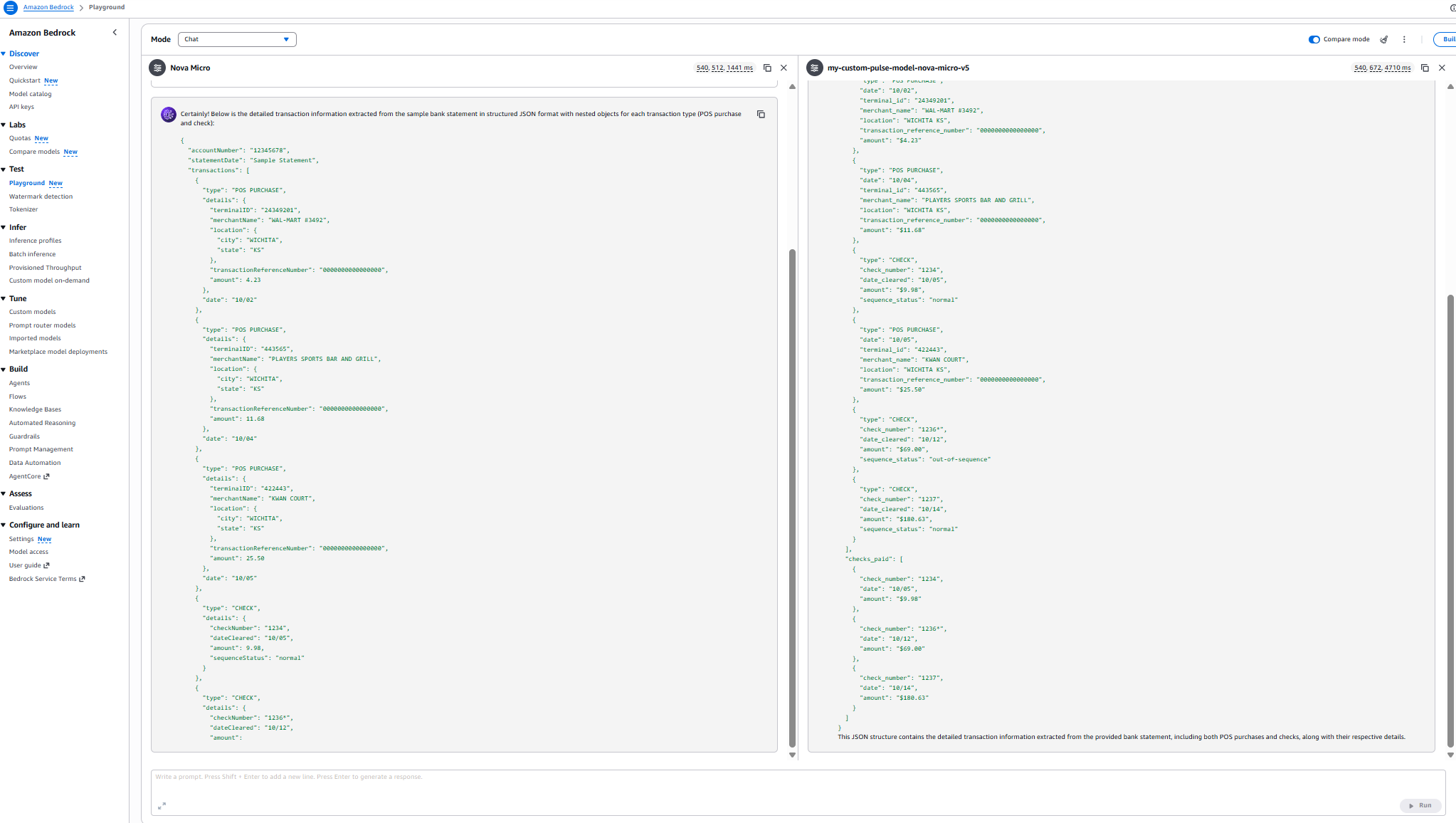
Performance comparison
Model comparison: Domain knowledge evaluation
| Metric | Nova Micro (Base) | my-custom-pulse-model-nova-micro-v5 |
| Latency | 540,508 ms (~9 min) | 543,600 ms (~9 min 3.6 sec) |
| Checks Extracted | 3 out of 6 | 6 out of 6 |
| POS Purchases Extracted | 3 out of 3 | 3 out of 3 |
| Transaction Organization | Separated by type | Chronological order |
| Completeness | 50% of check data | 100% of check data |
| Sequence Status Accuracy | Partial (3 checks) | Complete (all 6 checks) |
| JSON Structure | Segmented format | Unified transaction list |
| Domain Knowledge | Basic extraction | Comprehensive document understanding |
disclaimer :These metrics are specific to the sample document dataset. Your results will vary
Cleanup
Complete the following cleanup tasks to avoid incurring charges.
- Delete the instance profile:
aws iam delete-instance-profile --instance-profile-name BedrockTutorialProfile - Terminate the EC2 instance:
aws ec2 terminate-instances --instance-ids <instance-id> - Delete the security group:
aws ec2 delete-security-group --group-id <security-group-id> --region us-east-1 - Delete the key pair:
aws ec2 delete-key-pair --key-name <key-pair-name> --region us-east-1 - Delete the custom model deployment:
aws bedrock delete-custom-model-deployment --custom-model-deployment-identifier <deployment-name> --region us-east-1 - Delete the custom model:
aws bedrock delete-custom-model --model-identifier $CUSTOM_MODEL_ARN --region us-east-1
Warning: Data Loss Risk – The following commands will permanently delete all training data and outputs.
Before proceeding: 1) Verify the S3 bucket contains only tutorial data, 2) Back up any files that you need to retain, 3) Confirm that you have noted the bucket name correctly.
- Delete the fine-tuning training data from S3:
aws s3 rm s3://<your-bucket>/training-data/ --recursive - Delete the fine-tuning job outputs from S3:
aws s3 rm s3://<your-bucket>/output/ --recursive - Delete the S3 bucket if no longer needed:
aws s3 rb s3://<your-bucket> - Remove the IAM policies:
aws iam delete-role-policy --role-name AmazonBedrock-FineTuning-S3-Role --policy-name Bedrock-S3-Access-Policy- Delete the Secrets Manager secret:
aws secretsmanager delete-secret --secret-id pulse-api-key --force-delete-without-recovery --region us-east-1 - Delete the fine-tuning job:
aws bedrock stop-model-customization-job --job-identifier <job-arn> --region us-east-1
This AWS blog provides detailed instructions for iterative fine-tuning, so you can build upon previously customized models for continuous improvement without starting from scratch.Pulse converts unstructured documents into structured, schema aligned outputs. These outputs can be programmatically exported into JSONL datasets compatible with Amazon Bedrock fine-tuning requirements for text and vision models.This essentially lets Pulse handle the heavy lifting of extraction and data quality, while making it straightforward to generate the training datasets required for model customization on Amazon Bedrock.
Conclusion
By combining Pulse AI’s advanced document understanding with the ML capabilities of AWS, you can build financial data processing systems that are faster, more accurate, and more scalable than traditional approaches.This architecture demonstrates a production-ready approach to financial document processing using Amazon Bedrock and Pulse AI. Getting started with Pulse AI is straightforward.
Sign up for a Pulse AI Standard account to begin using fine-tuned models for your financial workflows. If you’re new to the system, the Pulse AI Quickstart Documentation provides step-by-step guidance to help you configure your first fine-tuning job and deploy custom models tailored to your organization’s needs. For personalized assistance or questions about implementing fine-tuning at scale, reach out to the team at hello@runpulse.com—they’re ready to help you unlock the full potential of domain-specific AI.
The real power of fine-tuning emerges when you supplement foundation models (FMs) with your organization’s unique financial datasets. By training models on your proprietary documents, terminology, and business processes, you create specialized capabilities that generic models typically cannot match. This approach transforms AI from a general-purpose tool into a strategic asset that understands the nuances of your specific financial domain.
Additional resources
To deepen your understanding of supervised fine-tuning and explore advanced implementation strategies, consult the AWS Nova Fine-tuning Guide and the documentation on customizing Amazon Nova Models. These resources provide technical details on hyperparameter improvements, data preparation best practices, and deployment patterns. The Pulse API Documentation provides comprehensive guidance for integrating production-grade document extraction capabilities into your existing workflows.
About the authors