Migrating to Amazon Quick doesn’t have to mean starting from scratch. Your dashboards encode hard-won domain knowledge: calculated fields your analysts perfected, layouts your executives rely on every Monday morning, security rules tuned to your org chart. You want AI-powered insights and serverless scale, but you’re staring at hundreds of dashboards and a migration estimate measured in months. Now you can significantly accelerate your migration to Amazon Quick, potentially reducing timelines from months to days.
In this post, we walk through the full journey, from setting up your migration workspace in AWS Transform to subscribing to partner agents through AWS Marketplace to unlocking Amazon Quick capabilities that change how your organization consumes data.
The real cost of staying on legacy BI
If you’re running a legacy BI tool, you face compounding pressures that go beyond licensing fees:
- You’re spending time on servers instead of analytics. Patching, scaling, and monitoring infrastructure takes effort away from the insights work that drives business value. Amazon Quick is serverless and fully managed, so there’s no capacity planning and no maintenance windows.
- Traditional BI tools require custom engineering for AI-powered answers. Amazon Quick includes native AI capabilities that your teams can use to ask business questions in natural language and automate workflows directly from dashboards.
- Your analysts wait too long for answers. Provisioning capacity, managing extracts, and troubleshooting performance creates bottlenecks. The Quick Sight SPICE in-memory engine delivers sub-second query performance at scale, and you can publish dashboards directly into your own applications using its embedded analytics APIs.
The case for modernization is clear. The question is how to do it without breaking what already works. To learn more about what Amazon Quick offers, see Getting Started with Amazon Quick.
AWS Transform, an AI-powered service built to accelerate enterprise modernization, now answers that how for BI migration. Organizations already use AWS Transform to modernize mainframe applications, transform Windows and SQL Server workloads, migrate VMware environments, and modernize custom applications. Now, the same agentic AI platform extends to BI migration. Wavicle Data Solutions, an AWS Advanced Consulting Partner, integrates the EZConvertBI agents directly into AWS Transform, bringing deep Tableau and Power BI migration expertise for accelerating your cloud journey.
How it works: A two-step, chat-based migration
In AWS Transform, you create a workspace and launch migration jobs through a conversational interface. For BI migration, Wavicle provides four specialized agents available for purchase through AWS Marketplace: one Analyzer agent and one Converter agent for each BI migration source (Power BI and Tableau).
Together, these agents deliver a guided, chat-based, AWS-native migration experience. Everything runs within your own AWS account: no data ever leaves your environment, no separate tools to procure, and no external data transfers to approve. This removes the security and procurement friction that typically slows migration projects.
Regardless of your source BI tool, the migration follows the same two-step process:In the Analyze step, the analyzer agent connects to your existing BI environment, extracts metadata only, cataloging dashboards, datasets, calculations, and dependencies across your workspaces, and generates a migration readiness assessment. The assessment includes a compatibility report that shows what will convert cleanly and what might require attention. It helps teams understand migration scope before proceeding.In the Convert step, you identify the dashboards to migrate and start a conversion job. The Converter agent rebuilds assets in Amazon Quick Sight, including datasets, calculated fields (both at the dataset and analysis level), visualizations and charts, filters, and parameters. This preserves the analytical logic that your teams spent years developing in your BI tool.
The agents use Amazon Bedrock, a fully managed service that provides the underlying AI capabilities needed for migration automation. Amazon Bedrock AgentCore (a secure runtime for hosting and managing AI agents) provides the execution environment, handling credential management through workload identities and AWS Identity and Access Management (IAM)-based access control. The domain expertise comes from Wavicle’s deep BI migration experience encoded into the agent logic.
Architecture overview
The solution is built on the following AWS-native services:
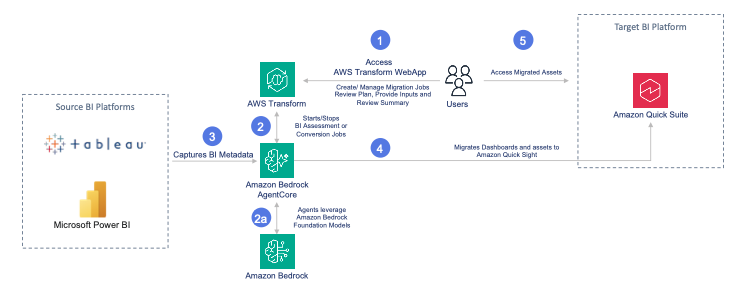
- AWS Transform is a collaborative enterprise IT transformation workbench powered by expert agents, agentic AI systems, and continuous learning that accelerates cloud migration, legacy app modernization, and tech debt reduction. It provides the orchestration layer with a conversational interface powered by Amazon Bedrock, so you can create and manage migration jobs through chat, track progress across workspaces, and coordinate across teams.
- Amazon Bedrock AgentCore serves as the secure runtime environment, managing agent execution, credential storage through workload identities, and IAM-based access control.
- Amazon Quick Sight acts as the target BI service, offering serverless scalability, SPICE in-memory engine performance, and native integration with AWS data services.
- Amazon Simple Storage Service (Amazon S3) stores validation reports and migration artifacts for audit and review purposes.
Your migration journey
Here’s what the full experience looks like, from first selection to migrated dashboards in Amazon Quick Sight:
Step 1: Complete the prerequisites on your source BI
Before running your first migration, you must prepare your source BI tool so the agent can read your dashboard metadata:
- For Power BI: Configure workspace access and service principal authentication so the agent can read your Power BI tenant metadata. For instructions, see Power BI Prerequisites.
- For Tableau: Enable the Metadata API on your Tableau Server and generate a Personal Access Token (PAT) for authenticated API access. For instructions, see Tableau Prerequisites.
Step 2: Set up AWS Transform and Subscribe through AWS Marketplace
Follow the steps in this interactive demo.
AWS Transform provides the orchestration layer for your entire migration. It deploys specialized AI agents that automate assessments, dependency mapping, and transformation planning. Everyone works in the same shared workspace, collaborating in real time, tracking progress, and managing the migration from start to finish. Because AWS Transform executes tasks in parallel, you can convert hundreds of dashboards simultaneously without sacrificing quality or control.
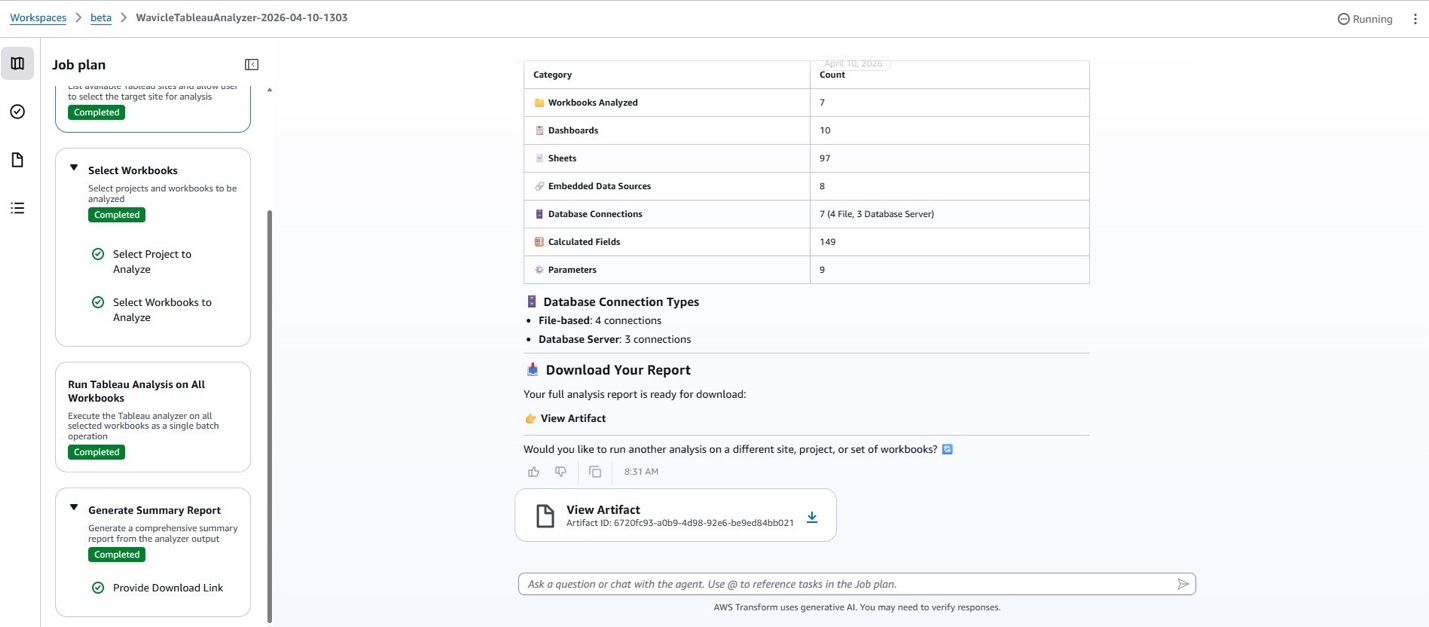
Step 3: Analyze your BI dashboards
Follow the steps in this Power BI Analyzer agent interactive demo or Tableau Analyzer agent interactive demo.
The comprehensive analysis report captures complexity across various dimensions such as number of data sources, analytical calculations, consumption nuances like conditional rules, and cross-dashboard dependencies. This allows migration project managers to define a migration execution plan based on priority and utility of the dashboards, even before committing to additional resources.
Step 4: Convert your BI dashboards
Follow the steps in this Power BI Convertor agent interactive demo or Tableau Convertor agent interactive demo.
The Converter agent rebuilds your selected dashboards in Amazon Quick: datasets with mapped data sources and data types, calculated fields at both the dataset and analysis level, visualizations with preserved chart types and formatting, and filter controls with parameter inputs. Throughout the conversion, you can monitor progress directly in the AWS Transform chat interface.
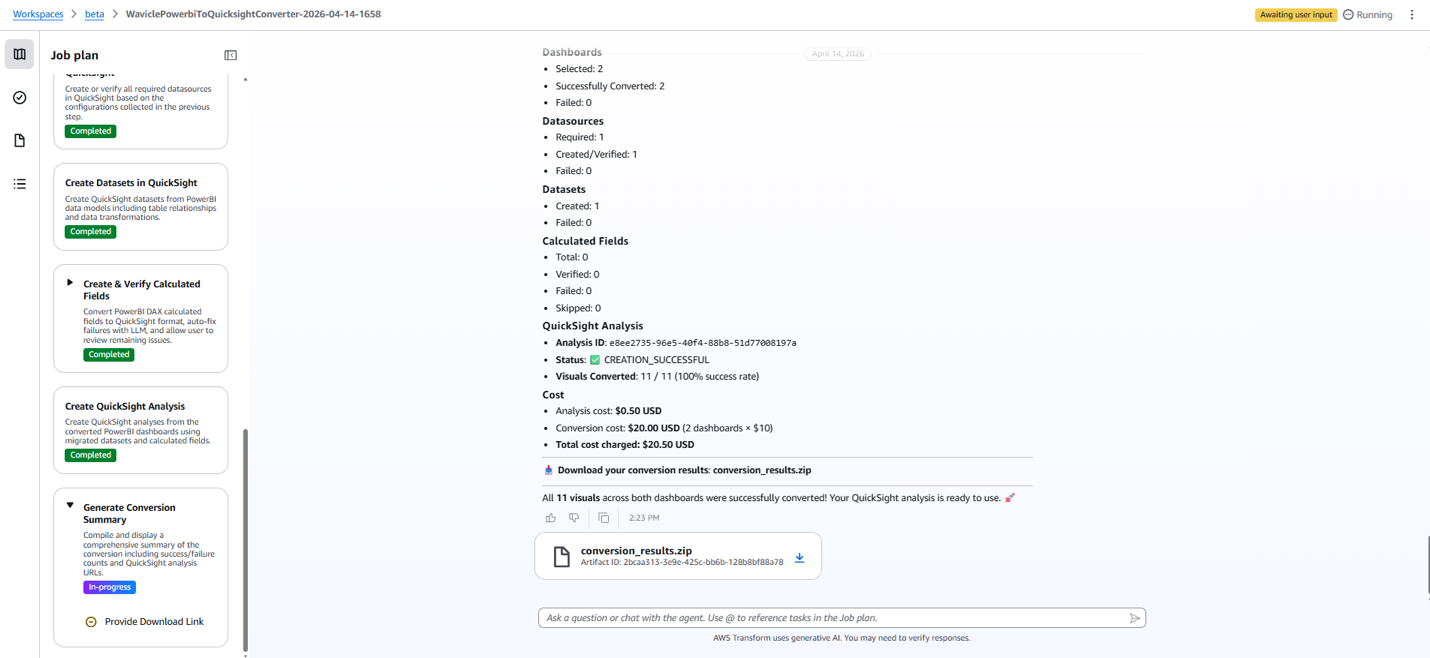
After the conversion completes, you receive your Quick Sight assets and can begin the final validation and go-live process.
After migration: From converted to production-ready
The migration agent delivers your converted assets: Quick Sight datasets and analyses, including calculated fields, visuals, controls, and parameters. These are the building blocks. What comes next, governance, validation, and publishing, is owned by your team. This deliberate handoff helps maintain quality and clear accountability.Note: The assessment report flags components that might need manual refinement after migration, such as parameters, custom SQL, tool-specific calculations, and third-party visuals. There are no surprises at this stage.
For Quick admin: Assign ownership and configure governance
As Quick Sight administrator (the role configured in the Quick Sight connector), you assign ownership of each migrated dashboard to the appropriate BI authors.User authentication and directory structures in your source BI tool rarely map one-to-one to Amazon Quick Sight. For example, Tableau environments often rely on Active Directory groups, while Power BI uses workspace-level service principals. The migration agent transfers the analytical assets, not the access controls. You must manually configure user permissions, row-level security (RLS), and sharing settings in Quick Sight to match your organization’s requirements. For enterprises with complex directory hierarchies, plan for this as a distinct workstream.
This step establishes clear accountability: who owns each dashboard’s accuracy, who maintains it, and who controls access. Nothing goes live until permissions are properly configured.
For Quick authors: Validate and accept
You receive the assigned dashboards and own UAT. This means verifying that visualizations, calculated fields, filters, and interactivity match the source through side-by-side metric comparison, testing drill-downs and dashboard actions, and confirming layout consistency. Because the migration agent doesn’t carry over permissions or row-level security, consider verifying that the right users can access the right data in Quick Sight. BI authors know their dashboards better than automated tools do. The agent gets the structure across. Your team confirms the substance is right.
Publish and go live
After validation, Quick authors publish their dashboards: configuring sharing permissions, setting up email subscriptions, and setting up embedding if needed. For larger migrations, you can learn more about Amazon Quick Sight asset deployment APIs to automate permission assignments and dashboard distribution at scale. At that point, the original source dashboards can be archived.
With your dashboards live in Amazon Quick, your teams unlock capabilities that weren’t possible with your legacy BI tool: natural language queries, automated analysis across enterprise data sources, and data-driven actions directly from dashboards.
Get started
You’ve seen the full journey, from Marketplace subscription to production-ready dashboards. Here’s how to take the first step:
- Explore the Power BI to Quick Sight Agents and Tableau to Quick Sight Agents.
- Access user guide and interactive demo on Wavicle Data Solutions website.
- Contact your AWS account team to discuss your migration requirements and explore available programs for free or discounted Amazon Quick migrations.
Whether you’re migrating 10 dashboards or 10,000, AWS Transform gives you a governed, repeatable path to Amazon Quick. Combined with Amazon Bedrock AI capabilities and Wavicle’s migration expertise, your team can stop managing BI infrastructure and start getting insights faster. And because AWS Transform is the one place to go for all your modernization needs, you can use the same workbench for your next modernization challenge.You have invested years in your dashboards. Now bring them to Amazon Quick in days and start asking questions your legacy BI tool could never answer.
About the authors