Architecture documentation remains one of the most persistent challenges in software development as code bases evolve rapidly. Development teams often spend hours manually creating architecture diagrams, only to watch them become outdated within weeks of deployment. This documentation gap creates knowledge silos, slows developer onboarding, and complicates compliance audits.
Amazon Bedrock AgentCore is the platform to build, connect, and optimize agents at scale with any framework or model. It provides a solution through autonomous agents that can analyze code bases, generate architecture diagrams, and maintain searchable documentation automatically. This agentic approach uses iterative refinement and self-correction to coordinate code analysis, diagram generation, and automated publishing through AWS services.
In this post, you’ll learn how a global interdealer broker built an automated architecture documentation pipeline that integrates with existing continuous integration and continuous delivery (CI/CD) workflows. The solution combines AgentCore for code analysis, Amazon Bedrock Knowledge Bases for semantic search capabilities, and AWS CodePipeline for continuous deployment. We developed and validated this approach with a global financial services firm specializing in interdealer broking across major financial markets, where it has been running in production since Q1 2026 to maintain architecture documentation across their electronic trading platform.
The architecture documentation challenge
Development teams face several critical pain points with architecture documentation:
- Time-intensive manual processes – Creating comprehensive architecture diagrams in formats like Unified Modeling Language (UML) or Mermaid is labor-intensive. For large code bases, this becomes unsustainable.
- Rapid obsolescence – Code changes daily, but documentation updates lag. Within weeks, diagrams no longer reflect reality, making them unreliable for decision-making.
- Knowledge silos – Tribal knowledge disappears when team members leave. Legacy systems become “black boxes,” forcing new developers to reverse-engineer code, slowing onboarding and reducing organizational knowledge.
- Compliance gaps – Security reviews and audits require current architecture diagrams. Outdated documentation creates compliance risks and delays certification.
These challenges compound in microservices architectures, where understanding service dependencies and message flows is critical for preventing cascading failures.
Solution overview
Our solution uses AgentCore to create an autonomous agent that analyzes .NET code bases and generates comprehensive architecture diagrams. The agent operates within an AWS CodePipeline, triggered on code commits to AWS CodeCommit repositories. Generated diagrams and their metadata are then ingested into Amazon Bedrock Knowledge Bases to support semantic search and natural language querying over the full corpus of architecture documentation. This gives you a clearer picture of the current state of the architecture and unlocks business value from that level of visibility.
Key components
The solution integrates several AWS services to deliver a streamlined workflow:
| Service Name | Responsibility |
| Amazon Bedrock AgentCore | Provides the serverless runtime environment for our autonomous documentation agent. AgentCore handles agent lifecycle management, automatic scaling, and tool orchestration without requiring infrastructure management. |
| AWS CodePipeline | Orchestrates the end-to-end workflow from code commit to published documentation. The pipeline integrates directly with AWS CodeCommit, triggering documentation generation on every push to the main branch. |
| Amazon Simple Storage Service (Amazon S3) | Stores generated diagrams and hosts the documentation website, providing durable storage and global accessibility. A dedicated Architecture Diagrams bucket holds Scalable Vector Graphics (SVG) files, Mermaid source files, and diagram metadata. Amazon S3 also serves as the vector store backend for Amazon Bedrock Knowledge Bases. |
| AWS CodeBuild | Executes the pipeline stages, including dependency installation, agent invocation, and artifact preparation. |
| Amazon Bedrock Knowledge Bases | Serves as the retrieval and presentation layer for generated architecture documentation. Diagram metadata, Mermaid source files, and descriptions stored in Amazon S3 are ingested into a Knowledge Base using the Amazon Titan Text Embeddings model. With Amazon S3 as the vector store, it supports semantic search and natural language querying. |
The following architecture diagram illustrates the overall system design from pushing the code into AWS CodeCommit through diagram generation to ingestion into Amazon Bedrock Knowledge Bases.
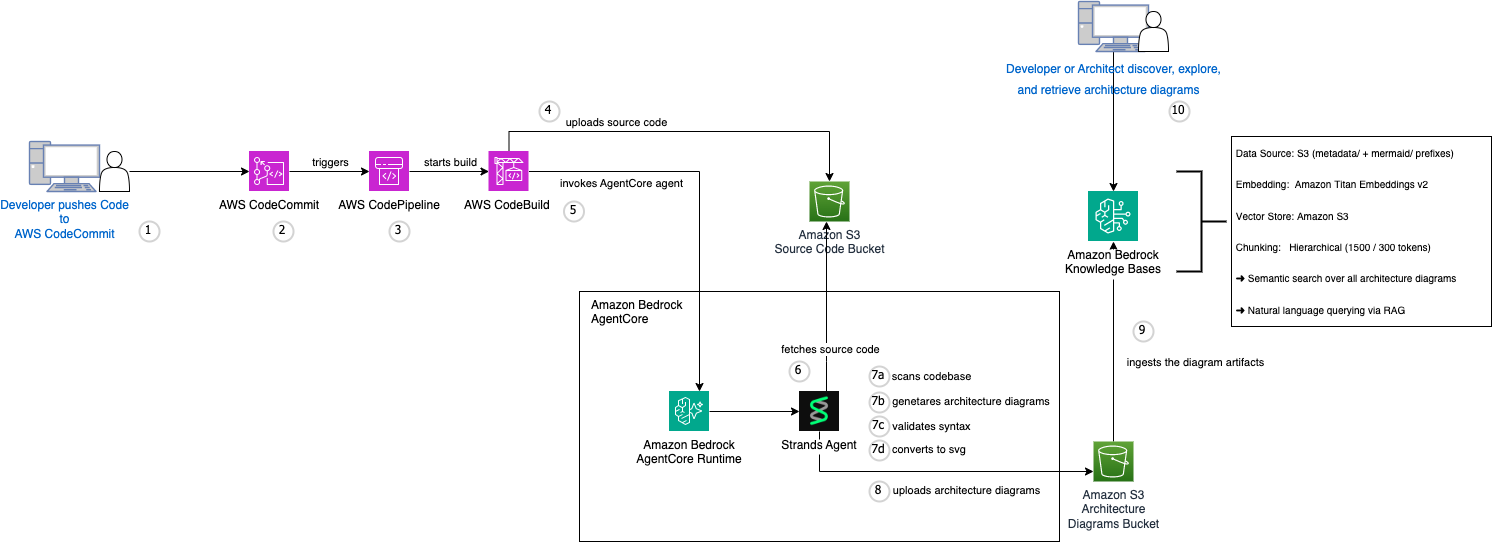
Figure 1: Overall system design from AWS CodeCommit through diagram generation to Amazon Bedrock Knowledge Bases ingestion
This workflow involves the following steps:
- Developer pushes the code changes to AWS CodeCommit.
- AWS CodeCommit triggers AWS CodePipeline execution.
- AWS CodePipeline starts the build process.
- AWS CodeBuild fetches code from the AWS CodeCommit repository, then packages and uploads the source code to the Amazon S3 source code bucket.
- AWS CodeBuild invokes AgentCore. It prepares the invocation payload and calls the AgentCore-hosted Strands agent. The agent uses a large language model available through Amazon Bedrock as its reasoning engine to analyze code patterns, generate diagram syntax, and self-correct validation errors. For model availability by Region, refer to Supported models by AWS Region in Amazon Bedrock.
- Strands agent fetches source code from Amazon S3.
- Strands agent scans the code base, generates diagrams, validates syntax, and converts diagrams to SVG files for iterative refinement.
- Strands agent uploads artifacts to the Amazon S3 Architecture Diagrams bucket, including rendered SVG files, Mermaid source files, and diagram description metadata (JSON).
- Amazon Bedrock Knowledge Bases ingests the diagram artifacts from the Amazon S3 Architecture Diagrams bucket. The ingestion pipeline uses the Amazon Titan Text Embeddings v2 model to generate vector embeddings, applies chunking to segment diagram descriptions and Mermaid source into semantically meaningful units, and stores the resulting vectors in the Amazon S3 vector store. This supports semantic search and retrieval-augmented generation (RAG) over the complete architecture documentation.
- Developers and stakeholders query the knowledge base through natural language to discover, explore, and retrieve relevant architecture diagrams and their contextual explanations: for example, asking “What does the reconnection activity flow look like?” or “List all class diagrams for infrastructure components.”
Code analysis and prioritization
The agent begins by analyzing the code base structure. Rather than processing every file, it focuses on production code while excluding test files, build artifacts, and generated code. This prioritization reduces processing time and improves diagram relevance.
The scan identifies key architectural elements including interfaces, abstract classes, concrete implementations, and their dependencies. This structured analysis provides the agent with the context needed to generate accurate diagrams.
Deploying the documentation agent with Amazon Bedrock AgentCore
You can use AgentCore to host an autonomous documentation agent that uses the Strands agent for iterative refinement and self-correction.
The agent makes tool-usage decisions based on its analysis of the code base and the current state of diagram generation. This agentic approach allows self-correction when validation errors occur, significantly improving reliability compared to single-shot API calls.
Agentic workflow
The agent follows an iterative workflow that mirrors how a human architect would approach documentation:
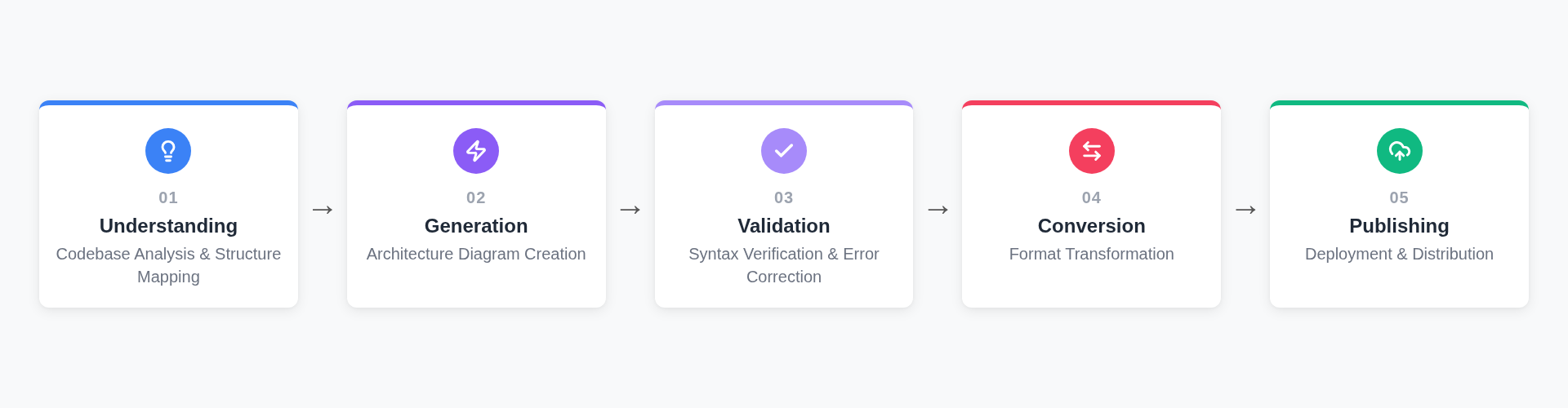
Figure 2: Iterative agent workflow across understanding, generation, validation, conversion, and publishing phases
Phase 1 – Understanding: The agent fetches source code from Amazon S3 and scans the code base to understand the overall structure, identifying key components, interfaces, and relationships.
Phase 2 – Generation: For each of the architecture diagram types, the agent uses foundation models available through Amazon Bedrock to generate Mermaid-based UML from its analysis. The diagrams include class, sequence, state, component, and activity diagrams.
Phase 3 – Validation: After generating each diagram, the agent validates the Mermaid syntax. If it detects errors, the agent analyzes the error messages and regenerates the diagram with corrections.
Phase 4 – Conversion: Once validated, the agent converts diagrams to SVG format for high-quality rendering in web browsers.
Phase 5 – Publishing: The agent uploads artifacts, SVG files, Mermaid source files, and diagram metadata to the Amazon S3 Architecture Diagrams bucket.
This iterative approach achieves 95% reliability compared to 65% with single-shot API calls, because the agent can detect and correct errors autonomously.
AWS CodePipeline integration
The pipeline orchestrates the entire workflow from code commit to published documentation and Knowledge Base ingestion:
The pipeline uses AWS CodeBuild for execution, providing a consistent environment with the necessary dependencies. AWS Identity and Access Management (IAM) roles grant the pipeline permissions to access AWS CodeCommit, invoke AgentCore, publish to Amazon S3, and trigger Amazon Bedrock Knowledge Bases ingestion. Following the publishing step, an ingestion job ingests the updated output into the knowledge base, so that the semantic search index stays current with every code change.
Output formats
The solution generates multiple output formats. SVG diagrams provide high-quality, scalable vector graphics. Mermaid source files provide version-controlled, editable diagram definitions. Metadata JSON files power the Amazon Bedrock Knowledge Bases semantic search layer for natural language discovery of diagrams.
Knowledge base configuration and presentation layer
The solution integrates Amazon Bedrock Knowledge Bases, the fully managed RAG capability, as a semantic retrieval layer, transforming static diagrams into a queryable knowledge system that stays synchronized with the code base.
For each generated diagram, the agent also creates an accompanying metadata file, stored alongside the SVGs and Mermaid files in the Architecture Diagrams bucket.
Knowledge base setup
The knowledge base is configured with three components:
Data source: The Amazon S3 Architecture Diagrams bucket, scoped to the metadata/ and mermaid/ prefixes to index only semantically rich content such as diagram descriptions and source definitions, rather than raw SVG binary data.
Embedding model: Amazon Titan Text Embeddings v2 generates 1,024-dimensional vectors supporting up to 8,192 tokens per chunk, providing high-quality semantic representations of diagram content.
Vector store: Amazon S3 serves as the vector store backend, eliminating the need for a separate vector database and aligning with the solution’s serverless approach.
Chunking strategy: Hierarchical chunking with 1,500-token parent chunks for full diagram context and 300-token child chunks for granular entity-level retrieval. With this strategy, the knowledge base returns either a complete diagram description or a focused response about a specific entity, depending on the query.
Querying the knowledge base
Once ingestion completes, developers can query the knowledge base using natural language through the Amazon Bedrock console, Amazon Bedrock AgentCore, or a custom application with the RetrieveAndGenerate API. For example, a query such as “What reconnection strategy does the system use?” surfaces the activity diagram with its exponential backoff description.
The knowledge base refreshes with each pipeline run to keep results current with code base changes.
Cost analysis
Understanding the cost structure helps you plan your documentation automation strategy. For current rates, see Amazon Bedrock pricing. To estimate costs for your specific usage, use the AWS Pricing Calculator. The following pricing estimates are based on rates as of May 2026.
Per-repository cost breakdown
For a medium-sized repository with approximately 1,500 files, the costs break down as follows. Amazon Bedrock model inference calls depend on the selected model and token usage. Refer to the AWS Pricing Calculator for estimates.
- Input tokens: Approx. 29,000 tokens.
- Output tokens: Approx. 10,000 tokens.
- Total per generation: Approx. $0.24.
AWS CodePipeline: $1.00 per active pipeline per month (first pipeline free)
AWS CodeBuild: $0.005 per build minute × 5 minutes = $0.025 per execution
Amazon S3 storage: Negligible for documentation artifacts (typically under 10 MB)
Amazon Bedrock Knowledge Bases: Ingestion costs are based on the Amazon Titan Text Embeddings v2 token usage for embedding generation. For the metadata and Mermaid files produced by seven diagrams, embedding costs are typically under $0.01 per ingestion run. Amazon S3 vector store storage costs are negligible.
Total cost per generation: ~$0.28.
Multi-repository projections
For organizations with multiple repositories, weekly documentation updates scale linearly:
- 5 repositories: $1.40/week → $5.60/month.
- 20 repositories: $5.60/week → $22.40/month.
- 50 repositories: $14.00/week → $56/month.
- 100 repositories: $28.00/week → $112.00/month.
Return on investment
The return on investment (ROI) becomes clear when comparing automated documentation to manual alternatives:
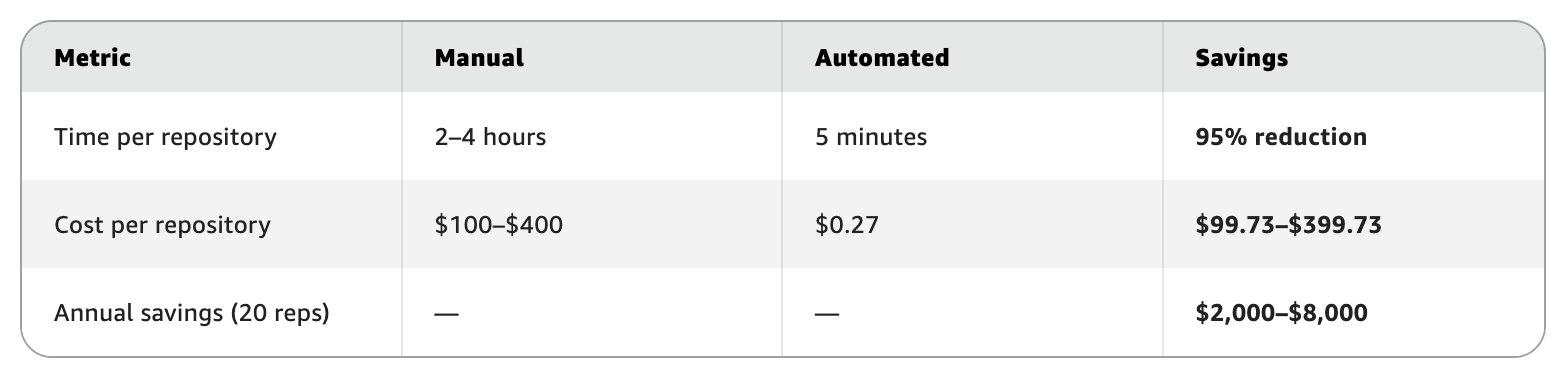
Figure 3: Return on investment comparison of automated versus manual documentation
For an organization with 20 repositories, you can achieve annual savings of $2,000–$8,000 in developer time. Additionally, up-to-date documentation that is made discoverable through Amazon Bedrock Knowledge Bases improves onboarding, compliance, and architectural decision-making.
Solution walkthrough
This section walks you through deploying the solution in your own AWS environment. We cover the prerequisites, deployment steps, and key configuration details to get the pipeline running against your code base.
Prerequisites
Before deploying the solution, make sure you have the following AWS services enabled, permissions configured, and technical familiarity in place.
AWS account setup: Make sure your AWS account has access to Amazon Bedrock with Claude Sonnet and Amazon Titan Text Embeddings v2 enabled in your target region (us-east-1 recommended for model availability).
IAM permissions: Create an AWS IAM role for AWS CodePipeline with permissions for:
- AWS CodeCommit repository access.
- AWS CodeBuild project execution.
- AgentCore invocation.
- Amazon Bedrock Knowledge Bases StartIngestionJob and Retrieve actions.
- Amazon S3 bucket read/write access (source, diagrams, and vector store buckets).
- Amazon CloudWatch Logs creation.
- AWS Cloud Development Kit (AWS CDK) Bootstrap:
cdk bootstrap aws://ACCOUNT_ID/us-east-1.
Technical skills (300–400 level requirements):
- .NET code bases: You need familiarity with standard .NET project structures and common coding patterns.
- CI/CD pipelines: You need basic understanding of automated build and deploy pipelines (preferably AWS CodePipeline).
- AWS CDK: You need experience deploying infrastructure as code using AWS CDK.
- Architecture visualization: You need comfort with interpreting technical diagrams and architectural patterns.
Repository structure: The solution works best with code bases that follow standard .NET project conventions, with source code in a src/ directory and clear separation between production and test code.
Deployment steps
With prerequisites in place, follow these steps to deploy the end-to-end pipeline. Each step builds on the previous one, so complete them in order.
- Deploy the AgentCore agent: Use the AgentCore CLI to package and deploy your agent code to AWS.
- Create AWS CodePipeline: Configure a pipeline with source, build, and deploy stages connected to your AWS CodeCommit repository.
- Configure Amazon S3 buckets: Create buckets for source code staging and documentation hosting, with appropriate lifecycle policies.
- Create the Amazon Bedrock Knowledge Bases: Configure a Knowledge Base with the Amazon S3 Architecture Diagrams bucket as the data source (scoped to metadata/ and mermaid/ prefixes), Amazon Titan Text Embeddings v2 as the embedding model, and Amazon S3 as the vector store. Set hierarchical chunking with 1,500-token parent and 300-token child chunks.
- Set up monitoring: Configure Amazon CloudWatch alarms for pipeline failures and AgentCore invocation errors.
- Test the pipeline: Trigger a manual execution to verify end-to-end functionality, including Knowledge Base ingestion and query results, before enabling automatic triggers.
- Cleanup: To avoid incurring ongoing charges, delete the resources created during this walkthrough when you no longer need them:
Real-world use cases
Amazon Bedrock Knowledge Bases accelerates developer onboarding, enables safe legacy modernization, supports audit-ready compliance, and boosts discoverability by transforming static diagrams into searchable, natural-language queries. It also fosters cross-team collaboration on microservices and helps identify technical debt by visualizing system complexities and dependencies through generated diagrams.
For a global interdealer broker, the solution generates seven diagram types across 20 repositories and services on a weekly cadence, maintaining current architecture documentation for their electronic trading platform. This supports compliance audits, developer onboarding, and cross-team visibility into service dependencies for real-time trading flows.
Benefits
This solution has been running in production since December 2025 at a large financial services firm, a strategic AWS customer operating across 20 repositories, generating over 140 architecture diagrams weekly with zero manual overhead.
Based on internal measurements over six months of continuous production use, the measurable business impact has been substantial. Delivery timelines compressed from 10 days to 3 days. Message throughput doubled, and mean time to recovery reduced by 20%. Production incidents decreased by 30%. Audit preparation and architecture decision records, previously a 2-week effort, now complete in 2 days. Developer onboarding accelerated from 4 weeks to 1 week.
Documentation that once consumed 2 to 4 hours per repository now takes 5 minutes. The agentic approach delivers 40% cost savings over single-shot API calls, and the serverless architecture spanning AgentCore, Amazon S3, and Amazon Bedrock Knowledge Bases scales automatically across the entire estate without infrastructure management.
This is not a proof of concept. It is a large-scale, multi-agent production system solving a real and recurring customer problem: maintaining comprehensive, searchable, and always-current architecture documentation at enterprise scale.
Next steps
To implement this solution in your organization:
- Start with a pilot project using 5–10 repositories to validate the approach.
- Gather feedback from developers and architects on diagram quality, usefulness, and Knowledge Base query relevance.
- Expand to more repositories and customize diagram types for your specific needs.
- Integrate with your existing documentation systems such as Confluence or internal wikis, and connect Amazon Bedrock Knowledge Bases to chat interfaces or developer portals for self-service access.
- Explore advanced knowledge base features such as metadata filtering for repository-scoped queries and multi-turn conversation support for interactive architecture exploration.
Conclusion
Automating architecture documentation with AgentCore and AWS CodePipeline transforms a manual, time-consuming process into a smooth, scalable workflow. The agentic approach delivers reliability through self-correction, cost efficiency through focused model interactions, and infrastructure independence through serverless design. Amazon Bedrock Knowledge Bases extends this value by making the generated documentation instantly discoverable through natural language, so architecture knowledge is not only current but also accessible to every stakeholder.
A global interdealer broker demonstrates this in production today, generating over 140 diagrams weekly across 20 repositories without manual overhead, turning what was a multi-hour weekly task into an automated, queryable knowledge system. By adopting this solution, teams maintain comprehensive, up-to-date, and searchable architecture documentation without traditional overhead, which supports faster onboarding, compliance readiness, and smarter architectural decisions.
About the authors