Your prospects leave trails across multiple sources: a founder asks “What should I use for X?” in r/SaaS while their product launches on Hacker News. Stack Overflow questions spike. A GitHub repo crosses 2,400 stars. Each signal alone is noise, but correlated across sources, they reveal a prospect ready to buy. Multi-agent systems built with Strands Agents and Amazon Bedrock AgentCore can automate this social intelligence at scale.
Thrad.ai is building the advertising infrastructure for AI, introducing paid ads in LLMs. Their platform lets chat interfaces monetize through ads and lets brands advertise in them. They faced an especially signal-rich version of this problem. Tracking these patterns manually doesn’t scale, and generic outreach lacks the context that makes email worth opening. Thrad.ai’s sales team spent 30 to 45 minutes researching each lead across six sources before writing one outreach email.
A single AI agent can’t solve this: the signal diversity is too broad, the source APIs too varied, and the analysis too nuanced for one model to handle well. With multi-agent orchestration, you assign each source to a specialist agent, then fuse results through a dedicated analysis agent that spots cross-source patterns.
This post shows how Thrad.ai deployed a multi-agent system with Strands Agents and Amazon Bedrock AgentCore that automates the pipeline from prospect discovery through personalized email generation. The post compares two orchestration patterns (Swarm and Graph) with head-to-head benchmarks on latency, cost, and email quality. You’ll also learn how the system scores prospects using weighted criteria, intent classification, and temporal decay, plus governance controls for production deployment.
You can apply these patterns to competitive intelligence, candidate sourcing, and market research. A companion repository is available to help you follow along.
Prerequisites
This post assumes familiarity with Python, AWS Cloud Development Kit (AWS CDK) basics, and large language model (LLM) concepts.
- AWS account with Amazon Bedrock access (Claude Sonnet 4.6 model enabled) and Amazon Bedrock AgentCore.
- Permissions for Amazon DynamoDB, AWS Lambda, AWS Secrets Manager, and AWS CDK.
- Python 3.12+, Node.js 18+
strands-agents>=1.25.0,bedrock-agentcore[strands-agents]>=1.2.1,pydantic>=2.12.5- Approximately 60 minutes for hands-on deployment, approximately $3 to $5 (Amazon Bedrock model invocations).
- Important: Deployed resources (DynamoDB tables, Lambda functions, AgentCore services) incur charges while running. Complete the Clean up steps after finishing the tutorial to avoid ongoing costs.
Note: You can follow this post conceptually without deploying. To run the code yourself, you’ll need the preceding prerequisites.
Full setup guide: README.md
Solution overview
With this architecture illustrated in Figure 1, you can turn raw social signals into personalized outreach automatically. Four specialized agents handle discovery, enrichment, scoring, and email generation, each with its own tools and strict output validation.
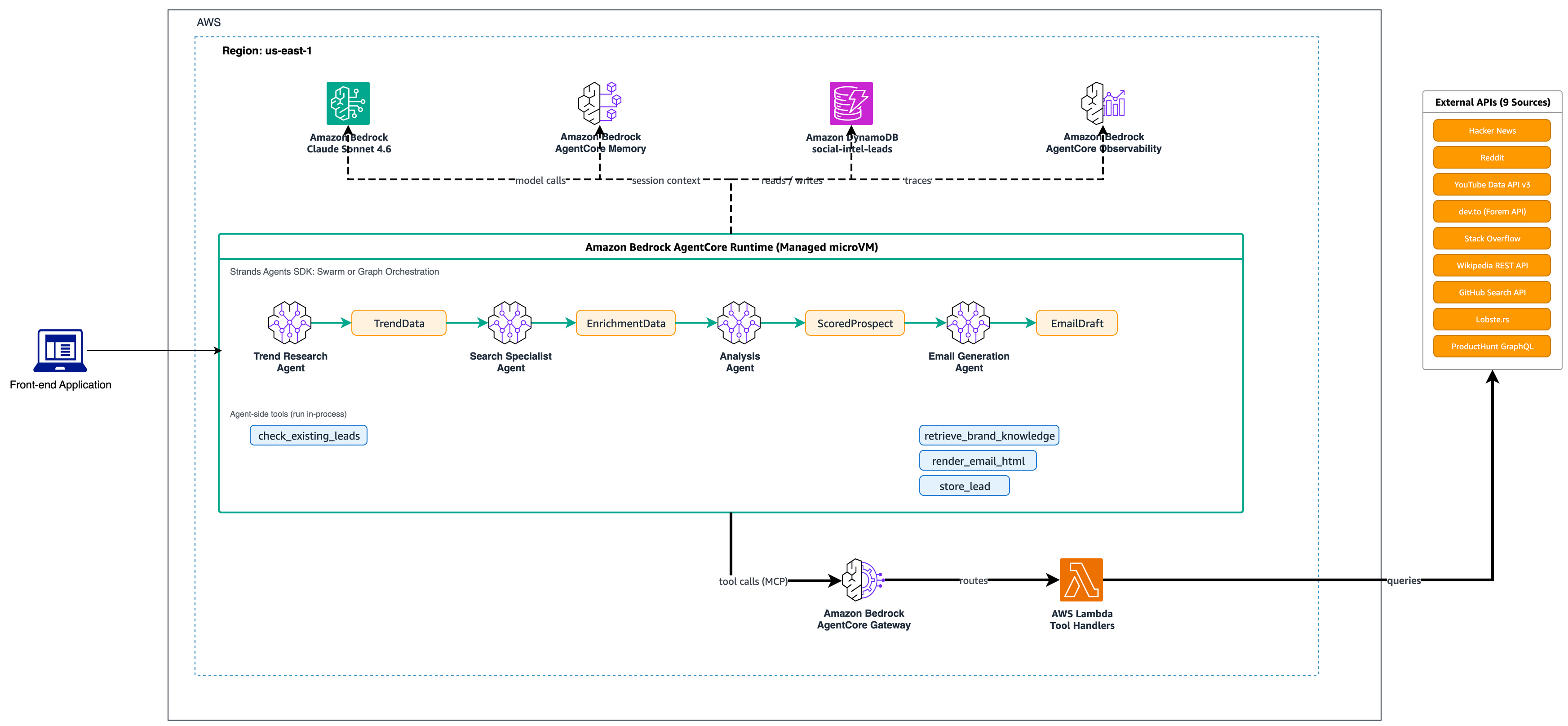
Four-agent pipeline with Amazon Bedrock AgentCore Runtime, Gateway, Memory, and Observability
The following table describes each agent’s role, tools, and the AgentCore services it uses.
| Agent | Role | Tools | AgentCore Services |
| Trend Research | Discovers trending launches and buying-intent signals | Hacker News, YouTube, dev.to, ProductHunt, Reddit, Stack Overflow APIs | Runtime, Gateway |
| Search Specialist | Enriches prospect profiles with context | Wikipedia, GitHub, Lobste.rs, Stack Overflow APIs | Runtime, Gateway |
| Analysis | Scores prospect-trend pairs (0-100) | Scoring engine, ICP matcher | Runtime, Memory |
| Email Generation | Drafts personalized outreach | Brand knowledge retrieval, lead storage | Runtime, Gateway, Memory |
Two agents start data collection in parallel. The Trend Research Agent queries six sources (Hacker News, YouTube, dev.to, ProductHunt, Reddit, Stack Overflow) for trending launches and buying-intent signals. Meanwhile, the Search Specialist Agent enriches each prospect via Wikipedia, GitHub, Lobste.rs, and Stack Overflow.
After both agents finish, the Analysis Agent scores each prospect-trend pair from 0 to 100 using Claude Sonnet 4.6 on Amazon Bedrock. The agents use a global inference profile (global.anthropic.claude-sonnet-4-6), which routes requests to the nearest available Region. This avoids region-specific model ARNs in IAM policies and streamlines multi-Region deployment. High-scoring prospects flow to the Email Generation Agent, which drafts personalized email messages tied to specific trends and validates each draft against brand guidelines.
Each agent owns one responsibility, one set of tools, and one Pydantic-validated output contract. Pydantic is a Python data validation library that enforces type-safe schemas at runtime. If an agent returns data in the wrong shape, the system catches it before the next agent sees it.
The Reddit tool scans five subreddits (r/SaaS, r/startups, r/devtools, r/selfhosted, r/Entrepreneur) and uses keyword pattern matching to classify posts into four intent categories: recommendation-seeking, competitor frustration, product launch, and purchase intent. When a Hacker News launch also appears in a Reddit “what tool should I use?” thread, that prospect scores higher.
The scoring relies on signal triangulation: a prospect needs correlated evidence from at least two independent sources. The Trend Research Agent first calls check_existing_leads to skip prospects already in the pipeline. A trending Hacker News post with no Reddit discussion, no Stack Overflow activity, and zero GitHub stars likely reflects a promotional push. The system filters it before spending tokens on analysis.
The Analysis Agent applies five weighted criteria: topical alignment (25%), timing relevance (20%), engagement potential (20%), intent signals (20%), and data quality (15%). Ideal customer profile (ICP) matching adds up to 10 bonus points for developer tools with open source presence and B2B focus. Temporal decay sharpens the score: signals under 24 hours old get 1.5x weight, signals over 7 days get 0.5x.
Strands orchestration: Swarm vs. Graph
Now comes the central design decision: how do four agents coordinate? Strands Agents provides two orchestration patterns. Thrad.ai built both and compared them against the same 50-prospect workload. The following sections walk through each pattern, then present benchmark results.
Swarm: Autonomous handoffs
Figure 2 illustrates how agents are passing control via the handoff_to_agent tool with shared context. In Swarm orchestration, agents pass control dynamically using a handoff_to_agent tool. The Trend Research Agent discovers prospects and hands off to Search Specialist for enrichment. Search Specialist passes to Analysis for scoring. If data is sparse, Analysis can hand back to Trend Research for additional context. Agents share a common working memory.
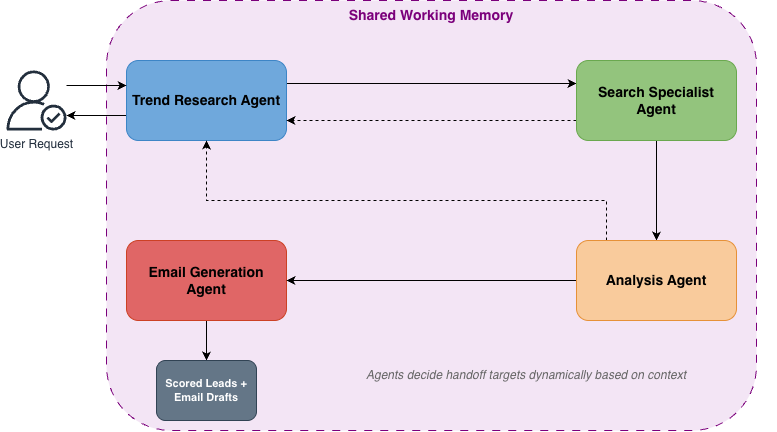
Dynamic agent-to-agent transfers with shared working memory
Swarm agents act as self-organizing peers with shared context, where each agent decides when to hand off to a specialist. Trend Research discovers a prospect and hands off to Search Specialist for enrichment, and Search Specialist passes to Analysis for scoring.
If data is thin, Analysis hands back to Trend Research to receive more context. This bidirectional handoff lets agents request additional context when needed.
The following code shows how to configure a Swarm with safety bounds:
The repetitive handoff parameters matter. Without them, two agents can ping-pong across each other indefinitely. A window of 8 with a minimum of 3 unique agents forces forward progress.
Swarm works best when prospect complexity varies and agents benefit from re-engaging earlier stages. However, execution paths are harder to predict, and token consumption runs higher from handoff-reasoning overhead.
Graph: Structured workflow
Figure 3 illustrates how a directed graph starts with parallel research and search entry points, then converges at analysis, with a conditional edge to email. In Graph orchestration, agents follow a fixed directed workflow. Trend Research and Search Specialist run in parallel as entry points. Analysis waits for both to finish before running. A conditional edge gates Email Generation, which only runs if the prospect scores 60 or higher.

Parallel entry, all-dependencies-complete gating, and conditional score threshold
The Graph pattern wires agents into a fixed workflow with explicit, one-way edges. Trend Research and Search Specialist run in parallel, cutting data-gathering time in half. Analysis waits for both to finish. Email runs only if the prospect scores 60 or higher, acting as a policy gate.
The following code shows how to define a Graph with parallel entry points and conditional edges:
Graph shines when the workflow is repeatable and auditability matters. Every run follows the same path, so you can reproduce failures by replaying the same input. The limitation is that it can’t dynamically loop back without explicit feedback edges. If an agent needs more context, you’ll need to add a dedicated feedback edge in the directed acyclic graph (DAG) definition.
Head-to-head results
Both patterns ran three times against 50 Hacker News prospects. Two reviewers scored email relevance on a 1 to 10 rubric (specificity, tone, accuracy).
| Metric | Swarm | Graph |
| Avg latency per prospect | 45s | 32s |
| P95 latency | 78s | 38s |
| Avg tokens per prospect | ~12,000 | ~8,500 |
| Email relevance (human-rated) | 8.2 | 7.6 |
| Cost per prospect (est.) | ~$0.08 | ~$0.06 |
Business impact: For a 1,000-prospect batch, Graph saves approximately 3.6 hours of processing time and $20 in token costs compared to Swarm.
Swarm produced higher-quality email messages (8.2 vs. 7.6) because agents looped back for more context when data was sparse, while Graph cost 25% less per prospect with tighter latency bounds. Thrad.ai chose Graph for nightly batch processing and Swarm for weekly deep-dives on high-value prospects.
How to decide: Choose Graph when the workflow is repeatable and you need predictable latency. Choose Swarm when input quality varies and agents need to adapt. You can run both in the same code base, switched by a configuration flag.
Deploying on Amazon Bedrock AgentCore
Production workloads need session isolation, capacity management, and observability that go beyond local prototyping. Amazon Bedrock AgentCore handles these as managed services. The CDK stack (client-side orchestration code that defines your infrastructure) deploys four services using aws-cdk-lib/aws-bedrock-agentcore-alpha L2 constructs:
- Runtime hosts agents in isolated microVMs (lightweight virtual machines) with AWS Identity and Access Management (IAM) authentication and lifecycle controls (15-min idle timeout, 8-hour max lifetime).
- Gateway provides a single Model Context Protocol (MCP) endpoint for the nine tools. MCP is a standard protocol for LLM-tool communication. Agents discover tools dynamically at startup via the Strands
MCPClient. - Memory stores short-term context within sessions and long-term semantic data across sessions. Optional; agents degrade gracefully without it.
- Observability captures distributed traces via OpenTelemetry (an open standard for telemetry data) with span-level latency and token counts. Integrates with Amazon CloudWatch and third-party services.
Thrad.ai found that YouTube API calls accounted for 40% of total latency. The trace data led the team to add get_with_retry with exponential backoff to HTTP calls.
The companion README for this blog post and AgentCore documentation provides the full CDK stack, Gateway setup, and deployment walkthrough.
Walkthrough: A real run
Here’s what a Graph run produces against the current Hacker News feed:
Here’s an example email generated for Prospect A:
Prospect A scored 88 because of cross-source signals (HN + Reddit + dev.to), 2,400 GitHub stars matching ICP criteria, and all signals under 48 hours old (1.5x temporal weight). Prospect C scored below 60 and was skipped, saving ~3,000 tokens. The Graph pattern processed all 50 prospects in under 30 minutes.
What we learned
Building and benchmarking both orchestration patterns revealed several insights for production multi-agent systems.
Intent signals beat passive trends: Adding Reddit intent detection increased prospects scoring above 80 by 22% in our tests. A prospect asking “What tool should I use for X?” converts at higher rates than one trending passively.
Temporal decay helps prevent stale outreach: Signals under 24 hours old get 1.5x weight, while signals over 7 days get 0.5x. A Stack Overflow surge from yesterday starts a conversation. One from last month is noise.
Pick the pattern based on the job: Swarm wins on quality when data is sparse. Graph wins on cost and predictability for batch work. Running both in the same system, switched by a configuration flag, gives you flexibility without maintaining separate code bases.
Governance and human-in-the-loop
When agents take on more decision-making, you’ll need guardrails. The system implements controls at three levels:
- Policy gates via conditional edges: The Analysis-to-Email edge checks the relevance score. The system logs prospects below 60 but skips email generation. You can extend this pattern to require human approval before email generation by adding a review node.
- Scoped tool access: Each agent receives only the tools it needs. The Email Agent gets
store_leadandretrieve_brand_knowledge. Trend Research getscheck_existing_leadsplus discovery tools. An agent can’t invoke tools outside its scope. - Swarm safety bounds: Repetitive handoff detection stops loops.
max_handoffsandexecution_timeoutcap autonomous behavior. These guardrails help prevent runaway token spend.
Conclusion
You now have a blueprint for building multi-agent social intelligence systems with Strands Agents and Amazon Bedrock AgentCore. With the Swarm and Graph patterns, you can match your orchestration strategy to your workload’s needs. These techniques extend beyond sales intelligence:
- Competitive intelligence: Replace discovery tools with competitor monitoring. The same multi-signal fusion detects launches and economic shifts.
- Candidate sourcing: Replace sales outreach with recruiting. GitHub contributions, Stack Overflow activity, and dev.to articles are strong candidate signals.
- Content curation: Replace email generation with content recommendation. Intent signals identify what your audience cares about right now.
“Working with the AWS PACE team helped us turn what was honestly a messy, multi-source problem into something we could actually run in production. With Strands Agents and Amazon Bedrock AgentCore, we’ve reduced a lot of the manual research while improving the timing and relevance of our outreach.
What’s been especially useful in practice is being able to use both Graph and Swarm depending on the job. Graph lets us process large batches quickly and cheaply, while Swarm helps us go deeper on higher-value leads where extra context actually makes a difference.”
— Marco Visentin, Co-founder & CTO of Thrad.ai
Next steps
To deploy and customize:
- Clone the companion repository.
- Deploy the infrastructure with
cdk deploy --all. - Configure API keys in AWS Secrets Manager.
- Swap data sources by registering new Lambda targets in
infra/gateway_stack.py.
To evaluate Swarm vs. Graph:
- Run
python scripts/benchmark.py --prospects 50. - Compare trace outputs in CloudWatch against your latency and quality requirements.
Clean up
To avoid ongoing charges, delete the deployed resources when you are done experimenting:
Confirm the deletion when prompted. This removes DynamoDB tables, Lambda functions, Secrets Manager secrets, and AgentCore services. Warning: This action permanently deletes all stored lead data in DynamoDB. Export any data you need to retain before running the destroy command. Verify deletion in the AWS CloudFormation console by confirming all stacks are removed.
Related resources
- Multi-Agent collaboration patterns with Strands Agents and Amazon Nova.
- AI agents in enterprises: Best practices with Amazon Bedrock AgentCore.
- Customize agent workflows with advanced orchestration techniques using Strands Agents.
- Amazon Bedrock AgentCore Documentation.
- GitHub: Companion repository.
About the authors