This post was cowritten by Rishi Srivastava and Scott Reynolds from Clarus Care.
Many healthcare practices today struggle with managing high volumes of patient calls efficiently. From appointment scheduling and prescription refills to billing inquiries and urgent medical concerns, practices face the challenge of providing timely responses while maintaining quality patient care. Traditional phone systems often lead to long hold times, frustrated patients, and overwhelmed staff who manually process and prioritize hundreds of calls daily. These communication bottlenecks not only impact patient satisfaction but can also delay critical care coordination.
In this post, we illustrate how Clarus Care, a healthcare contact center solutions provider, worked with the AWS Generative AI Innovation Center (GenAIIC) team to develop a generative AI-powered contact center prototype. This solution enables conversational interaction and multi-intent resolution through an automated voicebot and chat interface. It also incorporates a scalable service model to support growth, human transfer capabilities–when requested or for urgent cases–and an analytics pipeline for performance insights.
Clarus Care is a healthcare technology company that helps medical practices manage patient communication through an AI-powered call management system. By automatically transcribing, prioritizing, and routing patient messages, Clarus improves response times, reduces staff workload, and minimizes hold times. Clarus is the fastest growing healthcare call management company, serving over 16,000 users across 40+ specialties. The company handles 15 million patient calls annually and maintains a 99% client retention rate.
Use case overview
Clarus is embarking on an innovative journey to transform their patient communication system from a traditional menu-driven Interactive Voice Response (IVR) to a more natural, conversational experience. The company aims to revolutionize how patients interact with healthcare providers by creating a generative AI-powered contact center capable of understanding and addressing multiple patient intents in a single interaction. Previously, patients navigated through rigid menu options to leave messages, which are then transcribed and processed. This approach, while functional, limits the system’s ability to handle complex patient needs efficiently. Recognizing the need for a more intuitive and flexible solution, Clarus collaborated with the GenAIIC to develop an AI-powered contact center that can comprehend natural language conversation, manage multiple intents, and provide a seamless experience across both voice and web chat interfaces. Key success criteria for the project were:
- A natural language voice interface capable of understanding and processing multiple patient intents such as billing questions, scheduling, and prescription refills in a single call
- <3 second latency for backend processing and response to the user
- The ability to transcribe, record, and analyze call information
- Smart transfer capabilities for urgent calls or when patients request to speak directly with providers
- Support for both voice calls and web chat interfaces to accommodate various patient preferences
- A scalable foundation to support Clarus’s growing customer base and expanding healthcare facility network
- High availability with a 99.99% SLA requirement to facilitate reliable patient communication
Solution overview & architecture
The GenAIIC team collaborated with Clarus to create a generative AI-powered contact center using Amazon Connect and Amazon Lex, integrated with Amazon Nova and Anthropic’s Claude 3.5 Sonnet foundation models through Amazon Bedrock. Connect was selected as the core system due to its ability to maintain 99.99% availability while providing comprehensive contact center capabilities across voice and chat channels.
The model flexibility of Bedrock is central to the system, allowing task-specific model selection based on accuracy and latency. Claude 3.5 Sonnet was used for its high-quality natural language understanding capabilities, and Nova models offered optimization for low latency and comparable natural language understanding and generation capabilities. The following diagram illustrates the solution architecture for the main contact center solution:
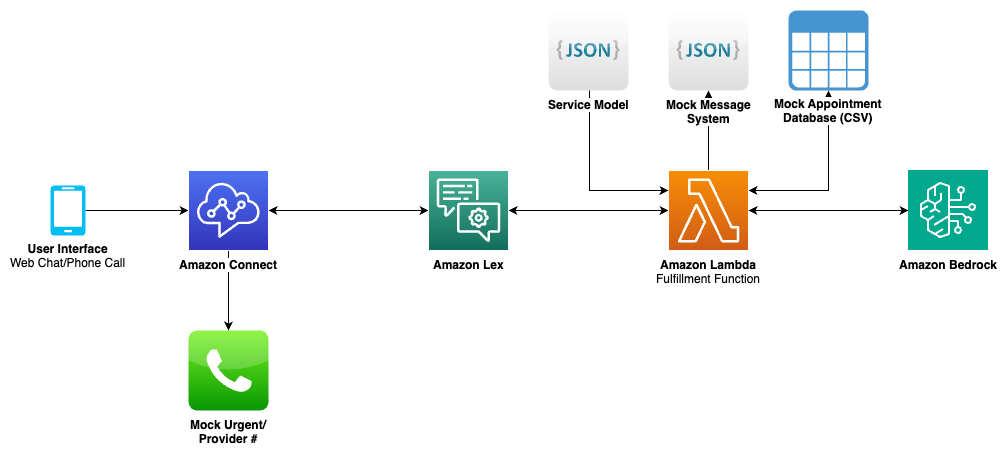
The workflow consists of the following high-level steps:
- A patient initiates contact through either a phone call or web chat interface.
- Connect processes the initial contact and routes it through a configured contact flow.
- Lex handles transcription and maintains conversation state.
- An AWS Lambda fulfillment function processes the conversation using Claude 3.5 Sonnet and Nova models through Bedrock to:
- Classify urgency and intents
- Extract required information
- Generate natural responses
- Manage appointment scheduling when applicable
The models used for each specific function are described in solution detail sections.
- Smart transfers to staff are initiated when urgent cases are detected or when patients request to speak with providers.
- Conversation data is processed through an analytics pipeline for monitoring and reporting (described later in this post).
Some challenges the team tackled during the development process included:
- Formatting the contact center call flow and service model in a way that is interchangeable for different customers, with minimal code and configuration changes
- Managing latency requirements for a natural conversation experience
- Transcription and understanding of patient names
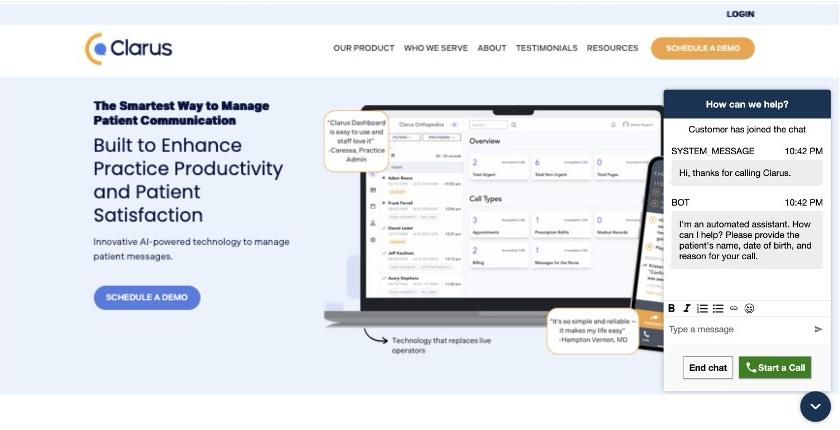
In addition to voice calls, the team developed a web interface using Amazon CloudFront and Amazon S3 Static Website Hosting that demonstrates the system’s multichannel capabilities. This interface shows how patients can engage in AI-powered conversations through a chat widget, providing the same level of service and functionality as voice calls. While the web interface demo uses the same contact flow as the voice call, it can be further customized for chat-specific language.
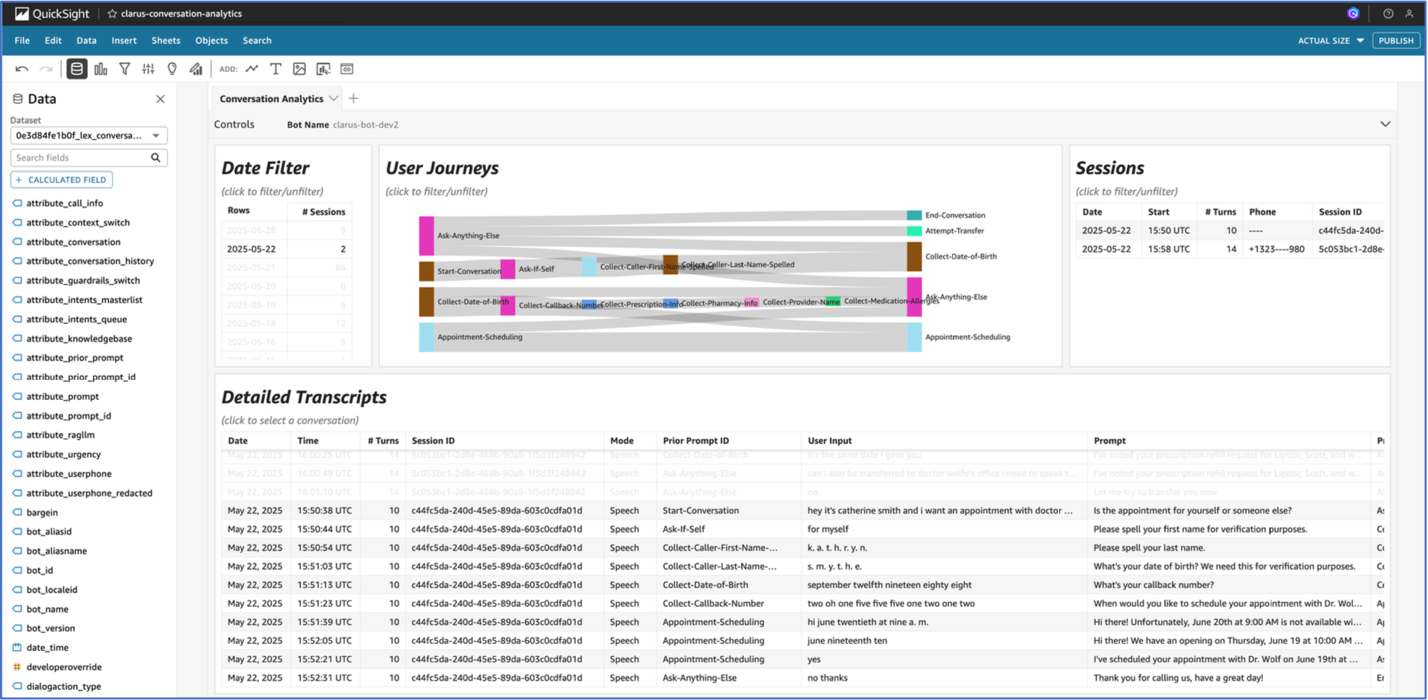
The team also built an analytics pipeline that processes conversation logs to provide valuable insights into system performance and patient interactions. A customizable dashboard offers a user-friendly interface for visualizing this data, allowing both technical and non-technical staff to gain actionable insights from patient communications. The analytics pipeline and dashboard were built using a previously published reusable GenAI contact center asset.
Conversation handling details
The solution employs a sophisticated conversation management system that orchestrates natural patient interactions through the multi-model capabilities of Bedrock and carefully designed prompt layering. At the heart of this system is the ability of Bedrock to provide access to multiple foundation models, enabling the team to select the optimal model for each specific task based on accuracy, cost, and latency requirements. The flow of the conversation management system is shown in the following image; NLU stands for natural language understanding.
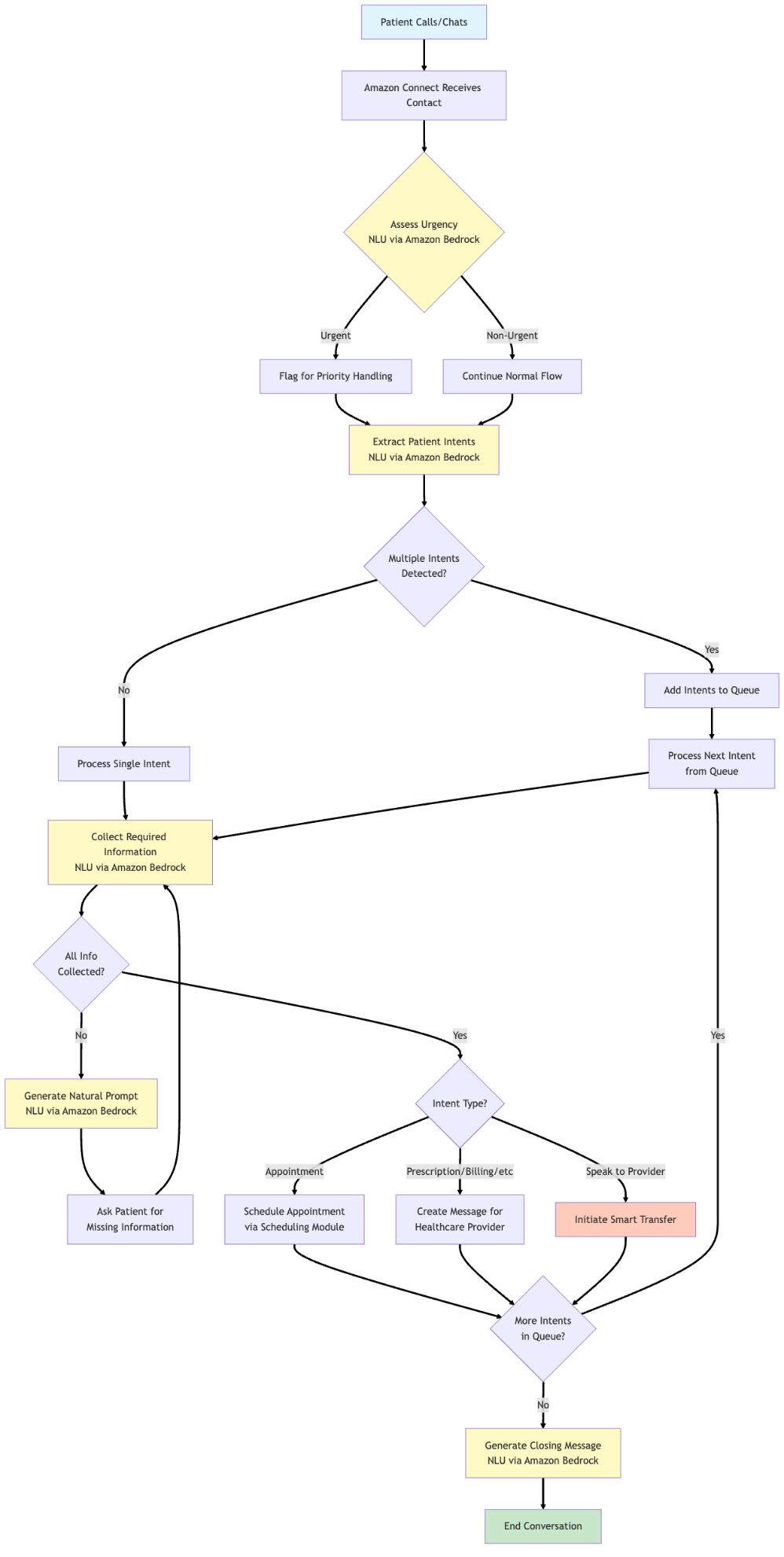
The conversation flow begins with a greeting and urgency assessment. When a patient calls, the system immediately evaluates whether the situation requires urgent attention using Bedrock APIs. This first step makes sure that emergency cases are quickly identified and routed appropriately. The system uses a focused prompt that analyzes the patient’s initial statement against a predefined list of urgent intent categories, returning either “urgent” or “non_urgent” to guide subsequent handling.
Following this, the system moves to intent detection. A key innovation here is the system’s ability to process multiple intents within a single interaction. Rather than forcing patients through rigid menu trees, the system can leverage powerful language models to understand when a patient mentions both a prescription refill and a billing question, queuing these intents for sequential processing while maintaining natural conversation flow. During this extraction, we make sure that the intent and the quote from the user input are both extracted. This produces two results:
- Integrated model reasoning to make sure that the correct intent is extracted
- Conversation history reference that led to intent extraction, so the same intent is not extracted twice unless explicitly asked for
Once the system starts processing intents sequentially, it starts prompting the user for data required to service the intent at hand. This happens in two interdependent stages:
- Checking for missing information fields and generating a natural language prompt to ask the user for information
- Parsing user utterances to analyze and extract collected fields and the fields that are still missing
These two steps happen in a loop until the required information is collected. The system also considers provider-specific services at this stage, where fields required per provider is collected. The solution automatically matches provider names mentioned by patients to the correct provider in the system. This handles variations like “Dr. Smith” matching to “Dr. Jennifer Smith” or “Jenny Smith,” removing the rigid name matching or extension requirements of traditional IVR systems. The solution also includes smart handoff capabilities. When the system needs to determine if a patient should speak with a specific provider, it analyses the conversation context to consider urgency and routing needs for the expressed intent. This process preserves the conversation context and collected information, facilitating a seamless experience when human intervention is requested. Throughout the conversation, the system maintains comprehensive state tracking through Lex session attributes while the natural language processing occurs through Bedrock model invocations. These attributes serve as the conversation’s memory, storing everything from the user’s collected information and conversation history to detected intents and collected information. This state management enables the system to maintain context across multiple Bedrock API calls, creating a more natural dialogue flow.
Intent management
The intent management system was designed through a hierarchical service model structure that reflects how patients naturally express their needs. To traverse this hierarchical service model, the user inputs are parsed using natural language understanding, which are handled through Bedrock API calls.
The hierarchical service model organizes intents into three primary levels:
- Urgency Level: Separating urgent from non-urgent services facilitates appropriate handling and routing.
- Service Level: Grouping related services like appointments, prescriptions, and billing creates logical categories.
- Provider-Specific Level: Further granularity accommodates provider-specific requirements and sub-services
This structure enables the system to efficiently navigate through possible intents while maintaining flexibility for customization across different healthcare facilities. Each intent in the model includes custom instructions that can be dynamically injected into Bedrock prompts, allowing for highly configurable behavior without code changes. The intent extraction process leverages the advanced language understanding capabilities of Bedrock through a prompt that instructs the model to identify the intents present in a patient’s natural language input. The prompt includes comprehensive instructions about what constitutes a new intent, the complete list of possible intents, and formatting requirements for the response. Rather than forcing classification into a single intent, we intend to detect multiple needs expressed simultaneously. Once intents are identified, they are added to a processing queue. The system then works through each intent sequentially, making additional model calls in multiple layers to collect required information through natural conversation. To optimize for both quality and latency, the solution leverages the model selection flexibility of Bedrock for various conversation tasks in a similar fashion:
- Intent extraction uses Anthropic’s Claude 3.5 Sonnet through Bedrock for detailed analysis that can identify multiple intents from natural language, making sure patients do not need to repeat information.
- Information collection employs a faster model, Amazon Nova Pro, through Bedrock for structured data extraction while maintaining conversational tone.
- Response generation utilizes a smaller model, Nova Lite, through Bedrock to create low-latency, natural, and empathetic responses based on the conversation state.
Doing this helps in making sure that the solution can:
- Maintain conversational tone and empathy
- Ask for only the specific missing information
- Acknowledge information already provided
- Handle special cases like spelling out names
The entire intent management pipeline benefits from the Bedrock unified Converse API, which provides:
- Consistent interface across the model calls, simplifying development and maintenance
- Model version control facilitating stable behavior across deployments
- Future-proof architecture allowing seamless adoption of new models as they become available
By implementing this hierarchical intent management system, Clarus can offer patients a more natural and efficient communication experience while maintaining the structure needed for proper routing and information collection. The flexibility of combining the multi-model capabilities of Bedrock with a configurable service model allows for straightforward customization per healthcare facility while keeping the core conversation logic consistent and maintainable. As new models become available in Bedrock, the system can be updated to leverage improved capabilities without major architectural changes, facilitating long-term scalability and performance optimization.
Scheduling
The scheduling component of the solution is handled in a separate, purpose-built module. If an ‘appointment’ intent is detected in the main handler, processing is passed to the scheduling module. The module operates as a state machine consisting of conversation states and next steps. The overall flow of the scheduling system is shown below:
There are three main LLM prompts used in the scheduling flow:
- Extract time preferences (Nova Lite is used for low latency and use preference understanding)
- Determine if user is confirming or denying time (Nova Micro is used for low latency on a simple task)
- Generate a natural response based on a next step (Nova Lite is used for low latency and response generation)
The possible steps are:
- Initial greeting
- Confirm time
- Show alternative times
- Ask for new preferences
- Let the user know you will escalate to the office
- End a conversation with booking confirmation
System Extensions
In the future, Clarus can integrate the contact center’s voicebot with Amazon Nova Sonic. Nova Sonic is a speech-to-speech LLM that delivers real-time, human-like voice conversations with leading price performance and low latency. Nova Sonic is now directly integrated with Connect.
Bedrock has several additional services which help with scaling the solution and deploying it to production, including:
- Native support for Retrieval Augmented Generation (RAG) and structured data retrieval through Bedrock Knowledge Bases
- Bedrock Guardrails for implementing content and PII/PHI safeguards
- Bedrock Evaluations for automated and human-based conversation evaluation
Conclusion
In this post, we demonstrated how the GenAIIC team collaborated with Clarus Care to develop a generative AI-powered healthcare contact center using Amazon Connect, Amazon Lex, and Amazon Bedrock. The solution showcases a conversational voice interface capable of handling multiple patient intents, managing appointment scheduling, and providing smart transfer capabilities. By leveraging Amazon Nova and Anthropic’s Claude 3.5 Sonnet language models and AWS services, the system achieves high availability while offering a more intuitive and efficient patient communication experience.The solution also incorporates an analytics pipeline for monitoring call quality and metrics, as well as a web interface demonstrating multichannel support. The solution’s architecture provides a scalable foundation that can adapt to Clarus Care’s growing customer base and future service offerings.The transition from a traditional menu-driven IVR to an AI-powered conversational interface enables Clarus to help enhance patient experience, increase automation capabilities, and streamline healthcare communications. As they move towards implementation, this solution will empower Clarus Care to meet the evolving needs of both patients and healthcare providers in an increasingly digital healthcare landscape.
If you want to implement a similar solution for your use case, consider the blog Deploy generative AI agents in your contact center for voice and chat using Amazon Connect, Amazon Lex, and Amazon Bedrock Knowledge Bases for the infrastructure setup.
About the authors
 Rishi Srivastava is the VP of Engineering at Clarus Care. He is a seasoned industry leader with over 20 years in enterprise software engineering, specializing in design of multi-tenant Cloud based SaaS architecture and, conversational AI agentic solutions related to patient engagement. Previously, he worked in financial services and quantitative finance, building latent factor models for sophisticated portfolio analytics to drive data-informed investment strategies.
 Scott Reynolds is the VP of Product at Clarus Care, a healthcare SaaS communications and AI-powered patient engagement platform. He’s spent over 25 years in the technology and software market creating secure, interoperable platforms that streamline clinical and operational workflows. He has founded multiple startups and holds a U.S. patent for patient-centric communication technology.
Brian Halperin joined AWS in 2024 as a GenAI Strategist in the Generative AI Innovation Center, where he helps enterprise customers unlock transformative business value through artificial intelligence. With over 9 years of experience spanning enterprise AI implementation and digital technology transformation, he brings a proven track record of translating complex AI capabilities into measurable business outcomes. Brian previously served as Vice President on an operating team at a global alternative investment firm, leading AI initiatives across portfolio companies.
 Brian Yost is a Principal Deep Learning Architect in the AWS Generative AI Innovation Center. He specializes in applying agentic AI capabilities in customer support scenarios, including contact center solutions.
 Parth Patwa is a Data Scientist in the Generative AI Innovation Center at Amazon Web Services. He has co-authored research papers at top AI/ML venues and has 1500+ citations.
 Smita Bailur is a Senior Applied Scientist at the AWS Generative AI Innovation Center, where she brings over 10 years of expertise in traditional AI/ML, deep learning, and generative AI to help customers unlock transformative solutions. She holds a masters degree in Electrical Engineering from the University of Pennsylvania.
 Shreya Mohanty Shreya Mohanty is a Strategist in the AWS Generative AI Innovation Center where she specializes in model customization and optimization. Previously she was a Deep Learning Architect, focused on building GenAI solutions for customers. She uses her cross-functional background to translate customer goals into tangible outcomes and measurable impact.
 Yingwei Yu Yingwei Yu is an Applied Science Manager at the Generative AI Innovation Center (GenAIIC) at Amazon Web Services (AWS), based in Houston, Texas. With experience in applied machine learning and generative AI, Yu leads the development of innovative solutions across various industries. He has multiple patents and peer-reviewed publications in professional conferences. Yingwei earned his Ph.D. in Computer Science from Texas A&M University – College Station.