The adoption and implementation of generative AI inference has increased with organizations building more operational workloads that use AI capabilities in production at scale. To help customers achieve the scale of their generative AI applications, Amazon Bedrock offers cross-Region inference (CRIS) profiles. CRIS is a powerful feature that organizations can use to seamlessly distribute inference processing across multiple AWS Regions. This capability helps you get higher throughput while you’re building at scale and helps keep your generative AI applications responsive and reliable even under heavy load.
We are excited to introduce Global cross-Region inference for Amazon Bedrock and bring Anthropic Claude models in India. Amazon Bedrock now offers Anthropic’s Claude Opus 4.6, Claude Sonnet 4.6, and Claude Haiku 4.5 through Amazon Bedrock Global cross-Region inference (CRIS) for customers operating in India. These frontier models deliver a massive 1-million token context window and advanced agentic capabilities, allowing your applications to process vast datasets and complex workflows with unprecedented speed and intelligence. With this launch, customers using ap-south-1 (Mumbai) and ap-south-2 (Hyderabad) can access Anthropic’s latest Claude models on Amazon Bedrock while benefiting from global inference capacity and highly available inference managed by Amazon Bedrock. With global CRIS, customers can scale inference workloads seamlessly, improve resiliency, and reduce operational complexity. In this post, you will discover how to use Amazon Bedrock’s Global cross-Region Inference for Claude models in India. We will guide you through the capabilities of each Claude model variant and how to get started with a code example to help you start building generative AI applications immediately.
Core functionality of Global cross-Region inference
Global cross-Region inference helps organizations manage unplanned traffic bursts by using compute resources across inference capacity across commercial AWS Regions (Regions other than the AWS GovCloud (US) Regions and the China Regions) globally. This section explores how the Global cross-Region inference feature works and the technical mechanisms that power its functionality.
Understanding inference profiles
Global cross-Region inference is offered through Inference profiles. Inference profiles operate on two key concepts:
- Source Region – The Region from which the API request is made
- Destination Region – A Region to which Amazon Bedrock can route the request for inference
To use Anthropic models, Amazon Bedrock offers out of the box Global Inference profiles. For example:
- Opus 4.6:
<global.anthropic.claude-opus-4-6-v1> - Sonnet 4.6:
<global.anthropic.claude-sonnet-4-6> - Opus 4.5:
<global.anthropic.claude-opus-4-5-20251101-v1:0> - Sonnet 4.5:
<global.anthropic.claude-sonnet-4-5-20250929-v1:0> - Haiku 4.5:
<global.anthropic.claude-haiku-4-5-20251001-v1:0>
For customers in India using BOM (ap-south-1) and HYD (ap-south-2), the respective source and destinations would be as follows:
- Source -> Destination
- BOM (
ap-south-1) -> AWS commercial Regions - HYD (
ap-south-2) -> AWS commercial Regions
- BOM (
For information about considerations for choosing between Geographic and Global cross-Region inference, see Choosing between Geographic and Global cross-Region inference on the Amazon Bedrock User Guide.
Implementing global cross-Region inference
As of today, you can implement global CRIS for the following models.
| Name | Model | Inference profile ID | Inference Processing Destination Regions |
| Global Anthropic Claude Opus 4.6 | Claude Opus 4.6 | global.anthropic.claude-opus-4-6-v1 |
Commercial AWS Regions |
| Global Anthropic Claude Sonnet 4.6 | Claude Sonnet 4.6 | global.anthropic.claude-sonnet-4-6 |
Commercial AWS Regions |
| Global Anthropic Claude Haiku 4.5 | Claude Haiku 4.5 | global.anthropic.claude-haiku-4-5-20251001-v1:0 |
Commercial AWS Regions |
| Global Claude Sonnet 4.5 | Claude Sonnet 4.5 | global.anthropic.claude-sonnet-4-5-20250929-v1:0 |
Commercial AWS Regions |
| GLOBAL Anthropic Claude Opus 4.5 | Claude Opus 4.5 | global.anthropic.claude-opus-4-5-20251101-v1:0 |
Commercial AWS Regions |
For example, to use Global cross-Region inference with Anthropic’s Claude Opus 4.5, you should complete the following key steps:
- Use the global inference profile ID – When making API calls to Amazon Bedrock, specify the global Anthropic’s Claude Opus 4.5 inference profile ID (
global.anthropic.claude-opus-4-5-20251101-v1:0) instead of a Region-specific model ID. This works withInvokeModel,InvokeModelWithResponseStream, andConverseandConverseStreamAPIs. - Configure IAM permissions – To enable Global cross-Region inference for your users, you must apply a three-part AWS Identity and Access Management policy to the role. For more information, see Configuring IAM policy for global cross-Region inference.
Global cross-Region inference for India’s peak demand seasons
Indian enterprises face unique challenges during high-traffic periods. Diwali shopping surges, Dussehra ecommerce spikes, Eid celebrations, Christmas festivities, tax filing deadlines, cricket tournaments, and festival seasons when customer engagement peaks dramatically. Global cross-Region inference provides customers in India with the throughput elasticity needed to handle these demand surges without degradation.During such peak periods ecommerce platforms, fintech applications, and customer service chatbots experience 3-5x the normal traffic. With Global CRIS, your applications automatically access inference capacity across AWS Commercial Regions, helping with
- Uninterrupted service during festival shopping peaks – When millions of customers simultaneously interact with AI-powered product recommendations and customer support, for example, during Diwali, Eid, Christmas, and regional celebrations
- Seamless tax season processing – Handles the surge in document analysis, form processing, and compliance queries during the July-September tax filing periods
- Festival campaign scalability – Deploys AI-driven marketing campaigns during festivals without capacity planning overhead
- Business continuity during cultural and sporting events – Maintains performance during cricket tournaments, election periods, and other events that drive massive engagement spikes
By routing requests globally, customers in India gain access to a significantly larger capacity pool—transforming from Regional Tokens per Minute (TPM) limits to global-scale throughput. This means that your generative AI applications remain responsive and reliable when your business needs them most, without the operational complexity of manual multi-Region orchestration or the risk of customer-facing throttling errors.
Step by step guidance for getting started with inferencing with Global cross-Region inference on Amazon Bedrock:
There are two approaches to infer the Global cross-Region supported models. Let’s understand these approaches in detail.
Approach 1: Inferencing on global CRIS models on AWS Console with Amazon Bedrock playgrounds – Asia Pacific (Mumbai) Region
The Amazon Bedrock playgrounds provide a visual interface to experiment on different models by using different configuration parameters. You can use playgrounds to test and compare different models by experimenting with prompts before integrating them into your application.
To get started using playgrounds, complete the following steps:
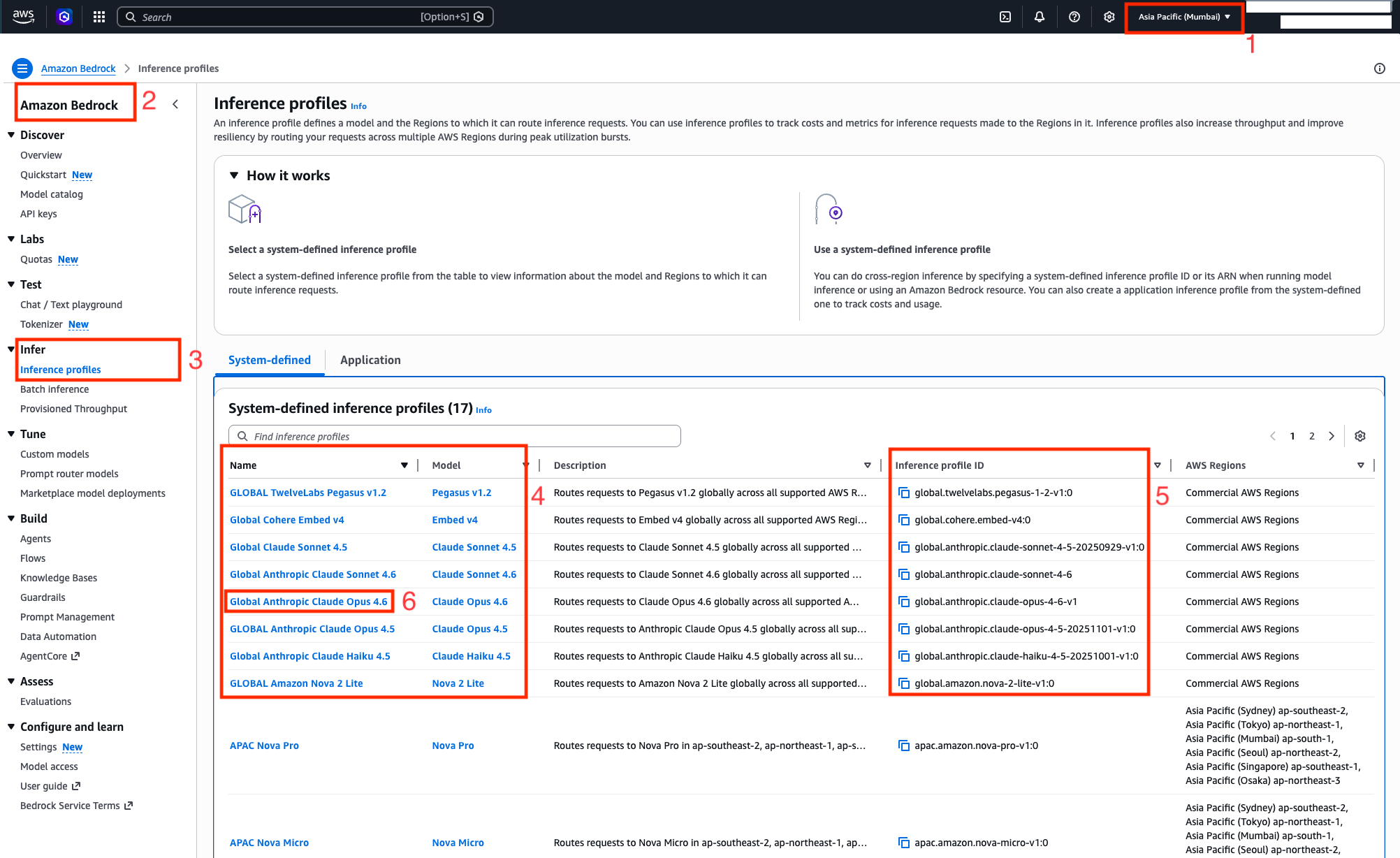
- Log in to the AWS Console and select region as Asia Pacific (Mumbai) Region.
- Navigate to Amazon Bedrock console
- On the side navigation menu for Infer, select Inference profiles.
- Global inference profiles will start with the keyword
global. - The model ID to invoke models via global CRIS is obtained via the corresponding Inference profile ID column from the System-defined inference profiles table. At the time of writing this blog post, it supports Anthropic Claude Opus 4.6, Claude Sonnet 4.6, Claude Haiku 4.5, and other foundation models.
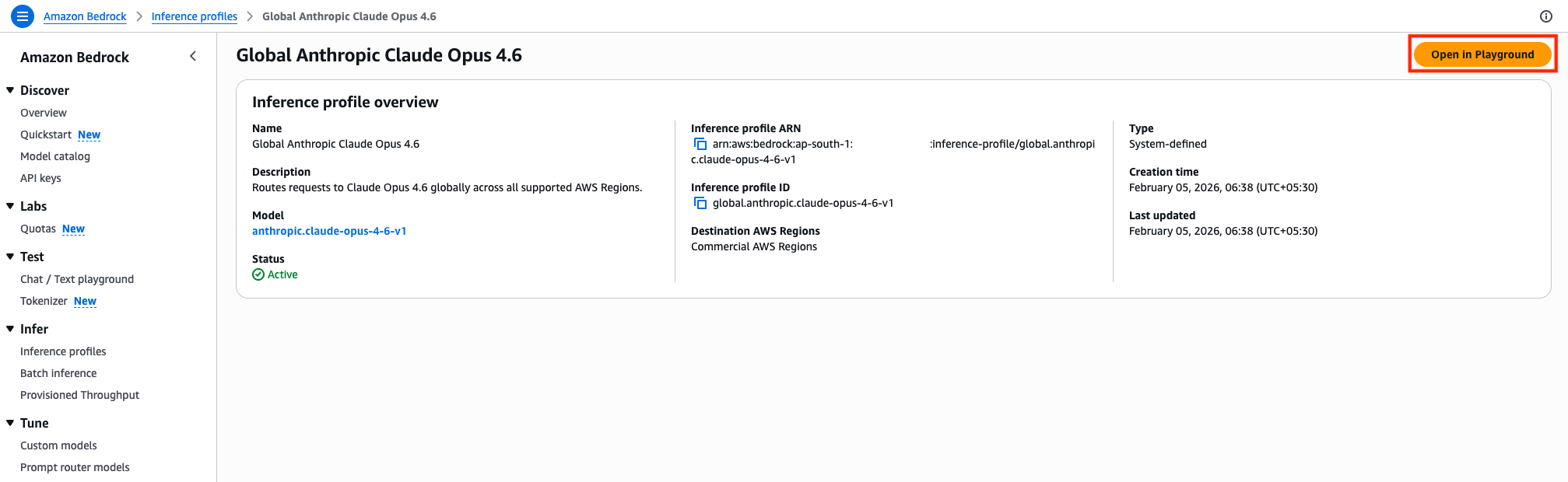
- Select the Name of the model for example, Global Anthropic Claude Opus 4.6 and navigate to the screen where you will be shown the model details.
- Review the Inference profile overview of the chosen model from previous step. To perform inference in Chat/Text playground, choose Open In Playground button in the console.
- You can start inferencing the model on Amazon Bedrock chat / text playground, by trying out some prompts
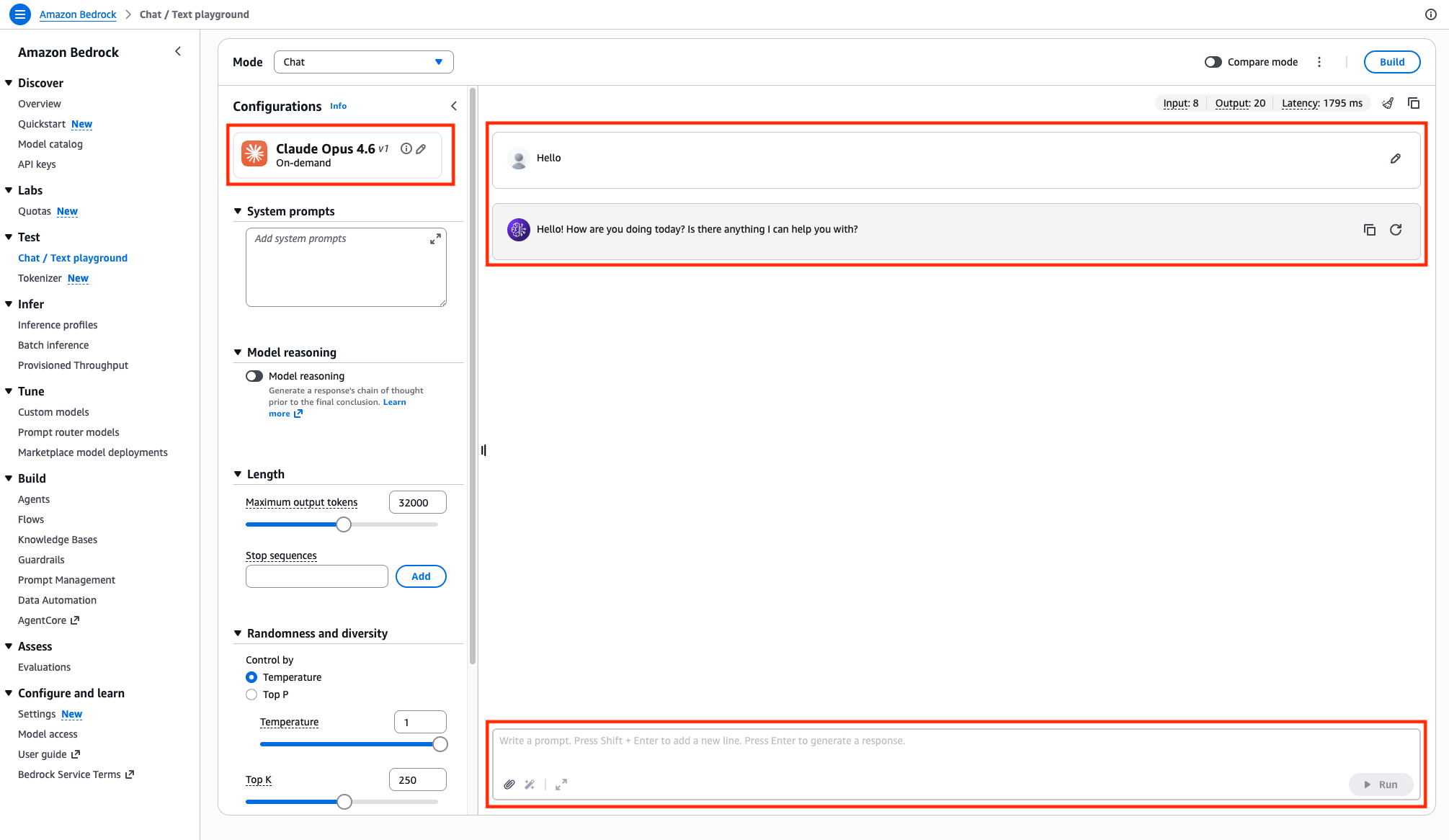
Approach 2: Inferencing global cross-Region inference models programmatically
To invoke the global models programmatically, one can use InvokeModel, Converse API for real-time requests, and InvokeModelWithResponseStream and ConverseStream API for streaming workloads. The full source code demonstrating these invocation APIs is available at the GitHub repository aws-samples/sample-amazon-bedrock-global-cris.
Invoke Anthropic Claude model with global cross-Region inference using Converse API
Let’s understand the implementation of global cross-Region inference on global.anthropic.claude-opus-4-6-v1 model using Converse API. We recommend the Converse API for conversational applications with a unified interface.
import boto3

# Initialize Bedrock client for India region (Mumbai)
bedrock = boto3.client("bedrock-runtime", region_name="ap-south-1")

# Global CRIS model ID for Claude Opus 4.6
MODEL_ID = "global.anthropic.claude-opus-4-6-v1"

try:
    print("Invoking Claude Opus 4.6 via Global CRIS...")

    # Use Converse API for simplified interaction
    response = bedrock.converse(
        messages=[
            {
                "role": "user",
                "content": [{"text": "Explain cloud computing in 2 sentences."}],
            }
        ],
        modelId=MODEL_ID,
    )

    # Extract and display response
    response_text = response["output"]["message"]["content"][0]["text"]
    print("Response:", response_text)

    # Display token usage information
    usage = response.get("usage", {})
    print("Tokens used:", usage)

    if usage:
        print(f"Input tokens: {usage.get('inputTokens', 'N/A')}")
        print(f"Output tokens: {usage.get('outputTokens', 'N/A')}")
        print(f"Total tokens: {usage.get('totalTokens', 'N/A')}")

except Exception as e:
    print(f"Error: {e}")
    print("Please check your AWS credentials and region configuration.")
Code samples to invoke the Anthropic Claude model with global cross-Region inference with different API types
The code samples for InvokeModel, InvokeModelWithResponseStream, and Converse and ConverseStream APIs for Global CRIS models can be referenced as follows:
| Model name | Inference profile ID | Invocation API | GitHub sample code |
| Global Anthropic Claude Opus 4.6 | global.anthropic.claude-opus-4-6-v1 |
Converse | Code |
| ConverseStream | Code | ||
| InvokeModel | Code, Advanced Usage | ||
| InvokeModelWithResponseStream | Code, Advanced Usage | ||
| Global Anthropic Claude Sonnet 4.6 | global.anthropic.claude-sonnet-4-6 |
Converse | Code |
| ConverseStream | Code | ||
| InvokeModel | Code | ||
| InvokeModelWithResponseStream | Code | ||
| Global Anthropic Claude Haiku 4.5 | global.anthropic.claude-haiku-4-5-20251001-v1:0 |
Converse | Code |
| ConverseStream | Code | ||
| InvokeModel | Code | ||
| InvokeModelWithResponseStream | Code | ||
| Global Claude Sonnet 4.5 | global.anthropic.claude-sonnet-4-5-20250929-v1:0 |
Converse | Code |
| ConverseStream | Code | ||
| InvokeModel | Code | ||
| InvokeModelWithResponseStream | Code | ||
| GLOBAL Anthropic Claude Opus 4.5 | global.anthropic.claude-opus-4-5-20251101-v1:0 |
Converse | Code |
| ConverseStream | Code | ||
| InvokeModel | Code | ||
| InvokeModelWithResponseStream | Code |
You can also work with global CRIS models using Application inference profiles. The sample is available on GitHub repository at application-inference-profile/multi_tenant_inference_profile_example.py. You can learn more on cross-Region (system-defined) inference profiles and application inference profiles from Set up a model invocation resource using inference profiles.
Monitoring and logging with Global cross-Region inference
When using global cross-Region inference, Amazon CloudWatch and AWS CloudTrail continue to record log entries only in the source Region where the request originated. This streamlines monitoring and logging by maintaining the records in a single Region regardless of where the inference request is ultimately processed.
So far, we have learnt how to invoke global cross-Region inference supported models using InvokeModel, InvokeModelWithResponseStream, and Converse and ConverseStream APIs. We also captured the usage from the response from these APIs. Next, we will learn how to efficiently capture logs and metrics, thus improving the overall observability and traceability of the requests and responses made for the global endpoints. We will build dashboards using several key features:
- Model invocation logging to push logs to CloudWatch Logs
- Generative AI observability
- Querying CloudTrail event data store to track which destination Region executes each inference request
This phased approach will help you how to set up and understand where your requests are being processed and help monitor your model performance effectively.
Phase 1: CloudWatch metrics enablement, graphs report snapshot
To gain comprehensive visibility into your global CRIS usage, you will need to enable model invocation logging and set up monitoring dashboards. This will help you track performance metrics, token usage, and identify which Regions are processing your requests.
Step 1: Enabling model invocation logging
To enable model invocation logging, navigate to the Amazon Bedrock service page in the AWS console and perform the following actions as shown.
- Select Settings under the Configure and learn section of side navigation that appears on the left. Toggle the radio on for Model invocation logging.
- At the top of the settings page, toggle on Model invocation logging. This will start publishing invocation logs for your Bedrock model usage.
- Select where you want your logs to be stored:
- S3 only – Store logs in Amazon Simple Storage Service (Amazon S3)
- CloudWatch Logs only – Store logs in CloudWatch (recommended for most users)
- Both S3 and CloudWatch Logs – Store logs in both locations
- Choose either CloudWatch Logs only or Both S3 and CloudWatch Logs because we must visualize the CloudWatch gen AI Dashboard.
- If you selected CloudWatch as a destination:
- Refer Create a log group in CloudWatch Logs to create a log group.
- Enter the Log group name where invocation logs will be published.
Note that logs and model input/output data up to 100 KB will be stored in this group.
- Under the section Choose a method to authorize Bedrock, select one of the following options to indicate how Amazon Bedrock should be authorized to write logs:
- Use an existing service role – Select a pre-existing IAM role.
- Create and use a new role – Let AWS create a new role automatically.
For simplicity, we will select Create and use a new role.
- Choose Save settings to apply your logging configuration.
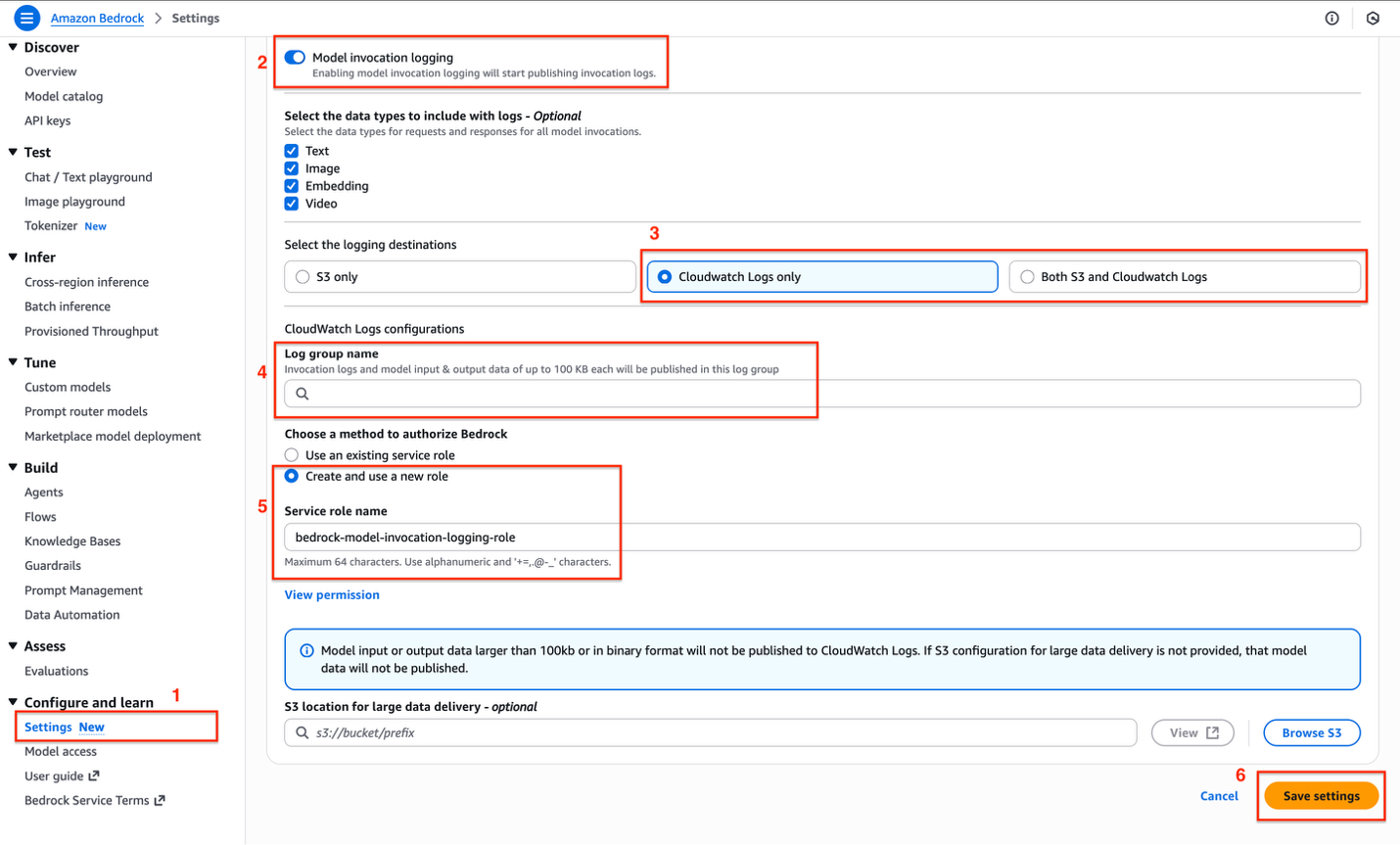
Step 2: Generative AI observability for Model Invocations
You can use CloudWatch Generative AI Observability dashboard to monitor Model Invocations performance. You can track metrics such as invocation count, token usage, and errors using out-of-box views. We already enabled model invocation logging, so we will navigate to the CloudWatch service page in AWS Console, and choose Model Invocations under Gen AI Observability.
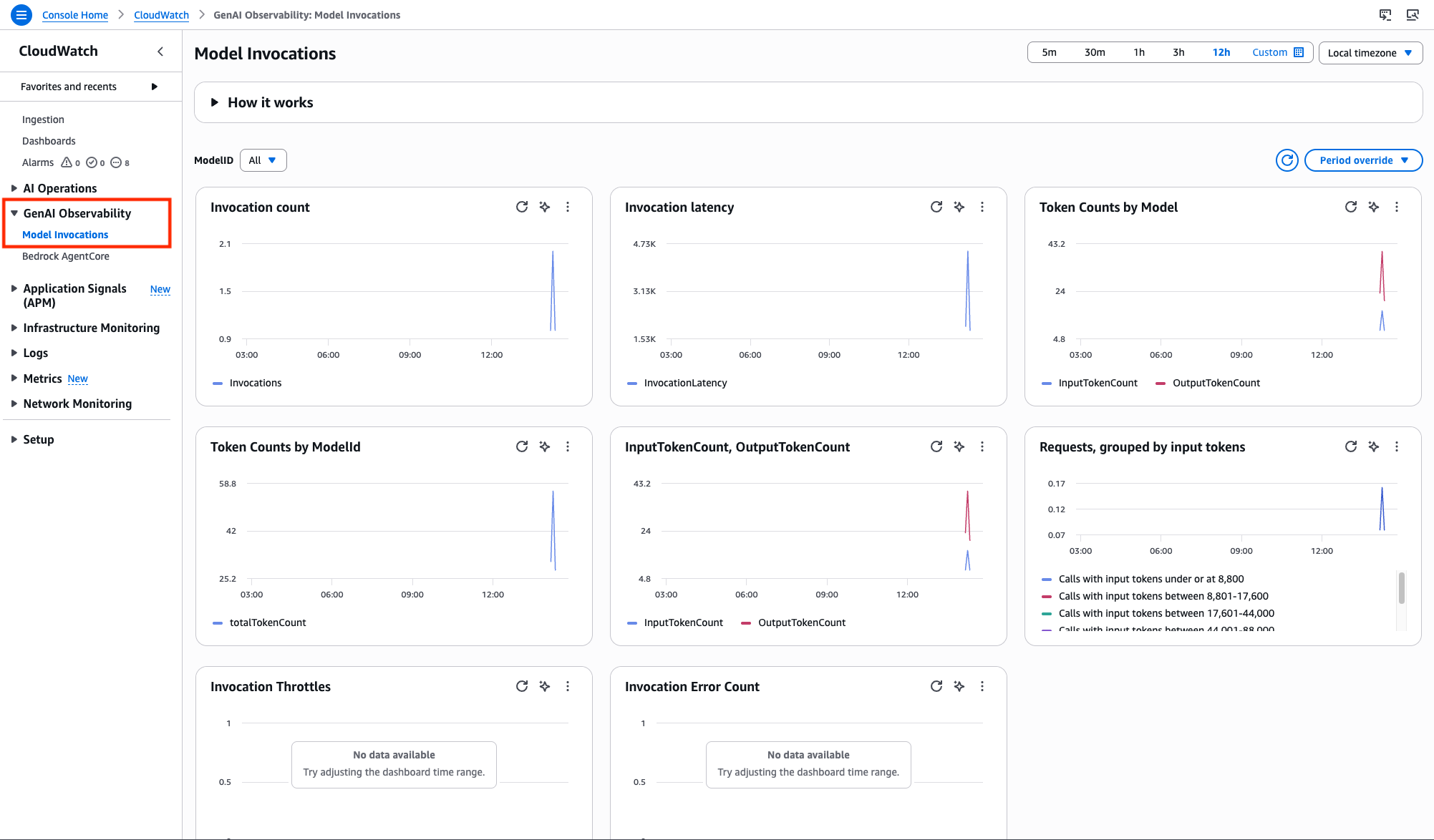
With Gen AI observability, you have complete visibility into your Gen AI workload’s performance with key metrics, end-to-end prompt tracing and step-by-step analysis of large language model (LLM) interactions. You can quickly diagnose issues and gain real-time insights into the performance and reliability of your entire AI stack.
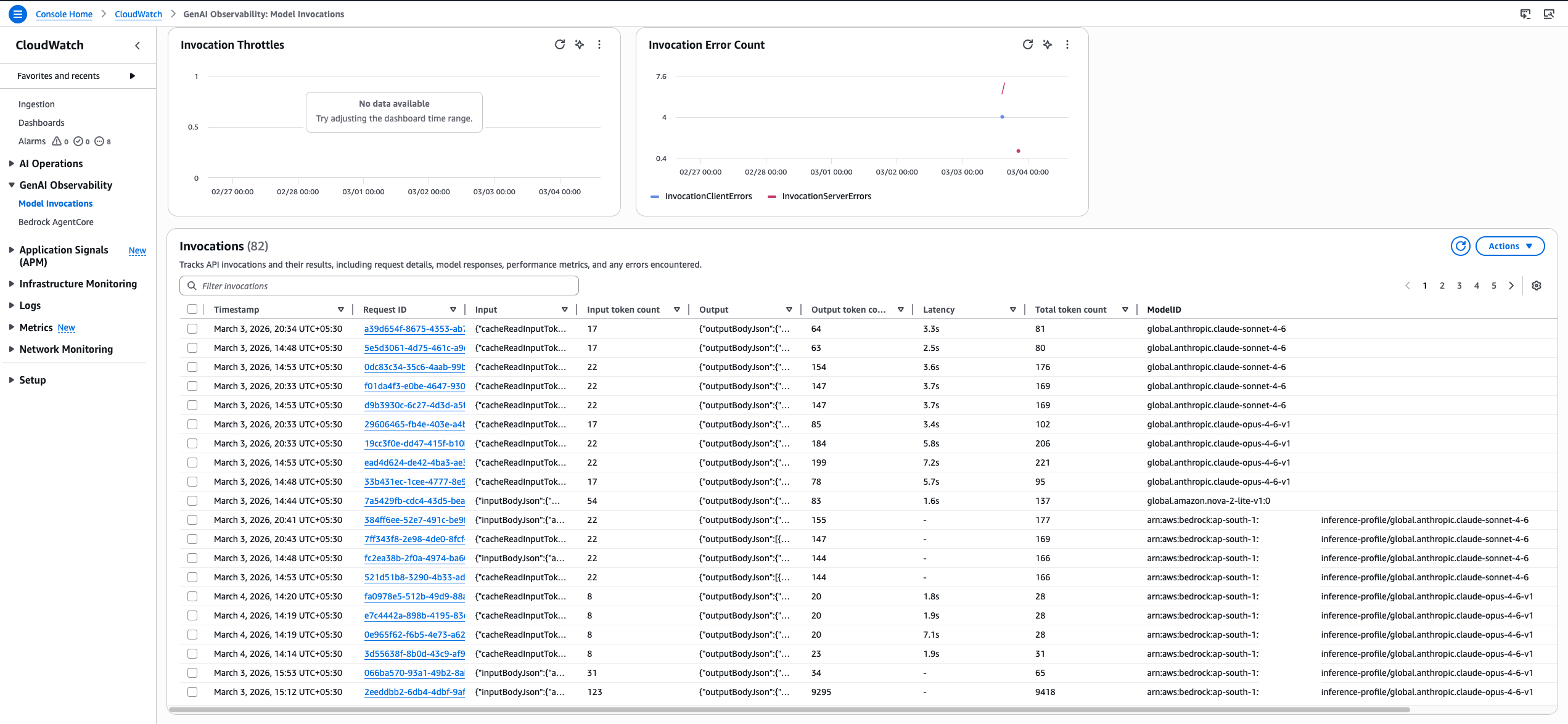
Phase 2: Understanding destination Region inference using CloudTrail for CRIS
To track which Region processed a request, CloudTrail events include an additionalEventData field with an inferenceRegion key that specifies the destination Region. Organizations can monitor and analyze the distribution of their inference requests across the AWS Global Infrastructure.
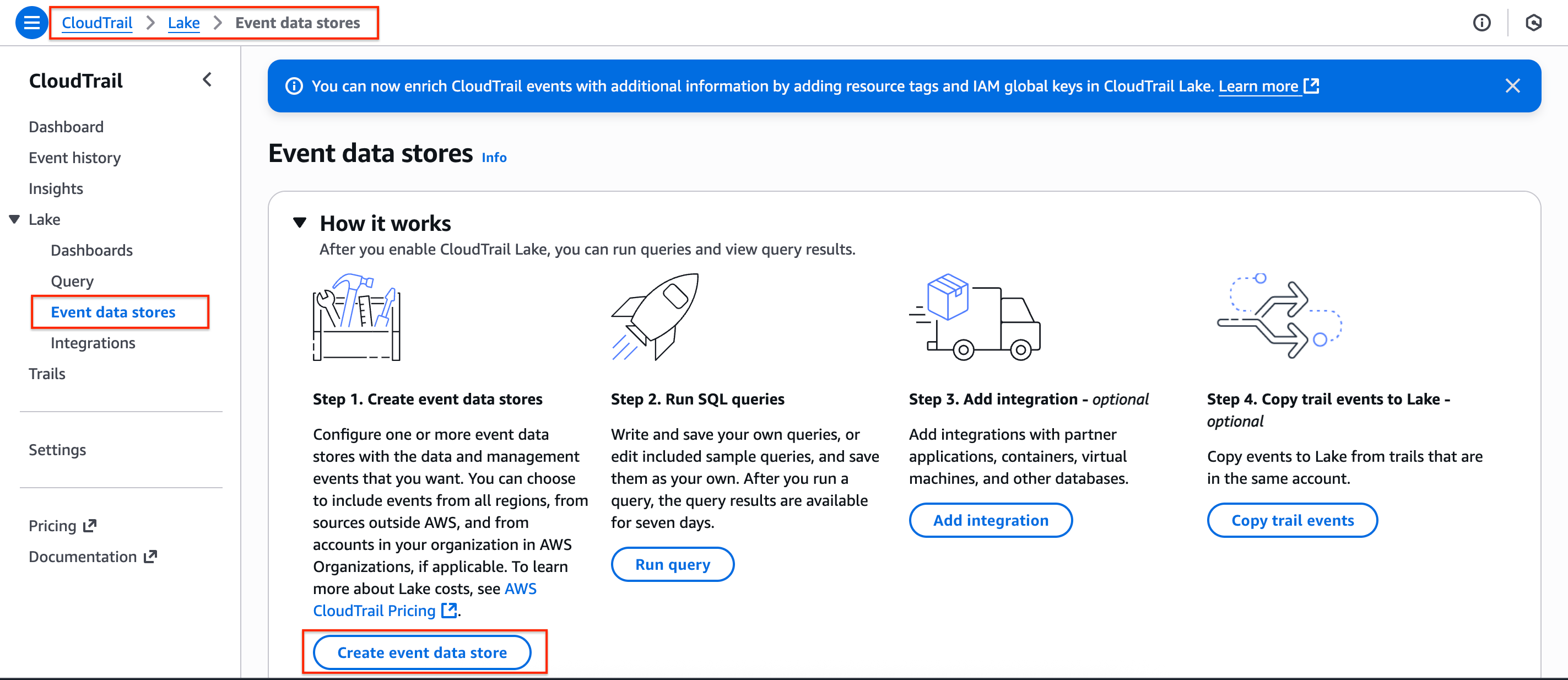
Step 1: Create event data store in CloudTrail
- In the AWS Console, navigate to CloudTrail service page, on the side navigation menu for Lake, select Event data stores.
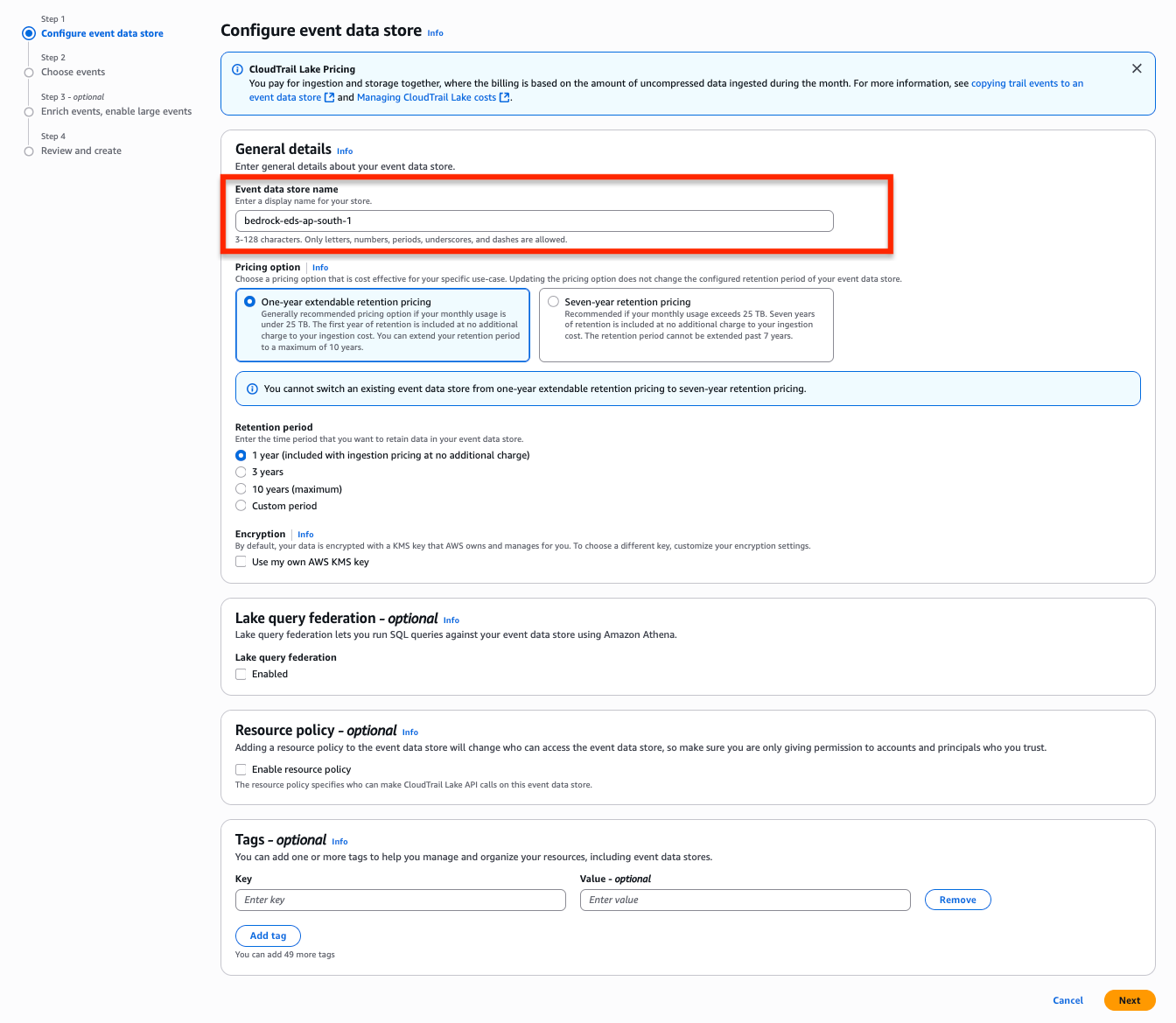
- Provide an Event data store name of your choice and keep everything as default. Choose the Next button to proceed to Choose events.
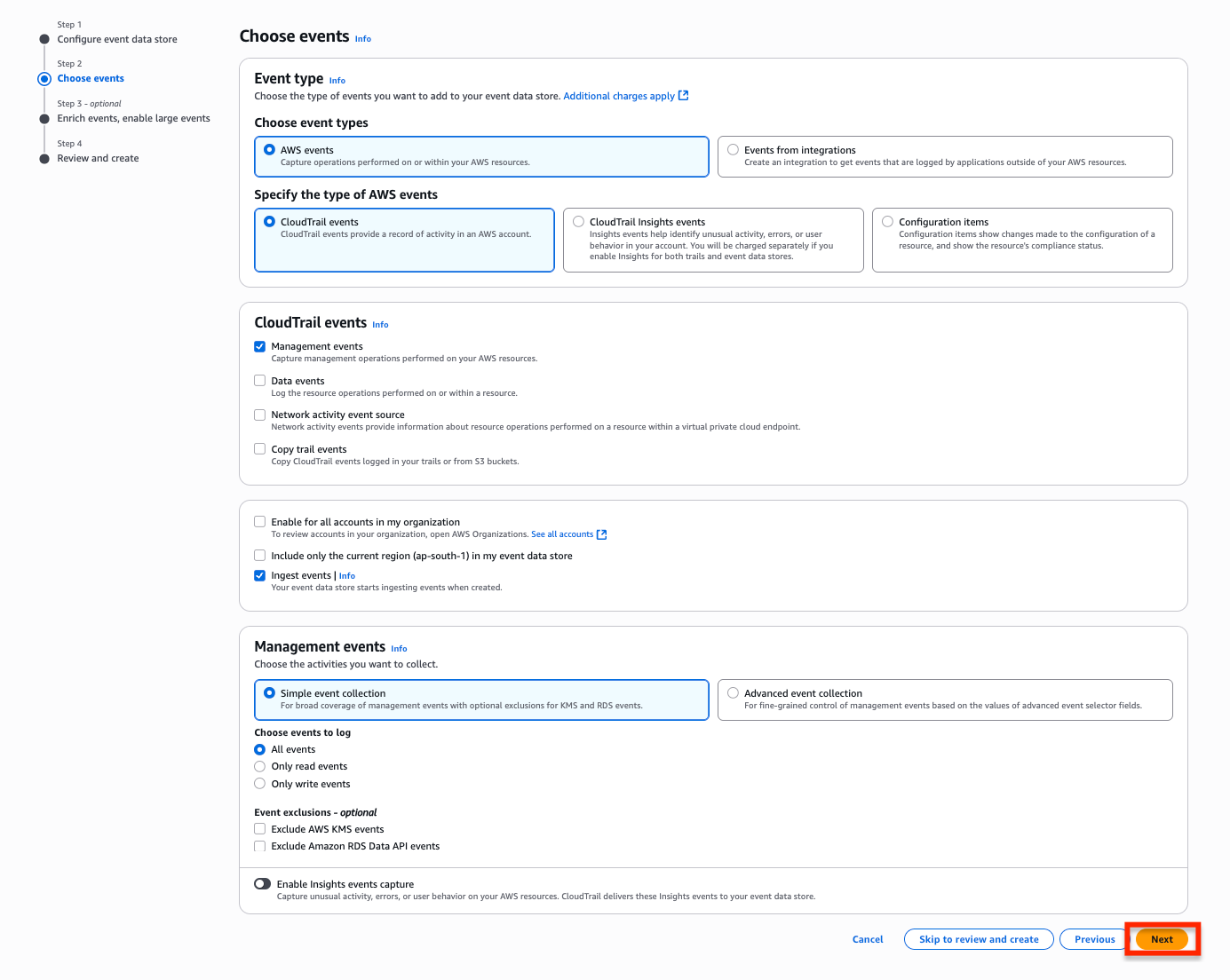
- In the Choose events section, keep every selection default and select Next to proceed to Enrich events, enable large events.
- Optionally, you can enrich CloudTrail events by adding resource tag keys and IAM global condition keys and increase the event size. You can use this information to efficiently categorize, search, and analyze CloudTrail events.
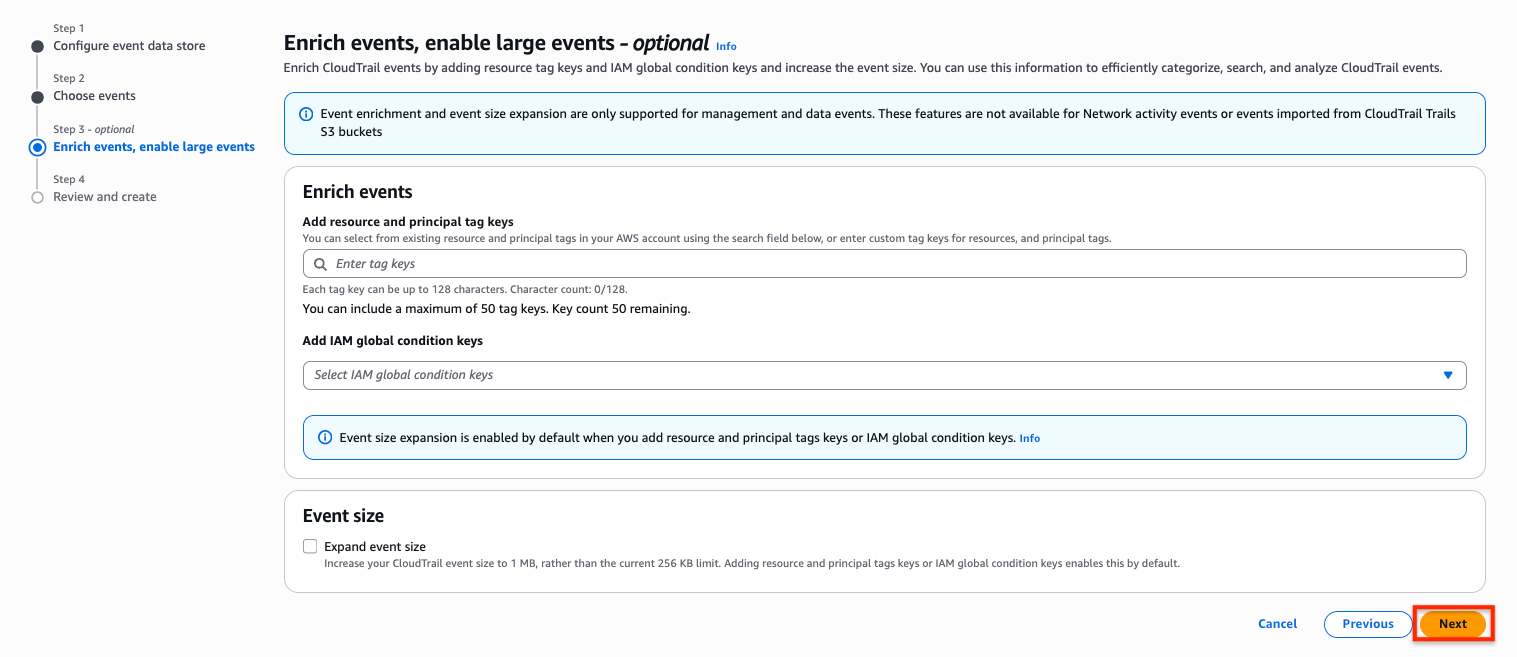
- Finally, choose Create event data store to create our event data store.

Step 2: Query the Event data store
For Amazon Bedrock Model Invocation, track which Region processed a request, CloudTrail events include an additionalEventData field with an inferenceRegion key that specifies the destination Region.
- In the CloudTrail console, navigate to the Query section under Lake.
- Select the event data store from the dropdown list.
- Enter your natural language prompt in the Query generator text box to describe what you want to query.
- Example Prompt: For Amazon Bedrock Model Invocation, track which Region processed a request, CloudTrail events include an additionalEventData field with an inferenceRegion key that specifies the destination Region.
- Select Generate query button to convert your prompt into SQL syntax. The query will appear similar to the following.
SELECT eventTime,
    awsRegion,
    element_at(additionalEventData, 'inferenceRegion') AS inferenceRegion,
    eventName,
    userIdentity.arn AS userArn,
    requestId
FROM <REPLACE_WITH_YOUR_EVENT_DATA_STORE_ID>
WHERE eventSource IN (
        'bedrock.amazonaws.com'
    )
    AND eventName IN ('InvokeModel', 'InvokeModelWithResponseStream', 'Converse', 'ConverseStream')
    AND eventTime >= '2025-11-06 00:00:00'
    AND eventTime <= '2026-03-05 23:59:59'
- Choose Run to execute the generated SQL query and view the results.
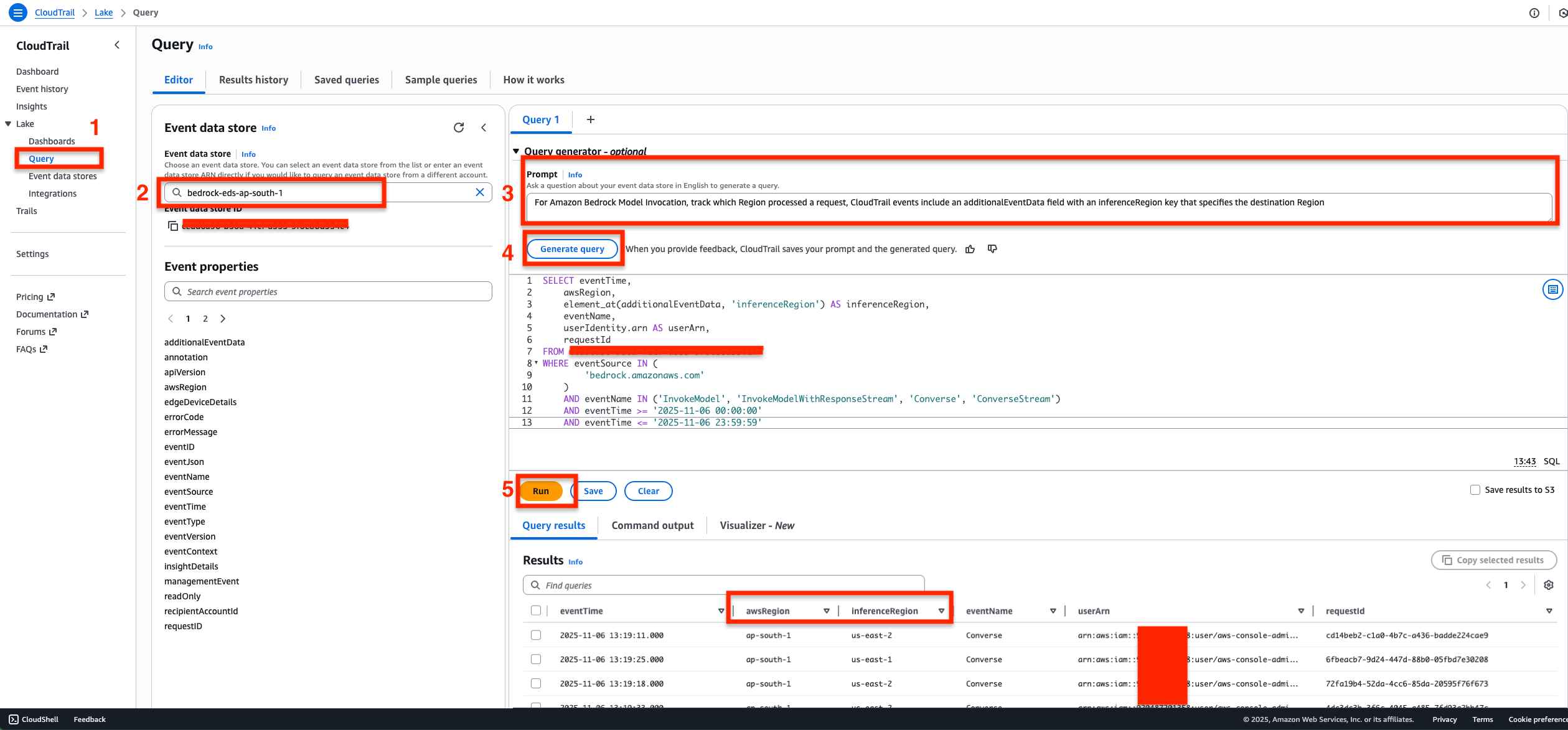 You can observe that the Query Results show
 awsRegion from where the inference request originated from and the inferenceRegion which indicates the destination Region where the request was actually processed from.
Phase 3: Understanding Query results from Event data store
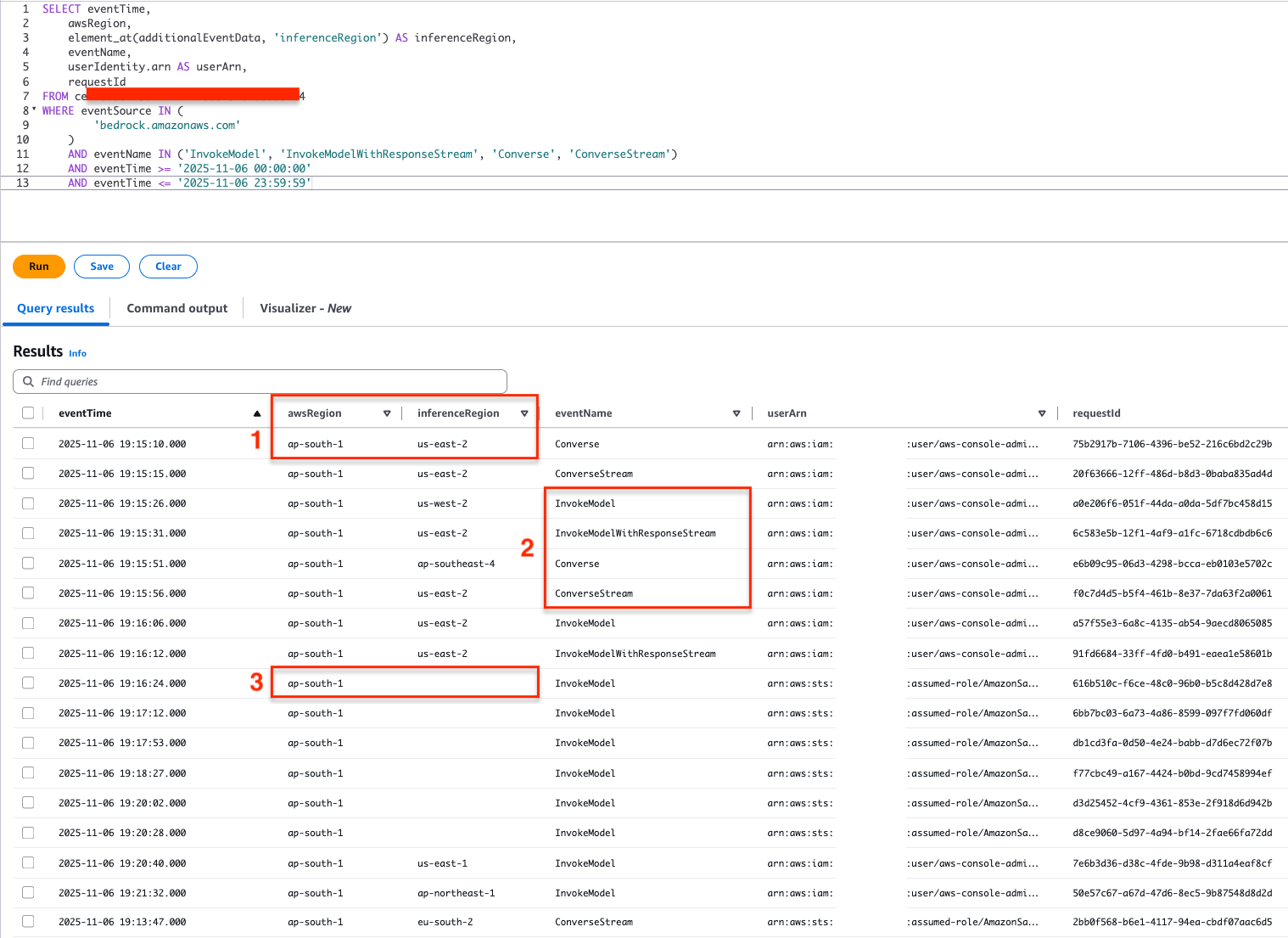
From the query results in the Event data store for global cross-Region inference requests
awsRegionindicates the origin of the request, andinferenceRegionindicates the destination Region where the inference request was processed.eventNameindicates the invocation API calls to the global CRIS models usingInvokeModel,InvokeModelWithResponseStream, andConverseandConverseStreamAPIs are captured.- We might also see results with
inferenceRegionblank, which indicate that the inference request executed within the Region where the request has originated from. Hence the destination Region in this case is the same asawsRegion.
Take your AI applications global
The Amazon Bedrock Global cross-Region inference can empower Indian organizations to build resilient, high-performing AI applications with intelligent request routing across the worldwide infrastructure of AWS. With the comprehensive monitoring capabilities demonstrated in this post, you can gain complete visibility into your application’s performance and can track exactly where your inference requests are being processed.
Start your journey with global CRIS today by implementing the code examples provided for Anthropic’s Claude Haiku 4.5, Sonnet 4.6, and Opus 4.6. You can enable model invocation logging to gain insights through CloudWatch Gen AI observability, and use CloudTrail to track cross-Region request routing. Whether you’re optimizing for performance with global profiles or maintaining compliance with geography-specific profiles, Amazon Bedrock provides the flexibility that your organization needs.
For more information about Global cross-Region inference for Anthropic’s Claude Opus 4.6 and Claude Sonnet 4.6 in Amazon Bedrock, see Increase throughput with cross-Region inference, Supported Regions and models for inference profiles, and Use an inference profile in model invocation.
We and our partners are excited to see what customers build with this AI Inference capability.
About the authors