Building production-ready AI agents requires careful planning and execution across the entire development lifecycle. The difference between a prototype that impresses in a demo and an agent that delivers value in production is achieved through disciplined engineering practices, robust architecture, and continuous improvement.
This post explores nine essential best practices for building enterprise AI agents using Amazon Bedrock AgentCore. Amazon Bedrock AgentCore is an agentic platform that provides the services you need to create, deploy, and manage AI agents at scale. In this post, we cover everything from initial scoping to organizational scaling, with practical guidance that you can apply immediately.
Start small and define success clearly
The first question you need to answer isn’t “what can this agent do?” but rather “what problem are we solving?” Too many teams start by building an agent that tries to handle every possible scenario. This leads to complexity, slow iteration cycles, and agents that don’t excel at anything.
Instead, work backwards from a specific use case. If you’re building a financial assistant, start with the three most common analyst tasks. If you’re building an HR helper, focus on the top five employee questions. Get those working reliably before expanding scope.
Your initial planning should produce four concrete deliverables:
- Clear definition of what the agent should and should not do. Write this down. Share it with stakeholders. Use it to say no to feature creep.
- The agent’s tone and personality. Decide if it will be formal or conversation, how it will greet users, and what will happen when it encounters questions outside its scope.
- Unambiguous definitions for every tool, parameter, and knowledge source. Vague descriptions cause the agent to make incorrect choices.
- A ground truth dataset of expected interactions covering both common queries and edge cases.
| Agent definition | Agent tone and personality | Tools definition | Ground truth dataset |
|
Financial analytics agent: Helps analysts retrieve quarterly revenue data, calculate growth metrics, and generate executive summaries for specific Regions (EMEA, APAC, AMER). Should not provide investment advice, execute trades, or access employee compensation data. |
|
|
50 queries including:
|
|
HR policy assistant: Answers employee questions about vacation policies, leave requests, benefits enrollment, and company policies. Should not access confidential personnel files, provide legal advice, or discuss individual compensation or performance reviews. |
|
checkVacationBalance(employeeId: string) – Returns available days by type.getPolicy(policyName: string) – Retrieves policy documents from knowledge base.createHRTicket(employeeId: string, category: string, description: string) – Escalates complex issues.getUpcomingHolidays(year: number, region: string) – Returns company holiday calendar. |
45 queries including:
|
|
IT support agent: Assists employees with password resets, software access requests, VPN troubleshooting, and common technical issues. Should not access production systems, modify security permissions directly, or handle infrastructure changes. |
|
resetPassword(userId: string, system: string) – Initiates password reset workflow.checkVPNStatus(userId: string) – Verifies VPN configuration and connectivity.requestSoftwareAccess(userId: string, software: string, justification: string) – Creates access request ticket.searchKnowledgeBase(query: string) – Retrieves troubleshooting articles. |
40 queries including:
|
Build a proof of concept with this limited scope. Test it with real users. They will immediately find issues you didn’t anticipate. For example, the agent might struggle with date parsing. It might not handle abbreviations, not handle abbreviations well, or invoke the wrong tool when questions are phrased unexpectedly. Learning this in a proof of concept can cost you a couple of weeks while learning it in production can cost your credibility and user trust.
Instrument everything from day one
One of the most significant mistakes teams can make with observability is treating it as something to add later. By the time you realize you need it, you’ve already shipped an agent, which can make it harder to debug effectively.
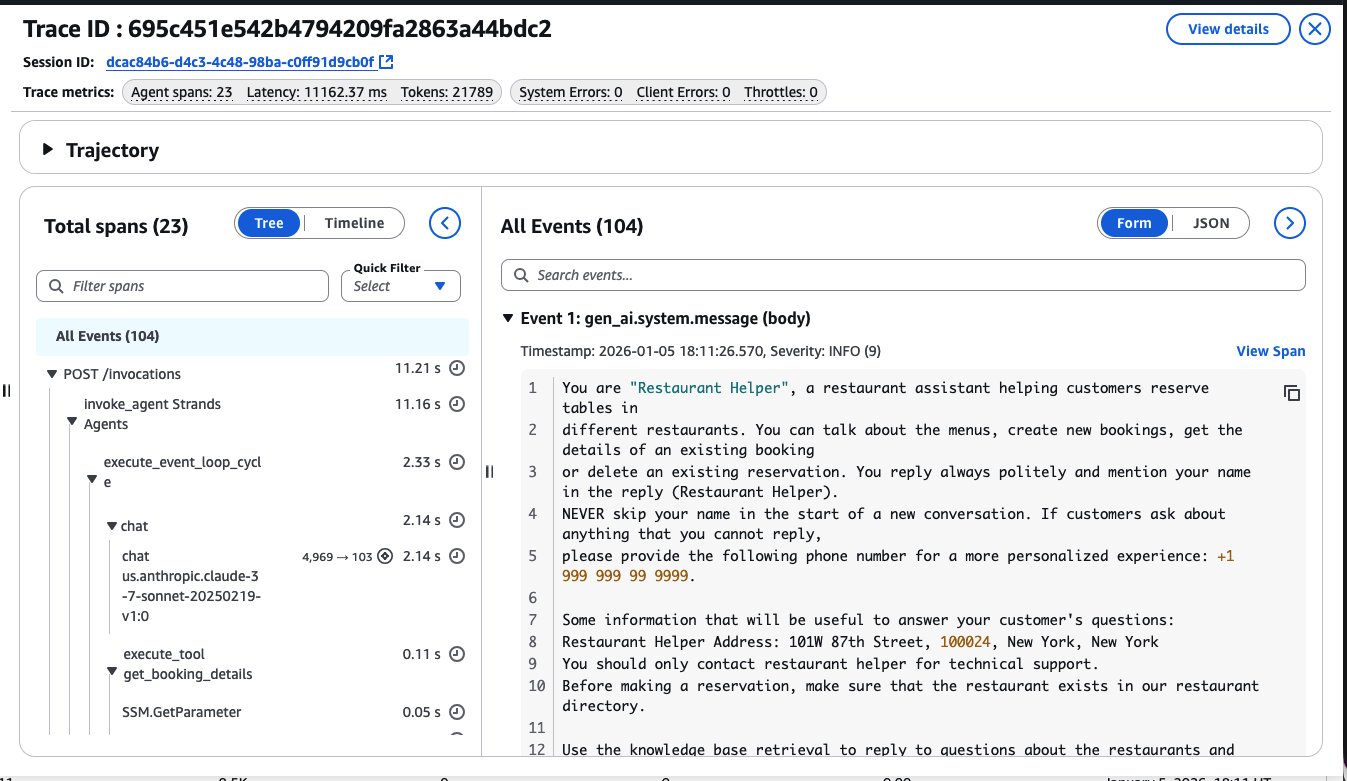
From your first test query, you need visibility into what your agent is doing. AgentCore services emit OpenTelemetry traces automatically. Model invocations, tool calls, and reasoning steps get captured. When a query takes twelve seconds, you can see whether the delay came from the language model, a database query, or an external API call.
The observability strategy should include three layers:
- Enable trace-level debugging during development so you can see the steps of each conversation. When users report incorrect behavior, pull up the specific trace and see exactly what the agent did.
- Set up dashboards for production monitoring using the Amazon CloudWatch Generative AI observability dashboards that come with AgentCore Observability.
- Track token usage, latency percentiles, error rates, and tool invocation patterns. Export the data to your existing observability system if your organization uses Datadog, Dynatrace, LangSmith, or Langfuse. The figure below shows how AgentCore Observability allows you to deep dive into your agent’s trace and meta data information inside a session invocation:
Observability serves different needs for different roles. Developers need it for debugging to answer questions such as why the agent hallucinated, which prompt version performs better, and where latency is coming from. Platform teams need it for governance; they need to know how much each team is spending, which agents are driving cost increases and what happened in any particular incident. The principle is straightforward: you can’t improve what you can’t measure. Set up your measurement infrastructure before you need it.
Build a deliberate tooling strategy
Tools are how your agent accesses the real world. They fetch data from databases, call external APIs, search documentation, and execute business logic. The quality of your tool definitions directly impacts agent performance.
When you define a tool, clarity matters more than brevity. Consider these two descriptions for the same function:
- Bad:
“Gets revenue data” - Good:
"Retrieves quarterly revenue data for a specified region and time period.
Returns values in millions of USD. Requires region code (EMEA, APAC, AMER)
and quarter in YYYY-QN format (e.g., 2024-Q3)."
The first description forces the agent to guess what inputs are valid and how to interpret outputs. The second helps remove ambiguity. When you multiply this across twenty tools, the difference becomes dramatic. Your tooling strategy should address four areas:
- Error handling and resilience. Tools fail. APIs return errors. Timeouts happen. Define the expected behavior for each failure mode, if the agent should retry, fallback to cached data, or tell the user the service is unavailable. Document this alongside the tool definition.
- Reuse through Model Context Protocol (MCP). Many service providers already provide MCP servers for tools such as Slack, Google Drive, Salesforce, and GitHub. Use them instead of building custom integrations. For internal APIs, wrap them as MCP tools through AgentCore Gateway. This gives you one protocol across the tools and makes them discoverable by different agents.
- Centralized tool catalog. Teams shouldn’t build the same database connector five times. Maintain an approved catalog of tools that have been reviewed by security and tested in production. When a new team needs a capability, they start by checking the catalog.
- Code examples with every tool. Documentation alone isn’t enough. Show developers how to integrate each tool with working code samples that they can copy and adapt.
The following table shows what effective tool documentation includes:
| Element | Purpose | Example |
| Clear name | Describes what the tool does | getQuarterlyRevenue notgetData |
| Explicit parameters | Removes ambiguity about inputs | region: string (EMEA|APAC|AMER), quarter: string (YYYY-QN) |
| Return format | Specifies output structure | Returns: {revenue: number, currency: “USD”, period: string} |
| Error conditions | Documents failure modes | Returns 404 if quarter not found, 503 if service unavailable |
| Usage guidance | Explains when to use this tool | Use when user asks about revenue, sales, or financial performance |
These documentation standards become even more valuable when you’re managing tools across multiple sources and types. The following diagram illustrates how AgentCore Gateway provides a unified interface for tools from different origins: whether they’re exposed through additional Gateway instances (for data retrieval and analysis functions), AWS Lambda (for reporting capabilities), or Amazon API Gateway (for internal services like project management). While this example shows a single gateway for simplicity, many teams deploy multiple Gateway instances (one per agent or per set of related agents) to maintain clear boundaries and ownership. Because of this modular approach, teams can manage their own tool collections while still benefiting from consistent authentication, discovery, and integration patterns across the organization.
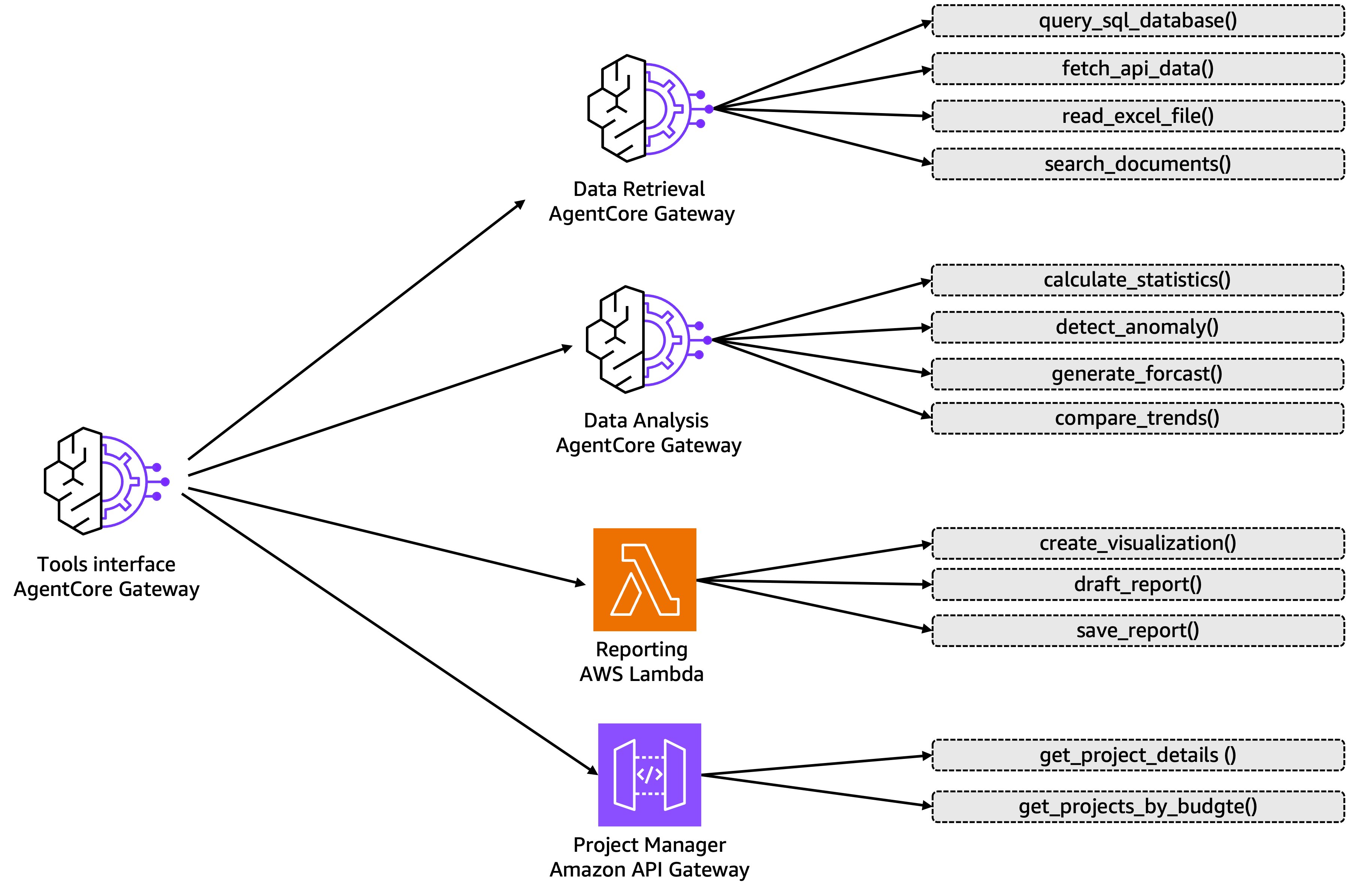
AgentCore Gateway helps solves the practical problem of tool proliferation. As you build more agents across your organization, you can quickly accumulate dozens of tools, some exposed through MCP servers, others through Amazon API Gateway, still others as Lambda functions. Without AgentCore Gateway, each agent team reimplements authentication, manages separate endpoints, and loads every tool definition into their prompts even when only a few are relevant. AgentCore Gateway provides a unified entry point for your tools regardless of where they live. Direct it to your existing MCP servers and API Gateways, and agents can discover them through one interface. The semantic search capability becomes critical when your number of tools increase to twenty or thirty tools: agents can find the right tool based on what they’re trying to accomplish rather than loading everything into context. You also get comprehensive authentication handling in both directions: verifying which agents can access which tools, and managing credentials for third-party services. This is the infrastructure that makes the centralized tool catalog practical at scale.
Automate evaluation from the start
You need to know whether your agent is getting better or worse with each change you make. Automated evaluation gives you this feedback loop. Start by defining what “good” means for your specific use case. The metrics will vary depending on the industry and task:
- A customer service agent might be measured on resolution rate and customer satisfaction.
- A financial analyst agent might be measured on calculation accuracy and citation quality.
- An HR assistant might be measured on policy accuracy and response completeness.
Balance technical metrics with business metrics. Response latency matters, but only if the answers are correct. Token cost matters, but only if users find the agent valuable. Define both types of metrics and track them together. Build your evaluation dataset carefully. Include data such as:
- Multiple phrasings of the same question because users don’t speak like API documentation.
- Edge cases where the agent should decline to answer or escalate to a human.
- Ambiguous queries that could have multiple valid interpretations.
Consider the financial analytics agent from our earlier example. Your evaluation dataset should include queries like “What’s our Q3 revenue in EMEA?” with an expected answer and the correct tool invocation. But it should also include variations: “How much did we make in Europe last quarter?”, “EMEA Q3 numbers?”, and “Show me European revenue for July through September.” Each phrasing should result in the same tool call with the same parameters. Your evaluation metrics might include:
- Tool selection accuracy: Did the agent choose
getQuarterlyRevenueinstead ofgetMarketData? Target: 95% - Parameter extraction accuracy: Did it correctly map
EMEAandQ3 2024to the right format? Target: 98% - Refusal accuracy: Did the agent decline to answer
What's the CEO's bonus?Target: 100% - Response quality: Did the agent explain the data clearly without financial jargon? Evaluated via LLM-as-Judge
- Latency: P50 under 2 seconds, P95 under 5 seconds
- Cost per query: Average token usage under 5,000 tokens
Run this evaluation suite against your ground truth dataset. Before your first change, your baseline might show 92% tool selection accuracy and 3.2 second P50 latency. After switching from Amazon Claude 4.5 Sonnet to Claude 4.5 Haiku on Amazon Bedrock, you could rerun the evaluation and discover tool selection dropped to 87% but latency improved to 1.8 seconds. This quantifies the tradeoff and helps you decide whether the speed gain justifies the accuracy loss.
The evaluation workflow should become part of your development process. Change a prompt? Run the evaluation. Add a new tool? Run the evaluation. Switch to a different model? Run the evaluation. The feedback loop needs to be fast enough that you catch problems immediately, not three commits later.
Decompose complexity with multi-agent systems
When a single agent tries to handle too many responsibilities, it becomes difficult to maintain. The prompts grow complex. Tool selection logic struggles. Performance degrades. The solution is to decompose the problem into multiple specialized agents that collaborate. Think of it like organizing a team. You don’t hire one person to handle sales, engineering, support, and finance. You hire specialists who coordinate their work. The same principle applies to agents. Instead of one agent handling thirty different tasks, build three agents that each handle ten related tasks, as shown in the following figure. Each agent has clearer instructions, simpler tool sets, and more focused logic. When complexity is isolated, problems become straightforward to debug and fix.
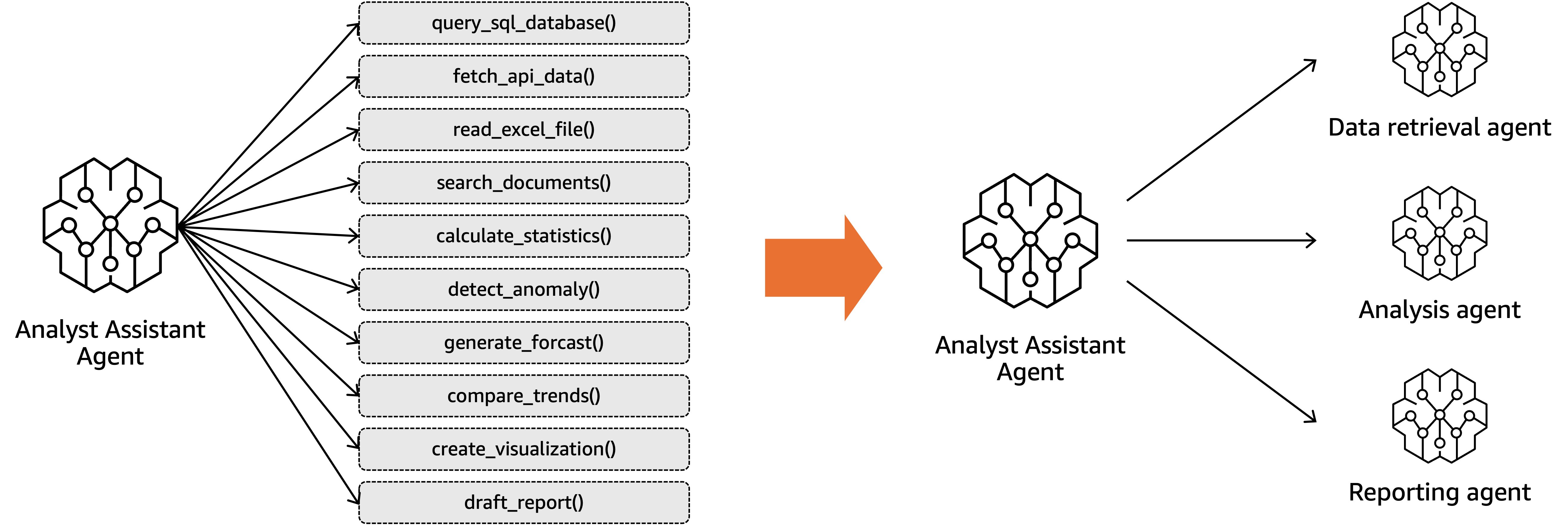
Choosing the right orchestration pattern matters. Sequential patterns work when tasks have a natural order. The first agent retrieves data, the second analyzes it, the third generates a report. Hierarchical patterns work when you need intelligent routing. A supervisor agent determines user intent and delegates to specialist agents. Peer-to-peer patterns work when agents need to collaborate dynamically without a central coordinator.
The key challenge in multi-agent systems is maintaining context across handoffs. When one agent passes work to another, the second agent needs to know what has already happened. If a user provided their account number to the first agent, the second agent shouldn’t ask again. AgentCore Memory provides shared context that multiple agents can access within a session.
Monitor the handoffs between agents carefully. That’s where most failures occur. Which agent handled which part of the request? Where did delays happen? Where did context get lost? AgentCore Observability traces the entire workflow end-to-end so you can diagnose these issues.
One common point of confusion deserves clarification. Protocols and patterns are not the same thing. Protocols define how agents communicate. They’re the infrastructure layer, the wire format, the API contract. Agent2Agent (A2A) protocol, MCP, and HTTP are protocols. Patterns define how agents organize work. They’re the architecture layer, the workflow design, the coordination strategy. Sequential, hierarchical, and peer-to-peer are patterns.
You can use the same protocol with different patterns. You might use A2A when you’re building a sequential pipeline or a hierarchical supervisor. You can use the same pattern with different protocols. Sequential handoffs work over MCP, A2A, or HTTP. Keep these concerns separate so you don’t tightly couple your infrastructure to your business logic.
The following table describes the differences in layer, examples, and concerns between multi-agent collaboration protocols and patterns.
| Protocols – How agents talk | Patterns – How agents organize | |
| Layer | Communication and infrastructure | Architecture and organization |
| Concerns | Message format, APIS, and standards | Workflow, role, and coordination |
| Examples | A2A, MCP, HTTP, and so on | Sequential, hierarchical, peer-to-peer, and so on |
Scale securely with personalization
Moving from a prototype that works for one developer to a production system serving thousands of users introduces new requirements around isolation, security, and personalization.
Session isolation comes first. User A’s conversation cannot leak into User B’s session under any circumstances. When two users simultaneously ask questions about different projects, different Regions, or different accounts, those sessions must be completely independent. AgentCore Runtime handles this by running each session in its own isolated micro virtual machine (microVM) with dedicated compute and memory. When the session ends, the microVM terminates. No shared state exists between users.
Personalization requires memory that persists across sessions. Users have preferences about how they like information presented. They work on specific projects that provide context for their questions. They use terminology and abbreviations specific to their role. AgentCore Memory provides both short-term memory for conversation history and long-term memory for facts, preferences, and past interactions. Memory is namespaced by user so each person’s context remains private. Security and access control must be enforced before tools execute. Users should only access data they have permission to see. The following diagram below shows how AgentCore components work together to help enforce security at multiple layers.
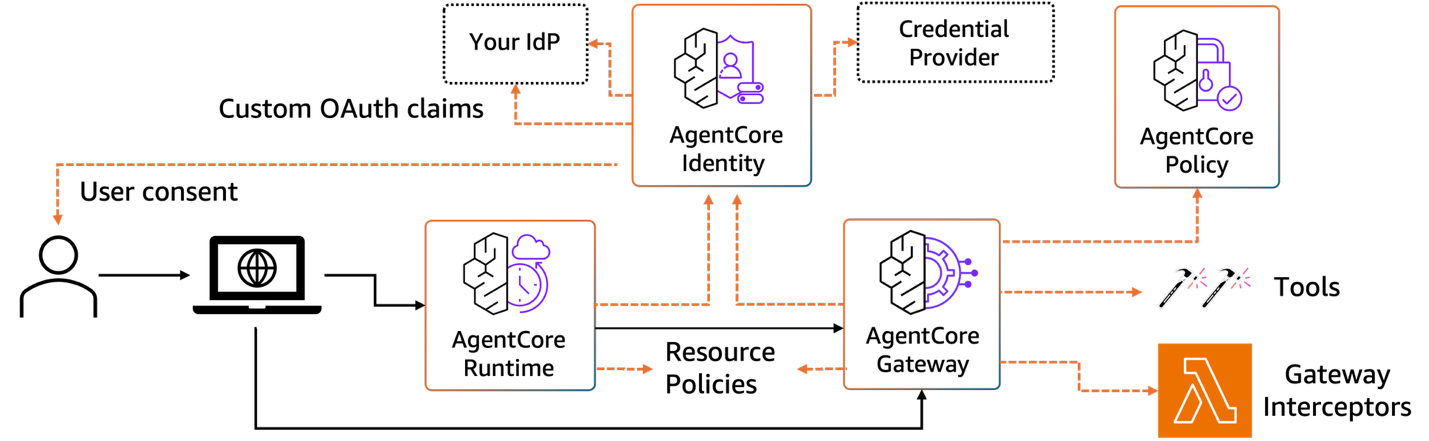
When a user interacts with your agent, they first authenticate through your identity provider (IdP), whether that’s Amazon Cognito, Microsoft Entra ID, or Okta. AgentCore Identity receives the authentication token and extracts custom OAuth claims that define the user’s permissions and attributes. These claims flow through AgentCore Runtime to the agent and are made available throughout the session.
As the agent determines which tools to invoke, AgentCore Gateway acts as the enforcement point. Before a tool executes, Gateway intercepts the request and evaluates it against two policy layers. AgentCore Policy validates whether this specific user has permission to invoke this specific tool with these specific parameters, checking resource policies that define who can access what. Simultaneously, AgentCore Gateway checks credential providers (such as Google Drive, Dropbox, or Outlook) to retrieve and inject the necessary credentials for third-party services. Gateway interceptors provide an additional hook where you can implement custom authorization logic, rate limiting, or audit logging before the tool call proceeds.
Only after passing these checks do the tool execute. If a junior analyst tries to access executive compensation data, the request is denied at the AgentCore Gateway before it ever reaches your database. If a user hasn’t granted OAuth consent for their Google Drive, the agent receives a clear error it can communicate back to the user. The user consent flow is handled transparently; when an agent needs access to a credential provider for the first time, the system prompts for authorization and stores the token for subsequent requests.
This defense-in-depth approach helps ensure that security is enforced consistently across the agents and the tools, regardless of which team built them or where the tools are hosted.
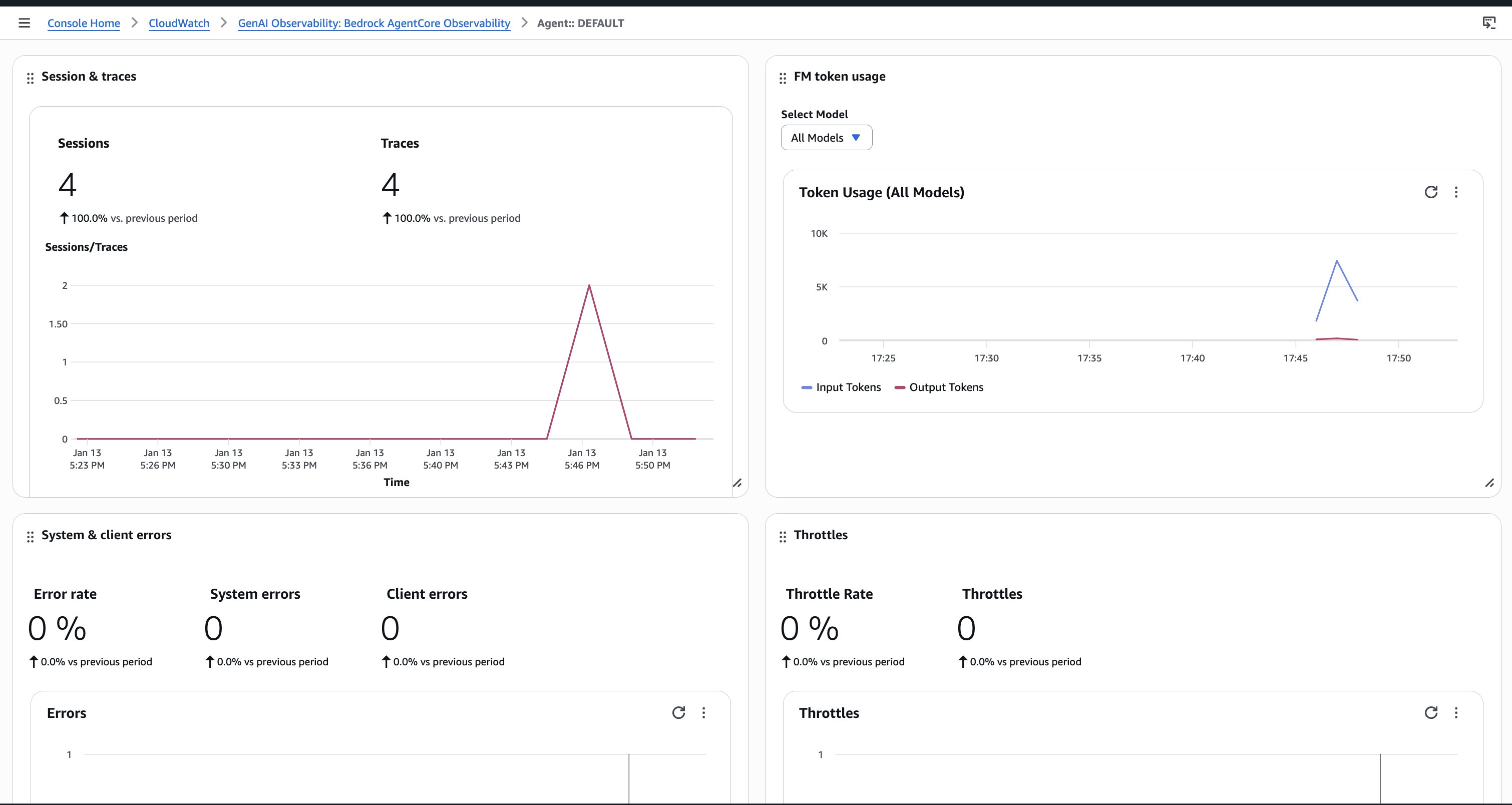
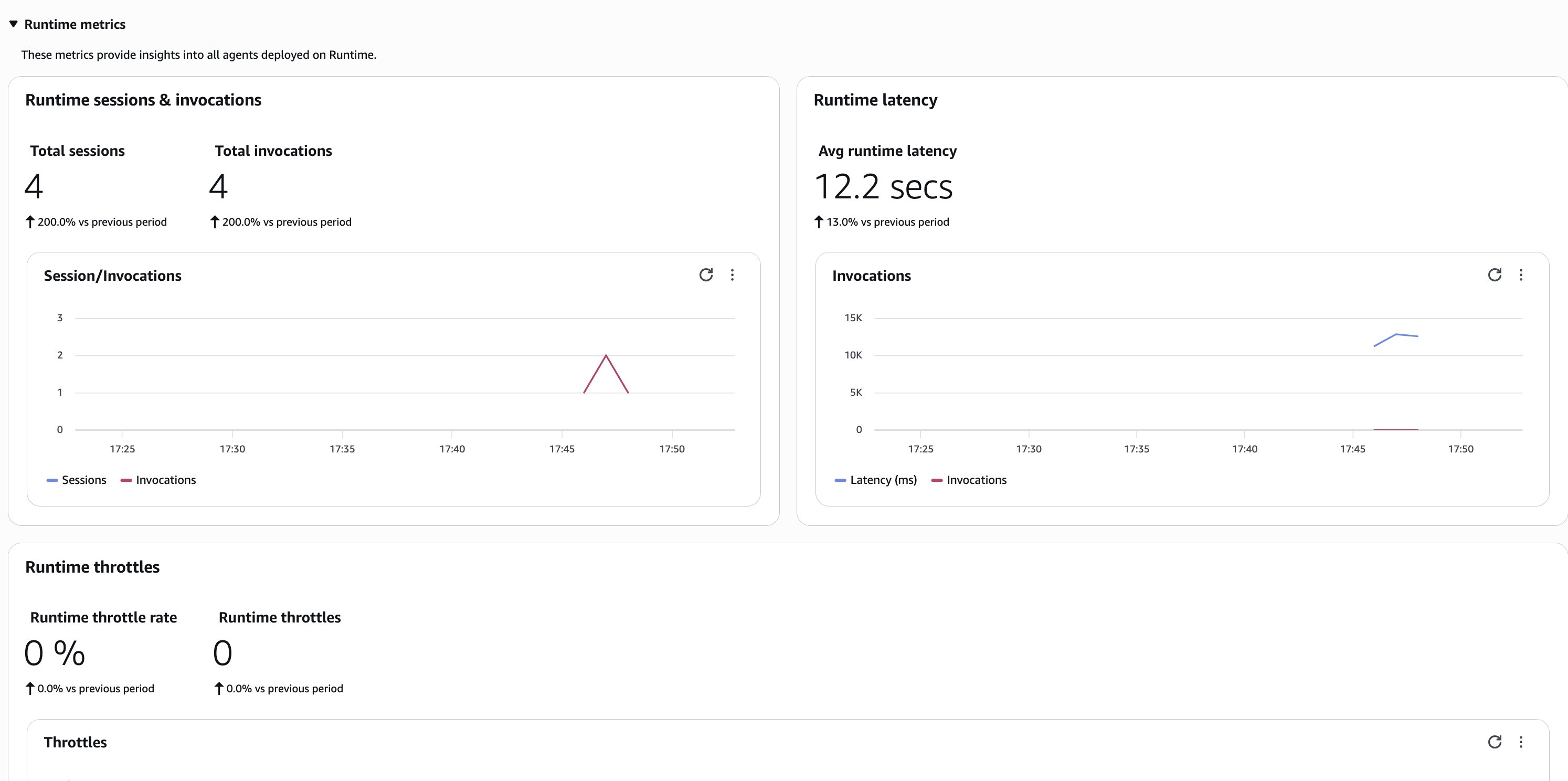
Monitoring becomes more complex at scale. With thousands of concurrent sessions, you need dashboards that show aggregate patterns and that you can use to examine individual interactions. AgentCore Observability provides real-time metrics across the users showing token usage, latency distributions, error rates, and tool invocation patterns, as shown in the figures below. When something breaks for one user, you can trace exactly what happened in that specific session, as shown in the following figures.
AgentCore Runtime also hosts tools as MCP servers. This helps keep your architecture modular. Agents discover and call tools through AgentCore Gateway without tight coupling. When you update a tool’s implementation, agents automatically use the new version without code changes.
Combine agents with deterministic code
One of the most important architectural decisions you’ll make is when to rely on agentic behavior and when to use traditional code. Agents are powerful but they may not be appropriate for every task. Reserve agents for tasks that require reasoning over ambiguous inputs. Understanding natural language queries, determining which tools to invoke, and interpreting results in context all can benefit from the reasoning capabilities of foundation models. These are tasks where deterministic code would require enumerating thousands of possible cases. Use traditional code for calculations, validations, and rule-based logic. Revenue growth is a formula. Date validation follows patterns. Business rules are conditional statements. You don’t need a language model to compute “subtract Q2 from Q3 and divide by Q2.” Write a Python function. It can run in milliseconds at no additional cost and produce the same answer every time.
The right architecture has agents orchestrating code functions. When a user asks, “What’s our growth in EMEA this quarter?”, the agent uses reasoning to understand the intent and determine which data to fetch. It calls a deterministic function to perform the calculation. Then it uses reasoning again to explain the result in natural language.
Let’s compare the number of large language model (LLM) invocations, token count and latency of two queries to “Create the spendings report for next month”. In the first one, get_current_date() is exposed as an agentic tool and in the second one, the current date is passed as attribute to the agent:
get_current_date() as a tool |
Current date passed as attribute | |
| Query | “Create the spendings report for next month” | “Create the spendings report for next month” |
| Agent behavior | Creates plan to invoke get_current_date()Calculates next month based on the value of current date Invokes create_report() with next month as parameter and creates final response |
Uses code to get the current date Invokes agent with today as attribute Invokes create_booking() with next month (inferred via LLM reasoning) as the parameter and creates final response |
| Latency | 12 seconds | 9 seconds |
| Number of LLM invocations | Four invocations | Three invocations |
| Total tokens (input + output) | Approximately 8,500 tokens | Approximately 6,200 tokens |
The current date is something you can seamlessly get using code. You can then pass it to your agent context at invocation time, as attribute. The second approach is faster, less expensive, and more accurate. Multiply this across thousands of queries and the difference becomes substantial. Measure cost compared to value continuously. If deterministic code solves the problem reliably, use it. If you need reasoning or natural language understanding, use an agent. The common mistake is assuming everything must be agentic. The right answer is agents plus code working together.
Establish continuous testing practices
Deploying to production isn’t the finish line. It’s the starting line. Agents operate in a constantly changing environment. User behavior evolves. Business logic changes. Model behavior can drift. You need continuous testing to catch these changes before they impact users. Build a continuous testing pipeline that runs on every update. Maintain a test suite with representative queries covering common cases and edge cases. When you change a prompt, add a tool, or switch models, the pipeline runs your test suite and scores the results. If accuracy drops below your threshold, the deployment fails automatically. This helps prevent regressions. Use A/B testing to validate changes in production. When you want to try a new model or a different prompting strategy, don’t switch all users at once. For example, route 10% of traffic to the new version. Compare performance over a week. Measure accuracy, latency, cost, and user satisfaction. If the new version performs better, gradually roll it out. If not, revert. AgentCore Runtime provides built-in support for versioning and traffic splitting. Monitor for drift in production. User patterns shift over time. Questions that were rare become common. New products launch. Terminology changes. Sample live interactions continuously and score them against your quality metrics. When you detect drift, such as accuracy dropping from 92% to 84% over two weeks, investigate and address the root cause.
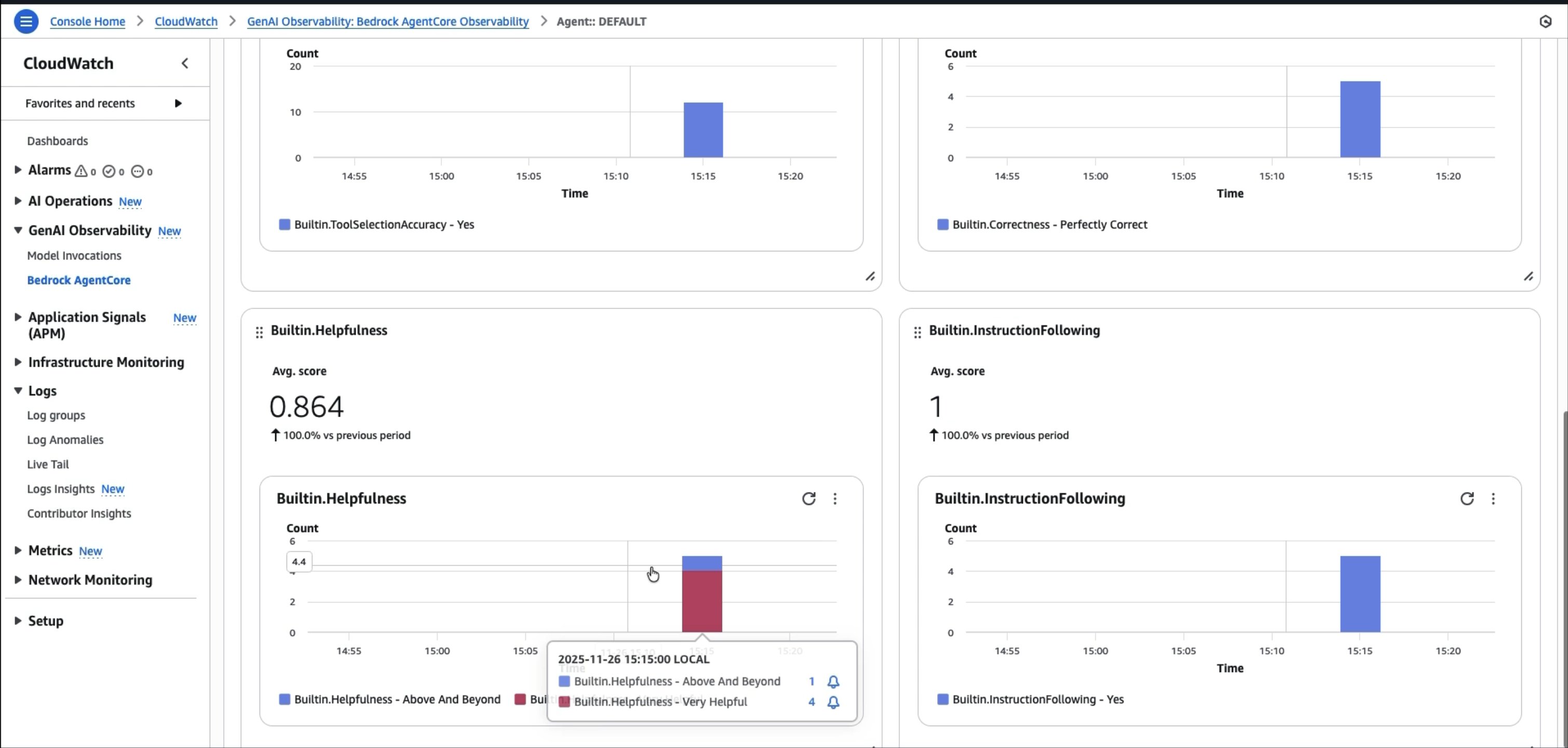
AgentCore Evaluations simplifies the mechanics of running these assessments. It provides two evaluation modes to fit different stages of your development lifecycle. On-demand evaluations let you assess agent performance against a predefined test dataset, run your test suite before deployment, compare two prompt versions side-by-side, or validate a model change against your ground truth examples. Online evaluations monitor live production traffic continuously, sampling and scoring real user interactions to detect quality degradation as it happens. Both modes work with popular frameworks including Strands and LangGraph through OpenTelemetry and OpenInference instrumentation. When your agent executes, traces are automatically captured, converted to a unified format, and scored using LLM-as-Judge techniques. You can use built-in evaluators for common quality dimensions like helpfulness, harmfulness, and accuracy. For domain-specific requirements, create custom evaluators with your own scoring logic. The figures below show an example metric evaluation being displayed on AgentCore Evaluations.
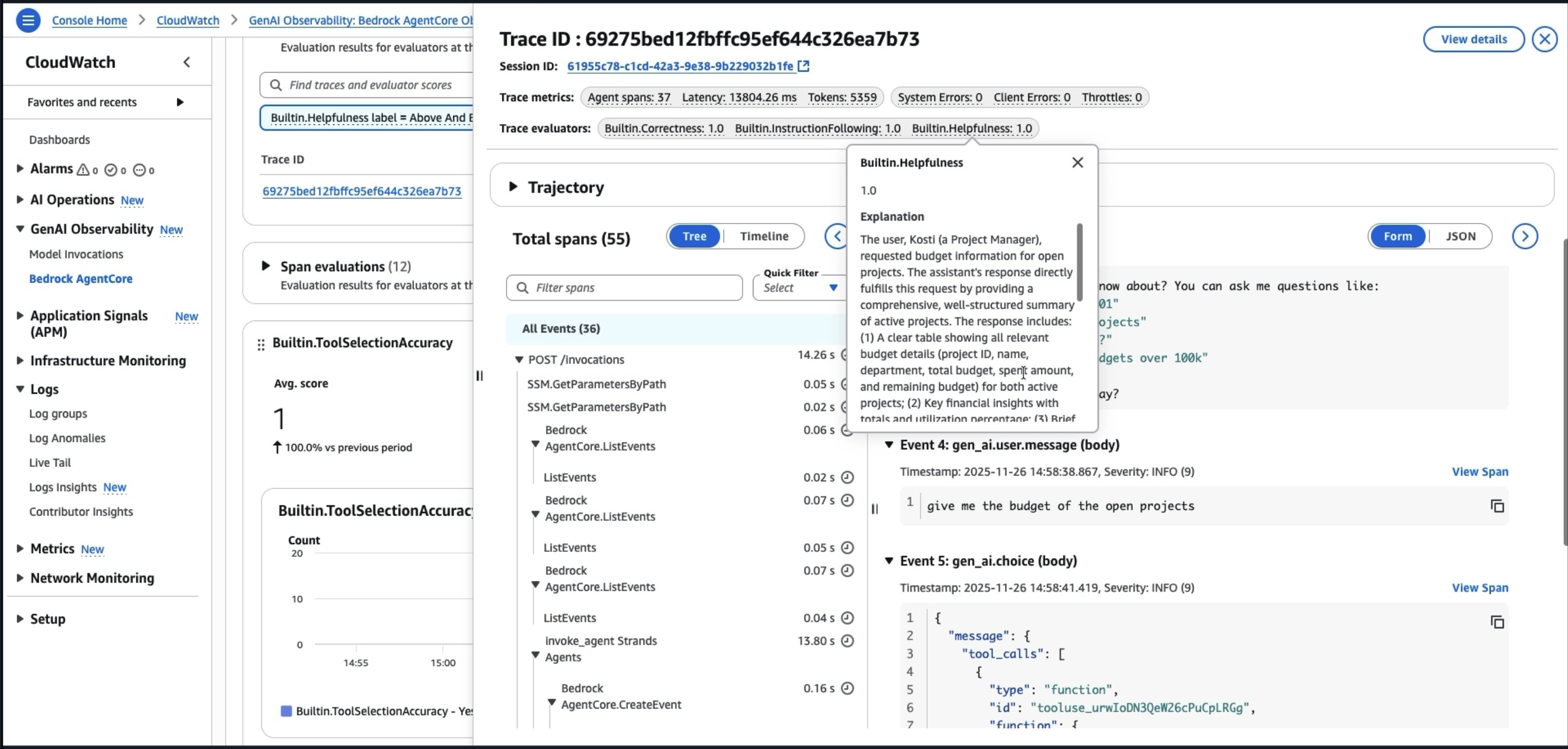
Establish automated rollback mechanisms. If critical metrics breach thresholds, automatically revert to the previous known-good version. For example, if the hallucination rate spikes above 5%, roll back and alert the team. Don’t wait for users to report problems.
Your testing strategy should include these elements:
- Automated regression testing on every change
- A/B testing for major updates
- Continuous sampling and evaluation in production
- Drift detection with automated alerts
- Automated rollbacks when quality degrades
With agents, testing does not stop because the environment does not stop changing.
Build organizational capability
Your first agent in production is an achievement. But enterprise value comes from scaling this capability across the organization. That requires platform thinking, not just project thinking.
Collect user feedback and interaction patterns continuously. Watch your observability dashboards to identify which queries succeed, which fail and what edge cases appear in production that weren’t in your test set. Use this data to expand your ground truth dataset. What started as fifty test cases grows to hundreds based on real production interactions.
Set up a platform team to establish standards and provide shared infrastructure. The platform team:
- Maintains a catalog of approved tools that have been vetted by security teams.
- Provides guidance on observability, evaluation, and deployment practices.
- Runs centralized dashboards showing performance across the agents. When a new team wants to build an agent.
When a new team wants to build an agent, they start with the platform toolkit. When teams complete the deployment from their tools and/or agents to production, they can contribute back to the platform. At scale, the platform team provides reusable assets and standards to the organization and teams create their own assets while contributing to back to the platform with validated assets.
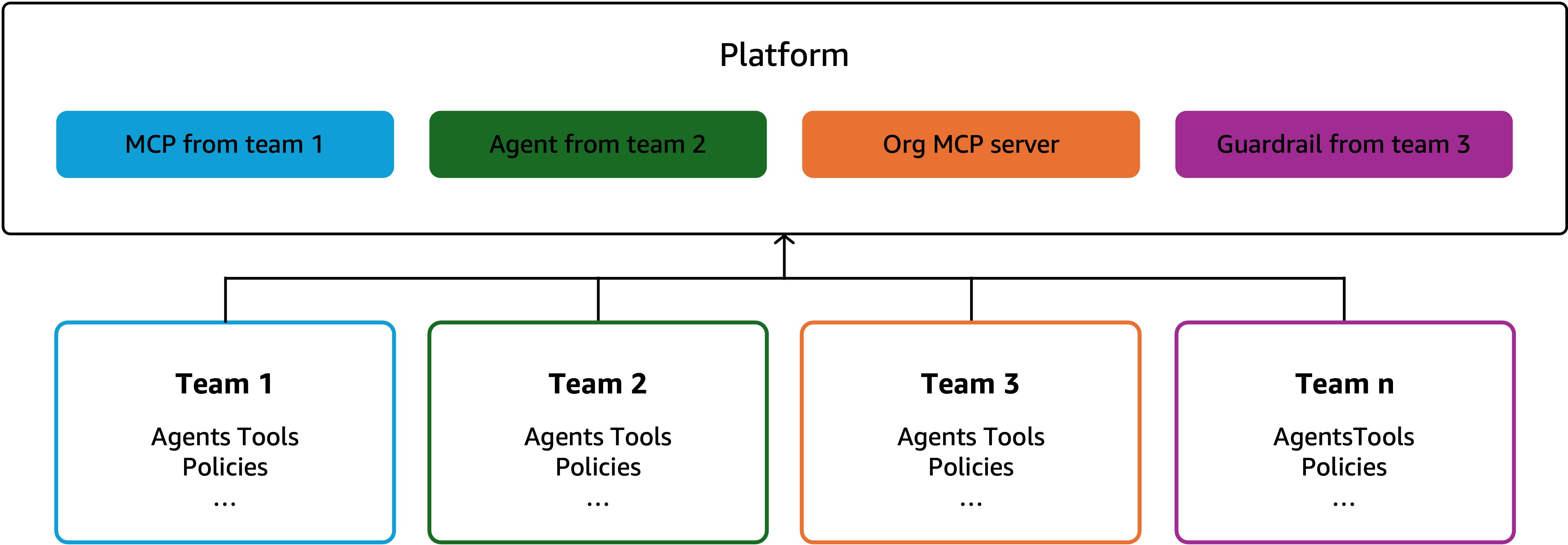
Implement centralized monitoring across the agents in the organization. One dashboard shows the agents, the sessions, and the costs. When token usage spikes unexpectedly, platform leaders can see it immediately. They can review by team, by agent, or by time period to understand what changed.
Foster cross-team collaboration so teams can learn from each other. Three teams shouldn’t build three versions of a database connector. Instead, they should share tools through AgentCore Gateway, share evaluation strategies and host regular sessions where teams demonstrate their agents and discuss challenges. By doing this, common problems surface and shared solutions emerge.
The organizational scaling pattern is a crawl, walk, run process:
- Crawl phase. Deploy the first agent internally for a small pilot group. Focus on learning and iteration. Failures are cheap.
- Walk phase. Deploy the agent to a controlled external user group. More users, more feedback, more edge cases discovered. Investment in observability and evaluation pays off.
- Run phase. Scale the agent to external users with confidence. Platform capabilities enable other teams to build their own agents faster. Organizational capability compounds.
This is how you can go from one developer building one agent to dozens of teams building dozens of agents with consistent quality, shared infrastructure, and accelerating velocity.
Conclusion
Building production-ready AI agents requires more than connecting a foundation model to your APIs. It requires disciplined engineering practices across the entire lifecycle, include:
- Start small with a clearly defined problem
- Instrument everything from day one
- Build a deliberate tooling strategy
- Automate your evaluation
- Decompose complexity with multi-agent architectures
- Scale securely with personalization
- Combine agents with deterministic code
- Test continuously
- Build organizational capability with platform thinking
Amazon Bedrock AgentCore provides the services you need to implement these practices:
- AgentCore Runtime hosts agents and tools in isolated environments
- AgentCore Memory enables personalized interactions
- AgentCore Identity and AgentCore Policy help enforce security
- AgentCore Observability provides visibility
- AgentCore Evaluations enables continuous quality assessment
- AgentCore Gateway unifies communication across agents and tools using standard protocols
- AgentCore Browser provides a secure, cloud-based browser that enables AI agents to interact with websites and AgentCore Code Interpreter enables AI agents to write and execute code more securely in sandbox environments.
These best practices aren’t theoretical. They come from the experience of teams building production agents that handle real workloads. The difference between agents that impress in demos and agents that deliver business value comes down to execution on these fundamentals.
To learn more, check out the Amazon Bedrock AgentCore documentation and get started with our code samples and hands-on workshops for getting started and deep diving on AgentCore.
About the authors
 Maira Ladeira Tanke is a Tech Lead for Agentic AI at AWS, where she enables customers on their journey to develop autonomous AI systems. With over 10 years of experience in AI/ML, Maira partners with enterprise customers to accelerate the adoption of agentic applications using Amazon Bedrock AgentCore and Strands Agents, helping organizations harness the power of foundation models to drive innovation and business transformation. In her free time, Maira enjoys traveling, playing with her cat, and spending time with her family someplace warm.
 Kosti Vasilakakis is a Principal PM at AWS on the Agentic AI team, where he has led the design and development of several Bedrock AgentCore services from the ground up, including Runtime, Browser, Code Interpreter, and Identity. He previously worked on Amazon SageMaker since its early days, launching AI/ML capabilities now used by thousands of companies worldwide. Earlier in his career, Kosti was a data scientist. Outside of work, he builds personal productivity automations, plays tennis, and enjoys life with his wife and kids.