Performing research and clinical analytics on vast amounts of clinical data can be difficult. Healthcare data scientists and epidemiologists possess deep domain expertise in patient care, disease patterns, and clinical outcomes, yet they often spend weeks navigating complex data infrastructures, writing boilerplate code, and wrestling with technical barriers before they can answer a single clinical question. This slows down research and delays evidence-based decisions, which might impact patient care.
On November 21, 2025, Amazon SageMaker introduced a built-in data agent within Amazon SageMaker Unified Studio that transforms large-scale data analysis. Amazon SageMaker Data Agent has a context-aware feature that saves time connecting to clinical data across clinical databases, patient cohorts, and organizational metadata, and autonomously breaks down complex analytical requests into structured, executable plans. For example, when you ask a clinical question, “Compare comorbidity patterns between diabetic and hypertensive patient cohorts,” the data agent thinks through the problem systematically. It creates a multi-step analysis plan, identifies the relevant clinical tables, determines the appropriate statistical methods, generates validated code in the optimal language (SQL, Python, or PySpark), and executes each step with built-in checkpoints for human oversight. SageMaker Data Agent is designed to respect existing customer security controls and governance policies, helping support customer compliance requirements by operating within a customer’s organizational data framework.
In this post, we demonstrate, through a detailed case study of an epidemiologist conducting clinical cohort analysis, how SageMaker Data Agent can help reduce weeks of data preparation into days, and days of analysis development into hours—ultimately accelerating the path from clinical questions to research conclusions.
Key challenges in accelerating healthcare data analytics
Healthcare research in laboratory settings, clinical settings, academic medical centers, government, and commercial facilities produce enormous volumes of clinical data. Key challenges include:
- Navigating complex clinical data – Clinical data catalogs use specialized medical terminology and coding systems that require domain expertise to navigate. Finding which tables contain relevant patient cohorts and understanding how condition codes map across different classification systems creates a significant discovery challenge before analysis even begins.
- Preparing technical data preparation for analysis – After data is located, healthcare analysts spend a significant amount of time doing intensive coding work writing Python or PySpark scripts to extract patient cohorts, calculate clinical metrics, and perform statistical analyses. This technical burden is particularly acute because clinical researchers are often experts in epidemiology or biostatistics and not software engineering.
How SageMaker Data Agent accelerates healthcare analytics
SageMaker Data Agent provides a natural language-based interface for healthcare professionals to interact with clinical data. Rather than simply generating code snippets, it functions as an intelligent research assistant that works to understand your specific data environment and clinical objectives. It directly addresses the aforementioned key challenges:
- Navigating complex clinical data – SageMaker Data Agent is integrated with the AWS Glue Data Catalog to map your entire healthcare data landscape. The agent understands your actual clinical tables—patient demographics, diagnoses, encounters, conditions, medications, immunizations, procedures—by their real names and relationships, not generic placeholders. It recognizes temporal relationships between encounters, understands how diagnosis codes are structured, and navigates the complex hierarchies of clinical data without requiring you to memorize database schemas.
- Preparing technical data preparation for analysis – The agent transforms natural language clinical questions into production-ready analytical code, reducing code development hours. It generates optimized code across SQL for efficient patient cohort extraction, Python for statistical analysis, and PySpark for large-scale data processing, and it helps clinical researchers use the right tool without needing expertise in each language. It also creates a structured, multi-step analysis plan that mirrors how experienced clinical researchers approach problems: cohort definition, then baseline characteristics, then statistical comparison, and lastly visualization. Each step includes validation points for the user to review the data agent’s process, which will help with clinical validity, proper handling of missing data, and the use of statistically appropriate methods. This agentic approach shifts your time back from technical preparation to clinical interpretation.
Solution overview
In this post, we explore through a fictional example how SageMaker Data Agent can assist in clinical research and analysis. In this use case, an epidemiologist at an academic medical center performs detailed analysis of clinical conditions like sinusitis, diabetes, and hypertension through cohort comparison and survival analysis. Their traditional workflow involves navigating multiple disconnected systems to locate datasets, waiting for access approvals, understanding complex data schemas, and writing extensive Python and PySpark code—a multi-week process where most of their time goes to data preparation rather than actual clinical analysis. This bottleneck limits them to just 2–3 comprehensive studies per quarter, directly delaying analytics insights.
With AI-powered SageMaker Data Agent, you can see your accessible datasets upon login, validate data quality with quick previews, and use it to perform analysis through natural language prompts—reducing manual coding effort. SageMaker Data Agent is designed to accelerate your research capacity, which can help treatment patterns be identified earlier. By shifting the vast majority of your time from data preparation to actual analysis, SageMaker Data Agent helps you deliver research findings more efficiently while reducing infrastructure costs.SageMaker Data Agent has two interaction modes to help your analysis:
- Agent panel for comprehensive clinical analysis – Ideal for end-to-end research projects. This mode breaks complex healthcare questions into structured analytical steps with intermediate review points, maintaining human oversight throughout the process.
- In-line assistance for focused tasks – Ideal for experienced researchers who want targeted help with specific coding challenges, error fixes, or code enhancements while maintaining hands-on control of their workflow.
Throughout both modes, SageMaker Data Agent operates securely within your AWS environment, respecting AWS Identity and Access Management (IAM) policies and organizational data boundaries, helping you maintain your security controls while accelerating clinical analytics.
In the following sections, we walk through the process to use SageMaker Data Agent.
Prerequisites
We chose Synthea as a tool to generate synthetic patient data in CSV format, consisting of data about patients, conditions, immunizations, allergies, encounters, and procedures. Synthea is an open source synthetic patient generator (distributed and used under the Apache 2.0 License) that models the medical history of synthetic patients. No real human data is used in this post.
As part of SageMaker setup, open the SageMaker console and choose Get started to create an IAM- based domain and a project named ClinicalDataProject. For instructions to set up an IAM-based domain and create a project, refer to IAM-based domains and projects.
Preview clinical data using SQL
To preview the data using SQL, complete the following steps:
- On the SageMaker console, choose Open, then choose the project you created (
ClinicalDataProject).

You will be redirected to the overview page of SageMaker Unified Studio.
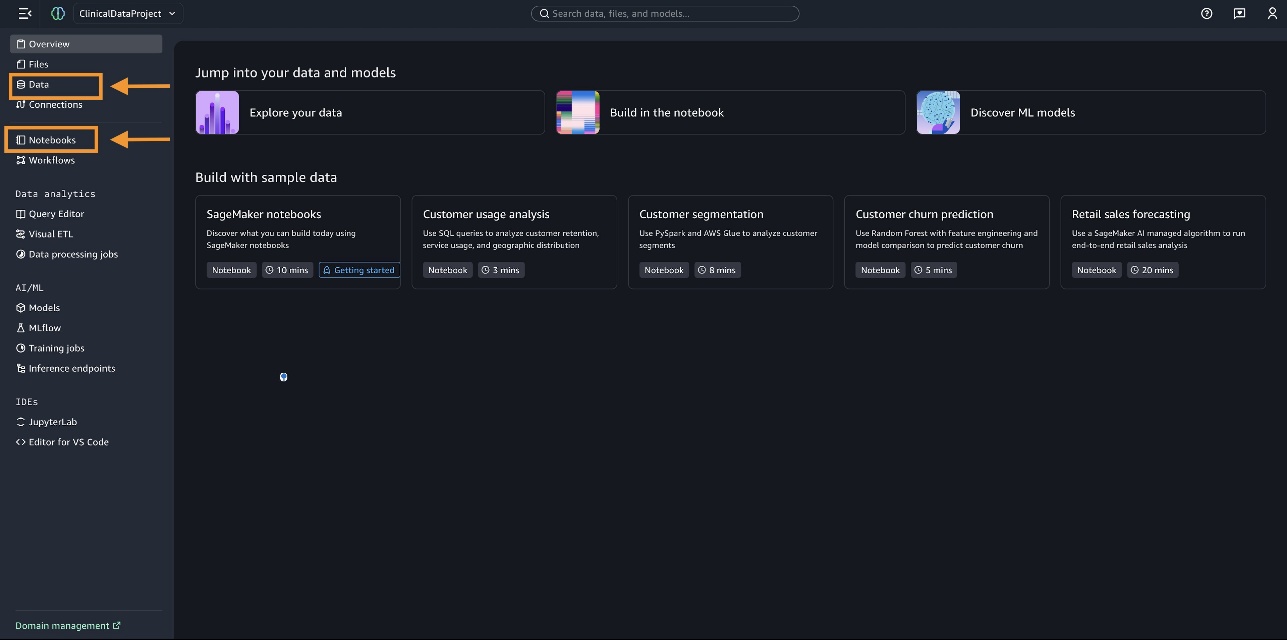
- Choose Data in the navigation pane.
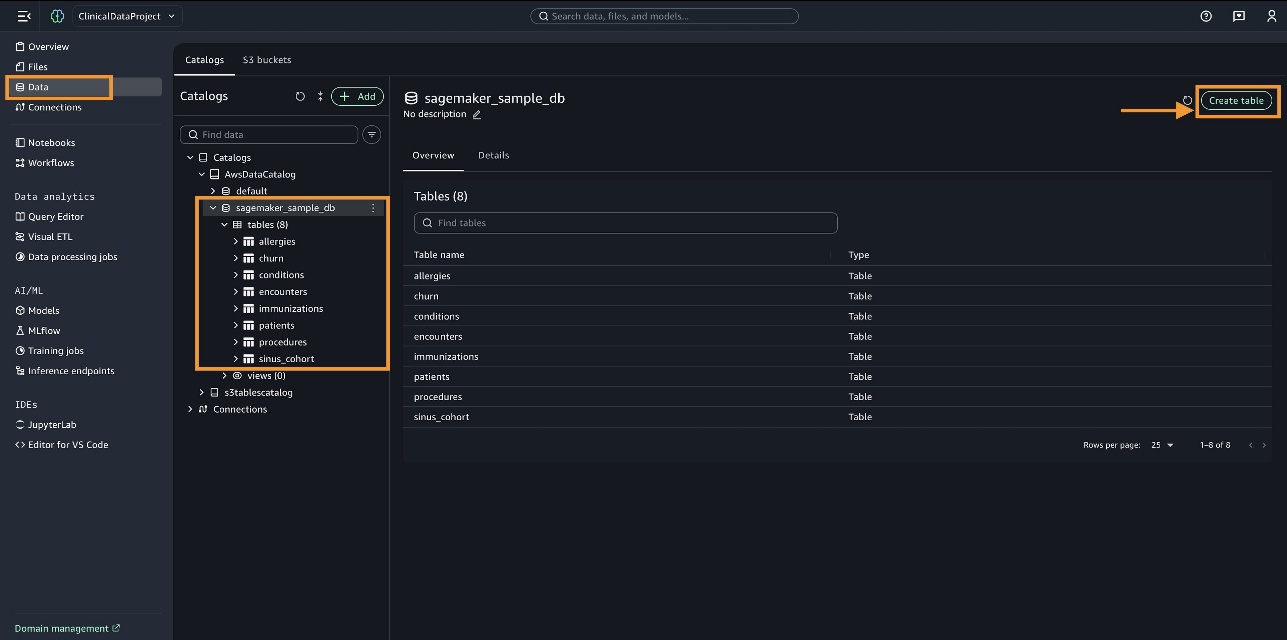
- Expand
AWSDataCatalogto view the preloaded and cataloged data you have access to in your account.
For this use case, create each of the tables (patients, conditions, immunizations, allergies, encounters, and procedures) under sagemaker_sample_db using the CSV files that you generated earlier by choosing Create table as shown below.
Before you perform the complex clinical analysis, let’s run a basic query on the conditions table.
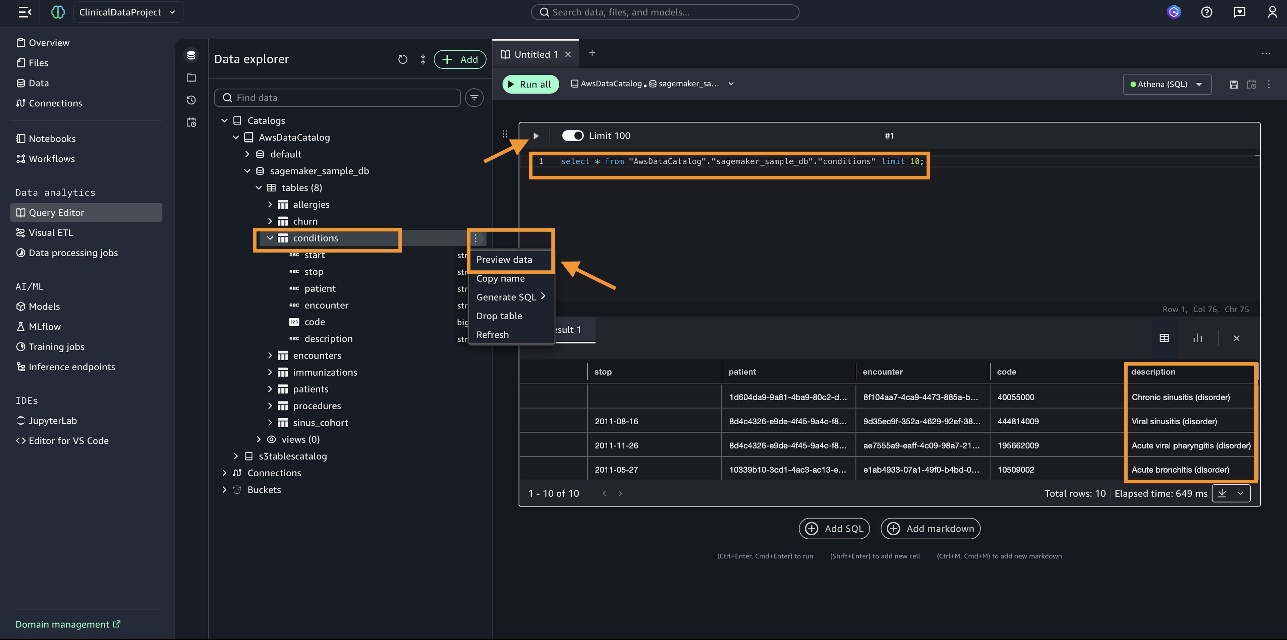
- Choose the
conditionstable and choose Preview data on the options menu. - Perform a SQL operation, for example:
select * from "AwsDataCatalog"."sagemaker_sample_db"."conditions" limit 10
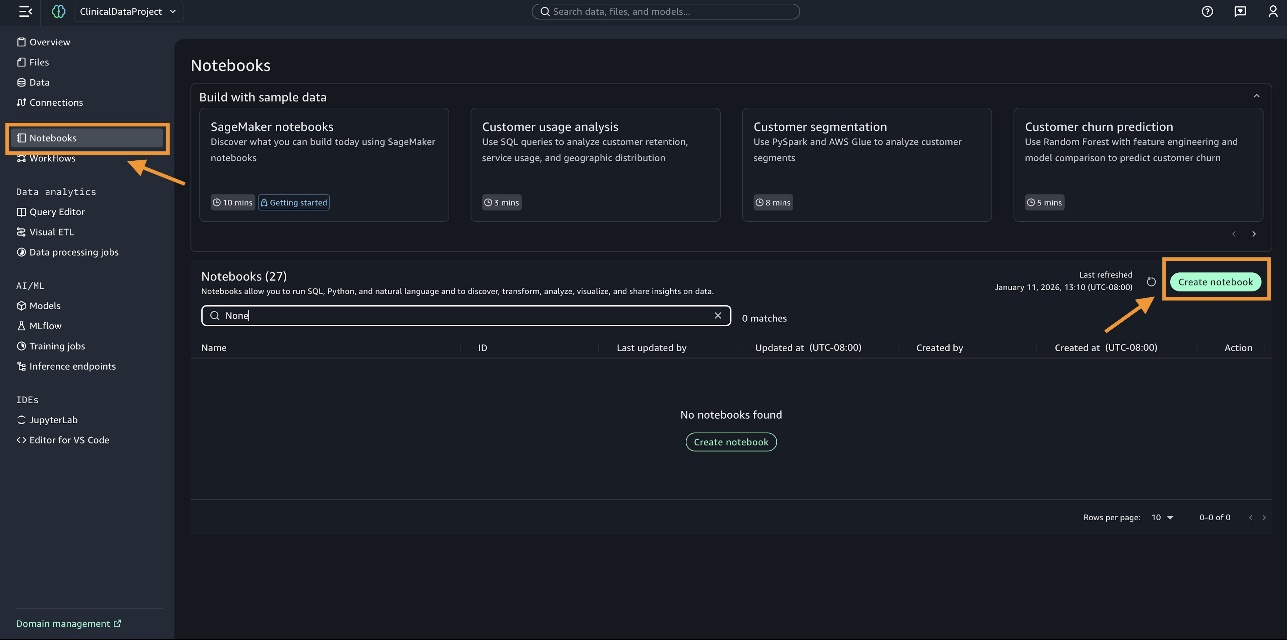
Create notebook
To perform a detailed analysis, you should create a notebook. Complete the following steps:
- Choose Notebooks in the navigation pane.
- Choose Create notebook.
Interact with data
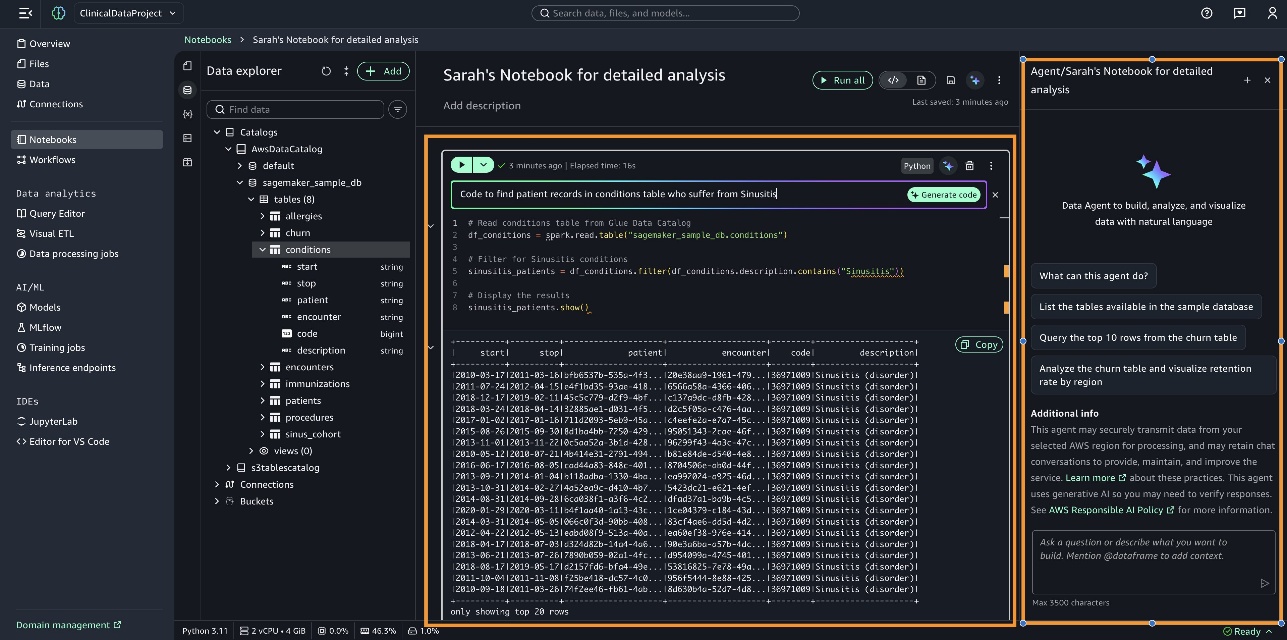
After you create the notebook, you can interact with the data in two ways:
- Code directly within notebook cells by using the inline prompt interface. For example, enter “Code to find patient records in conditions table who suffer from Sinusitis,” choose Generate code, and run the cell to display the results.
- Use the Data Agent panel, which supports comprehensive analytical tasks by breaking them down into structured steps, each with generated code that is built on previous results.
In the following sections, we provide examples of using the Data Agent panel.
Use SageMaker Data Agent for detailed analysis of clinical data
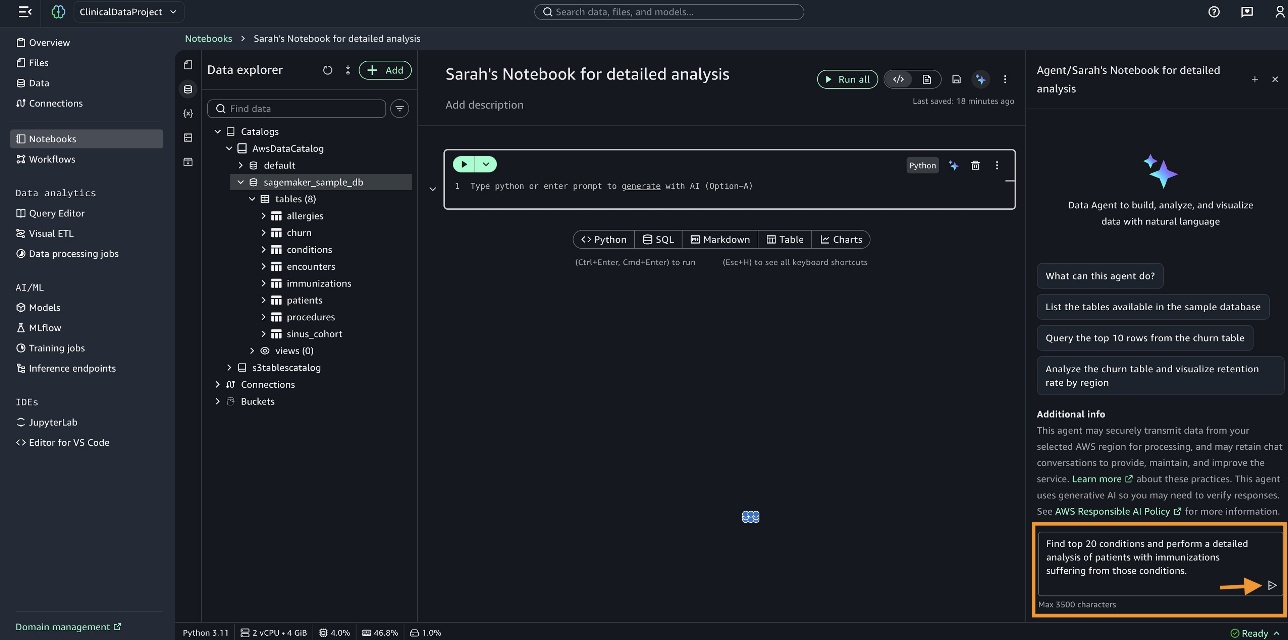
In the Data Agent panel, we enter the query “Find top 20 conditions and perform a detailed analysis of patients with immunizations suffering from those conditions” and generate the code.
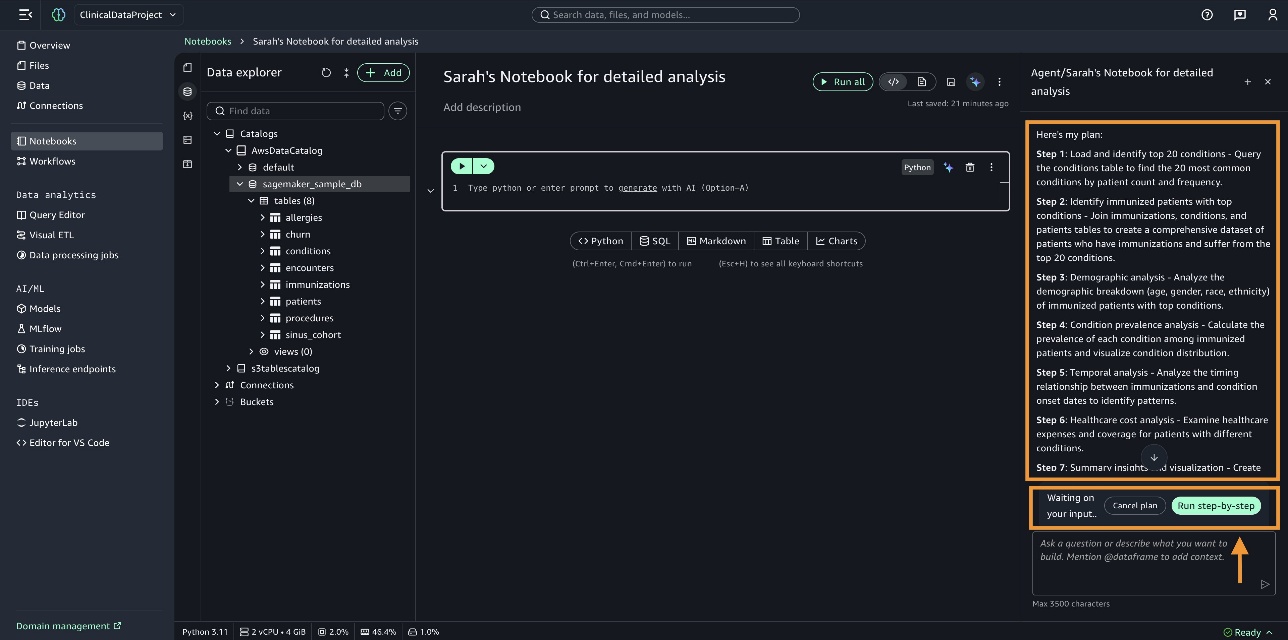
SageMaker Data Agent checks the current state of the notebook to understand what data we’re working with. It identifies the conditions, immunizations, and patients tables in the sagemaker_sample_db database. It prepares a comprehensive plan and lists them for you to review. You can review the plan, make necessary changes if needed, and then choose Run step-by-step.
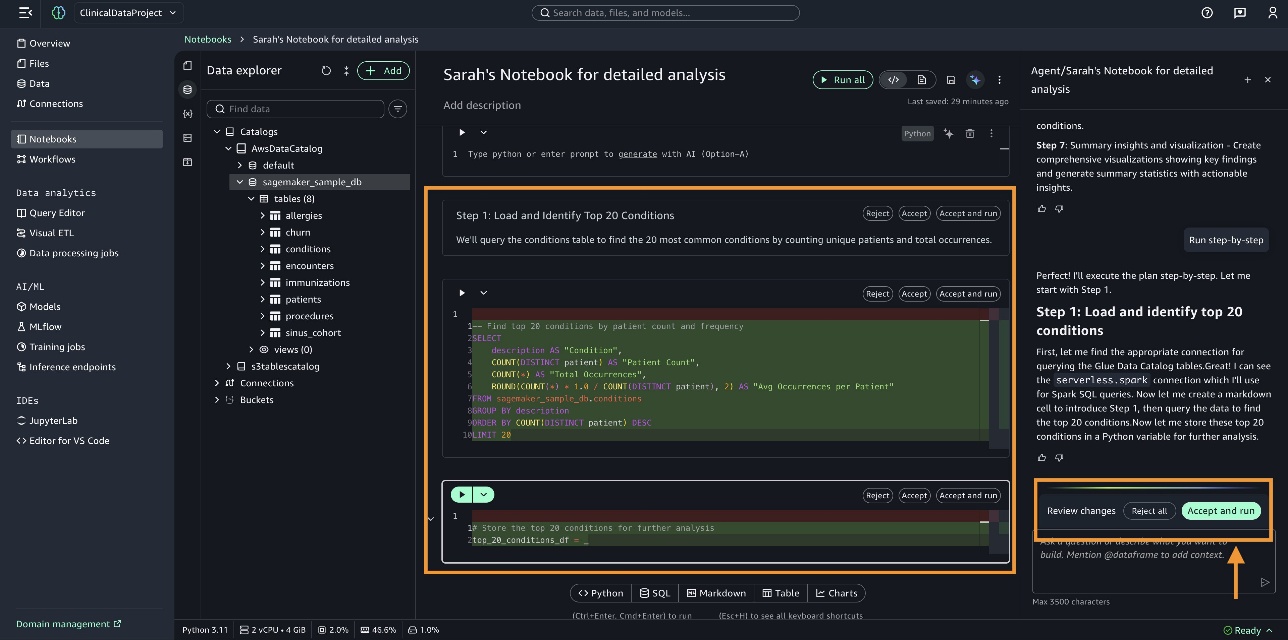
SageMaker Data Agent writes the code in the notebook cells. You can review the code, then choose Accept and run.
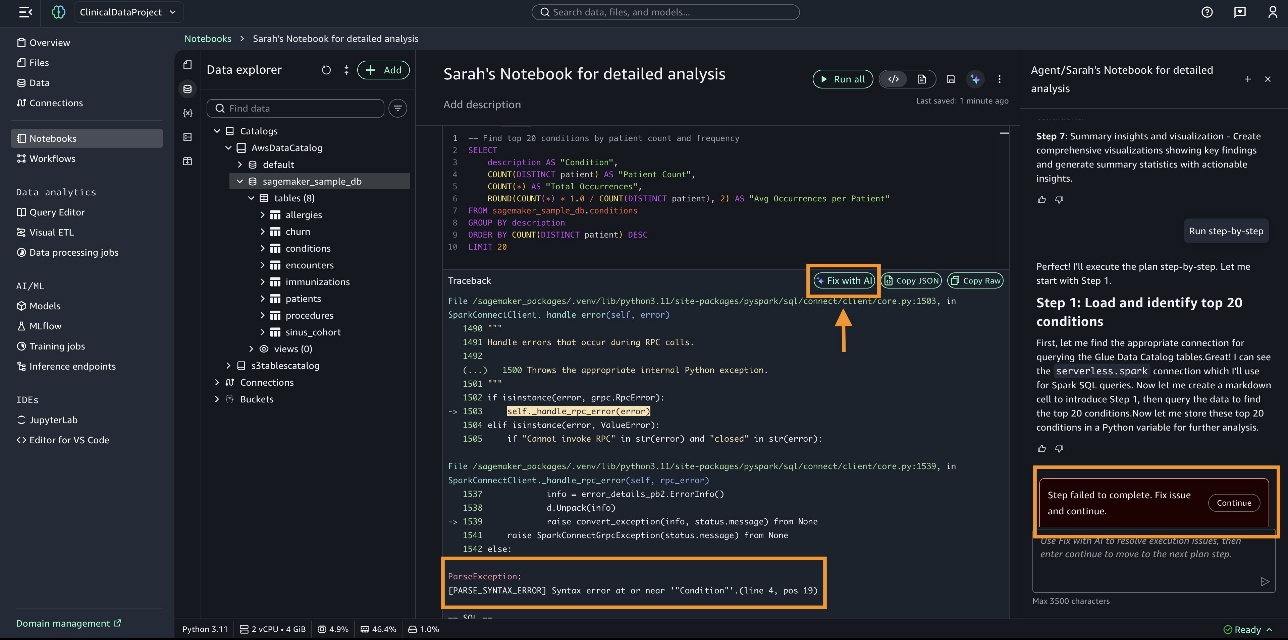
Some steps might fail to execute. In this scenario, you can choose Fix with AI to proceed.
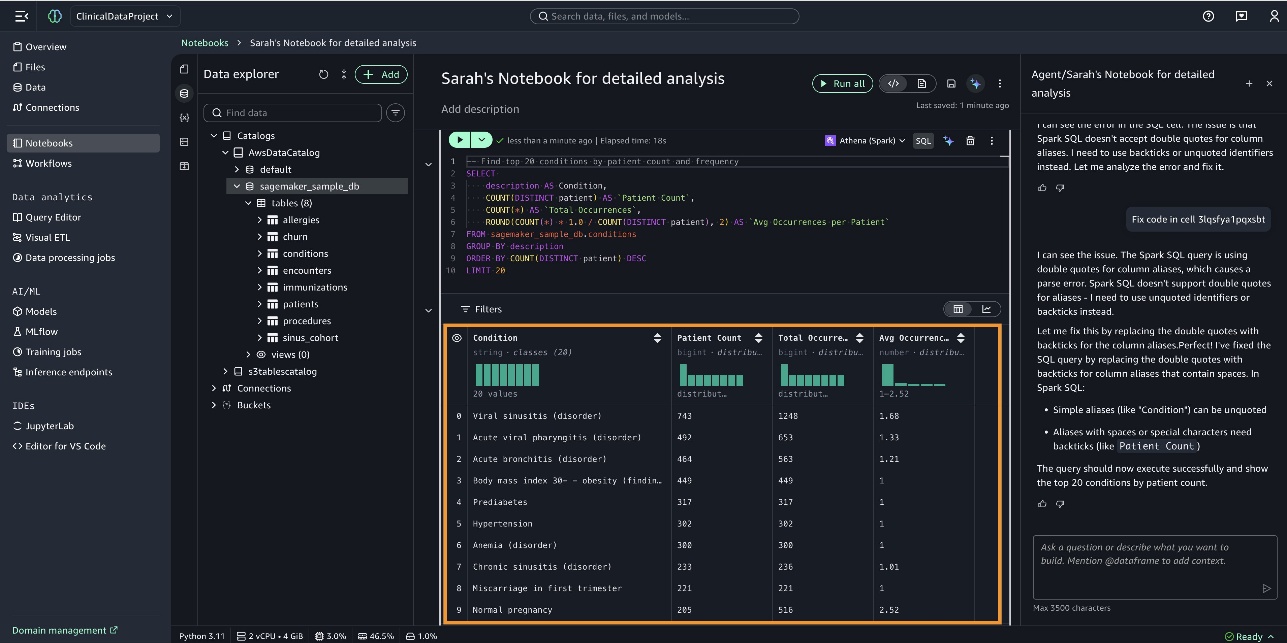
When the query is complete, the results are displayed, as shown in the following screenshot.
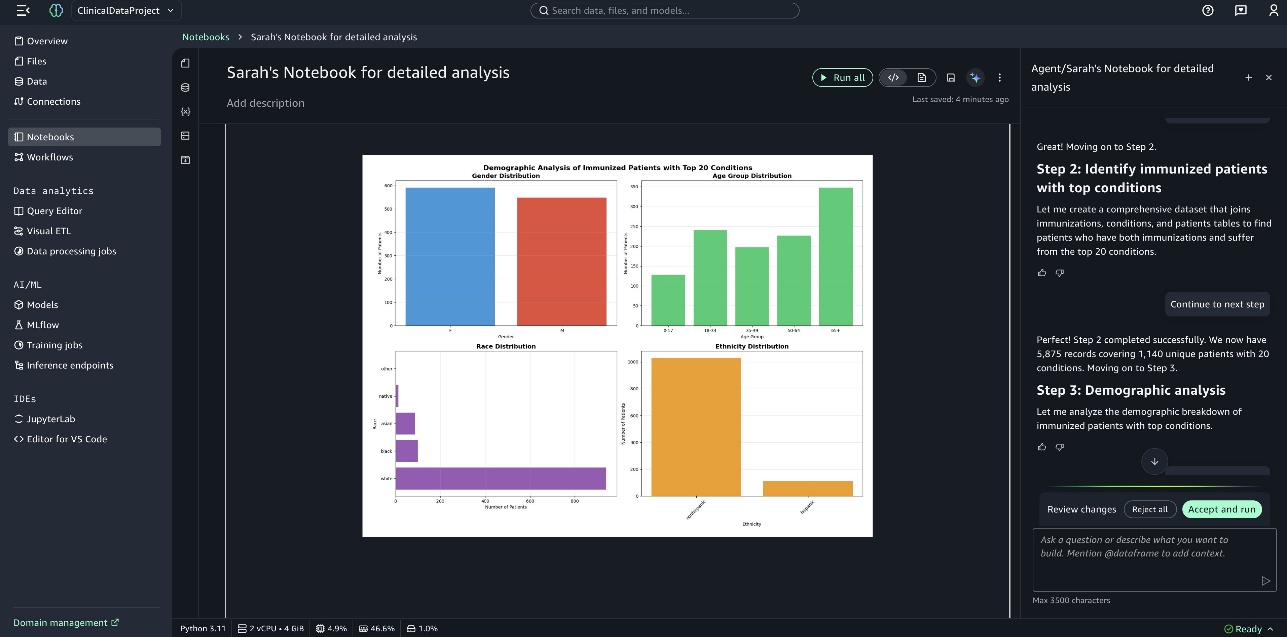
You can see the bar graph created by SageMaker Data Agent in the notebook titled Demographics Analysis of Immunized Patients with Top 20 Conditions, as shown in the following screenshot.
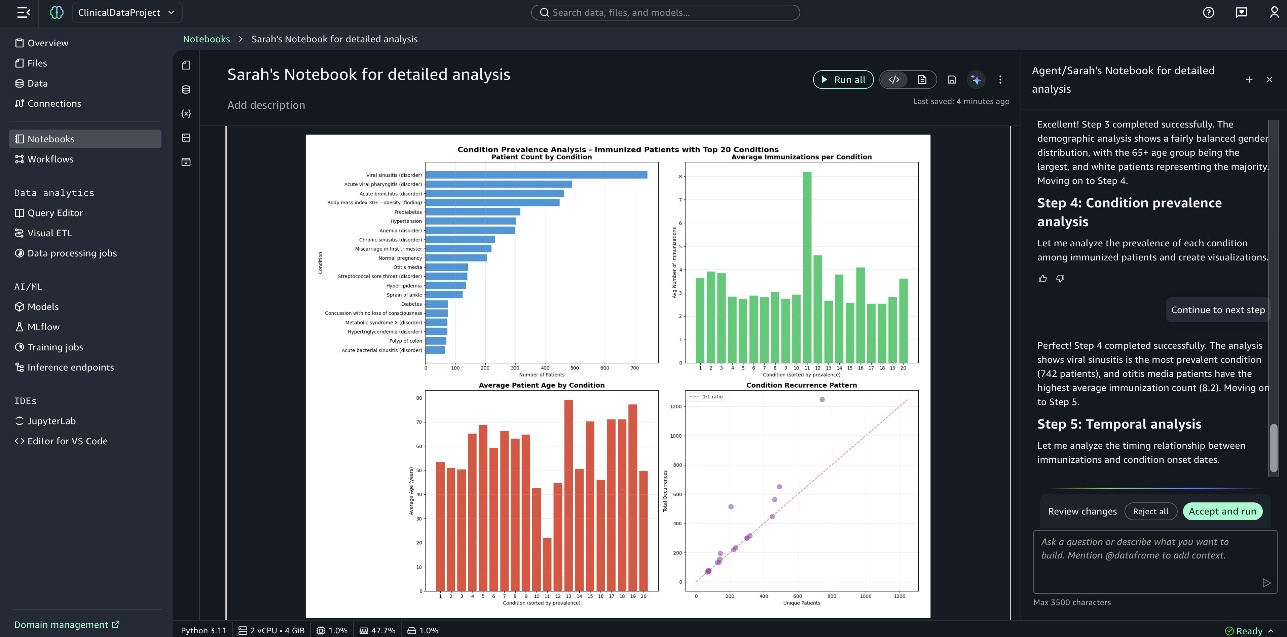
The following screenshot shows the graph Condition Prevalence Analysis of Immunized Patients with Top 20 Conditions.
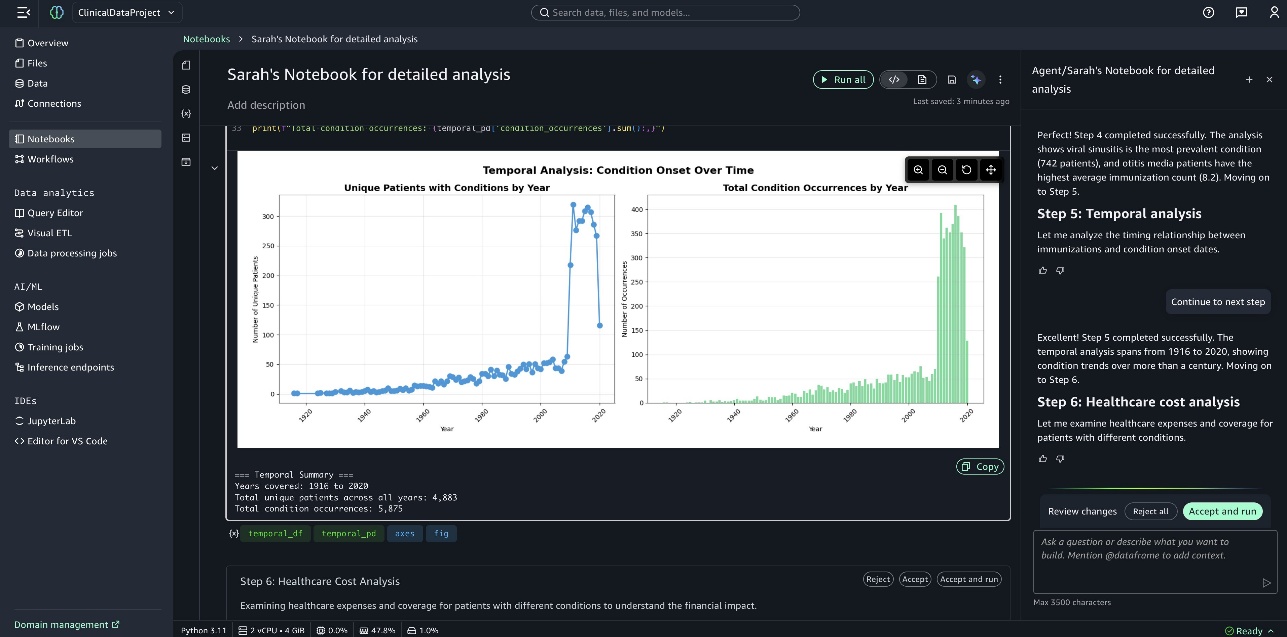
The following screenshot shows the graph Temporal Analysis of Condition Onset.
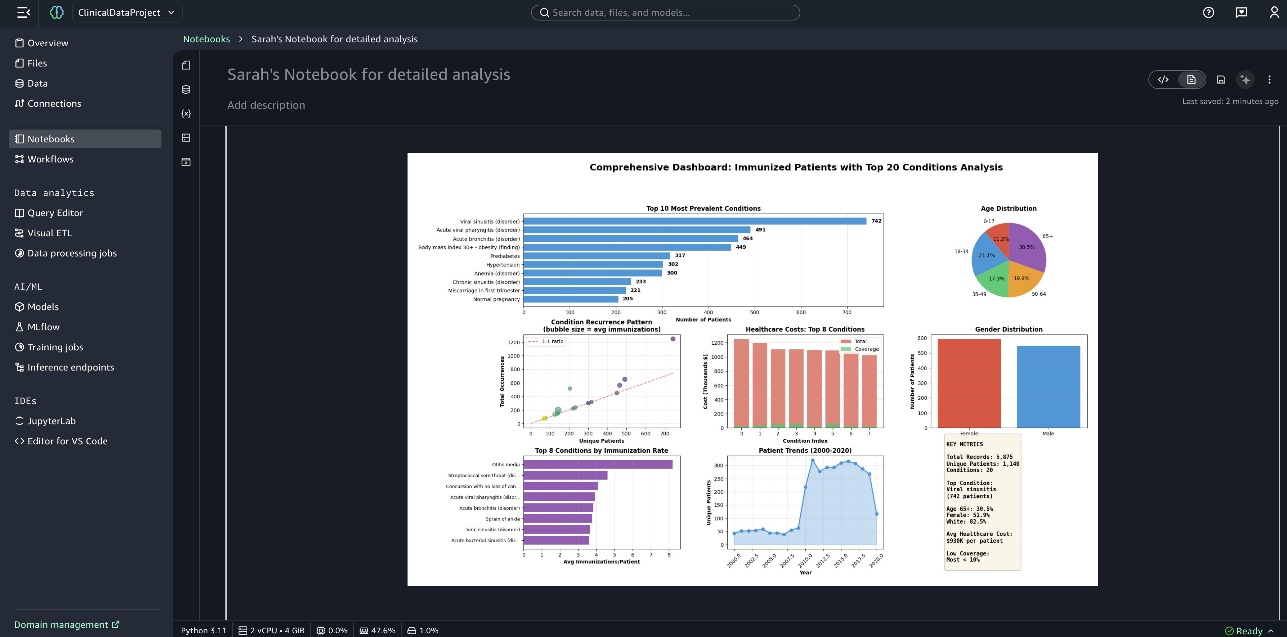
A comprehensive dashboard is presented at the end of the notebook.
Use SageMaker Data Agent for cohort comparison and survival analysis
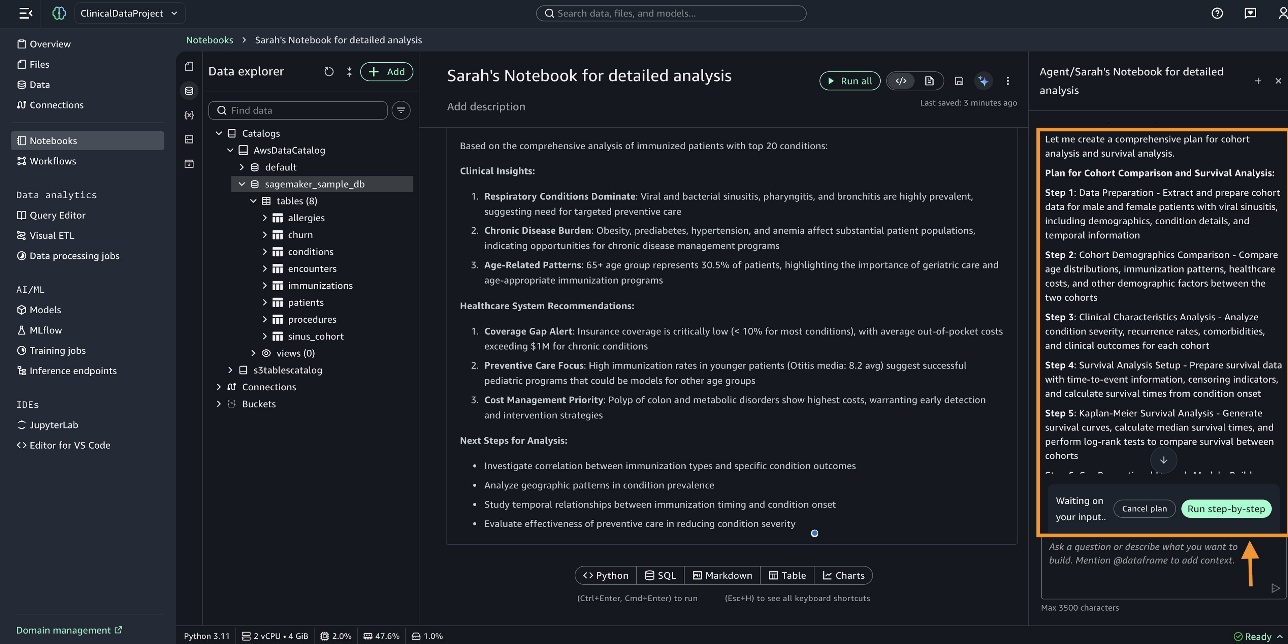
Viral sinusitis shows as the top condition for patients. To perform cohort comparison and survival analysis, we enter the following query in the Data Agent panel: “Build two cohorts 1/ Cohort for Male patients who are suffering from viral sinusitis 2/ Cohort for Female patients who are suffering from viral sinusitis. Run a detailed cohort comparison and survival analysis.”
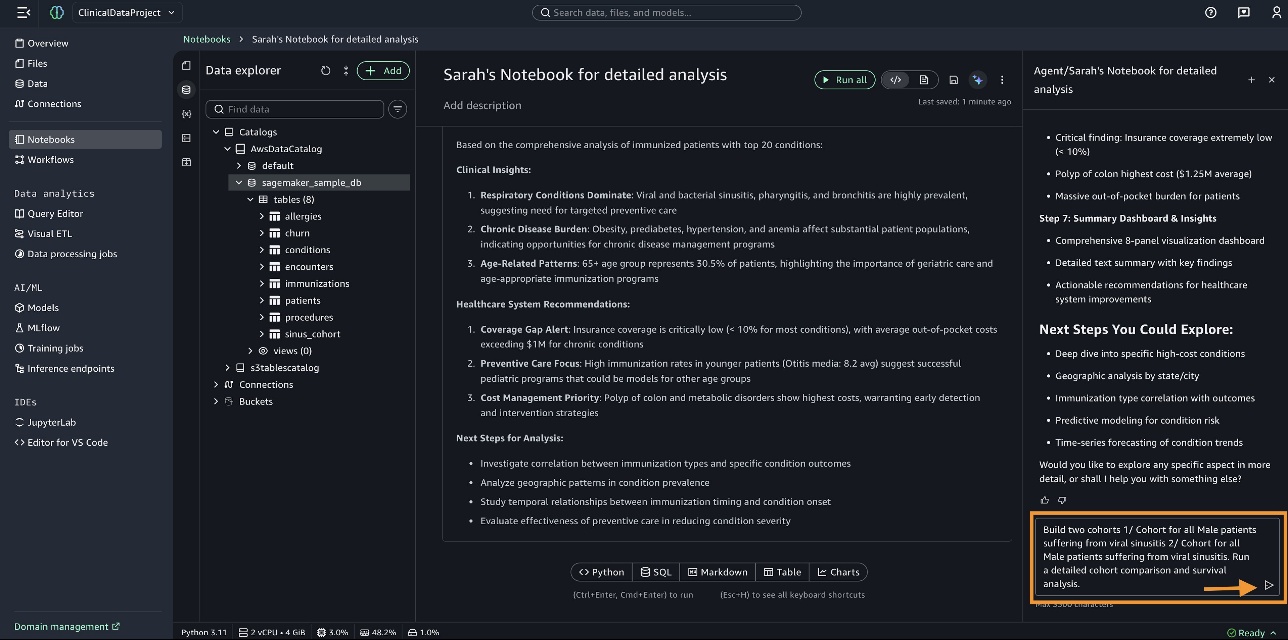
SageMaker Data Agent prepares a comprehensive plan for cohort creation, cohort comparison analysis, and survival analysis. You can review the plan and then choose Run step-by-step.
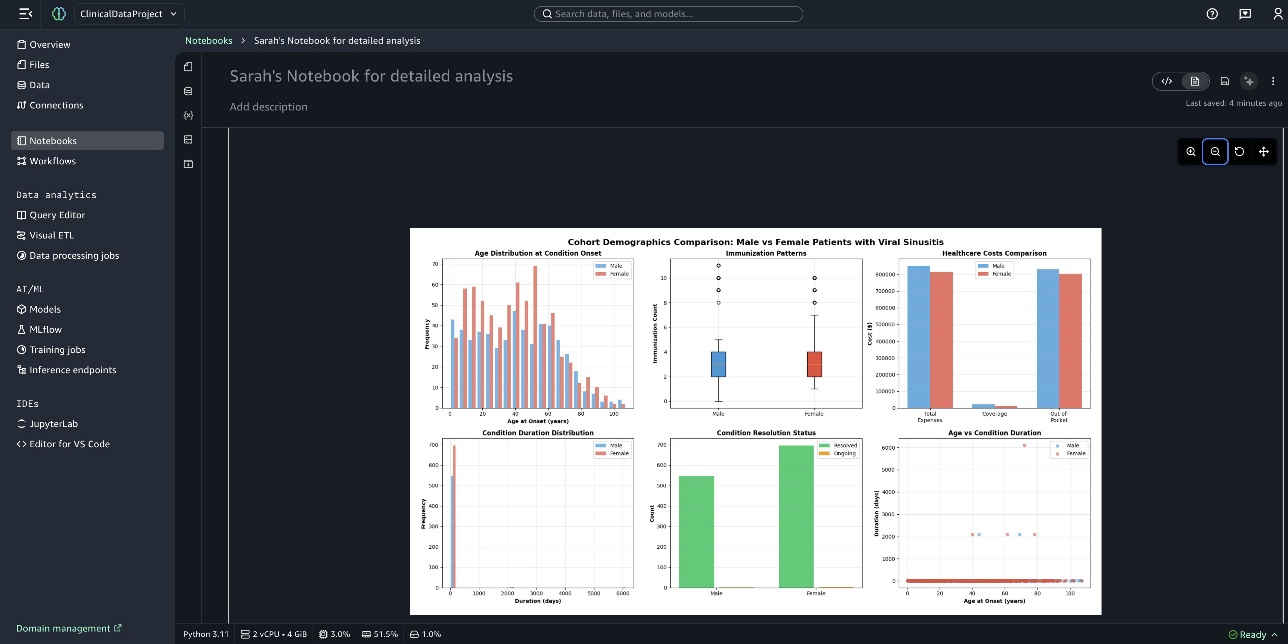
The following screenshot shows the graph Cohort Demographics Comparison: Male vs Female Patients with Viral Sinusitis.
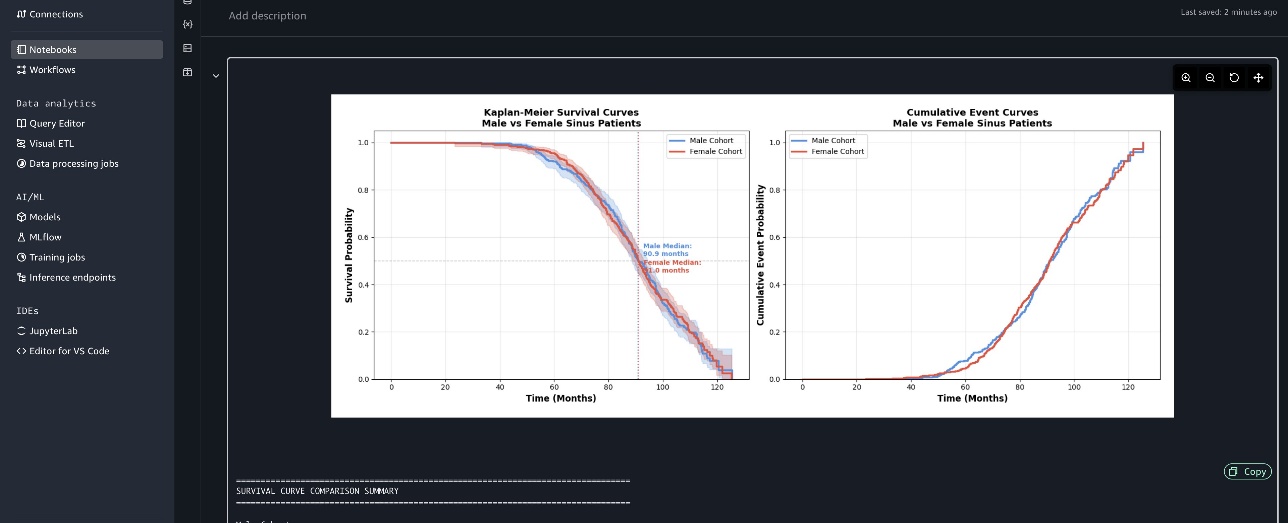
The following screenshot shows the Kaplan-Meier survival curves and cumulative event curves.
Cleanup Resources
To remove AWS resources created during this walkthrough, complete the following steps. First, delete the SageMaker Unified Studio project by navigating to the Amazon SageMaker Unified Studio console, selecting your project from the projects list, choosing Delete, and confirming the deletion. This will remove all associated notebooks, data connections, and project resources. Second, remove the AWS Glue Data Catalog resources by opening the AWS Glue console, navigating to Databases and deleting the sample database that got created for this walkthrough. Third, delete S3 buckets and data by opening the Amazon S3 console, locating the S3 bucket where healthcare data is stored, emptying the bucket contents, and deleting the bucket.
Conclusion
In this post, we demonstrated how SageMaker Data Agent increases data analysis work velocity, helping you extract impactful data insights. SageMaker Data Agent helps reduce time spent on data management, so you can spend more time identifying treatment patterns and delivering evidence-based recommendations. By simplifying access to complex data analysis through natural language interactions, SageMaker Data Agent can help you increase your research capacity while reducing infrastructure costs. Analyses are documented in reproducible notebooks that can be validated and audited by clinical stakeholders, supporting transparency while accelerating the path from data to impactful analysis.
About the authors
 Siddharth is heading Generative AI within SageMaker’s Unified Experiences. His focus is on driving agentic experiences, where AI systems act autonomously on behalf of users to accomplish complex tasks. An alumnus of the University of Illinois at Urbana-Champaign, he brings extensive experience from his roles at Yahoo, Glassdoor, and Twitch.
 Navneet Srivastava is a Principal Specialist and Analytics Strategy Leader, and develops strategic plans for building an end-to-end analytical strategy for large biopharma, healthcare, and life sciences organizations. His expertise spans across data analytics, data governance, AI, ML, big data, and healthcare-related technologies.
 Subrat Das is a Principal Solutions Architect and part of Global Healthcare and Life Sciences industry division at AWS. He is passionate about modernizing and architecting complex customer workloads. When he’s not working on technology solutions, he enjoys long hikes and traveling around the world.
 Ishneet Kaur is a Software Development Manager on the Amazon SageMaker Unified Studio team. She leads the engineering team to design and build generative AI capabilities in SageMaker Unified Studio.
 Mohan Gandhi is a Principal Software Engineer at AWS. He has been with AWS for the last 10 years and has worked on various AWS services like Amazon EMR, Amazon EFA, and Amazon RDS. Currently, he is focused on improving the Amazon SageMaker inference experience. In his spare time, he enjoys hiking and marathons.
 Vikramank Singh is a Senior Applied Scientist in the Agentic AI organization in AWS, working on products including Amazon SageMaker Unified Studio, Amazon RDS, and Amazon Redshift. His research interest lies at the intersection of AI, control systems, and RL, particularly using them to build systems for real-world applications that can autonomously perceive environments, model them, and take optimal decisions at scale.
 Shubham Mehta is a Senior Product Manager at AWS Analytics. He leads generative AI feature development across services such as AWS Glue, Amazon EMR, and Amazon MWAA, using AI/ML to simplify and enhance the experience of data practitioners building data applications on AWS.
 Amit Sinha is a Senior Manager leading SageMaker Unified Studio GenAI and ML product suites. He has over a decade of experience in AI/ML products, infrastructure management, and AWS Big Data processing services. An alumnus of Columbia University, in his free time Amit enjoys hiking and binge-watching documentaries on American history.