Marketing teams face major challenges creating campaigns in today’s digital environment. They must navigate through complex data analytics and rapidly changing consumer preferences to produce engaging, personalized content across multiple channels while maintaining brand consistency and working within tight deadlines. Using generative AI can streamline and accelerate the creative process while maintaining alignment with business objectives. Indeed, according to McKinsey’s “The State of AI in 2023” report, 72% of organizations now integrate AI into their operations, with marketing emerging as a key area of implementation.
Building upon our earlier work of marketing campaign image generation using Amazon Nova foundation models, in this post, we demonstrate how to enhance image generation by learning from previous marketing campaigns. We explore how to integrate Amazon Bedrock, AWS Lambda, and Amazon OpenSearch Serverless to create an advanced image generation system that uses reference campaigns to maintain brand guidelines, deliver consistent content, and enhance the effectiveness and efficiency of new campaign creation.
The value of previous campaign information
Historical campaign data serves as a powerful foundation for creating effective marketing content. By analyzing performance patterns across past campaigns, teams can identify and replicate successful creative elements that consistently drive higher engagement rates and conversions. These patterns might include specific color schemes, image compositions, or visual storytelling techniques that resonate with target audiences. Previous campaign assets also serve as proven references for maintaining consistent brand voice and visual identity across channels. This consistency is crucial for building brand recognition and trust, especially in multi-channel marketing environments where coherent messaging is essential.
In this post, we explore how to use historical campaign assets in marketing content creation. We enrich reference images with valuable metadata, including campaign details and AI-generated image descriptions, and process them through embedding models. By integrating these reference assets with AI-powered content generation, marketing teams can transform past successes into actionable insights for future campaigns. Organizations can use this data-driven approach to scale their marketing efforts while maintaining quality and consistency, resulting in more efficient resource utilization and improved campaign performance. We’ll demonstrate how this systematic method of using previous campaign data can significantly enhance marketing strategies and outcomes.
Solution overview
In our previous post, we implemented a marketing campaign image generator using Amazon Nova Pro and Amazon Nova Canvas. In this post, we explore how to enhance this solution by incorporating a reference image search engine that uses historical campaign assets to improve generation results. The following architecture diagram illustrates the solution:
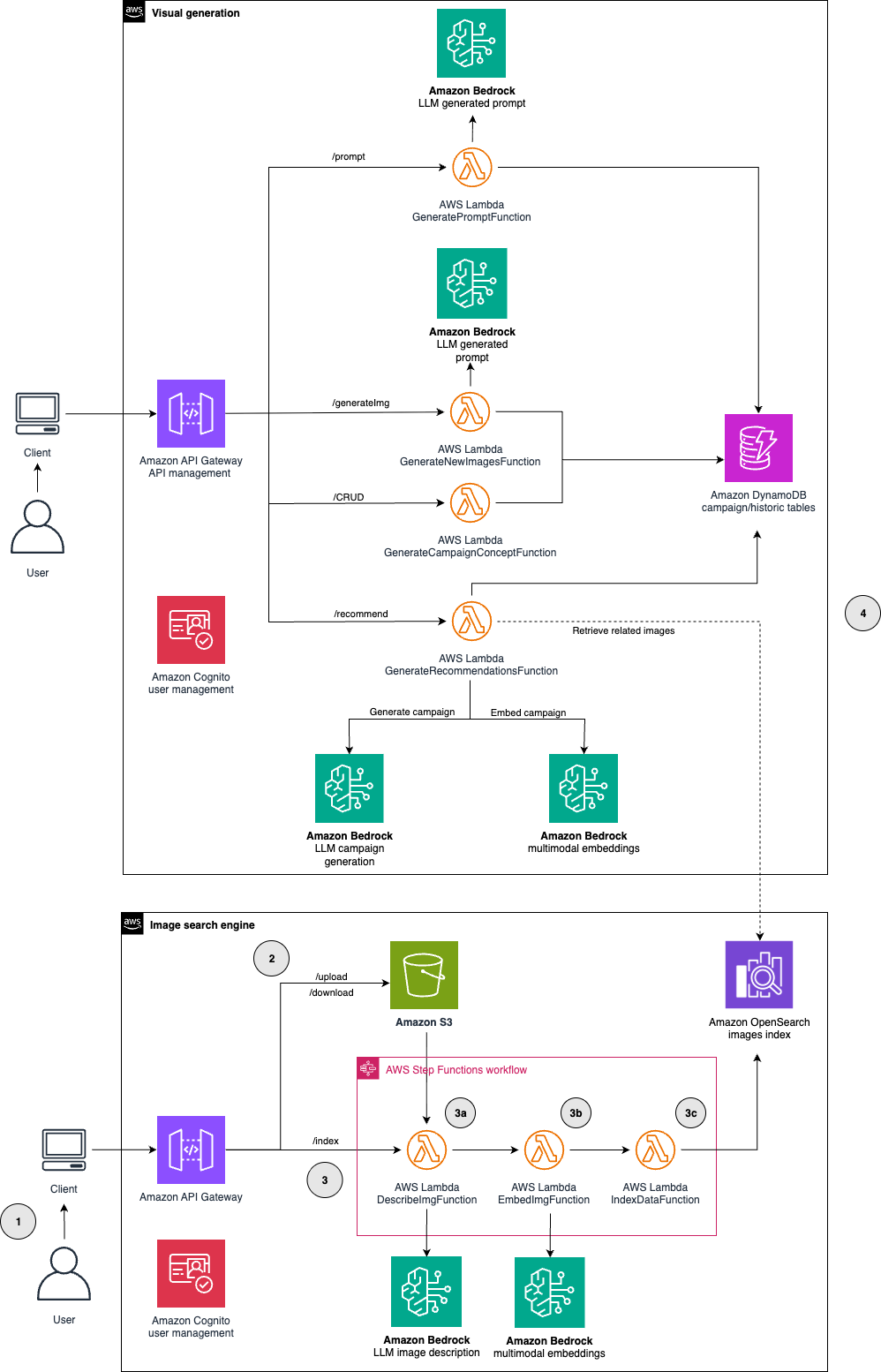
The main architecture components are explained in the following list:
- Our system begins with a web-based UI that users can access to start the creation of new marketing campaign images. Amazon Cognito handles user authentication and management, helping to ensure secure access to the platform.
- The historical marketing assets are uploaded to Amazon Simple Storage Service (Amazon S3) to build a relevant reference library. This upload process is initiated through Amazon API Gateway. In this post, we use the publicly available COCO (Common Objects in Context) dataset as our source of reference images.
- The image processing AWS Step Functions workflow is triggered through API Gateway and processes images in three steps:
- A Lambda function (
DescribeImgFunction) uses the Amazon Nova Pro model to describe the images and identify their key elements. - A Lambda function (
EmbedImgFunction) transforms the images into embeddings using the Amazon Titan Multimodal Embeddings foundation model. - A Lambda function (
IndexDataFunction) stores the reference image embeddings in an OpenSearch Serverless index, enabling quick similarity searches.
- A Lambda function (
- This step bridges asset discovery and content generation. When users initiate a new campaign, a Lambda function (
GenerateRecommendationsFunction) transforms the campaign requirements into vector embeddings and performs a similarity search in the OpenSearch Serverless index to identify the most relevant reference images. The descriptions of selected reference images are then incorporated into an enhanced prompt through a Lambda function (GeneratePromptFunction). This prompt powers the creation of new campaign images using Amazon Bedrock through a Lambda function (GenerateNewImagesFunction). For detailed information about the image generation process, see our previous blog.
Our solution is available in GitHub. To deploy this project, follow the instructions available in the README file.
Procedure
In this section, we examine the technical components of our solution, from reference image processing through final marketing content generation.
Analyzing the reference image dataset
The first step in our AWS Step Functions workflow is analyzing reference images using the Lambda Function DescribeImgFunction. This resource uses Amazon Nova Pro 1.0 to generate two key components for each image: a detailed description and a list of elements present in the image. These metadata components will be integrated into our vector database index later and used for creating new campaign visuals.
For implementation details, including the complete prompt template and Lambda function code, see our GitHub repository. The following is the structured output generated by the function when presented with an image:

Generating reference image embeddings
The Lambda function EmbedImgFunction encodes the reference images into vector representations using the Amazon Titan Multimodal Embeddings model. This model can embed both modalities into a joint space where text and images are represented as numerical vectors in the same dimensional space. In this unified representation, semantically similar objects (whether text or images) are positioned closer together. The model preserves semantic relationships within and across modalities, enabling direct comparisons between any combination of images and text. This enables powerful capabilities such as text-based image search, image similarity search, and combined text and image search.
The following code demonstrates the essential logic for converting images into vector embeddings. For the complete implementation of the Lambda function, see our GitHub repository.
with open(image_path, "rb") as image_file:
    input_image = base64.b64encode(image_file.read()).decode('utf8')

response = bedrock_runtime.invoke_model(
    body=json.dumps({
        "inputImage": input_image,
        "embeddingConfig": {
            "outputEmbeddingLength": dimension
        }
    }),
    modelId=model_id
)
json.loads(response.get("body").read())
The function outputs a structured response containing the image details and its embedding vector, as shown in the following example.
Index reference images with Amazon Bedrock and OpenSearch Serverless
Our solution uses OpenSearch Serverless to enable efficient vector search capabilities for reference images. This process involves two main steps: setting up the search infrastructure and then populating it with reference image data.
Creation of the search index
Before indexing our reference images, we need to set up the appropriate search infrastructure. When our stack is deployed, it provisions a vector search collection in OpenSearch Serverless, which automatically handles scaling and infrastructure management. Within this collection, we create a search index using the Lambda function CreateOpenSearchIndexFn.
Our index mappings configuration, shown in the following code, defines the vector similarity algorithm and the campaign metadata fields for filtering. We use the Hierarchical Navigable Small World (HNSW) algorithm, providing an optimal balance between search speed and accuracy. The campaign metadata includes an objective field that captures campaign goals (such as clicks, awareness, or likes) and a node field that identifies target audiences (such as followers, customers, or new customers). By filtering search results using these fields, we can help ensure that reference images come from campaigns with matching objectives and target audiences, maintaining alignment in our marketing approach.
For the complete implementation details, including index settings and additional configurations, see our GitHub repository.
Indexing reference images
With our search index in place, we can now populate it with reference image data. The Lambda function IndexDataFunction handles this process by connecting to the OpenSearch Serverless index and storing each image’s vector embedding alongside its metadata (campaign objectives, target audience, descriptions, and other relevant information). We can use this indexed data later to quickly find relevant reference images when creating new marketing campaigns. Below is a simplified implementation, with the complete code available in our GitHub repository:
# Initialize the OpenSearch client
oss_client = OpenSearch(
    hosts=[{'host': OSS_HOST, 'port': 443}],
    http_auth=AWSV4SignerAuth(boto3.Session().get_credentials(), region, 'aoss'),
    use_ssl=True,
    verify_certs=True,
    connection_class=RequestsHttpConnection
)
# Prepare document for indexing
document = {
    "id": image_id,
    "node": metadata['node'],
    "objective": metadata['objective'],
    "image_s3_uri": s3_url,
    "image_description": description,
    "img_element_list": elements,
    "embeddings": embedding_vector
}
# Index document in OpenSearch
oss_response = oss_client.index(
    index=OSS_EMBEDDINGS_INDEX_NAME,
    body=document
)
Integrate the search engine into the marketing campaigns image generator
The image generation workflow combines campaign requirements with insights from previous reference images to create new marketing visuals. The process begins when users initiate a new campaign through the web UI. Users provide three key inputs: a text description of their desired campaign, its objective, and its node. Using these inputs, we perform a vector similarity search in OpenSearch Serverless to identify the most relevant reference images from our library. For these selected images, we retrieve their descriptions (created earlier through Lambda function DescribeImgFunction) and incorporate them into our prompt engineering process. The resulting enhanced prompt serves as the foundation for generating new campaign images that align with both: the user’s requirements and successful reference examples. Let’s examine each step of this process in detail.
Get image recommendations
When a user defines a new campaign description, the Lambda function GetRecommendationsFunction transforms it into a vector embedding using the Amazon Titan Multimodal Embeddings model. By transforming the campaign description into the same vector space as our image library, we can perform precise similarity searches and identify reference images that closely align with the campaign’s objectives and visual requirements.
The Lambda function configures the search parameters, including the number of results to retrieve and the k value for the k-NN algorithm. In our sample implementation, we set k to 5, retrieving the top five most similar images. These parameters can be adjusted to balance result diversity and relevance.
To help ensure contextual relevance, we apply filters to match both the node (target audience) and objective of the new campaign. This approach guarantees that recommended images are not only visually similar but also aligned with the campaign’s specific goals and target audience. We showcase a simplified implementation of our search query, with the complete code available in our GitHub repository.
body = {
    "size": k,
    "_source": {"exclude": ["embeddings"]},
    "query":
        {
            "knn":
                {
                    "embeddings": {
                        "vector": embedding,
                        "k": k,
                    }
                }
        },
    "post_filter": {
        "bool": {
            "filter": [
                {"term": {"node": node}},
                {"term": {"objective": objective}}
            ]
        }
    }
}
res = oss_client.search(index=OSS_EMBEDDINGS_INDEX_NAME, body=body)
The function processes the search results, which are stored in Amazon DynamoDB to maintain a persistent record of campaign-image associations for efficient retrieval. Users can access these recommendations through the UI and select which reference images to use for their new campaign creation.
Enhancing the meta-prompting technique with reference images
The prompt generation phase builds upon our meta-prompting technique introduced in our previous blog. While maintaining the same approach with Amazon Nova Pro 1.0, we now enhance the process by incorporating descriptions from user-selected reference images. These descriptions are integrated into the template prompt using XML tags (<related_images>), as shown in the following example.
The prompt generation is orchestrated by the Lambda function GeneratePromptFunction. The function receives the campaign ID and the URLs of selected reference images, retrieves their descriptions from DynamoDB, and uses Amazon Nova Pro 1.0 to create an optimized prompt from the previous template. This prompt is used in the subsequent image generation phase. The code implementation of the Lambda function is available in our GitHub repository.
Image generation
After obtaining reference images and generating an enhanced prompt, we use the Lambda function GenerateNewImagesFunction to create the new campaign image. This function uses Amazon Nova Canvas 1.0 to generate a final visual asset that incorporates insights from successful reference campaigns. The implementation follows the image generation process we detailed in our previous blog. For the complete Lambda function code, see our GitHub repository.
Creating a new marketing campaign: An end-to-end example
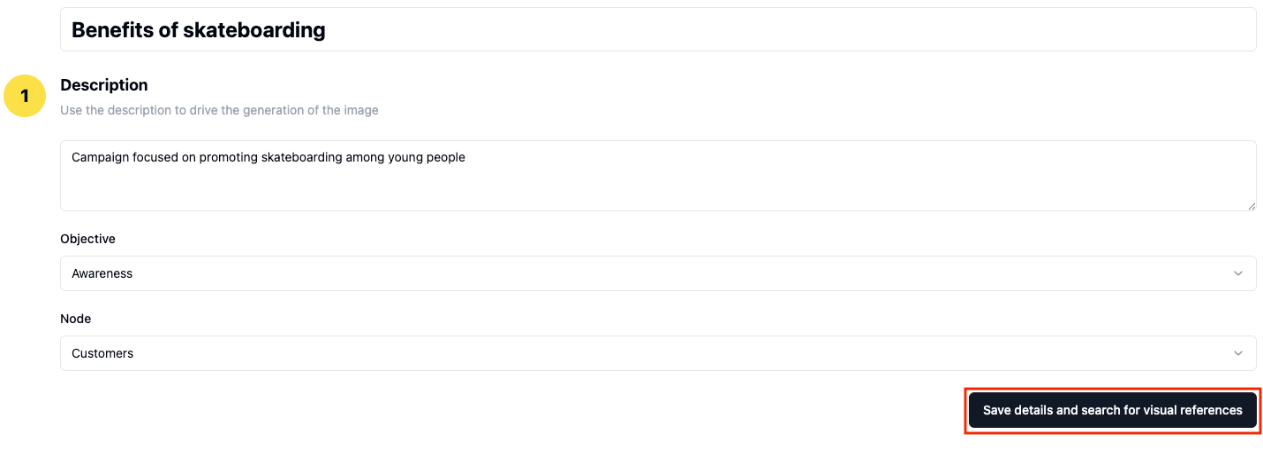
We developed an intuitive interface that guides users through the campaign creation process. The interface handles the complexity of AI-powered image generation, only requiring users to provide their campaign description and basic details. We walk through the steps to create a marketing campaign using our solution:
- Users begin by defining three key campaign elements:
- Campaign description: A detailed brief that serves as the foundation for image generation.
- Campaign objective: The marketing aim (for example, Awareness) that guides the visual strategy.
- Target node: The specific audience segment (for example, Customers) for content targeting.
- Based on the campaign details, the system presents relevant images from previous successful campaigns. Users can review and select the images that align with their vision. These selections will guide the image generation process.
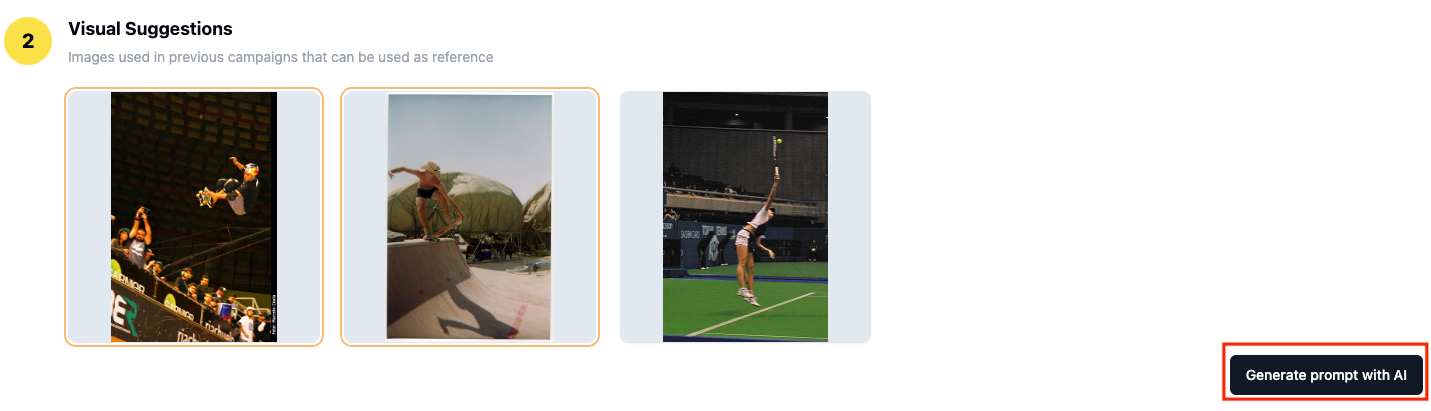
- Using the campaign description and selected reference images, the system generates an enhanced prompt that serves as the input for the final image generation step.

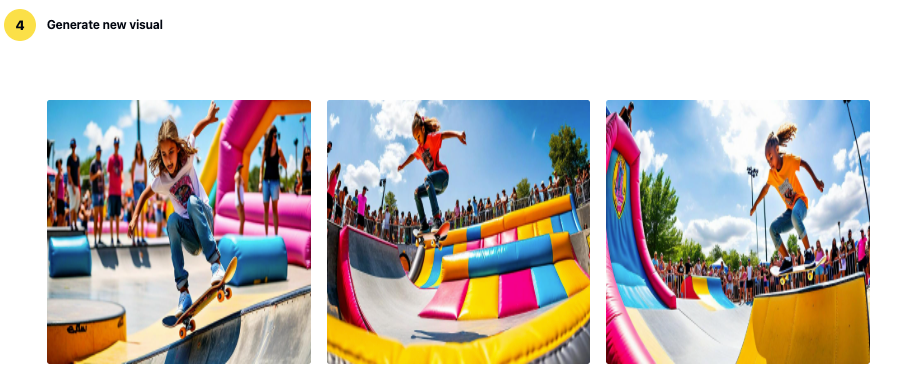
- In the final step, our system generates visual assets based on the prompt that could potentially be used as inspiration for a complete campaign briefing.
How Bancolombia is using Amazon Nova to streamline their marketing campaign assets generation
Bancolombia, one of Colombia’s leading banks, has been experimenting with this marketing content creation approach for more than a year. Their implementation provides valuable insights into how this solution can be integrated into established marketing workflows. Bancolombia has been able to streamline their creative workflow while ensuring that the generated visuals align with the campaign’s strategic intent. Juan Pablo Duque, Marketing Scientist Lead at Bancolombia, shares his perspective on the impact of this technology:
“For the Bancolombia team, leveraging historical imagery was a cornerstone in building this solution. Our goal was to directly tackle three major industry pain points:
- Long and costly iterative processes: By implementing meta-prompting techniques and ensuring strict brand guidelines, we’ve significantly reduced the time users spend generating high-quality images.
- Difficulty maintaining context across creative variations: By identifying and locking in key visual elements, we ensure seamless consistency across all graphic assets.
- Lack of control over outputs: The suite of strategies integrated into our solution provides users with much greater precision and control over the results.
And this is just the beginning. This exercise allows us to validate new AI creations against our current library, ensuring we don’t over-rely on the same visuals and keeping our brand’s look fresh and engaging.”
Clean up
To avoid incurring future charges, you should delete all the resources used in this solution. Because the solution was deployed using multiple AWS CDK stacks, you should delete them in the reverse order of deployment to properly remove all resources. Follow these steps to clean up your environment:
- Delete the frontend stack:
- Delete the image generation backend stack:
- Delete the image indexing backend stack:
- Delete the OpenSearch roles stack:
The cdk destroy command will remove most resources automatically, but there might be some resources that require manual deletion such as S3 buckets with content and OpenSearch collections. Make sure to check the AWS Management Console to verify that all resources have been properly removed. For more information about the cdk destroy command, see the AWS CDK Command Line Reference.
Conclusion
This post has presented a solution that enhances marketing content creation by combining generative AI with insights from historical campaigns. Using Amazon OpenSearch Serverless and Amazon Bedrock, we built a system that efficiently searches and uses reference images from previous marketing campaigns. The system filters these images based on campaign objectives and target audiences, helping to ensure strategic alignment. These references then feed into our prompt engineering process. Using Amazon Nova Pro, we generate a prompt that combines new campaign requirements with insights from successful past campaigns, providing brand consistency in the final image generation.
This implementation represents an initial step in using generative AI for marketing. The complete solution, including detailed implementations of the Lambda functions and configuration files, is available in our GitHub repository for adaptation to specific organizational needs.
For more information, see the following related resources:
- Getting started with Amazon OpenSearch Service
- Getting started with Amazon Nova
- Build a reverse image search engine with Amazon Titan Multimodal Embeddings in Amazon Bedrock and AWS managed services
- Build a contextual text and image search engine for product recommendations using Amazon Bedrock and Amazon OpenSearch Serverless
About the authors
 María Fernanda Cortés is a Senior Data Scientist at the Professional Services team of AWS. She’s focused on designing and developing end-to-end AI/ML solutions to address business challenges for customers globally. She’s passionate about scientific knowledge sharing and volunteering in technical communities.
 David Laredo is a Senior Applied Scientist at Amazon, where he helps innovate on behalf of customers through the application of state-of-the-art techniques in ML. With over 10 years of AI/ML experience David is a regional technical leader for LATAM who constantly produces content in the form of blogposts, code samples and public speaking sessions. He currently leads the AI/ML expert community in LATAM.
 Adriana Dorado is a Computer Engineer and Machine Learning Technical Field Community (TFC) member at AWS, where she has been for 5 years. She’s focused on helping small and medium-sized businesses and financial services customers to architect on the cloud and leverage AWS services to derive business value. Outside of work she’s passionate about serving as the Vice President of the Society of Women Engineers (SWE) Colombia chapter, reading science fiction and fantasy novels, and being the proud aunt of a beautiful niece.
 Yunuen Piña is a Solutions Architect at AWS, specializing in helping small and medium-sized businesses across Mexico to transform their ideas into innovative cloud solutions that drive business growth.
 Juan Pablo Duque is a Marketing Science Lead at Bancolombia, where he merges science and marketing to drive efficiency and effectiveness. He transforms complex analytics into compelling narratives. Passionate about GenAI in MarTech, he writes informative blog posts. He leads data scientists dedicated to reshaping the marketing landscape and defining new ways to measure.