Organizations managing hundreds of contracts annually face significant inefficiencies, with fragmented systems and complex workflows that require teams to spend hours on contract review cycles. This solution addresses these challenges through multi-agent collaboration—specialized AI agents that can work simultaneously on different aspects of contract analysis, reducing cycle times while maintaining accuracy and oversight.
This guide demonstrates how to build an intelligent contract management solution using Amazon Quick Suite as your primary contract management solution, augmented with Amazon Bedrock AgentCore for advanced multi-agent capabilities.
Why Quick Suite augmented with Amazon Bedrock AgentCore
Quick Suite serves as your agentic workspace, providing a unified interface for chat, research, business intelligence, and automation. Quick Suite helps you seamlessly transition from getting answers to taking action, while also automating tasks from routine daily activities to complex business processes such as contract processing and analysis.
By using Amazon Bedrock AgentCore with Quick Suite, you can encapsulate business logic in highly capable AI agents more securely at scale. AgentCore services work with many frameworks including Strands Agents, in addition to foundation models in or outside of Amazon Bedrock.
Solution overview
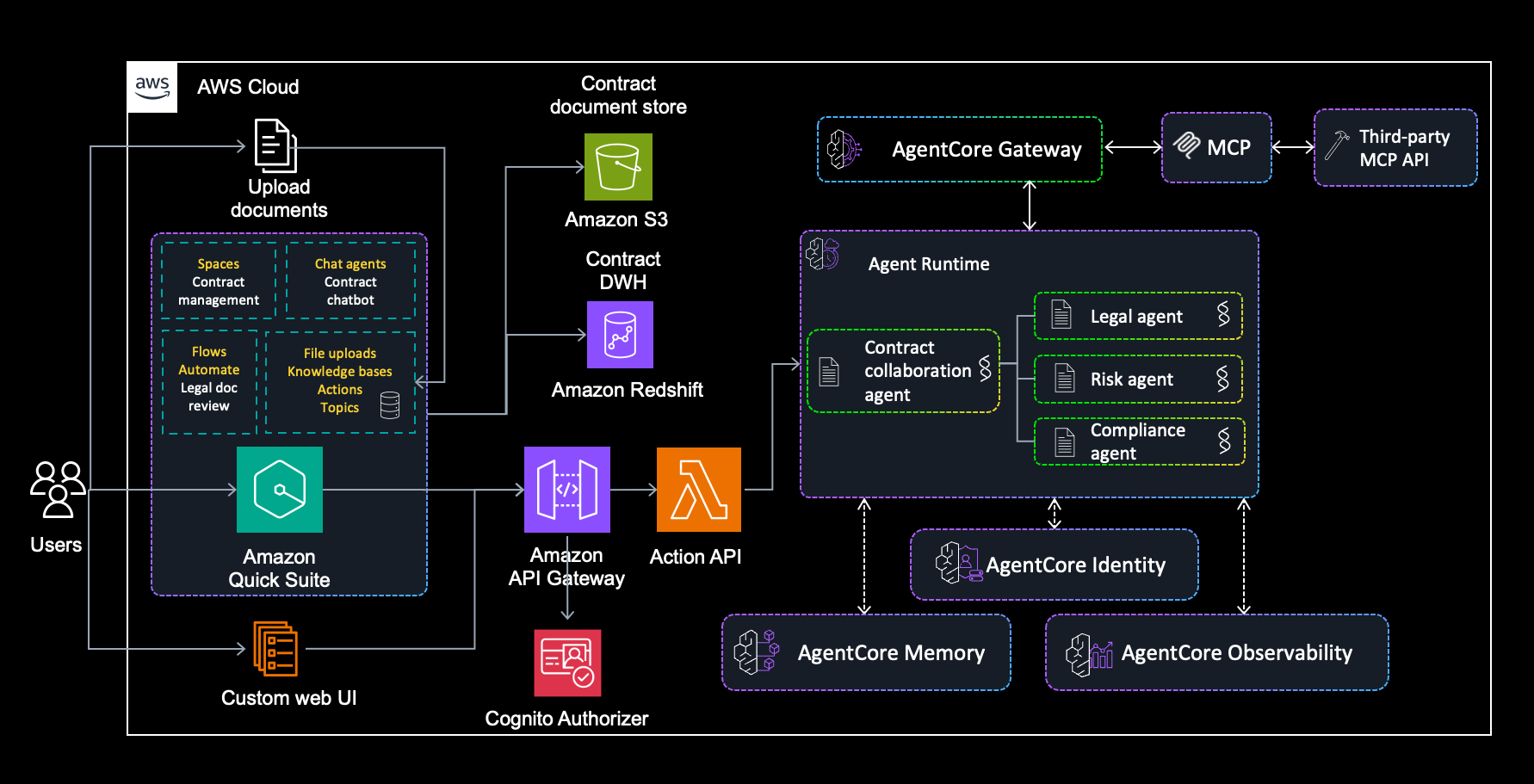
This solution demonstrates an intelligent contract management system using Quick Suite as the user interface and knowledge base, with Amazon Bedrock AgentCore providing multi-agent collaboration functionality. The system uses specialized agents to analyze contracts, assess risks, evaluate compliance, and provide structured insights through a streamlined architecture, shown in the following figure.
Architecture components
The components of the solution architecture include:
- Quick Suite components:
- Spaces for contract management workflows
- Chat agents for conversational contract interactions
- Knowledge bases for integrating legal documents stored in Amazon S3
- Topics for integrating structured contract data
- Actions for connecting to custom agents developed with Amazon Bedrock AgentCore
- Flows for recurring semi-manual document review processes
- Automate for daily and monthly contract automation tasks
- Multi-agent system powered by AgentCore:
- Contract collaboration agent: Central orchestrator coordinating workflow
- Legal agent: Analyzes legal terms and extracts key obligations
- Risk agent: Assesses financial and operational risks
- Compliance agent: Evaluates regulatory compliance
- Supporting infrastructure:
- Amazon API Gateway and AWS Lambda for managing API requests
- Amazon Simple Storage Service (Amazon S3) for document storage
- Amazon Redshift for structured data
Contract management workflow
The solution implements a streamlined contract management workflow that significantly reduces processing time while improving accuracy. The system processes contracts through coordinated AI agents, typically completing analysis within minutes compared to days of manual review.
| Agent type | Primary function | Key outputs |
| Contract collaboration agent | Central orchestrator and workflow manager | Document routing decisions, and consolidated results |
| Legal agent | Legal term analysis and obligation extraction | Party details, key terms, obligations, and risk flags |
| Risk agent | Financial and operational risk assessment | Risk scores, exposure metrics, and negotiation recommendations |
| Compliance agent | Regulatory compliance evaluation | Compliance status, regulatory flags, and remediation suggestions |
Let’s explore an example of processing a sample service agreement contract. The workflow consists of the following steps:
- The contract collaboration agent identifies the document as requiring legal, risk, and compliance analysis.
- The legal agent extracts parties, payment terms, and obligations.
- The risk agent identifies financial exposure and negotiation leverage points.
- The compliance agent evaluates regulatory requirements and flags potential issues.
- The contract collaboration agent consolidates findings into a comprehensive report.
Prerequisites
Before setting up Quick Suite, make sure you have:
- An AWS account with administrative permissions
- Access to supported AWS Regions where Quick Suite is available
- Appropriate AWS Identity and Access Management (IAM) roles and policies for Quick Suite service access
Setup part 1: Set up Quick Suite
In the following steps we set up the Quick Suite components.
Enable Quick Suite
Your AWS administrator can enable Quick Suite by:
- Signing in to the AWS Management Console
- Navigating to Quick Suite from the console
- Subscribing to Quick Suite service for your organization
- Configuring identity and access management as needed
After Quick Suite is enabled, navigate to the Amazon Quick Suite web interface and sign in with your credentials.
Create the contract management space
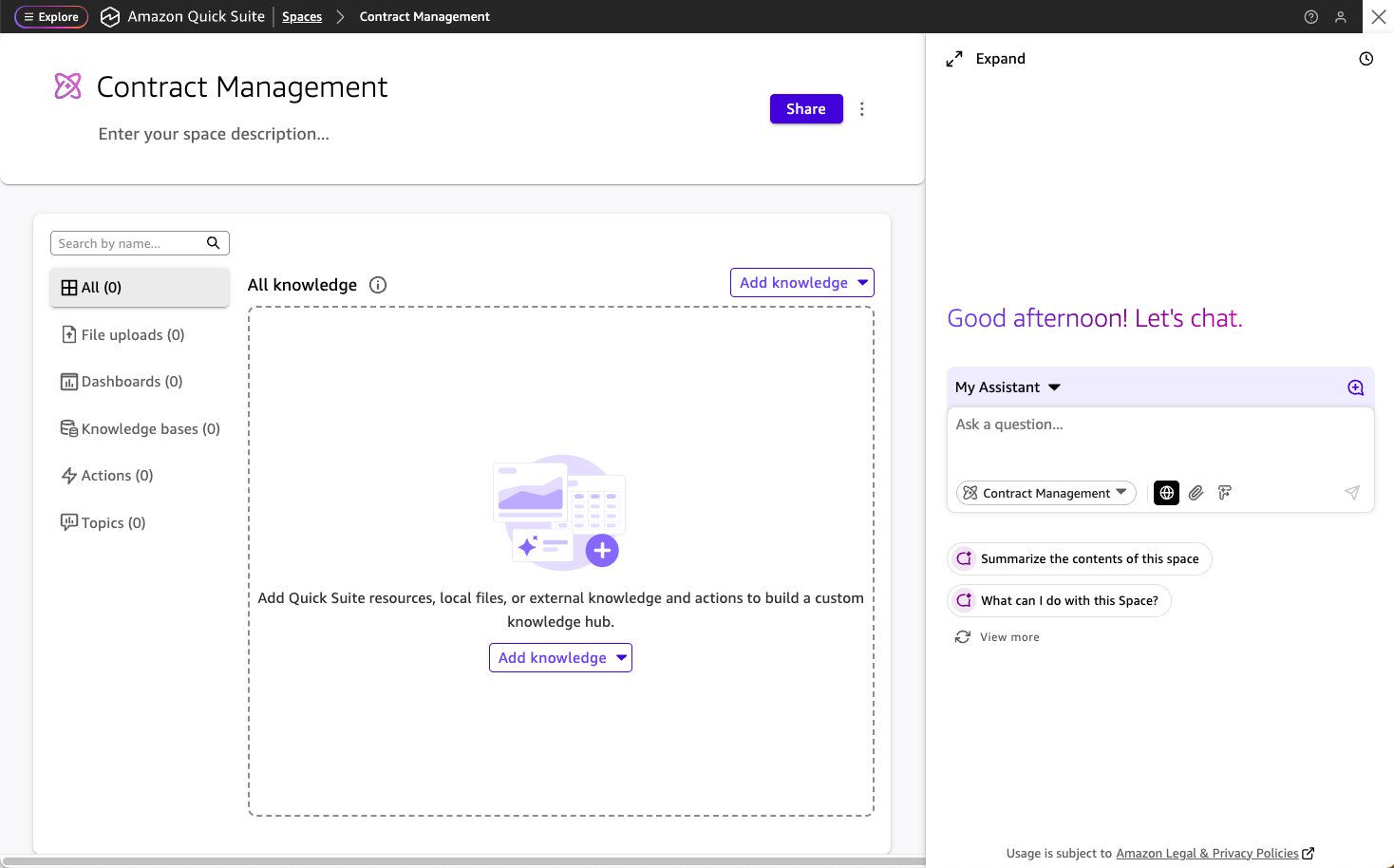
In Quick Suite, create a new space called Contract Management to organize your contract-related workflows and resources. You can then use the assistant on the right to ask queries about the resources in the space. The following figure shows the initial space.
Set up a knowledge base for unstructured data (Amazon S3)
Follow these steps:
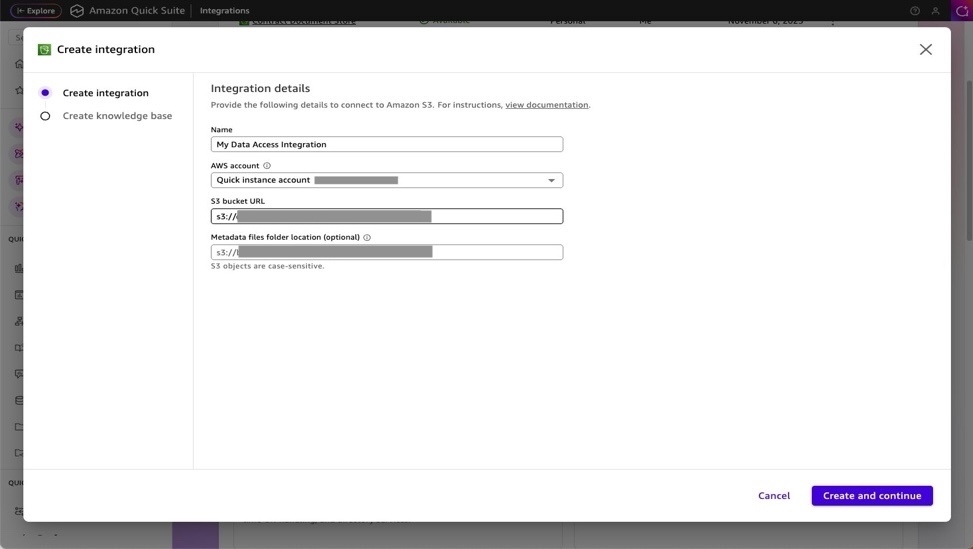
- Navigate to Knowledge bases: In the Integrations section, select Knowledge bases.
- Add Amazon S3 integration:
- Select Amazon S3 as your data source.
- Configure the S3 bucket that will store your contract documents.
- After the knowledge base is created, add it to the Contract Management space.
Set up a knowledge base for structured data (Amazon Redshift)
Follow these steps:
- Add dataset: In the Datasets section, configure your contract data warehouse (Amazon Redshift) for structured contract data. Follow these instructions in Creating a dataset from a database and wait until your dataset is configured.
- Add data topics: In the Topics section, integrate structured contract data sources such as:
- Contract databases
- Vendor information systems
- Compliance tracking systems
For adding topics in Quick Suite, see Adding datasets to a topic in Amazon Quick Sight.
- Add topics to your space: Add the relevant topics to your Contract Management space.
Setup part 2: Deploy Amazon Bedrock AgentCore
Amazon Bedrock AgentCore provides enterprise-grade infrastructure for deploying AI agents with session isolation, where each session runs with isolated CPU, memory, and filesystem resources. This creates separation between user sessions, helping to safeguard stateful agent reasoning processes.
- You can find the required code in this GitHub repository. Go to the subfolder
legal-contract-solution/deployment. - The solution includes a comprehensive
deploy_agents.pyscript that handles the complete deployment of the AI agents to AWS using cloud-centered builds. These instructions require Python>=3.10.
What the deployment script does
The deployment process is fully automated and handles:
- Dependency management:
- Automatically installs
bedrock-agentcore-starter-toolkitif needed - Verifies the required Python packages are available
- Automatically installs
- AWS infrastructure setup:
- Creates IAM roles with the necessary permissions for agent execution
- Sets up Amazon Elastic Container Registry (Amazon ECR) repository for container images
- Configures Amazon CloudWatch logging for monitoring
- Agent deployment:
- Deploys four specialized agents
- Uses AWS CodeBuild for cloud-centered ARM64 container builds
- No local Docker required—the builds happen in AWS infrastructure
- Configuration management:
- Automatically configures agent communication protocols
- Sets up security boundaries between agents
- Establishes monitoring and observability
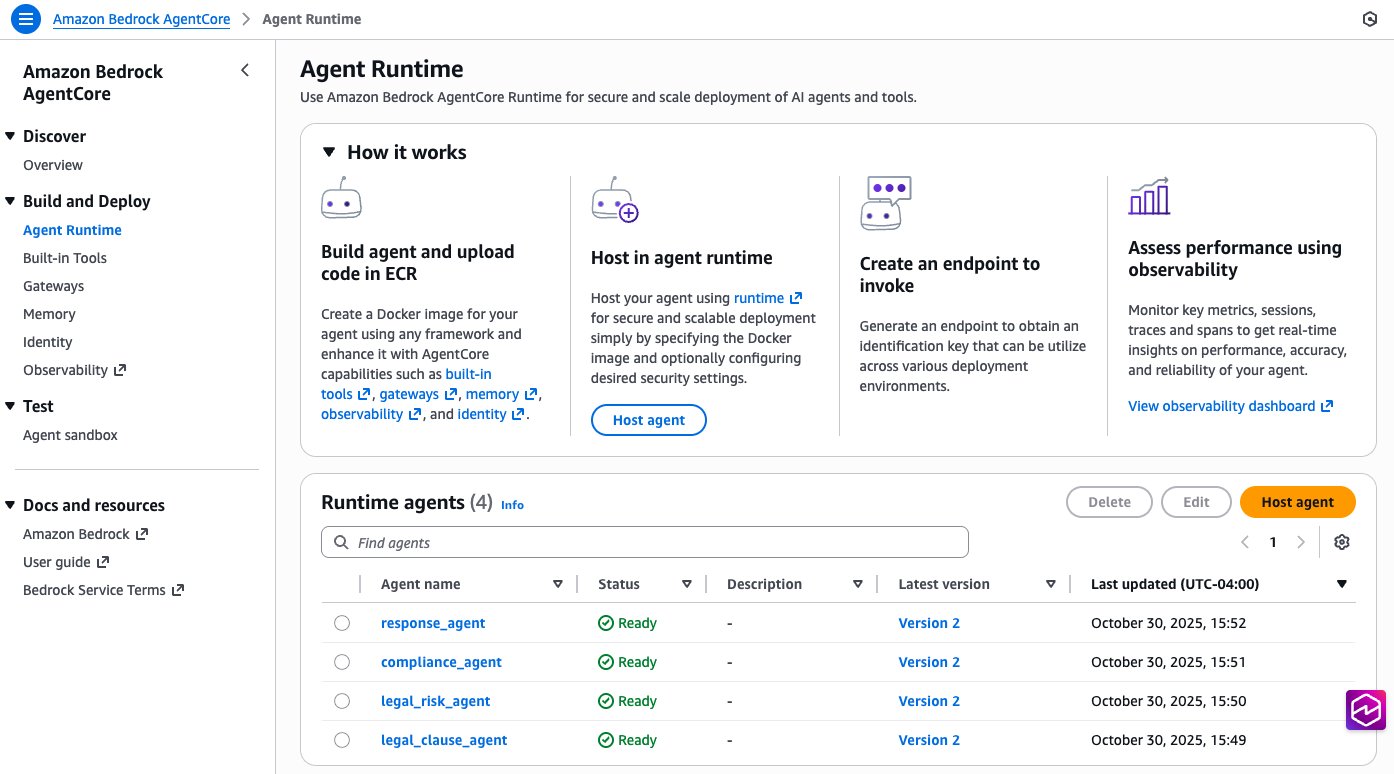
After the agents are deployed, you can see them in the Amazon Bedrock AgentCore console, as shown in the following figure.
Setup part 3: Integrate Amazon Bedrock AgentCore with Quick Suite
Quick Suite can connect to enterprise solutions and agents through actions integrations, making tools available to chat agents and automation workflows.
Deploy API Gateway and Lambda
Go to the subfolder legal-contract-solution/deployment and run the following command: python3 deploy_quicksuite_integration.py
This will provision Amazon Cognito with a user pool to permission access to the API Gateway endpoint. The Quick Suite configuration references the OAuth details for this user pool. After successful deployment, two files will be generated for your Quick Suite integration:
quicksuite_integration_config.json– Complete configurationquicksuite_openapi_schema.json– OpenAPI schema for Quick Suite import
Set up actions integration in Quick Suite
In the Actions section, prepare the integration points that will connect to your agents deployed by AgentCore:
- Get the OpenAPI specification file
quicksuite_openapi_schema.jsonfrom the working folder. - In the Integrations/Actions section, go to OpenAPI Specification. Create a new OpenAPI integration by uploading the
api_gateway_openapi_schema.jsonfile, and enter the following Name and Description for the provided agents. Enter the endpoint with the URL by using the information from thequicksuite_integration_config.jsonfile.- Name: Legal Contract Analyzer
- Description: Analyze a legal contract using AI agents for clause extraction, risk assessment, and compliance checking
Set up chat agent definition details
In the Chat agents section, set up the following agent and enter the following details:
- Name:
Legal Contract AI Analyzer - Description:
- Agent identity:
- Persona instructions:
- Communication style:
Professional, precise, and analytical with clear legal terminology. - Response format:
- Length:
- Welcome message:
- Suggested prompts:
Analyze this contract for potential legal risks and compliance issuesReview the liability clauses in this agreement for red flagsAssess the termination conditions and notice requirements in this contract
Test your contract management solution
Now that you’ve deployed the infrastructure and configured Quick Suite, you can test the contract management solution by selecting the Contract Management space. You can use the agent interface to ask questions about the knowledge base and instruct agents to review the documents. Your space will look like the following figure:
Clean up
There are associated infrastructure costs with the deployed solution. Once you no longer need it in your AWS account, you can go to the subfolder legal-contract-solution/deployment and run the following command for clean up:python3 cleanup.py
Conclusion
The combination of Amazon Quick Suite and Amazon Bedrock AgentCore offers procurement and legal teams immediate operational benefits while positioning them for future AI advancements. You can use Amazon Bedrock multi-agent collaboration to build and manage multiple specialized agents that work together to address increasingly complex business workflows. By implementing this intelligent contract management solution, you can transform your organization’s procurement processes, reduce contract cycle times, and enable your teams to focus on strategic decision-making rather than administrative tasks. Because of the solution’s extensible architecture, you can start with core contract management functions and gradually expand to address more complex use cases as your organization’s needs evolve. Whether you’re looking to streamline routine contract reviews or implement comprehensive procurement transformation, the intelligent contract management solution provides a powerful foundation for achieving your business objectives. To learn more about Amazon Quick Suite and Amazon Bedrock AgentCore, see:
About the authors
 Oliver Steffmann is a Principal Solutions Architect at AWS based in New York and is passionate about GenAI and public blockchain use cases. He has over 20 years of experience working with financial institutions and helps his customers get their cloud transformation off the ground. Outside of work he enjoys spending time with his family and training for the next Ironman.
 David Dai is an Enterprise Solutions Architect at AWS based in New York. He works with customers across various industries, helping them design and implement cloud solutions that drive business value. David is passionate about cloud architecture and enjoys guiding organizations through their digital transformation journeys. Outside of work, he values spending quality time with family and exploring the latest technologies.
 Krishna Pramod is a Senior Solutions Architect at AWS. He works as a trusted advisor for customers, guiding them through innovation with modern technologies and development of well-architected applications in the AWS cloud. Outside of work, Krishna enjoys reading, music and exploring new destinations.
 Malhar Mane is an Enterprise Solutions Architect at AWS based in Seattle, where he serves as a trusted advisor to enterprise customers across diverse industries. With a deep passion for Generative AI and storage solutions, Malhar specializes in guiding organizations through their cloud transformation journeys and helping them harness the power of generative AI to optimize business operations and drive innovation. Malhar holds a Bachelor’s degree in Computer Science from the University of California, Irvine. In his free time, Malhar enjoys hiking and exploring national parks.
 Praveen Panati is a Senior Solutions Architect at Amazon Web Services. He is passionate about cloud computing and works with AWS enterprise customers to architect, build, and scale cloud-based applications to achieve their business goals. Praveen’s area of expertise includes cloud computing, big data, streaming analytics, and software engineering.
 Sesan Komaiya is a Solutions Architect at Amazon Web Services. He works with a variety of customers, helping them with cloud adoption, cost optimization and emerging technologies. Sesan has over 15 year’s experience in Enterprise IT and has been at AWS for 5 years. In his free time, Sesan enjoys watching various sporting activities like Soccer, Tennis and Moto sport. He has 2 kids that also keeps him busy at home.