Media and entertainment, advertising, education, and enterprise training content combines visual, audio, and motion elements to tell stories and convey information, making it far more complex than text where individual words have clear meanings. This creates unique challenges for AI systems that need to understand video content. Video content is multidimensional, combining visual elements (scenes, objects, actions), temporal dynamics (motion, transitions), audio components (dialogue, music, sound effects), and text overlays (subtitles, captions). This complexity creates significant business challenges as organizations struggle to search through video archives, locate specific scenes, categorize content automatically and extract insights from their media assets for effective decision-making.
The model addresses this problem with a multi-vector architecture that creates separate embeddings for different content modalities. Instead of forcing all information into one vector, the model generates specialized representations. This approach preserves the rich, multifaceted nature of video data, enabling more accurate analysis across visual, temporal, and audio dimensions.
Amazon Bedrock has expanded its capabilities to support the TwelveLabs Marengo Embed 3.0 model with real-time text and image processing through synchronous inference. With this integration businesses can implement faster video search functionality using natural language queries, while also supporting interactive product discovery through sophisticated image similarity matching.
In this post, we’ll show how the TwelveLabs Marengo embedding model, available on Amazon Bedrock, enhances video understanding through multimodal AI. We’ll build a video semantic search and analysis solution using embeddings from the Marengo model with Amazon OpenSearch Serverless as the vector database, for semantic search capabilities that go beyond simple metadata matching to deliver intelligent content discovery.
Understanding video embeddings
Embeddings are dense vector representations that capture the semantic meaning of data in a high-dimensional space. Think of them as numerical fingerprints that encode the essence of content in a way machines can understand and compare. For text, embeddings might capture that “king” and “queen” are related concepts, or that “Paris” and “France” have a geographical relationship. For images, embeddings can understand that a golden retriever and labrador are both dogs, even if they look different. The following heat map shows the semantic similarity scores between these sentence fragments: “two people having a conversation,” “a man and a woman talking,” and “cats and dogs are lovely animals.”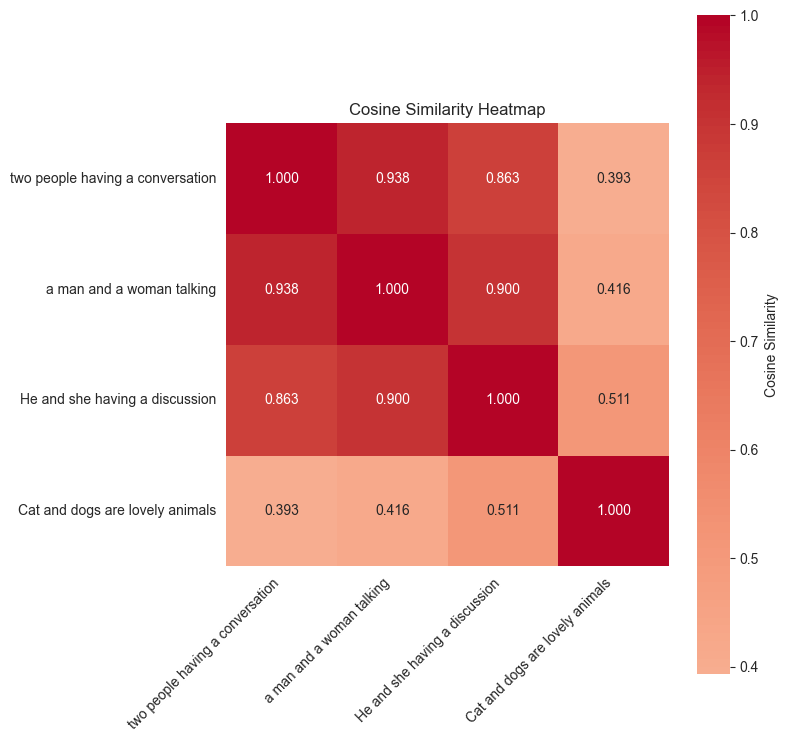
Video embeddings challenges
Video presents unique challenges because it’s inherently multimodal:
- Visual information: Objects, scenes, people, actions, and visual aesthetics
- Audio information: Speech, music, sound effects, and ambient noise
- Textual information: Captions, on-screen text, and transcribed speech
Traditional single-vector approaches compress all this rich information into one representation, often losing important nuances. This is where the approach by TwelveLabs Marengo is unique in addressing this challenge effectively.
Twelvelabs Marengo: A multimodal embedding model
The Marengo 3.0 model generates multiple specialized vectors, each capturing different aspects of the video content. A typical movie or TV show combines visual and auditory elements to create a unified storytelling experience. Marengo’s multi-vector architecture provides significant advantages for understanding this complex video content. Each vector captures a specific modality, avoiding information loss from compressing diverse data types into single representations. This enables flexible searches targeting specific content aspects—visual-only, audio-only, or combined queries. Specialized vectors deliver superior accuracy in complex multimodal scenarios while maintaining efficient scalability for large enterprise video datasets.
Solution overview: Marengo model capabilities
In the following section, we’ll demonstrate the power of Marengo’s embedding technology through code samples. The examples illustrate how Marengo processes different types of content and deliver exceptional search accuracy. The complete code sample can be found in this GitHub repository.
Prerequisites
Before we begin, verify you have:
- An AWS account with appropriate permissions.
- Access to Amazon Bedrock (with the TwelveLabs Marengo model enabled)
- Access to create an OpenSearch Serverless collection and index
- Basic familiarity with vector databases and embeddings
Sample video
Netflix Open Content is an open source content available under the Creative Commons Attribution 4.0 International license. We will be using one of the videos called Meridian for demonstrating the TwelveLabs Marengo model on Amazon Bedrock.

Create a video embedding
Amazon Bedrock uses asynchronous API for Marengo video embedding generations. The following is a python code snippet that shows an example of invoking an API that takes a video from an S3 bucket location. Please refer to the documentation for complete supported functionality.
The example above produces 280 individual embeddings from a single video – one for each segment, enabling precise temporal search and analysis. The type of embeddings for multi-vector output from the video could contain the following:
- visual – visual embeddings of the video
- transcription – embeddings of the transcribed text
- audio – embeddings of the audio in the video
When processing audio or video content, you can set how long each clip segment should be for embedding creation. By default, video clips are automatically divided at natural scene changes (shot boundaries). Audio clips are split into even segments that are as close to 10 seconds as possible—for example, a 50-second audio file becomes 5 segments of 10 seconds each, while a 16-second file becomes 2 segments of 8 seconds each. By default, a single Marengo video embedding API generates visual-text, visual-image, and audio embedding. You can also change the default setting to only output specific embedding types. Use the following code snippet to generate embeddings for a video with configurable options with the Amazon Bedrock API:
Vector database: Amazon OpenSearch Serverless
In our example, we’ll use Amazon OpenSearch Serverless as vector database for storing the text, images, audio, and video embeddings generated from the given video via Marengo model. As a vector database, OpenSearch Serverless allows you to quickly find similar content using semantic search without worrying about managing servers or infrastructure. The following code snippet demonstrates how to create an Amazon OpenSearch Serverless collection:
Once the OpenSearch Serverless collection is created, we’ll create an index that contains properties, including a vector field:
Index Marengo embeddings
The following code snippet demonstrates how to ingest the embedding output from the Marengo model into the OpenSearch index:
Cross-modal semantic search
With Marengo’s multi-vector design you can search across different modalities that is impossible with single-vector models. By creating separate but aligned embeddings for visual, audio, motion, and contextual elements, you can search videos using an input type of your choice. For example, “jazz music playing” returns video clips of musicians performing, jazz audio tracks, and concert hall scenes from one text query.
The following examples showcase Marengo’s exceptional search capabilities across different modalities:
Text search
Here’s a code snippet that demonstrates the cross modal semantic search capability using text:
The top search result from the text query: “a person smoking in a room” yields the following video clip:

Image search
The following code snippet demonstrates the cross modal semantic search capability for a given image:

The top search result from the image above yields the following video clip:

In addition to semantic searching using text and images on the video, the Marengo model can also search videos using audio embeddings that focus on dialogue and speech. The audio search capabilities help users find videos based on specific speakers, dialogue content, or spoken topics. This creates a comprehensive video search experience that combines text, image, audio for video understanding.
Conclusion
The combination of TwelveLabs Marengo and Amazon Bedrock opens up exciting new possibilities for video understanding through its multi-vector, multimodal approach. Throughout this post, we’ve explored practical examples like image-to-video search with temporal precision and detailed text-to-video matching. With just a single Bedrock API call, we transformed one video file into 336 searchable segments that respond to text, visual, and audio queries. These capabilities create opportunities for natural language content discovery, streamlined media asset management, and other applications that can help organizations better understand and utilize their video content at scale.
As video continues to dominate digital experiences, models like Marengo provide a solid foundation for building more intelligent video analysis systems. Check out the sample code and discover how multimodal video understanding can transform your applications.
About the authors
 Wei Teh is an Machine Learning Solutions Architect at AWS. He is passionate about helping customers achieve their business objectives using cutting-edge machine learning solutions. Outside of work, he enjoys outdoor activities like camping, fishing, and hiking with his family.
 Lana Zhang is a Senior Specialist Solutions Architect for Generative AI at AWS within the Worldwide Specialist Organization. She specializes in AI/ML, with a focus on use cases such as AI voice assistants and multimodal understanding. She works closely with customers across diverse industries, including media and entertainment, gaming, sports, advertising, financial services, and healthcare, to help them transform their business solutions through AI.
 Yanyan Zhang is a Senior Generative AI Data Scientist at Amazon Web Services, where she has been working on cutting-edge AI/ML technologies as a Generative AI Specialist, helping customers use generative AI to achieve their desired outcomes. Yanyan graduated from Texas A&M University with a PhD in Electrical Engineering. Outside of work, she loves traveling, working out, and exploring new things.